SAP S/4HANA Migration Performance Testing: The Complete Guide to a Stable Go-Live
 Varun RS
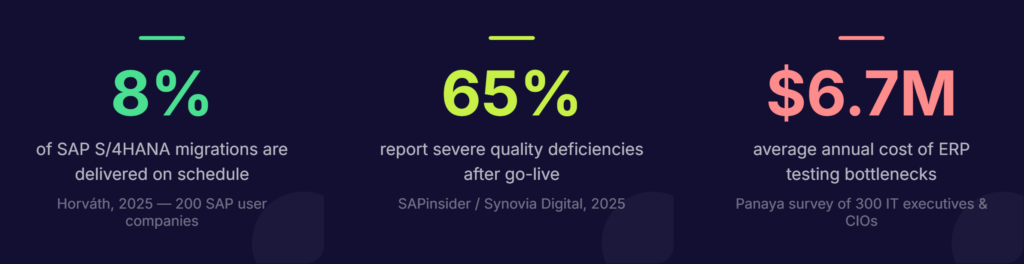
Only 8% of SAP S/4HANA migration projects are delivered on schedule. In more than six out of ten cases, the planned budget is exceeded. The root cause, according to a 2025 Horváth study of 200 SAP user companies, is not technology; it is decisions made too late, with too little data, including the decision to treat performance testing as a final checkbox rather than a continuous discipline.
With SAP mainstream support for ECC ending on December 31, 2027, enterprises no longer have the luxury of cautious timelines. Migrations are accelerating. But speed without rigor is the fastest route to a go-live failure that costs far more to fix than it would have cost to prevent.
Performance testing is where many S/4HANA projects quietly go wrong. Functional workflows pass. Data migrates cleanly. And then, on day one of production, a month-end closing job runs at three times the expected duration, the Fiori launchpad crawls under real user concurrency, and the help desk queue fills up before 9 AM.
This guide covers why SAP S/4HANA performance testing is fundamentally different from what worked in ECC, what you need to test, when to start, and how to make it scalable, without depending on a team of scarce SAP automation specialists.
Why SAP S/4HANA performance testing is not optional
SAP S/4HANA is not simply an upgraded version of ECC. It is a fundamentally different system, built on an in-memory HANA database, with a Fiori-first user interface, embedded analytics, and a simplified data model that consolidates tables that previously lived in separate structures. Each of these architectural shifts changes how the system behaves under load, and not always in the ways teams expect.
The assumption that HANA automatically resolves performance concerns is one of the most expensive misconceptions in enterprise IT. The in-memory architecture does deliver real-time processing and faster query execution — but inefficient custom ABAP code, poorly optimized CDS views, and heavy batch job schedules all introduce bottlenecks regardless of the database beneath them.
The numbers tell the story. A 2025 Horváth study found that 65% of organizations reported severe to very severe quality deficiencies after go-live. A survey of 300 IT executives and CIOs by Panaya found that ERP testing bottlenecks cost organizations an average of $6.7 million annually. And with SAP migration consulting costs expected to rise 30–50% in 2026–27 as demand for specialists outstrips supply, every defect that reaches production becomes exponentially more expensive to remediate.
Performance testing is the discipline that catches these issues before they catch you.
The four-layer architecture you must test
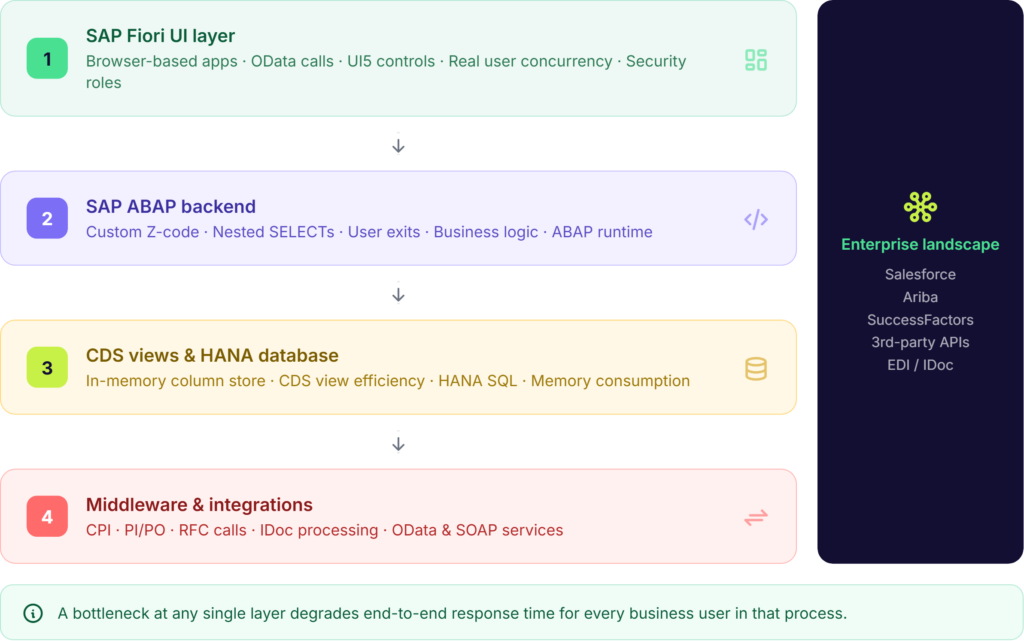
End-to-end response time in SAP S/4HANA is the sum of what happens across four distinct layers. A performance issue in any one of them degrades the experience for every business user in that process and most teams only test one or two.
Layer 1 — SAP Fiori UI
SAP Fiori replaces the traditional SAP GUI with browser-based applications built on UI5. This shift introduces a new set of latency vectors: OData service calls, JavaScript rendering, gateway request handling, and browser-specific behavior. A transaction like ME21N (purchase order creation) may appear fast when tested in backend SAP, but when tested through Chrome with real security roles, populated dropdown lists, and concurrent users, performance degrades significantly. Fiori testing must simulate real user sessions — including device type, network conditions, and role-based access rather than just backend response times.
Layer 2 — SAP ABAP backend
Custom Z-code developed for ECC often behaves differently on HANA. Nested SELECT statements, inefficient loops, and large table reads without WHERE clause filters — patterns that were tolerable on a traditional database — become serious bottlenecks in an in-memory environment. Custom ABAP logic and user exits must be performance-tested explicitly, not assumed to carry over cleanly.
Layer 3 — CDS views and SAP HANA database
Core Data Services (CDS) views are a central component of the S/4HANA data model. Poorly constructed views, heavy custom logic pushed down to the database layer, and column store unloads due to memory pressure are all common sources of hidden performance degradation. Transaction ST03N may show high database time, while SAP HANA’s expensive statements trace reveals the specific CDS view or query causing the slowdown.
Layer 4 — Middleware and integrations
SAP rarely operates in isolation. RFC calls, OData services, PI/PO flows, and IDoc processing all sit at the boundary between S/4HANA and the rest of the enterprise landscape. Under load, CPI flows can silently overload — queue sizes grow, threads fail, and upstream systems begin to back up. These integration layers must be stress-tested as part of the performance program, not treated as out-of-scope.
Defining Success: The KPIs that Matter
To move from “guessing” to “validating,” your performance testing program must be anchored in measurable Key Performance Indicators (KPIs). In an S/4HANA environment, “fast” is subjective, what matters is meeting or exceeding the benchmarks that ensure business continuity and user adoption.
When setting your targets, prioritize these four metrics:
- Average Dialog Response Time: For standard SAP transactions, the gold standard remains < 1,000ms (1 second). Anything beyond 2 seconds in a Fiori environment leads to a measurable drop-off in user productivity and increased help-desk tickets.
- Database (DB) Request Time: On a finely-tuned HANA database, DB request times for optimized queries should ideally stay below 200ms. If your performance tests show higher averages, it usually indicates inefficient CDS views or “row-store” logic being applied to a “column-store” environment.
- Fiori Launchpad and App Load Time: Unlike the old SAP GUI, Fiori must contend with browser rendering. A successful go-live target is a < 3-second load time for the initial Fiori Launchpad on a standard business network.
- Throughput (Transactions Per Hour): You must be able to match or exceed the Transactions Per Hour (TPH) recorded in your legacy ECC environment during peak periods. If your new S/4HANA system can’t process 10,000 sales orders in the same window your old system could, the migration is a regression, regardless of how “modern” the UI looks.
Five types of performance testing every S/4HANA migration needs
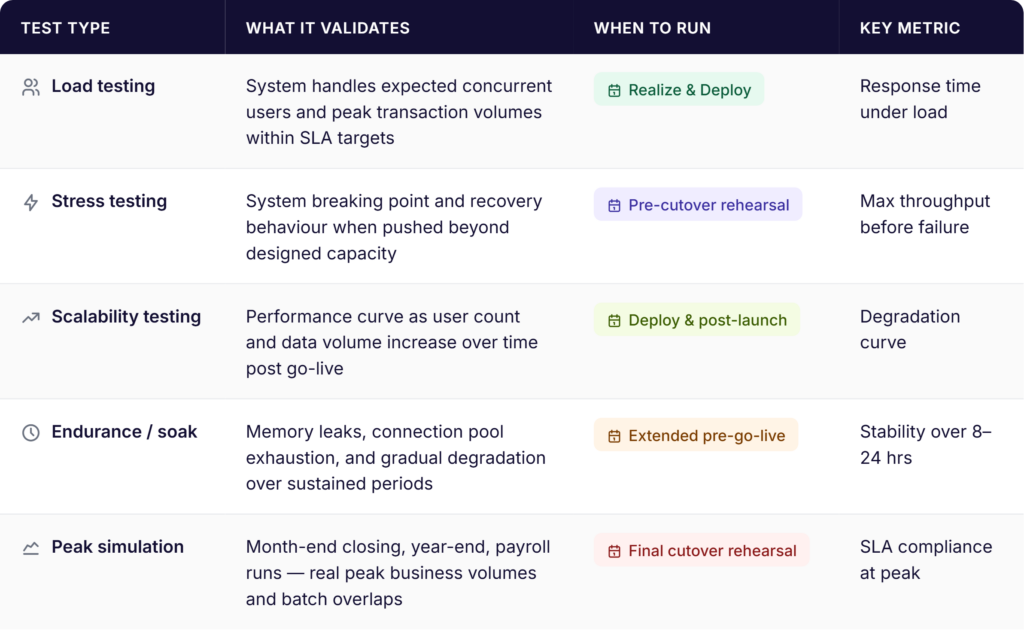
Performance testing is not a single activity. It is a suite of complementary disciplines, each designed to surface a different category of risk. Running only one or two of them leaves the others untested — and those gaps tend to surface at the worst possible moment.
Test type | What it validates | When to run | Key metric |
Load testing | System handles expected concurrent users and transaction volumes | Realize and Deploy phases | Response time under load |
Stress testing | System breaking point and behavior beyond capacity | Pre-cutover rehearsal | Max throughput before failure |
Scalability testing | Performance as users and data grow post go-live | Deploy phase and post-launch | Degradation curve |
Endurance / soak | Memory leaks and gradual degradation over sustained periods | Extended pre-go-live run | Stability over 8–24 hours |
Peak period simulation | Month-end, payroll runs, year-end — real business peak volumes | Final cutover rehearsal | SLA compliance at peak |
Load testing
Load testing simulates the expected volume of concurrent users and transactions to validate that the system meets response time targets under normal peak conditions. The goal is to confirm that your service level agreements (SLAs), typically sub-one-second dialog steps for standard SAP transactions, hold up when three hundred users are simultaneously processing sales orders on a Monday morning.
Stress testing
Stress testing pushes the system beyond its expected capacity to identify exactly where it breaks and how it recovers. This is not a destructive exercise, it is a risk mitigation one. Knowing the system’s breaking point before go-live means you can make informed decisions about infrastructure sizing, connection pool limits, and failover configuration.
Scalability testing
Scalability testing assesses how system performance changes as load increases — helping you project whether the platform can support business growth over the next two to three years without a significant infrastructure investment. This is particularly relevant for organizations migrating to RISE with SAP, where capacity planning decisions are made at contract time.
Endurance and soak testing
Running the system at sustained load over a prolonged period — typically eight to twenty-four hours — reveals issues that short test runs miss entirely: memory leaks in custom code, gradual connection pool exhaustion, and cumulative database fragmentation. These are the issues that manifest as mysterious Monday-morning slowdowns three weeks after go-live.
Peak period simulation
The most business-critical performance test simulates the specific high-volume scenarios your organization runs on a predictable schedule: month-end and year-end financial closing, payroll processing, quarter-end reporting, and seasonal order spikes. According to AWS’s SAP load testing guidance, batch job overlaps during these periods are a major bottleneck that is rarely tested under realistic concurrency. If your performance test suite does not include a month-end simulation, it has a critical gap.
When to start: the case for shift-left performance testing
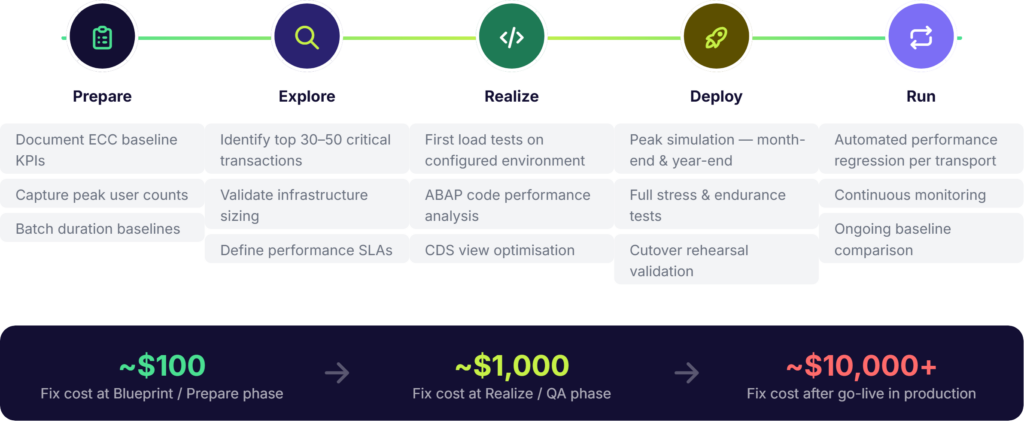
The traditional approach to performance testing—treating it as a final ‘checkbox’ activity in the weeks before go-live—is a high-risk strategy. When this cutover rehearsal doubles as the first real stress test, any discovered bottleneck becomes a ‘showstopper’ that inevitably delays the project.A defect caught during the blueprint phase costs roughly $100 to fix. The same defect caught after go-live costs $10,000 or more — in developer time, business disruption, and emergency remediation. Shift-left performance testing moves the testing activity earlier in the project lifecycle, when changes are cheap and project momentum is high.
Practically, this means aligning performance testing with the SAP Activate methodology rather than bolting it on at the end:
- Prepare phase: Document baseline performance KPIs from the current ECC production system. Response times, batch durations, and peak user counts in ECC become the benchmark against which S/4HANA performance will be judged.
- Explore phase: Identify the top thirty to fifty business-critical transactions by volume and business impact. These become the performance test candidates. Infrastructure sizing decisions should be validated against these transaction profiles, not generic estimates.
- Realize phase: Execute the first load tests against configured — not fully deployed — environments. Catch custom code performance issues while the development team is still actively working on them.
- Deploy phase: Run full peak simulation tests — month-end, year-end, concurrent batch — in a production-equivalent environment. This is your last opportunity to catch issues before they reach real users.
- Run phase: Performance testing does not end at go-live. Embed automated performance regression testing into your change management process so that every transport to production is validated against established baselines.
Key principle-
Performance testing is a program, not a phase. The teams that catch go-live failures before they happen are the ones that started performance testing at the blueprint stage — not the cutover stage.
Common SAP S/4HANA performance bottlenecks — and how to catch them
Knowing what to look for significantly reduces the effort required to find it. These are the bottlenecks that show up most consistently in S/4HANA migration performance testing:
- Custom Z-code: Nested SELECT statements, inefficient loops, and large table reads without filter conditions are the most common source of ABAP-layer performance issues. The HANA database is optimized for column-store access patterns — Z-code written for row-store databases like Oracle or DB2 can be orders of magnitude slower. SAP’s ABAP Test Cockpit (ATC) identifies incompatible patterns, but performance testing under load reveals the actual business impact.
- Clean Core and Side-by-Side Extensibility: Many organizations are adopting a “Clean Core” strategy, moving custom logic out of the SAP ERP and onto the SAP Business Technology Platform (BTP) using side-by-side extensibility. While this keeps the core system “upgrade-ready,” it introduces a new performance variable: network and API latency. A process that used to happen entirely within the SAP backend now requires multiple OData or REST API calls to BTP. If these calls aren’t performance-tested for concurrency, your “Clean Core” could become a major bottleneck, with the system spending more time “waiting” for external data than processing it.
- Batch job overlaps: Month-end closing processes that run concurrently without coordination create resource contention that does not appear in single-job testing. Scheduling these jobs in SM36/SM37 without overlap analysis is a common oversight that causes cascading delays during the first real month-end after go-live.
- Fiori degradation under concurrency: Fiori apps behave differently with 10 users than with 500. OData services that respond in 200ms in isolation can queue up under concurrency and degrade to multi-second response times. Gateway configuration, connection pool limits, and application server load balancing all affect Fiori performance under real conditions.
- CDS view inefficiency: HANA improves performance for well-constructed queries — but poorly designed CDS views with excessive joins, missing filters, or large aggregations still create database-layer bottlenecks. The HANA Cockpit and expensive statements trace in ST05 are the key tools for identifying these.
- Integration overload: High-volume IDoc processing, frequent RFC calls, and CPI flows that were designed for lower transaction rates can saturate integration middleware under migration load. Test integration layers under peak concurrency, not just in isolation.
- Infrastructure undersizing: No amount of code optimization compensates for an undersized system. HANA memory sizing, application server count, and network throughput all need to be validated against peak transaction profiles before performance tests are meaningful. Run SAP’s ABAP on HANA sizing report (note 1872170) as part of the Prepare phase.
How Qyrus SAP Testing removes the specialist bottleneck from performance testing
One of the most persistent barriers to rigorous SAP performance testing is not budget or time — it is the rarity of teams that combine SAP functional knowledge, S/4HANA module expertise, and test automation skills. According to QualiZeal’s SAP migration research, these three capabilities rarely co-exist in the same team. The result is either expensive dependence on specialist consultants, or performance testing that is narrower and later than it should be.
Qyrus SAP Testing is built to close that gap — an AI-powered platform that enables QA teams and business users to plan, execute, and analyze SAP performance testing without requiring deep automation coding expertise.
Performance bottleneck analysis, not just timing
Where most performance testing tools measure overall response time, Qyrus breaks that response time down into its component parts: CPU time, database time, and load time. This granularity tells developers not just that a transaction is slow, but exactly where the slowdown originates — which database tables are causing delays, where custom enhancements are consuming disproportionate resources, and where fine-tuning will have the highest impact.
Native SAP awareness across all testing layers
Qyrus’s UI5-aware recorder detects SAP Fiori and UI5 controls natively, eliminating the brittle XPath locators that cause most automation failures in Fiori environments. The platform integrates with SAP’s native backend services — OData, BAPIs, IDocs, and direct database queries — through an API-first architecture that validates business logic directly at the source, rather than relying solely on UI-layer assertions.
End-to-end process validation across the integration landscape
Qyrus supports cross-application orchestration — for example, validating a business process that flows from Salesforce through SAP S/4HANA into Ariba — across UI, API, and backend layers in a single test flow. Prebuilt business process packs for Order-to-Cash (O2C), Procure-to-Pay (P2P), and Hire-to-Retire (H2R) give migration teams a tested starting point for end-to-end coverage, rather than building from scratch.
AI-driven impact analysis with SAP Scribe
Qyrus uses a combination of proprietary algorithms and SAP Scribe — custom AI models fine-tuned to a customer’s specific SAP landscape — to analyze transport requests and change logs. The platform identifies which business processes are affected by a given change, matches them against the existing test repository, and surfaces gaps in coverage automatically. This means performance regression testing after each transport to production is targeted to where the risk actually is, not exhaustive across the full test suite.
DataChain: eliminating the test data bottleneck
Effective performance testing requires realistic, production-scale data — and creating that data manually is one of the most time-consuming steps in any SAP testing program. Qyrus DataChain addresses this directly: a single input (such as a sales order number) triggers automatic mapping of every linked transaction in the document flow, extracting the data from each step into a structured file ready for testing. The result is up to 92% faster test data creation, removing one of the most common reasons performance testing is compressed or skipped.
Autonomous regression testing at migration scale
Qyrus’ Autonomous Regression Testing (ARS) capability — AI that plans, selects, and executes regression tests without human intervention — delivers twice the test breadth with 50% fewer resources compared to conventional approaches. For S/4HANA migration programs running against a 2027 deadline, this matters: it means the testing program can scale to match the migration workload without a proportional increase in headcount.
Qyrus in numbers
- 65% faster regression preparation
- 50% fewer resources for test suite maintenance
- 92% faster test data creation (DataChain)
- 88% effort reduction documented in critical process testing
FAQs
Q1: What is SAP S/4HANA migration performance testing?
SAP S/4HANA migration performance testing is the process of validating that your S/4HANA system can handle real-world business volumes — concurrent users, peak transaction loads, batch jobs, and integration traffic — before the system goes live. Unlike functional testing, which checks whether a process works correctly, performance testing checks whether it works fast enough and stays stable under the load your business actually generates.
Q2: When should performance testing start in an SAP S/4HANA migration project? Performance testing should start in the Prepare phase of the SAP Activate methodology — not the Deploy phase. Baseline KPIs from the current ECC production system should be documented before migration begins. First load tests should run during the Realize phase, while developers can still act on the findings cheaply. Full peak simulation — month-end, payroll, year-end — should run in the Deploy phase in a production-equivalent environment.
Q3: What are the most common SAP S/4HANA performance bottlenecks?
The most common bottlenecks are: custom Z-code written for row-store databases (nested SELECTs, large unfiltered reads) that performs poorly on HANA; batch job overlaps during month-end closing; Fiori degradation under real user concurrency; poorly constructed CDS views; and integration middleware — CPI, PI/PO, RFC calls — that saturates under peak load. Infrastructure undersizing is also a frequent culprit that no amount of code optimization can compensate for.
Q4: How is performance testing for SAP S/4HANA different from SAP ECC?
S/4HANA introduces four testing layers that ECC did not require at the same depth: the Fiori UI layer (browser-based, OData-driven), the ABAP backend (where ECC-era custom code may behave very differently on HANA), CDS views (a new data access paradigm absent in ECC), and tighter integration with cloud middleware like SAP Integration Suite. Each layer can independently degrade end-to-end response time, so testing only the backend — as many ECC performance programs did — is insufficient for S/4HANA.
Q5: Can SAP S/4HANA performance testing be automated?
Yes — and for most migration projects under a 2027 deadline, it needs to be. Manual performance testing cannot match the pace or coverage a compressed migration timeline requires. Modern platforms like Qyrus SAP Testing enable QA teams to automate load simulation, bottleneck analysis (breaking response time into CPU, database, and load components), and performance regression testing after each transport to production — without requiring specialist automation coding expertise.
Performance testing is not a phase — it is a discipline
The organizations that reach go-live with confidence are not the ones that ran the most performance tests in the final week. They are the ones that started performance testing at the blueprint phase, covered all four architectural layers, modelled their actual peak business scenarios, and embedded performance validation into every stage of the migration program.
With SAP ECC mainstream support ending in December 2027 and consulting costs rising sharply as the deadline approaches, the cost of deferred performance testing is rising every quarter. A bottleneck caught during the Realize phase costs a fraction of what the same bottleneck costs after go-live — in developer hours, business disruption, and lost user confidence.
Three actions define a credible SAP S/4HANA performance testing program:
- Start early. Align performance testing with SAP Activate from the Prepare phase, not the Deploy phase.
- Test all four layers. Fiori, ABAP, HANA database, and middleware integrations all need explicit performance validation — not just the transactions visible to business users.
- Automate for scale. With migration timelines compressed and specialist resources scarce, manual performance testing cannot match the pace or coverage the program requires.
Ready to performance-test your SAP S/4HANA migration?
Qyrus SAP Testing gives QA teams and business users the tools to plan, execute, and analyze performance testing without specialist bottlenecks. See how it works — book a demo at qyrus.com.

 October 15, 2026
  4 min
4 min