Qyrus Named a Leader in The Forrester Wave™: Autonomous Testing Platforms, Q4 2025 – Read More

Table of Contents

What ‘Good’ UAT Actually Looks Like in 2026 
Building a UAT Test Strategy: The Framework 
UAT Best Practices That Actually Move the Needle 
Automated UAT Testing: Where Automation Fits (and Where It Doesn’t) 
UAT for SAP Teams: The Additional Layer of Risk 
Measuring UAT Success: KPIs, Entry/Exit Criteria, and Sign-Off 
How Qyrus Helps Teams Run UAT with Confidence 
Conclusion 
FAQ 

Master the Future of QA

Explore our full library of resources and discover how Qyrus can help you navigate the future of software quality with confidence.

Share article

Published on

August 19, 2026

Author name

User Acceptance Testing Best Practices: A Complete UAT Strategy Guide for SAP Teams

SAP UAT
SAP UAT

The majority of enterprise quality assurance initiatives struggle in the final stretch not due to insufficient engineering work, but because of a significant absence of operational organization. In the absence of defined entry and exit standards, measurable key performance indicators, or risk-focused delineation, testing phases rapidly turn into disorganized, chaotic activities.  

Previously, individuals in the industry viewed this phase as something static. It was like a box that people checked off at the end of a cycle. This was the step where a human had to say it was okay before a system was ready to use.  

Things are changing very quickly now. The industry is changing the way it thinks about this phase of the system going. The old way of thinking about this phase is not working anymore. But now, this phase is not a static checkbox, at the end.  

Modern delivery models reframe this phase into a continuous, risk-based, and increasingly AI-assisted function embedded much earlier in the software development lifecycle. 

Implementing user acceptance testing best practices is the single most effective lever for preventing defect leakage. An escaped defect causes engineering work increases support problems slows down product plans and greatly reduces the confidence that executives have in the quality checks. The money risk of seeing this step as a simple task is very high; the total cost of bad software quality in the United States was estimated to be about $24.1 trillion in 2022.  

This detailed report gives a structure, for enterprise quality assurance leaders, test architects and engineering managers who are running any validation program. Furthermore, because Enterprise Resource Planning (ERP) environments carry unique structural risks, this document includes a dedicated analysis for teams running operations inside SAP, where cross-module interdependencies introduce complexities that generic testing frameworks consistently fail to address. 

What ‘Good’ UAT Actually Looks Like in 2026 

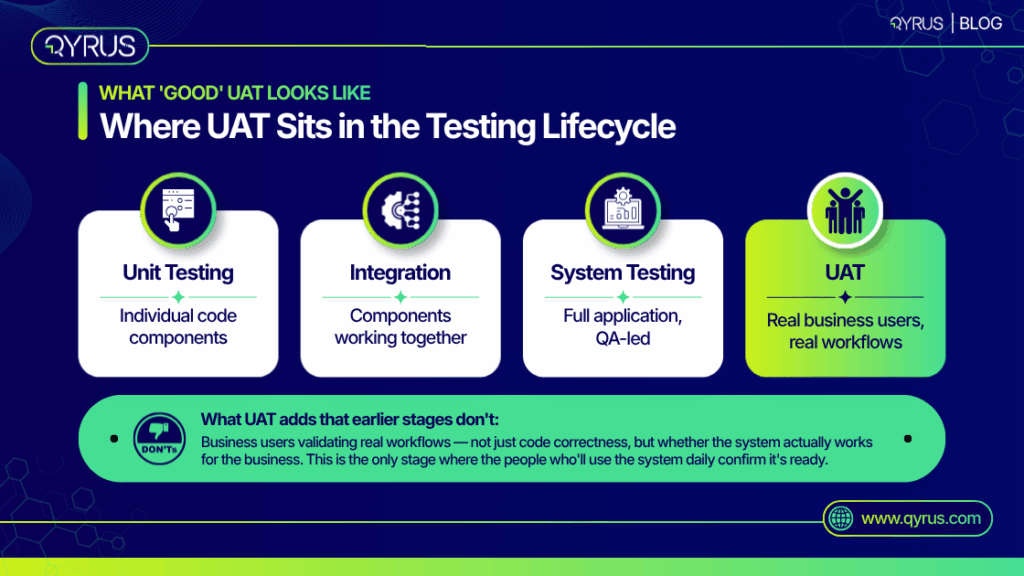
To understand what effective execution looks like, it is critical to define user acceptance testing precisely and distinguish it from system, regression, or functional testing. While functional testing verifies that a system operates according to technical specifications, acceptance testing validates that the system actually works for the business user in real-world operational scenarios. It is the definitive measure of business fitness. 

As we approach 2027, the operations of various systems have significantly transformed. We need to produce results more quickly, which means we have reduced time to thoroughly check everything prior to approval.  

Moreover, AI-generated code is being integrated into delivery pipelines more swiftly than conventional quality assurance methods can assess it. In reaction, established organizations are conducting smaller testing phases sooner and more often, linking these initiatives to feature finalization instead of random release timelines. 

Organizations that perform comprehensive, methodical acceptance testing encounter up to 40% fewer significant problems after launch than those that consider it merely a formality. 

QA Testing Phase 

Primary Objective 

Evaluator Profile 

Definition of Success 

Unit Testing 

Validate individual code components. 

Software Developer 

Code compiles and passes localized logical assertions. 

System/Integration Testing 

Validate API handoffs and system architecture. 

QA Automation Engineer 

Systems communicate correctly without technical errors. 

Functional Testing 

Validate software against technical requirements. 

QA Analyst 

Software behaves exactly as the technical design document specifies. 

User Acceptance Testing 

Validate business process viability. 

End-User / Subject Matter Expert 

The software enables the business to execute end-to-end workflows effectively. 

What 'Good' UAT Actually Looks Like in 2026

Building a UAT Test Strategy: The Framework 

A successful UAT test strategy requires significantly more than merely a schedule and a participant list. A formal governance document is needed, detailing the scope, objectives, RACI (Responsible, Accountable, Consulted, Informed) roles, environment configuration, and specific deadlines. 

A vital development in contemporary strategy is the transition to risk-oriented scoping. Thorough “test everything” methods are inherently at odds with rapid release cycles. In contrast, top enterprise teams intentionally focus on high-impact workflows, allowing the quality of evidence to determine the final go/no-go choice instead of the total number of test cases. 

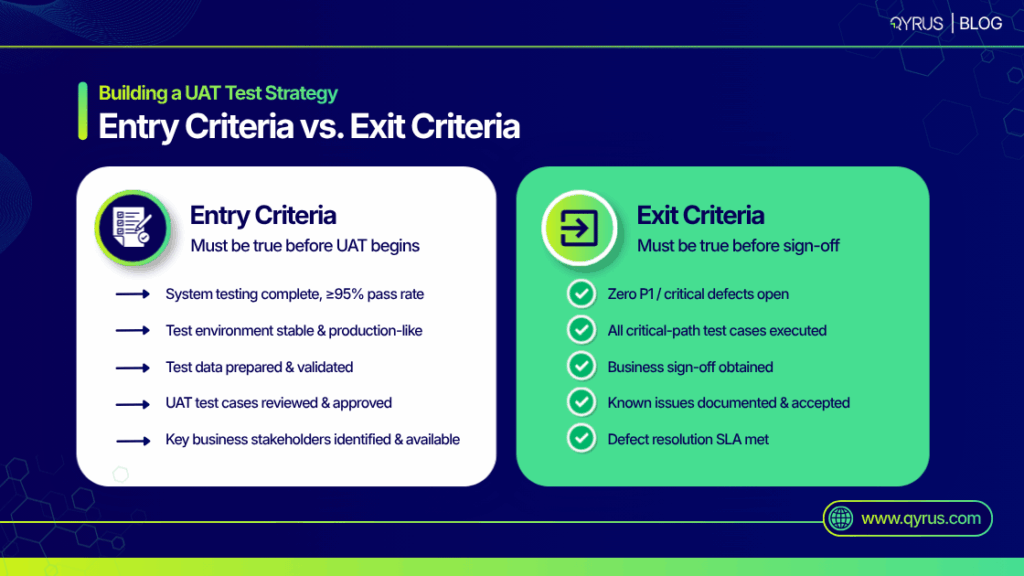
The foundation of this framework is the creation of strict entry and exit standards. A frequent failure happens when a strategy document is created at the start of a project and not reviewed again, resulting in subjective go-live choices driven by executive influence instead of empirical evidence. A structured approach specifically outlines the numerical limits that allow the testing process to start and finish. 

Governance Gate 

Component 

Concrete Requirement Example 

Entry Criteria 

System Testing Status 

System testing is 100% complete with a ≥95% pass rate. 

Entry Criteria 

Defect Thresholds 

Zero Critical (P1) or High (P2) defects remain open in the system environment. 

Entry Criteria 

Environment Readiness 

The dedicated staging environment is configured with production-like masked data and integrated APIs. 

Entry Criteria 

Participant Readiness 

Business users have completed training on the new workflows and received secure access credentials. 

Exit Criteria 

Execution Rate 

100% of the critical-path business scenarios have been executed and documented. 

Exit Criteria 

Defect Resolution 

All P1 and P2 defects discovered during the phase are resolved, retested, and closed. 

Exit Criteria 

Requirement Coverage 

100% of defined business requirements are covered by at least one executed scenario. 

Exit Criteria 

Formal Sign-Off 

Documented approval is obtained from all designated business process owners. 

UAT Test Strategy: The Framework

UAT Best Practices That Actually Move the Needle 

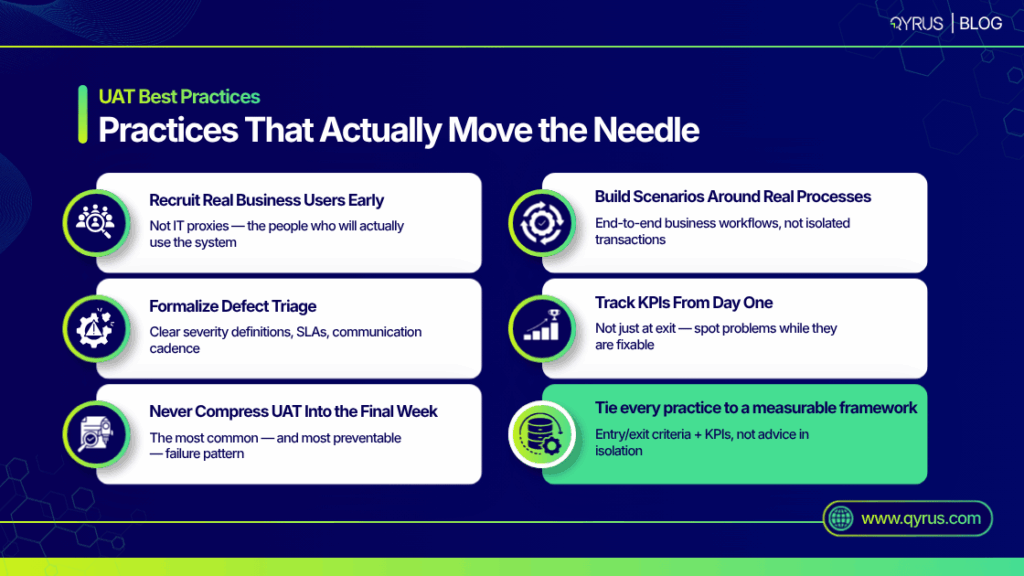
To optimize outcomes, quality leaders must move beyond theoretical advice and implement user acceptance testing best practices that directly address the most common points of failure. The following methodologies represent a measurable system for ensuring business readiness, grounded in empirical data rather than isolated advice. 

Pitch Real Business Users Early, Not IT Proxies 

More than 70% of digital transformation efforts fail, with insufficient acceptance from end users recognized as a key factor. This statistic clearly points to inadequate or ignored acceptance stages. IT proxies or business analysts aiming to “understand” end-users often miss critical workflow elements and real-life contexts. 

Real end-users need to be brought in, so that it gives them time to participate in making scenarios and to create test data. When people who are not technical are left out of the process, the final system usually does not match business needs. 

Build Scenarios Around End-to-End Business Processes 

Evaluating isolated transactions does not represent how tasks are genuinely performed within an organization. Test scenarios and data should be designed based on ongoing end-to-end business processes.  

For instance, instead of just confirming that a purchase order can be made, the scenario must follow the entire process from requisition creation to purchase order generation, receipt of goods, and final invoice payment. This guarantees that transfers between departments operate properly. 

Formalize Defect Management and Triage 

If something breaks, users need a simple way to flag it. To keep testing from stalling, teams should figure out what makes an issue urgent, agree on response times for developers, and touch base daily to clear any hurdles. If the defect reporting system is overly complicated, business users will cease reporting minor issues, resulting in unnoticed failures after launch. 

Track Telemetry and KPIs from Day One 

Quality leaders must not wait until the exit phase to evaluate performance. Tracking execution rates and defect detection trajectories daily allows test architects to intervene if a specific department is falling behind or if a particular module is generating an unusual volume of errors. This proactive telemetry separates disciplined programs from reactive ones. 

Prohibit Timeline Compression 

We see it happen all the time: development runs late, and testing gets shoved into the final week before go-live. It’s the quickest way to break a release. Instead of adjusting the timeline, testing time gets slashed just to meet a made-up deadline. Quality leaders have to draw a hard line here. The testing window is non-negotiable, and releases should be driven by actual product readiness, not a schedule. 

Strategic Best Practice 

Common Anti-Pattern to Avoid 

Operational Impact of Failure 

Direct End-User Involvement 

Using Business Analysts or QA engineers as stand-ins for actual system users. 

High risk of low user adoption; usability flaws escape into production. 

End-to-End Scenario Design 

Testing atomic, isolated transactions without context (e.g., just clicking “Save”). 

Cross-departmental workflows break down at integration points. 

Strict Defect Triage SLAs 

Allowing reported bugs to sit in an unprioritized backlog during the testing phase. 

Testing stalls; business users lose momentum and trust in the IT department. 

Protected Testing Windows 

Cannibalizing the UAT schedule to make up for upstream development delays. 

Severe defect leakage; critical path scenarios remain completely untested. 

UAT Best Practices

Automated UAT Testing: Where Automation Fits (and Where It Doesn’t) 

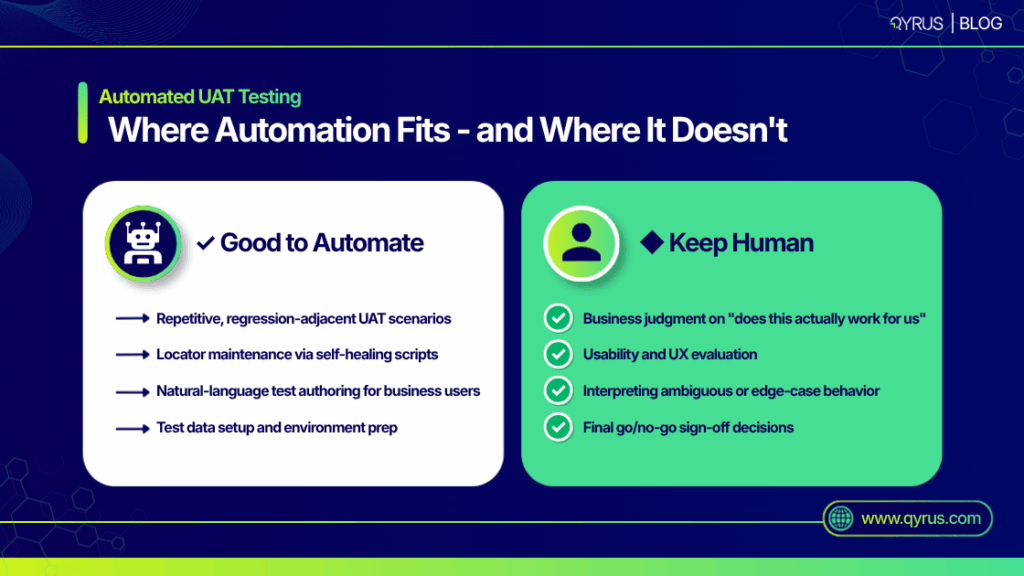
As organizations push for faster releases, automated UAT testing has become a strategic imperative. However, there is a stark divide between intention and execution within the enterprise space. While 75% of organizations say AI testing is a top priority, a tiny 16% have actually pulled it off 

The reason for this hold-up is pretty straightforward. When it comes to making business calls, evaluating how an app actually feels to use, or catching weird edge cases, you still need a human brain in the mix. 

Automating this phase requires honesty about what should and should not be scripted. The ideal candidates for automation are repetitive regression-adjacent scenarios, massive data setup procedures, and environmental health checks. 

Crucially, the underlying methodology of automation is experiencing a massive architectural shift. The industry must recognize that Automated Visual Testing – The Future of Workflow-Driven Testing is no longer confined to basic, static screenshot comparisons that break whenever a single CSS pixel shifts.  

Instead of running isolated checks, testing is moving toward visual, drag-and-drop test orchestration. This approach lets non-technical business users connect web, mobile, API, and desktop scripts into one continuous workflow. 

With Qyrus, subject matter experts can map out complex paths and conditional logic on a simple node-based canvas without writing code. The biggest advantage here is how data moves automatically. If an API test generates an order ID, that exact ID feeds straight into the next step—like a mobile app checking the order status. This lets teams test real, end-to-end user journeys across completely different systems without handing off data manually. 

To keep these workflows stable, AI locators automatically update your scripts whenever a user interface changes. This eliminates the constant maintenance that used to make automated testing so fragile. (For a closer look at how this works, check out Self-Healing Test Automation: The Complete Guide.) 

But test architects do have to watch out for data privacy. Since these tests need real-world context, it’s easy to accidentally expose sensitive production data. Teams have to carefully mask their data or generate synthetic sets to stay compliant with privacy laws, all while keeping the information realistic enough for these complex workflows to actually function. 

Automation Candidate Profile 

Keep-Human Candidate Profile 

Regression-Adjacent Workflows: Repetitive processes that verify existing functionality has not regressed. 

Usability and Experience: Evaluating whether a new interface is intuitive and efficient for daily operations. 

Complex Data Setup: Creating hundreds of purchase orders or user profiles required before manual validation can begin. 

Edge-Case Interpretation: Deciding how to handle ambiguous business scenarios that fall outside standard operating procedures. 

Cross-Platform Synchronization: Verifying that data entered in a Web application immediately reflects in the Mobile application. 

Process Governance Approvals: Final sign-off on legal, compliance, or financial workflows requiring human authorization. 

Automated UAT Testing

UAT for SAP Teams: The Additional Layer of Risk 

Executing a UAT SAP strategy requires navigating structural complexities that generic software testing frameworks simply do not account for. The most successful SAP implementations begin planning for user acceptance three to four months before the testing phase even starts, deliberately avoiding the trap of compressing validation into the final weeks. 

The primary challenge in an SAP environment is deep cross-module interdependency. An operational change in the Financial Accounting (FI) module can easily create unforeseen ripple effects in the Materials Management (MM) or Sales and Distribution (SD) modules. Consequently, test scenarios cannot be siloed by department; they must cross functional boundaries to ensure overarching business processes remain intact. 

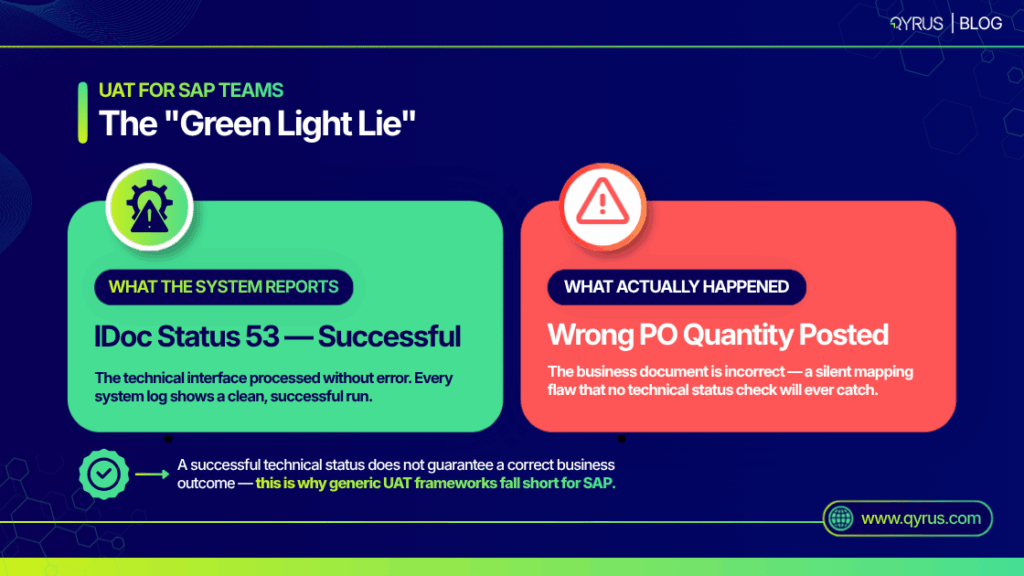
Furthermore, SAP teams face a unique and dangerous phenomenon known as the “Green Light Lie” when dealing with Electronic Data Interchange (EDI) and IDoc (Intermediate Document) processing. When an SAP system successfully processes an inbound document through the application layer, it assigns it Status 53 (“Application document posted”). Conversely, for outbound documents, a Status 03 indicates the data has been successfully passed to the port. 

The “Green Light Lie” occurs because these statuses only represent a technical success from the perspective of the SAP system itself. For an outbound transaction to be understood by an external trading partner, the IDoc must pass through an external EDI subsystem that translates it into a universal standard like ANSI X12 or EDIFACT. This critical translation occurs in a procedural black box outside of SAP’s direct view. If there is a single flaw in the mapping logic of this external subsystem, the data becomes semantically corrupted, a decimal point may be shifted, a unit of measure rendered incorrectly, or a shipping address altered. 

Because the SAP system registers a technical success (Status 53 for inbound processing or Status 03 for outbound completion), standard system monitors will show a green light.  

However, the business outcome is a complete failure, resulting in incorrect physical shipments, faulty invoices, and costly chargebacks. A robust strategy must explicitly test these integration points, utilizing side-by-side document comparison tools to illuminate the translation black box and verify semantic accuracy, not just technical handoffs. 

IDoc Status Code 

System Perspective 

True Business Reality (The Green Light Lie) 

Status 51 (Inbound) 

Error: Application document not posted. 

System halts correctly; data or configuration error identified. No hidden business risk. 

Status 03 (Outbound) 

Success: Data passed to port. 

Technical success inside SAP, but potential semantic corruption in the EDI subsystem mapping. 

Status 53 (Inbound) 

Success: Application document posted. 

Document posted, but underlying translated values (e.g., pricing, quantities) may be semantically incorrect. 

For a comprehensive methodology on mitigating these ERP-specific integration risks, teams should consult Mastering SAP User Acceptance Testing: Key Strategies for Success and SAP Functional Testing: The Executive Guide to Risk, Automation, and Release Velocity. 

UAT for SAP Teams

Measuring UAT Success: KPIs, Entry/Exit Criteria, and Sign-Off 

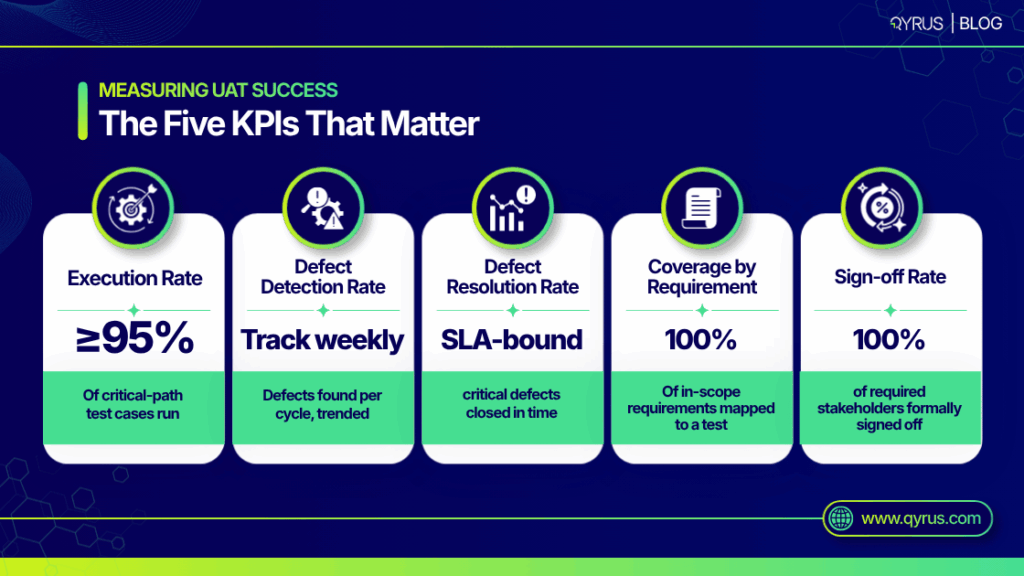
The ultimate differentiator between a disciplined validation program and an ad hoc exercise is the rigorous application of quantifiable Key Performance Indicators (KPIs). Translating subjective user feedback into objective mathematical data is vital for executive go/no-go decisions. Quality leaders must monitor a core set of metrics to gauge both the efficiency of the test team and the underlying readiness of the software. 

Execution Rate and Progress 

This metric tracks the velocity of the testing phase by measuring the total number of executed test cases against the total number planned. A healthy execution rate demonstrates that the testing environment is stable and that business users have the access and dedicated time necessary to complete their assignments. 

Defect Detection Rate and Efficiency (DDE) 

The Defect Detection Efficiency (or Defect Containment Efficiency) is a critical measure of how well the testing phase isolates issues before they reach production. It calculates the percentage of total bugs caught before launch versus those that escaped. 


A consistently high DDE means your testing strategy is doing its job. But if you’re suddenly finding basic technical glitches right at the end of the release cycle, that’s a massive red flag. It usually means your earlier stages, like system and integration testing, completely missed the mark. 

Requirements Coverage 

Also known as coverage-by-requirement, this metric ensures that every business workflow mapped during the requirements gathering phase is validated by at least one executed test case. 

An enterprise benchmark for critical-path workflows is typically >90%, ensuring no major functional area is left exposed. 

Defect Resolution Time 

You have to track exactly how long it takes to go from reporting a bug to getting a verified fix back in staging. Keeping this turnaround time short is what keeps your momentum going. If developers take too long to push fixes, testing grinds to a halt, and your business users will quickly lose interest in the process. 

Key Performance Indicator 

Enterprise Benchmark Target 

What a Negative Deviation Signals 

Execution Rate (Critical Path) 

≥95% 

Environmental instability, bad test data, or poor participant availability. 

Defect Escape Rate (Post-Live) 

<2% 

Severe gaps in risk-based scoping or inadequate end-to-end scenario design. 

Requirements Coverage 

>90% 

Incomplete test strategy leaving specific, critical business functions exposed to risk. 

Defect Resolution Time 

<48 hours for Critical bugs 

Engineering bottlenecks or poorly defined defect triage SLAs. 

User Sign-Off Rate 

100% of required process owners 

Process governance failures or unresolved business alignment issues. 

Final sign-off shouldn’t be treated as just another testing milestone—it’s a strict governance requirement. If your defect rates are low but nobody wants to approve the release, something is broken. It usually points to a massive gap between what the business wanted and what IT actually built. Tracking this data gives you a chance to fix that friction before it blocks your go-live. Establishing these dashboards early is a foundational practice, as detailed in Automated Regression Testing Improves Release Quality Here’s How. 
Measuring UAT Success

How Qyrus Helps Teams Run UAT with Confidence 

Executing these rigorous methodologies at an enterprise scale requires testing infrastructure capable of supporting both non-technical business users and complex architectural requirements. Qyrus provides an AI-driven, all-in-one platform designed to eliminate the friction that typically derails enterprise validation efforts. 

By offering a strictly codeless test-building interface, Qyrus significantly lowers the barrier to entry, allowing actual business subject matter experts to construct and execute tests directly. This addresses the critical best practice of involving real end-users early in the lifecycle without forcing them to learn complex automation frameworks.  

Furthermore, the platform’s self-healing (Healer) technology directly addresses the historical tension between automation speed and maintenance depth, dynamically updating locators when application interfaces inevitably change. 

For teams operating within complex ERP environments, the Qyrus SAP Fiori Test Specialist module and the Agentic Regression for SAP (ARS) framework provide a lightweight ecosystem utilizing pre-built, customizable suites via visual drag-and-drop actions.  

Additionally, Qyrus Document Exchange Testing provides a direct solution to the “Green Light Lie.” By automatically scanning the SAP system to link incoming electronic documents to their final posted business transaction, and utilizing side-by-side XML tree hierarchies with auto-highlighting, the platform rapidly illuminates the EDI subsystem black box. This ensures accurate semantic business validation alongside technical success, allowing teams to secure their enterprise environments efficiently. 

Conclusion 

The evolution of user acceptance testing from a static, end-of-cycle formality into a continuous, risk-based strategic function represents one of the most critical operational shifts in modern software delivery.  

However, implementing user acceptance testing best practices only yields a tangible return on investment when those practices are anchored to a highly measurable strategy. Organizations must enforce strict entry and exit criteria, continuously monitor quantifiable KPIs like defect detection efficiency, and maintain honest scoping boundaries regarding what visual automation orchestration can and cannot accomplish. 

In complex enterprise environments, especially SAP, catching structural issues like cross-module dependencies and IDoc mapping errors early is the only way to stop massive bugs from hitting production. But when you equip your team with smart test orchestration and a low-code platform, business users can finally validate these massive systems at the speed of modern development. 

Curious how we do it? Request a demo to see how Qyrus helps teams handle user acceptance testing, including heavy SAP workflows, with total confidence. 

FAQ 

What is the difference between UAT and functional testing? 

Functional testing focuses on the technical side. QA engineers run it to prove the software meets all the documented requirements. UAT shifts the focus to the real world. Actual business users step in to make sure the software handles their daily tasks and brings real value to the business. 

Who should be involved in UAT — QA testers or business users? 

Business users need to take the lead here. QA professionals are still essential—they organize the testing, manage the environments, and triage defects. But when it comes to actually clicking through the business processes, that has to be done by the people who will actually use the software on the job. 

How long should a UAT cycle take? 

There’s no standard timeline—it depends entirely on the scope of your release. However, most teams are moving away from cramming all their testing into a huge, multi-week phase at the end. The better approach is to run smaller, continuous checks as each feature wraps up. The one exception is large-scale projects like SAP rollouts, where you need to start planning three to four months in advance just to sort out your test data. 

What are the most common UAT failure points? 

Most UAT phases fall apart for a handful of predictable reasons. Usually, it happens when teams don’t set clear rules for when testing should begin and end. Another major issue is shrinking the QA window simply because development ran late. You also see failures when IT steps in to test instead of the actual business users, or when teams only check single actions rather than the full, end-to-end workflow. 

Can UAT be fully automated? 

No. You can definitely automate the repetitive heavy lifting—like data setup and standard regression flows—using test orchestration. But true acceptance testing will always require a human. Automation can’t judge how an app actually feels to use, make complex business decisions, or untangle unpredictable edge cases. The best approach is a hybrid one: use automation to prep the environments and run the predictable workflows, then let your human experts focus entirely on validating the real-world business value. 

How is SAP UAT different from standard application UAT? 

SAP environments feature deep cross-module interdependencies, meaning a seemingly minor change in a finance module can completely break a supply chain process. Additionally, SAP testing must account for complex data integrations and the “Green Light Lie” of IDoc processing, where technical success statuses often mask catastrophic semantic data mapping errors in external EDI subsystems. 

What does a good UAT exit criteria checklist include? 

A rigorous exit checklist must include strictly quantifiable metrics rather than subjective feelings. It should require 100% execution of critical-path scenarios, resolution and retesting of all high-severity defects, achievement of defined requirements coverage benchmarks (typically >90%), and formal, documented sign-off from all designated business process owners. 

QYRUS gets even more powerful with

Achieve agile quality across your testing needs.

Related Posts

Find a Time to Connect, Let's Talk Quality


    Ready to Revolutionize Your QA?

    Stop managing your testing and start innovating. See how Qyrus can help you deliver higher quality, faster, and at a lower cost.