The financial services sector is in the midst of a profound transformation. Fintech competition and rising customer expectations have made software quality a primary driver of competitive advantage, not just a back-office function. Modern customers manage their money through a dense network of mobile and web applications, pushing global mobile banking usage to over 2.17 billion users by 2025. This digital-first reality has placed immense pressure on the industry’s technology infrastructure, but many financial institutions have yet to adapt their testing practices.
This guide makes the case that automated app testing for financial software is a strategic imperative for survival and growth. It’s the only way to embed resilience, security, and compliance directly into the software development lifecycle. This guide explores the benefits of automation, the key challenges unique to the financial sector, and the transformative role of AI.
The Core Benefits of Automated App Testing for Financial Institutions
Automated app testing for financial software is a powerful force that drives significant, quantifiable benefits across the organization, transforming quality assurance from a cost center into a strategic enabler of business growth.
Accelerated Time-to-Market
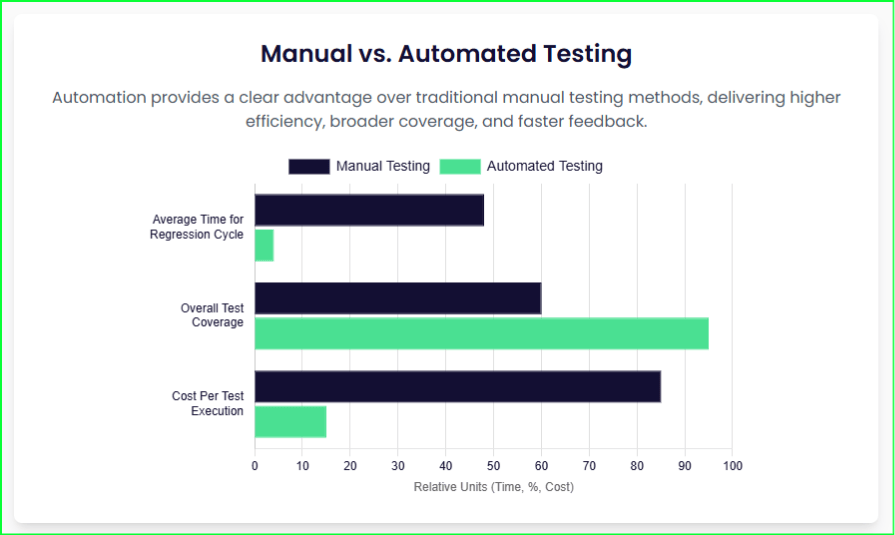
Automated testing drastically cuts down the time and effort required for manual testing, which can consume 30-40% of a typical banking IT budget. By automating repetitive tasks, institutions can reduce testing cycles by up to 50%. This acceleration allows financial firms to release new features and updates faster, a crucial advantage in a highly competitive market where new updates are constantly being deployed. Integrated automation can enable a 60% faster release cycle.
Enhanced Security and Risk Mitigation
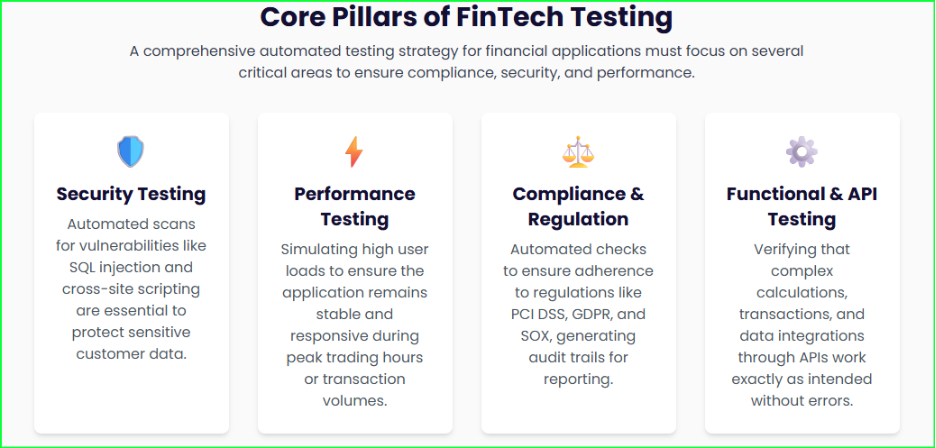
Financial applications are prime targets for cyber threats, and over 75% of applications have at least one flaw. Automated security testing tools regularly scan for known vulnerabilities and simulate cyberattacks to verify security measures. This includes testing common vulnerabilities like SQL injection, cross-site scripting attacks, and broken access controls that could allow unauthorized fund transfers. This proactive approach helps to reduce an application’s attack surface and keep customer data safe.
Ensuring Unwavering Regulatory Compliance
The financial industry faces overwhelming regulatory scrutiny from standards like the Payment Card Industry Data Security Standard (PCI DSS), the Sarbanes-Oxley Act (SOX), and the General Data Protection Regulation (GDPR).
Automated app testing for financial software simplifies this burden by continuously ensuring adherence to these standards and generating detailed audit trails. Automated compliance testing can reduce audit findings by as much as 82%.
Increased Accuracy and Reliability
Even minor mistakes can have significant financial consequences in this domain. Automated tests follow predefined steps with precision, which virtually eliminates the humanhuman error inherent in manual testing. This is critical for maintaining absolute transactional integrity, such as verifying data consistency and accurately calculating interest rates and fees.
Greater Test Coverage
Automation enables comprehensive test coverage by executing a wider range of scenarios, including complex use cases, edge cases, and repetitive tasks that are often difficult and time-consuming to perform manually. In fact, automation can lead to a 2-3x increase in automated test coverage compared to manual methods. By leveraging automation for tedious, repeatable tasks, human testers can focus on more complex, strategic work that requires critical thinking and creativity.
Key Challenges in Testing Financial Software
Despite the clear benefits, financial institutions face a complex and high-stakes environment for app testing. A generic testing strategy is insufficient because a failure can lead to severe consequences, including financial loss, reputational damage, and legal penalties. These challenges are distinct and require specialized attention.
Handling Sensitive Data
Financial applications handle immense volumes of sensitive customer data and personally identifiable information (PII). Testers must use secure methods to prevent data leaks, such as data masking, anonymization, and synthetic data generation. According to one report, 46% of banking businesses struggle with test data management, highlighting this significant hurdle. The use of realistic but non-production banking data is essential to protect sensitive information during testing.
Complex System Integrations
Modern financial systems are often a complex web of interconnected legacy systems and new APIs. The rise of trends like Open Banking APIs and Banking-as-a-Platform (BaaP) relies on deep integration between different systems and platforms, often from various providers. Ensuring seamless data transfer and integrity across this intricate web is a major challenge. The complexity of these integrations makes manual testing impossible at scale, making automation a prerequisite for the viability and reliability of these new platforms.
High-Stakes Performance Requirements
Financial applications must be able to handle immense transaction volumes and unexpected traffic spikes without slowing down or crashing. This is especially true during high-traffic events like tax season or flash sales on payment apps. Automated performance and load testing tools can simulate thousands of concurrent users to identify performance bottlenecks and ensure the application’s scalability.
Navigating Device and Platform Fragmentation
With customers using a wide variety of devices and operating systems, addressing device fragmentation and ensuring cross-platform compatibility is a significant hurdle for automated mobile testing. The modern financial journey is not linear; it spans web portals, mobile apps, third-party APIs, and core back-end systems. A single, unified platform is necessary to orchestrate this entire testing lifecycle and provide comprehensive test coverage across all critical technologies.
A Hybrid Approach: Automated vs. Manual Testing
The most effective strategy for app testing tools for financial software is not an “either/or” choice between automation and manual testing but a strategic hybrid approach. Each method has its unique strengths and weaknesses, and the optimal solution leverages both to ensure comprehensive quality and efficiency.
Automation’s Role
Automation excels at high-volume, repetitive, and data-intensive tasks where precision and speed are paramount. For financial applications, automation is indispensable for:
Regression Testing: As financial applications frequently update, automated regression tests are critical to ensure that new code changes do not negatively impact existing functionalities. This allows for the rapid re-execution of a comprehensive test suite after every code change.
Performance Testing and Load Testing: Automated tools can simulate thousands of concurrent users to identify performance bottlenecks, ensuring the application can handle immense transaction volumes without crashing.
API Testing: FinTech applications rely heavily on APIs to process payments and verify accounts. Automated API testing is essential for ensuring the functionality, performance, and security of these critical communication channels by directly sending requests and validating responses.
Manual Testing’s Role
While automation handles the heavy lifting, manual testing remains vital for tasks that require human adaptability and intuition. These are scenarios where a human can uncover subtle flaws that a script might miss:
Exploratory Scenarios: Testers can creatively explore the application to find unexpected issues, bugs, or use cases that were not part of the initial test plan.
Usability Evaluations: This involves assessing the intuitiveness of the user interface and the overall user experience to ensure the application is easy and seamless for customers to use. A landmark 2023 study found that global banks are losing 20% of their customers specifically due to poor customer experience.
The most effective strategy for B2B app testing automation and consumer-facing applications leverages a mix of both automation and manual testing. By using automation for tedious, repeatable tasks, human testers are freed to focus on more complex, strategic work that requires critical thinking and creativity, ensuring a more optimal use of resources. This synergistic relationship ensures that an application is not only functional and secure but also provides a flawless and intuitive user experience.
The Future is Here: The Role of AI and Machine Learning
The next frontier of financial software quality assurance lies in the strategic integration of artificial intelligence (AI) and machine learning (ML). These technologies are making testing smarter and more proactive, transforming QA from a reactive process to an intelligent function.
AI-Powered Test Automation
AI is not just automating tasks; it’s providing powerful new capabilities:
Self-Healing Tests: AI-powered tools can enable “self-healing tests” that automatically adapt to changes in the user interface (UI). This feature saves testers from the tedious task of continuously fixing brittle test scripts that break with every new software update. One study suggests that integrating AI can decrease testing cycles by 40% while increasing defect detection rates by 30%.
Test Case Generation and Prioritization: AI can intelligently generate test cases based on product specifications, user data, and real-world scenarios. This capability moves beyond a static test suite to a dynamic one that can prioritize tests to focus on high-risk areas and ensure more comprehensive coverage.
Autonomous Testing and Agentic Test Orchestration by SEER
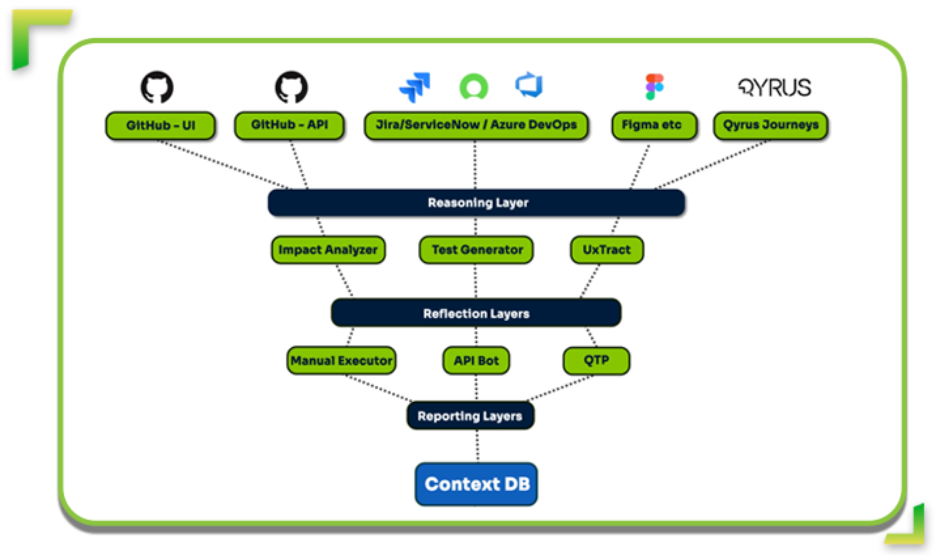
The rise of AI has led to a new paradigm called Agentic Orchestration. This approach is not about running scripts faster; it is about deploying an intelligent, end-to-end quality assurance ecosystem managed by a central, autonomous brain. Qyrus, a provider of an AI-powered digital testing platform, offers a framework called SEER (Sense → Evaluate → Execute → Report). This intelligent orchestration engine acts as the command center for the entire testing process.
Instead of one generalist AI trying to do everything, SEER analyzes the situation and deploys a team of specialized Single Use Agents (SUAs). These agents perform specific tasks with maximum precision and efficiency, such as:
Sensing Changes: SEER monitors repositories like GitHub for code commits and design platforms like Figma for UI/UX changes.
Evaluating Impact: The Impact Analyzer agent uses static analysis to determine which components are affected by a change, allowing for targeted testing instead of running an entire regression suite.
Executing Coordinated Action: SEER orchestrates the parallel execution of multiple agents, such as API Builder to validate new backend logic or TestPilot to perform functional tests on affected UI components.
Qyrus’ SEER Framework
Real-Time Fraud and Anomaly Detection
AI and ML algorithms can continuously monitor transaction logs to identify anomalies and potential fraud in real-time. This proactive approach significantly enhances security and mitigates risks associated with financial fraud. A case study of a payment processor revealed that an AI model achieved a 95% accuracy rate in identifying threats prior to deployment.
Qyrus: The All-in-One Solution for Financial Services QA
Qyrus is an AI-powered, codeless, end-to-end testing platform designed to address the unique challenges of financial software. It offers a unified solution for web, mobile, desktop, API, and SAP testing, eliminating the need for fragmented toolchains that create bottlenecks and blind spots. The platform’s integrated approach provides a single source of truth for quality, offering detailed reporting with screenshots, video recordings, and advanced analytics.
Mobile Testing Capabilities
The Qyrus platform’s mobile testing capabilities are built to handle the complexities of native and hybrid applications. It includes a cloud-based device farm that provides instant access to a vast range of real mobile devices and browsers for cross-platform testing. The Rover AI feature can autonomously explore applications to identify anomalies and potential issues much faster than any manual effort. It also intelligently evaluates outputs from AI models, a crucial capability as AI is integrated into fraud detection and credit scoring.
Solving Financial Industry Challenges
Qyrus directly addresses the financial industry’s unique security and compliance challenges with its secure, ISO 27001/SOC 2 compliant device farm and powerful AI capabilities. The platform’s no-code/low-code test design empowers both domain experts and technical users to rapidly build and execute complex test cases, reducing the dependency on specialized programming knowledge. This is particularly valuable given that 76% of financial organizations now prioritize deep financial domain expertise for their testing teams.
Quantifiable Results
The value of the Qyrus platform is demonstrated through powerful, quantifiable results. Key metrics from an independent Forrester Total Economic Impact™ (TEI) study highlight a 213% return on investment and a payback period of less than six months. A leading UK bank, for example, achieved a 200% ROI within the first year by leveraging the platform. The bank also saw a 60% reduction in manual testing efforts and prevented over 2,500 bugs from reaching production.
Curious about how much you can save on QA efforts with AI-powered automation? Contact our experts today!
Investing in Trust: The Ultimate Competitive Advantage
Automated app testing is no longer a choice but a necessity for financial institutions to stay competitive, compliant, and secure in a digital-first world. A modern QA strategy must move beyond simple cost-benefit calculations to a broader understanding of its role in risk management, compliance, and innovation.
By adopting a comprehensive testing strategy that combines automation with manual testing and leverages the power of AI, financial organizations can move beyond simply finding bugs to proactively managing risk and accelerating innovation.
The investment in a modern testing platform is a foundational step towards building a resilient, agile, and trustworthy financial technology stack. The future of finance will be defined not by those who offer the most products, but by those who earn the deepest trust, and that trust must be engineered.
Mobile apps are now the foundation of our digital lives, and their quality is no longer just a perk—it’s an absolute necessity. The global market for mobile application testing is experiencing explosive growth, projected to hit $42.4 billion by 2033.
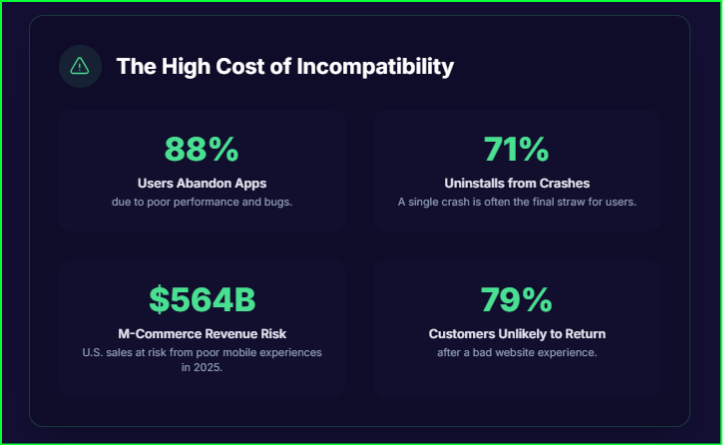
This surge in investment reflects a crucial reality: users have zero tolerance for subpar app experiences. They abandon apps with performance issues or bugs, with 88% of users leaving an app that isn’t working properly. The stakes are high; 94% of users uninstall an app within 30 days of installation.
This article is your roadmap to building a resilient mobile application testing strategy. We will cover the core actions that form the foundation of any test, the art of finding elements reliably, and the critical skill of managing timing for stable, effective mobile automation testing.
The Foundation of a Flawless App: Mastering the Three Core Interactions
A mobile test is essentially a script that mimics human behavior on a device. The foundation of any robust test script is the ability to accurately and reliably automate the three high-level user actions: tapping, swiping, and text entry. A good mobile automation testing framework not only executes these actions but also captures the subtle nuances of human interaction.
Tapping and Advanced Gestures
Tapping is the most common interaction in mobile apps. While a single tap is a straightforward action to automate, modern applications often feature more complex gestures critical to their functionality. A comprehensive test must include various forms of tapping. These include:
Single Tap: The most basic interaction for selecting elements.
Double Tap: Important for actions like zooming or selecting text.
Long Press: Critical for testing context menus or hidden options.
Drag and Drop: A complex, multi-touch action that requires careful coordination of the drag path and duration. A strategic analysis of the research reveals two primary methods for automating this gesture: the simple driver.drag_and_drop(origin, destination) method, and a more granular approach using a sequence of events like press, wait, moveTo, and release.
Multi-touch: Advanced gestures such as pinch-to-zoom or rotation require sophisticated automation that can simulate multiple touch points simultaneously.
The Qyrus Platform can efficiently automate each of these variations, simulating the full spectrum of user interactions to provide comprehensive coverage.
Swiping and Text Entry
Swiping is a fundamental gesture for mobile navigation, used for scrolling or switching pages. Automation frameworks should provide robust control over directional swipes, enabling testers to define the starting coordinates, direction, and even the number of swipes to perform, as is possible with platforms like Qyrus.
Text entry is another core component of any specific mobile test. The best practice for automating this action revolves around managing test data effectively.
Hard-coded Text Entry
This is the simplest approach. You define the text directly in the script. It is useful for scenarios like a login page where the test credentials remain the same every time you run the test.
Example Script (Python with Appium):
from appium import webdriver from appium.webdriver.common.appiumby import AppiumBy # Desired Capabilities for your device desired_caps = { “platformName”: “Android”, “deviceName”: “MyDevice”, “appPackage”: “com.example.app”, “appActivity”: “.MainActivity” } # Connect to Appium server driver = webdriver.Remote(“http://localhost:4723/wd/hub”, desired_caps) # Find the username and password fields using their Accessibility IDs username_field = driver.find_element(AppiumBy.ACCESSIBILITY_ID, “usernameInput”) password_field = driver.find_element(AppiumBy.ACCESSIBILITY_ID, “passwordInput”) login_button = driver.find_element(AppiumBy.ACCESSIBILITY_ID, “loginButton”) # Hard-coded text entry username_field.send_keys(“testuser1”) password_field.send_keys(“password123”) login_button.click() # Close the session driver.quit()
Dynamic Text Entry
This approach makes tests more flexible and powerful. Instead of hard-coding values, you pull them from an external source or generate them on the fly. This is essential for testing with a variety of data, such as different user types, unusual characters, or lengthy inputs. A common method is to use a data-driven approach, reading values from a file like a CSV.
Example Script (Python with Appium and an external CSV):
Next, write the Python script to read from this file and run the test for each row of data:
import csv from appium import webdriver from appium.webdriver.common.appiumby import AppiumBy # Desired Capabilities for your device desired_caps = { “platformName”: “Android”, “deviceName”: “MyDevice”, “appPackage”: “com.example.app”, “appActivity”: “.MainActivity” } # Connect to Appium server driver = webdriver.Remote(“http://localhost:4723/wd/hub”, desired_caps) # Read data from the CSV file with open(‘test_data.csv’, ‘r’) as file: reader = csv.reader(file)
# Skip the header row next(reader) # Iterate through each row in the CSV for row in reader: username, password, expected_result = row
# Clear fields before new input username_field.clear() password_field.clear()
# Dynamic text entry from the CSV username_field.send_keys(username) password_field.send_keys(password) login_button.click()
# Add your assertion logic here based on expected_result if expected_result == “success”: # Assert that the user is on the home screen pass else: # Assert that an error message is displayed pass # Close the session driver.quit()
A Different Kind of Roadmap: Finding Elements for Reliable Tests
A crucial task in mobile automation testing is reliably locating a specific UI element in a test script. While humans can easily identify a button by its text or color, automation scripts need a precise way to interact with an element. Modern test frameworks approach this challenge with two distinct philosophies: a structural, code-based approach and a visual, human-like one.
The Power of the XML Tree: Structural Locators
Most traditional mobile testing tools rely on an application’s internal structure—the XML or UI hierarchy—to identify elements. This method is fast and provides a direct reference to the element. A good strategy for effective software mobile testing involves a clear hierarchy for choosing a locator.
ID or Accessibility ID: Use these first. They are the fastest, most stable, and least likely to change with UI updates. On Android, the ID corresponds to the resource-id, while on iOS it maps to the name attribute. The accessibilityId is a great choice for cross-platform automation as developers can set it to be consistent across both iOS and Android.
Native Locator Strategies: These include -android uiautomator, -ios predicate string, or -ios class chain. These are “native” locator strategies because they are provided by Appium as a means of creating selectors in the native automation frameworks supported by the device. These locator strategies have many fans, who love the fine-grained expression and great performance (equally or just slightly less performance than accessibility id or id).
Class Name: This locator identifies elements by their class type. While it is useful for finding groups of similar elements, it is often less unique and can lead to unreliable tests.
XPath: Use this only as a last resort. While it is the most flexible locator, it is also highly susceptible to changes in the UI hierarchy, making it brittle and slow.
CSS Selector: This is a useful tool for hybrid applications that can switch from a mobile view to a web view, allowing for a seamless transition between testing contexts.
To find the values for these locators, use an inspector tool. It allows you to click an element in a running app and see all its attributes, speeding up test creation and ensuring you pick the most reliable locator.
Visual and AI-Powered Locators: A Human-Centered Approach
While structural locators are excellent for ensuring functionality, they can’t detect visual bugs like misaligned text, incorrect colors, or overlapping elements. This is where visual testing, which “focuses on the more natural behavior of humans,” becomes essential.
Visual testing works by comparing a screenshot of the current app against a stored baseline image. This approach can identify a wide range of inconsistencies that traditional functional tests often miss. Emerging AI-powered software mobile testing tools can process these screenshots intelligently, reducing noise and false positives. These tools can also employ self-healing locators that use AI to adapt to minor UI changes, automatically fixing tests and reducing maintenance costs.
The most effective mobile testing and mobile application testing strategy uses a hybrid approach: rely on stable structural locators (ID, Accessibility ID) for core functional tests and leverage AI-powered visual testing to validate the UI’s aesthetics and layout. This ensures a comprehensive test suite that guarantees both functionality and a flawless user experience.
Wait for It: The Art of Synchronization for Stable Tests
Timing is one of the most significant challenges in mobile application testing. Unlike a person, an automated script runs at a consistent, high speed and lacks the intuition to know when to wait for an application to load content, complete an animation, or respond to a server request. When a test attempts to interact with an element that has not yet appeared, it fails, resulting in a “flaky” or unreliable test.
To solve this synchronization problem, testers use waits. There are two primary types: implicit and explicit.
Implicit Waits vs. Explicit Waits
Implicit waits set a global timeout for all element search commands in a test. It instructs the framework to wait a specific amount of time before throwing an exception if an element is not found. While simple to implement, this approach can cause issues. For example, if an element loads in one second but the implicit wait is set to ten, the script will wait the full ten seconds, unnecessarily increasing the test execution time.
Explicit waits are a more intelligent and targeted synchronization method. They instruct the framework to wait until a specific condition is met on a particular element before proceeding. These conditions are highly customizable and include waiting for an element to be visible, clickable, or for a loading spinner to disappear.
The consensus among experts is to use explicit waits exclusively. Although they require more verbose code, they provide the granular control essential for handling dynamic applications. Using explicit waits prevents random failures caused by timing issues, saving immense time on debugging and maintenance, which ultimately builds confidence in your test results.
Concluding the Test: A Holistic Strategy for Success
Creating a successful mobile test requires synthesizing all these practices into a cohesive, overarching strategy. A truly effective framework considers the entire development lifecycle, from the choice of testing environments to integration with CI/CD pipelines.
The future of mobile testing lies in the continued evolution of both mobile testing tools and the role of the tester. As AI and machine learning technologies automate a growing share of tedious work—from test case generation to visual validation—the responsibilities of a quality professional are shifting.
The modern tester is no longer a manual executor but a strategic quality analyst, architecting intelligent automation frameworks and ensuring an app’s overall integrity. The judicious use of AI-powered visual testing, for example, frees testers from maintaining brittle structural locators, allowing them to focus on exploratory testing and the nuanced validation of user experiences.
To fully embrace these best practices and build a resilient framework, consider the Qyrus Mobile Testing solution. With features like integrated gesture automation, intelligent element identification, and advanced wait management, Qyrus provides the tools you need to create, run, and scale your mobile application testing efforts.
Experience the difference.Get in touch with us to learn how Qyrus can help you deliver the high-quality mobile testing toolsand user experiences that drive business success.
The conversation around quality assurance has changed because it has to. With developers spending up to half their time on bug fixing, the focus is no longer on simply writing better scripts. You now face a strategic choice that will define your team’s velocity, cost, and focus for years—a choice that determines whether quality assurance remains a cost center or becomes a critical value driver.
On one side, we have the “Buy” approach, embodied by all-in-one, no-code platforms like Qyrus. They promise immediate value and an AI-driven experience straight out of the box. On the other side is the “Build” approach—a powerful, customizable solution assembled in-house. This involves using a best-in-class open-source framework like Playwright and integrating it with an AI agent through the Model Context Protocol (MCP), creating what we can call a Playwright-MCP system. This path offers incredible control but demands a significant investment in engineering and maintenance.
This analysis dissects that decision, moving beyond the sales pitches to uncover real-world trade-offs in speed, cost, and long-term viability.
The ‘Build’ Vision: Engineering Your Edge with Playwright MCP
The appeal of the “Build” approach begins with its foundation: Playwright. This is not just another testing framework; its very architecture gives it a distinct advantage for modern web applications. However, this power comes with the responsibility of building and maintaining not just the tests, but the entire ecosystem that supports them.
Playwright: A Modern Foundation for Resilient Automation
Playwright runs tests out-of-process and communicates with browsers through native protocols, which provides deep, isolated control and eliminates an entire class of limitations common in older tools. This design directly addresses the most persistent headache in test automation: timing-related flakiness. The framework automatically waits for elements to be actionable before performing operations, removing the need for artificial timeouts. However, it does not solve test brittleness; when UI locators change during a redesign, engineers are still required to manually hunt down and update the affected scripts.
MCP: Turning AI into an Active Collaborator
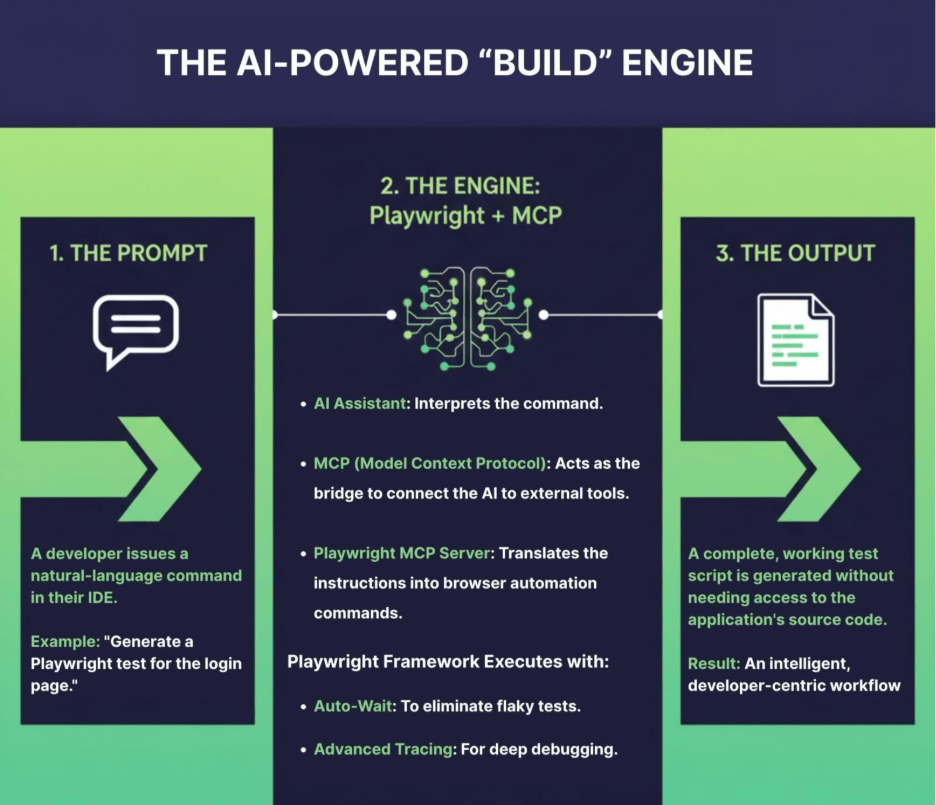
This powerful automation engine is then supercharged by the Model Context Protocol (MCP). MCP is an enterprise-wide standard that transforms AI assistants from simple code generators into active participants in the development lifecycle. It creates a bridge, allowing an AI to connect with and perform actions on external tools and data sources. This enables a developer to issue a natural language command like “check the status of my Azure storage accounts” and have the AI execute the task directly from the IDE. Microsoft has heavily invested in this ecosystem, releasing over ten specialized MCP servers for everything from Azure to GitHub, creating an interoperable environment.
Synergy in Action: The Playwright MCP Server
The synergy between these two technologies comes to life with the Playwright MCP Server. This component acts as the definitive link, allowing an AI agent to drive web browsers to perform complex testing and data extraction tasks. The practical applications are profound. An engineer can generate a complete Playwright test for a live website simply by instructing the AI, which then explores the page structure and generates a fully working script without ever needing access to the application’s source code. This core capability is so foundational that it powers the web browsing functionality of GitHub Copilot’s Coding Agent. Whether a team wants to create a custom agent or integrate a Claude MCP workflow, this model provides the blueprint for a highly customized and intelligent automation system.
The Hidden Responsibilities: More Than Just a Framework
Adopting a Playwright-MCP system means accepting the role of a systems integrator. Beyond the framework itself, a team must also build and manage a scalable test execution grid for cross-browser testing. They must integrate and maintain separate, third-party tools for comprehensive reporting and visual regression testing. And critically, this entire stack is accessible only to those with deep coding expertise, creating a silo that excludes business analysts and manual QA from the automation process.
The ‘Buy’ Approach: Gaining an AI Co-Pilot, Not a Second Job
The “Buy” approach presents a fundamentally different philosophy: AI should be a readily available feature that reduces workload, not a separate engineering project that adds to it. This is the core of a platform like Qyrus, which integrates AI-driven capabilities directly into a unified workflow, eliminating the hidden costs and complexities of a DIY stack.
Natural Language to Test Automation
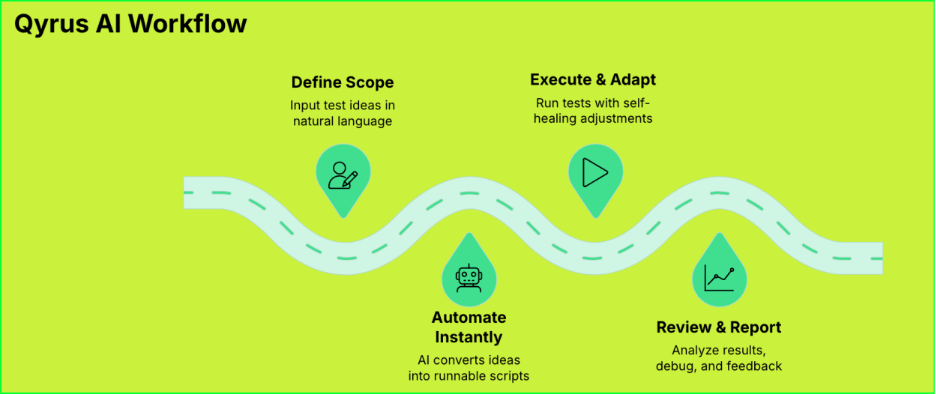
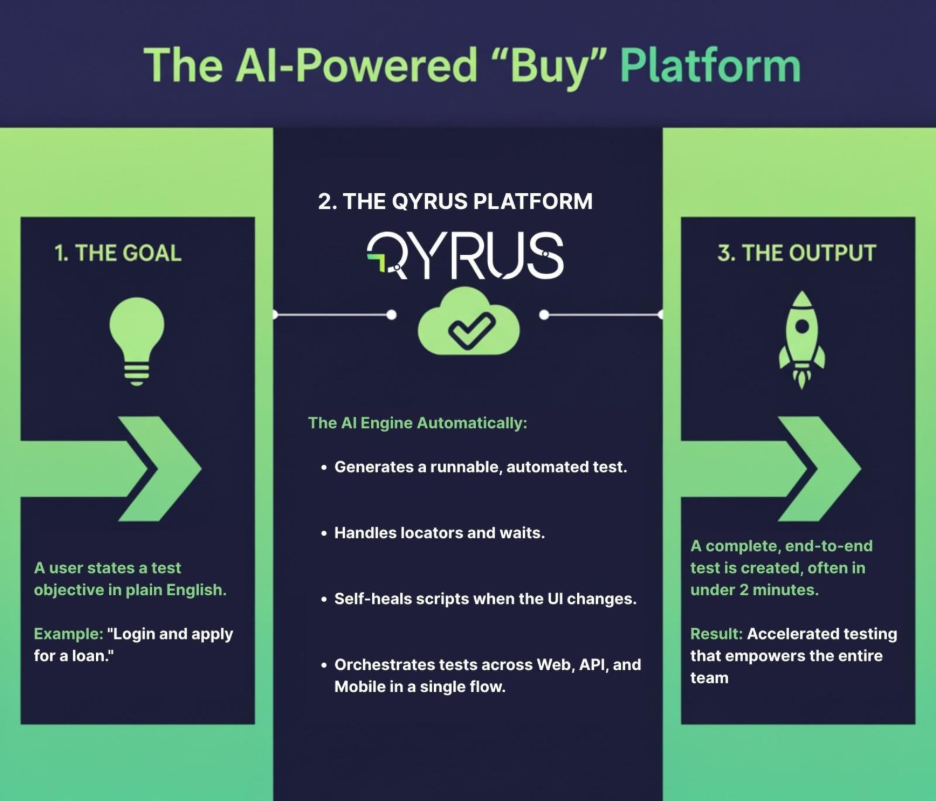
With Qyrus’ Quick Test Plan (QTP) AI, a user can simply type a test idea or objective, and Qyrus generates a runnable automated test in seconds. For example, typing “Login and apply for a loan” would yield a full test script with steps and locators. In live demos, teams achieved usable automated tests in under 2 minutes starting from a plain-English goal.
Qyrus alows allows testers to paste manual test case steps (plain text instructions) and have the AI convert them into executable automation steps. This bridges the gap between traditional test case documentation and automation, accelerating migration of manual test suites.
Democratizing Quality, Eradicating Maintenance
This accessibility empowers a broader range of team members to contribute to quality, but the platform’s biggest impact is on long-term maintenance. In stark contrast to a DIY approach, Qyrus tackles the most common points of failure head-on:
AI-Powered Self-Healing: While a UI change in a Playwright script requires an engineer to manually hunt down and fix broken locators, Qyrus’s AI automatically detects these changes and heals the test in real-time, preventing failures and addressing the maintenance burden that can consume 70% of a QA team’s effort. Common test framework elements – variables, secret credentials, data sets, assertions – are built-in features, not custom add-ons.
Built-in Visual Regression: Qyrus includes native visual testing to catch unintended UI changes by comparing screenshots. This ensures brand consistency and a flawless user experience—a critical capability that requires integrating a separate, often costly, third-party tool in a DIY stack.
Cross-Platform Object Repository: Qyrus features a unified object repository, where a UI element is mapped once and reused across web and mobile tests. A single fix corrects the element everywhere, a stark contrast to the script-by-script updates required in a DIY framework.
True End-to-End Orchestration, Zero Infrastructure Burden
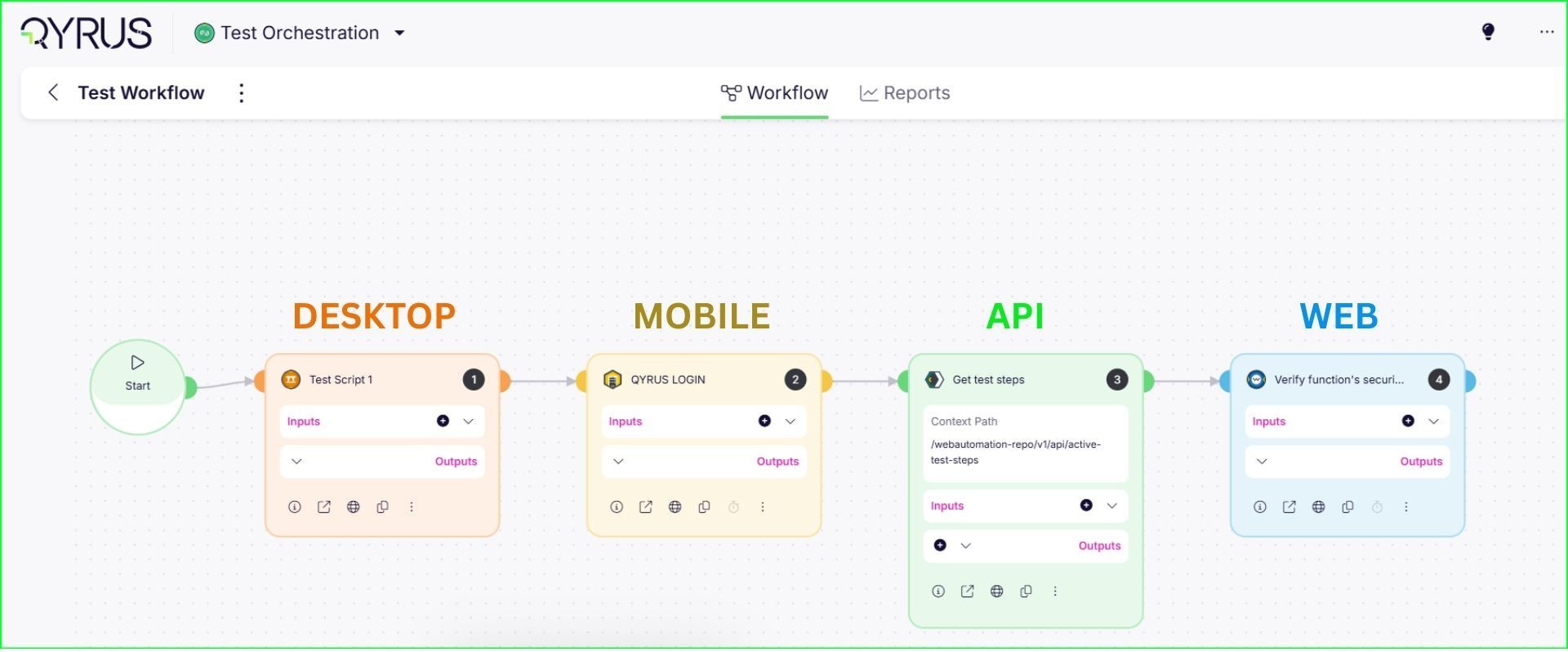
Perhaps the most significant differentiator is the platform’s unified, multi-channel coverage. Qyrus was designed to orchestrate complex tests that span Web, API, and Mobile applications within a single, coherent flow. For example, Qyrus can generate a test that logs into a web UI, then call an API to verify back-end data, then continue the test on a mobile app – all in one flow. The platform provides a managed cloud of real mobile devices and browsers, removing the entire operational burden of setting up and maintaining a complex test grid.
Furthermore, every test result is automatically fed into a centralized, out-of-the-box reporting dashboard complete with video playback, detailed logs, and performance metrics. This provides immediate, actionable insights for the whole team, a stark contrast to a DIY approach where engineers must integrate and manage separate third-party tools just to understand their test results.
The Decision Framework: Qyrus vs. Playwright-MCP
Choosing the right path requires a clear-eyed assessment of the practical trade-offs. Here is a direct comparison across six critical decision factors.
1. Time-to-Value & Setup Effort
This measures how quickly each approach delivers usable automation.
Qyrus: The platform is designed for immediate impact, with teams able to start creating AI-generated tests on day one. This acceleration is significant; one bank that adopted Qyrus cut its typical UAT cycle from 8–10 weeks down to just 3 weeks, driven by the platform’s ability to automate around 90% of their manual test cases.
Playwright + MCP: This approach requires a substantial upfront investment before delivering value. The initial setup—which includes standing up the framework, configuring an MCP server, and integrating with CI pipelines—is estimated to take 4–6 person-months of engineering effort.
2. AI Implementation: Feature vs. Project
This compares how AI is integrated into the workflow.
Qyrus: AI is treated as a turnkey feature and a “push-button productivity booster”. The AI behavior is pre-tuned, and the cost is amortized into the subscription fee.
Playwright + MCP: Adopting AI is a DIY project. The team is responsible for hosting the MCP server, managing LLM API keys, crafting and maintaining prompts, and implementing guardrails to prevent errors. This distinction is best summarized by the observation: “Qyrus: AI is a feature. DIY: AI is a project”.
3. Technical Coverage & Orchestration
This evaluates the ability to test across different application channels.
Qyrus: The platform was built for unified, multi-channel testing, supporting Web, API, and Mobile in a single, orchestrated flow. This provides one consolidated report and timeline for a complete end-to-end user journey.
Playwright + MCP: Playwright is primarily a web UI automation tool. Covering other channels requires finding and integrating additional libraries, such as Appium for mobile, and then “gluing these pieces together” in the test code. This often leads to fragmented test suites and separate reports that must be correlated manually.
4. Total Cost of Ownership (TCO)
This looks beyond the initial price tag to the full long-term cost.
Qyrus: The cost is a predictable annual subscription. While it involves a license fee, a Forrester analysis calculated a 213% ROI and a payback period of less than six months, driven by savings in labor and quality improvements.
Playwright + MCP: The “open source is free like a puppy, not free like a beer” analogy applies here. The TCO is often 1.5 to 2 times higher than the managed solution due to ongoing operational costs, which include an estimated 1-2 full-time engineers for maintenance, infrastructure costs, and variable LLM token consumption.
Below is a cost comparison table for a hypothetical 3-year period, based on a mid-size team and application (assumptions detailed after):
Cost Component
Qyrus (Platform)
DIY Playwright+MCP
Initial Setup Effort
Minimal – Platform ready Day 1; Onboarding and test migration in a few weeks (vendor support helps)
High – Stand up framework, MCP server, CI, etc. Estimated 4–6 person-months engineering effort (project delay)
License/Subscription
Subscription fee (cloud + support). Predictable (e.g. $X per year).
No license cost for Playwright. However, no vendor support – you own all maintenance.
Infrastructure & Tools
Included in subscription: browser farm, devices, reporting dashboard, uptime SLA.
Infra Costs: Cloud VM/container hours for test runners; optional device cloud service for mobile ($ per minute or monthly). Tool add-ons: e.g., monitoring, results dashboard (if not built in).
LLM Usage (AI features)
Included (Qyrus’s AI cost is amortized in fee). No extra charge per test generated.
Token Costs: Direct usage of OpenAI/Anthropic API by MCP. e.g., $0.015 per 1K output tokens . ($1 or less per 100 tests, assuming ~50K tokens total). Scales with test generation frequency.
Personnel (Maintenance)
Lower overhead: vendor handles platform updates, grid maintenance, security patches. QA engineers focus on writing tests and analyzing failures, not framework upkeep.
Higher overhead: Requires additional SDET/DevOps capacity to maintain the framework, update dependencies, handle flaky tests, etc. e.g., +1–2 FTEs dedicated to test platform and triage.
Support & Training
24×7 vendor support included; faster issue resolution. Built-in training materials for new users.
Community support only (forums, GitHub) – no SLAs. Internal expertise required for troubleshooting (risk if key engineer leaves).
Defect Risk & Quality Cost
Improved coverage and reliability reduces risk of costly production bugs. (Missed defects can cost 100× more to fix in production)
Higher risk of gaps or flaky tests leading to escaped defects. Downtime or failures due to test infra issues are on you (potentially delaying releases).
Reporting & Analytics
Included: Centralized dashboard with video, logs, and metrics out-of-the-box.
Requires 3rd-party tools: Must integrate, pay for, and maintain tools like ReportPortal or Allure.
Assumptions: This model assumes a fully-loaded engineer cost of $150k/year (for calculating person-month cost), cloud infrastructure costs based on typical usage, and LLM costs using current pricing (Claude Sonnet 4 or GPT-4 at ~$0.012–0.015 per 1K tokens output ). It also assumes roughly 100–200 test scenarios initially, scaling to 300+ over 3 years, with moderate use of AI generation for new tests and maintenance.
5. Maintenance, Scalability & Flakiness
This assesses the long-term effort required to keep the system running reliably.
Qyrus: As a cloud-based SaaS, the platform scales elastically, and the vendor is responsible for infrastructure, patching, and uptime via an SLA and 24×7 support. Features like self-healing locators reduce the maintenance burden from UI changes.
Playwright + MCP: The internal team becomes the de facto operations team for the test infrastructure. They are responsible for scaling CI runners, fixing issues at 2 AM, and managing flaky tests. Flakiness is a major hidden cost; one financial model shows that for a mid-sized team, investigating spurious test failures can waste over $150,000 in engineering time annually.
Below is a sensitivity table illustrating annual cost of maintenance under different assumptions. The maintenance cost is modeled as hours of engineering time wasted on flaky failures plus time spent writing/refactoring tests.
Scenario
Authoring Speed (vs. baseline coding)
Flaky Test %
Estimated Extra Effort (hrs/year)
Impact on TCO
Status Quo (Baseline)
1× (no AI, code manually)
10% (high)
400 hours (0.2 FTE) debugging flakes
(Too slow – not viable baseline)
Qyrus Platform
~3× faster creation (assumed)
~2% (very low)
50 hours (vendor mitigates most)
Lowest labor cost – focus on tests, not fixes
DIY w/ AI Assist (Conservative)
~2× faster creation
5% (med)
150 hours (self-managed)
Higher cost – needs an engineer part-time
DIY w/ AI Assist (Optimistic)
~3× faster creation
5% (med)
120 hours
Still higher than Qyrus due to infra overhead
DIY w/o sufficient guardrails
~2× faster creation
10% (high)
300+ hours (thrash on failures)
Highest cost – likely delays, unhappy team
Assumes ~1000 test runs per year for a mid-size suite for illustration.
6. Team Skills & Collaboration
This considers who on the team can effectively contribute to the automation effort.
Qyrus: The no-code interface ‘broadens the pool of contributors,’ allowing manual testers, business analysts, and developers to design and run tests. This directly addresses the industry-wide skills gap, where a staggering 42% of testing professionals report not being comfortable writing automation scripts.
Playwright + MCP: The work remains centered on engineers with expertise in JavaScript or TypeScript. Even with AI assistance, debugging and maintenance require deep coding knowledge, which can create a bottleneck where only a few experts can manage the test suite.
The Security Equation: Managed Assurance vs. Agentic Risk
Utilizing AI agents in software testing introduces a new category of security and compliance risks. How each approach mitigates these risks is a critical factor, especially for organizations in regulated industries.
The DIY Agent Security Gauntlet
When you build your own AI-driven test system with a toolset like Playwright-MCP, you assume full responsibility for a wide gamut of new and complex security challenges. This is not a trivial concern; cybercrime losses, often exploiting software vulnerabilities, have skyrocketed by 64% in a single year. The DIY approach expands your threat surface, requiring your team to become experts in securing not just your application, but an entire AI automation system. Key risks that must be proactively managed include:
Data Privacy & IP Leakage: Any data sent to an external LLM API—including screen text or form values—could contain sensitive information. Without careful prompt sanitization, there’s a risk of inadvertently leaking customer PII or intellectual property.
Prompt Injection Attacks: An attacker could place malicious text on your website that, when read by the testing agent, tricks it into revealing secure information or performing unintended actions.
Hallucinations and False Actions: LLMs can sometimes generate incorrect or even dangerous steps. Without strict, custom-built guardrails, a claude mcp agent might execute a sequence that deletes data or corrupts an environment if it misinterprets a command.
API Misuse and Cost Overflow: A bug in the agent’s logic could cause an infinite loop of API calls to the LLM provider, racking up huge and unexpected charges. This requires implementing robust monitoring, rate limits, and budget alerts.
Supply Chain Vulnerabilities: The system relies on a chain of open-source components, each of which could have vulnerabilities. A supply chain attack via a malicious library version could potentially grant an attacker access to your test environment.
The Managed Platform Security Advantage
A managed solution like Qyrus is designed to handle these concerns with enterprise-grade security, abstracting the risk away from your team. This approach is built on a principle of risk transference.
Built-in Security & Compliance: Qyrus is developed with industry best practices, including data encryption, role-based access control, and comprehensive audit logging. The vendor manages compliance certifications (like ISO or SOC2) and ensures that all AI features operate within safe, sandboxed boundaries.
Risk Transference: By using a proven platform, you transfer certain operational and security risks to the vendor. The vendor’s core business is to handle these threats continuously, likely with more dedicated resources than an internal team could provide.
Guaranteed Uptime and Support: Uptime, disaster recovery, and 24×7 support are built into the Service Level Agreement (SLA). This provides an assurance of reliability that a DIY system, which relies on your internal team for fixes, cannot offer. The financial value of this guarantee is immense, as 91% of enterprises report that a single hour of downtime costs them over $300,000. Qyrus transfers uptime and patching risk out of your team; DIY puts it squarely back.
Conclusion: Making the Right Choice for Your Team
After a careful, head-to-head analysis, the evidence shows two valid but distinctly different paths for achieving AI-powered test automation. The decision is not simply about technology; it is about strategic alignment. The right choice depends entirely on your team’s resources, priorities, and what you believe will provide the greatest competitive advantage for your business.
To make the decision, consider which of these profiles best describes your organization:
Choose the “Build” path with Playwright-MCP if: Your organization has strong in-house engineering talent, particularly SDETs and DevOps specialists who are prepared to invest in building and maintaining a custom testing platform. This path is ideal for teams that require deep, bespoke customization, want to integrate with a specific developer ecosystem like Azure and GitHub, and value the ultimate control that comes from owning their entire toolchain.
Choose the “Buy” path with Qyrus if: Your primary goals are speed, predictable cost, and broad test coverage out of the box. This approach is the clear winner for teams that want to accelerate release cycles immediately, empower non-technical users to contribute to automation, and transfer operational and security risks to a vendor. If your goal is to focus engineering talent on your core product rather than internal tools, the financial case is definitive: a commissioned Forrester TEI study found that an organization using Qyrus achieved a 213% ROI, a $1 million net present value, and a payback period of less than six months.
Ultimately, maintaining a custom test framework is likely not what differentiates your business. If you remain on the fence, the most effective next step is a small-scale pilot with Qyrus. Implement a bake-off for a limited scope, automating the same critical test scenario in both systems.
Welcome to our October update! As we move into the final quarter of the year, our focus sharpens on refining the details that make a world of difference in your daily workflows. At Qyrus, we are continually committed to evolving our platform not just with big new features, but with smart enhancements that make your testing processes faster, simpler, and more powerful.
This month, we are excited to roll out a series of updates centered on intelligent workflow automation, enhanced user control, and advanced mobile testing capabilities. We’ve streamlined how you import, export, and manage test assets, unlocked a powerful new way to simulate offline conditions for iOS, and expanded our AI-driven analytics to cover your core API test suites. These improvements are all designed to give you more time back in your day and greater confidence in your results.
Let’s explore the latest enhancements now available on the Qyrus platform!
Improvement
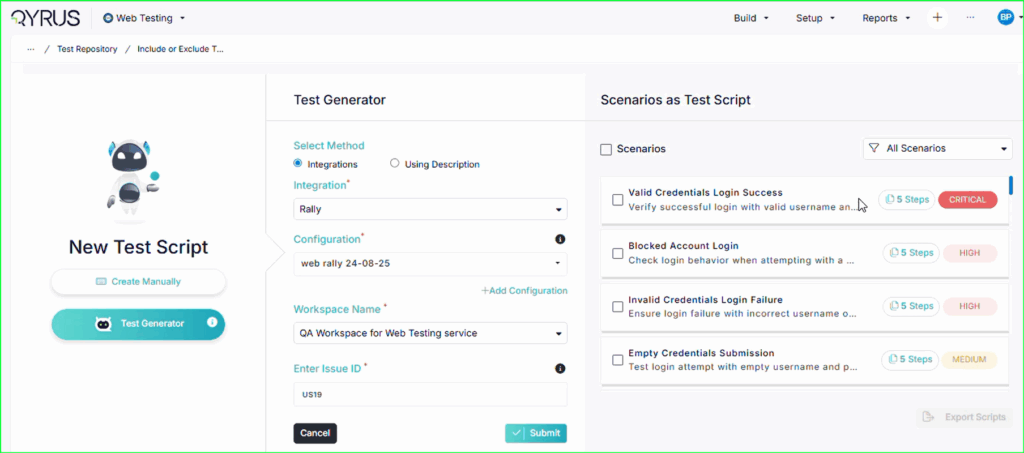
Your Scenarios, Your Way: New Controls for TestGenerator Imports
The Challenge:
Previously, when importing scenarios from TestGenerator, the system would import assets in a predefined way. This lacked the flexibility for users who might only want high-level scenario titles for test planning. Additionally, creating these test assets in both the Qyrus platform and a management tool like Rally requires two separate, repetitive actions.
The Fix:
We have introduced significant enhancements to the TestGenerator import process to give you more control and improve efficiency. You now have the option to choose whether to import “Only the scenarios” or the complete “Scenarios along with their test steps.” You can now choose to import your generated test assets into both the Qyrus platform and Rally at the same time, in a single action.
How will it help?
These updates provide you with more precise control and a more streamlined workflow:
You can now choose the level of detail you want, whether it’s just high-level scenarios for creating a test plan or the full, detailed steps for immediate automation.
The simultaneous import to Qyrus and Rally eliminates a repetitive step, saves you valuable time, and ensures your test cases are perfectly synchronized with your project management tool from the moment they are created.
Improvement
Swiftly Edit Your Scenarios: Delete One Step or Delete Them All!
The Challenge:
Previously, managing steps within the Test Steps Editor could be inefficient. Deleting a single, unwanted step might have been a cumbersome process, and clearing an entire test scenario to start fresh required the tedious task of removing each step one by one, which was especially frustrating for long test cases.
The Fix:
We have significantly improved the Test Steps Editor with new, highly requested features:
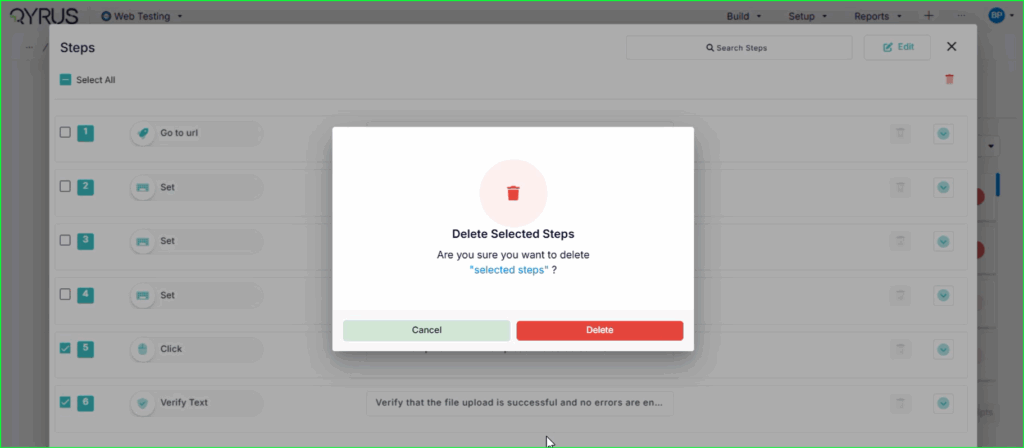
Per-Step Delete: Each test step now has its own dedicated delete option.
Delete All: A new “Delete All” feature has been added to instantly clear all steps from a scenario with a single click.
How will it help?
These updates make managing and refining your test scenarios much faster and more intuitive. The per-step delete option allows for quick, precise edits, while the “Delete All” feature is a massive time-saver when you need to reset a test case. This gives you more efficient control over your test steps and improves your overall workflow within the editor
Improvement
One Selection, Two Destinations: Streamlined Exports to Rally and Qyrus!
The Challenge:
Previously, the workflow for exporting scripts to both Rally and the Qyrus platform was tedious. After a user carefully selected a group of scripts and exported them to Rally, the selection would reset. To then import those exact same scripts into Qyrus, the user was forced to manually re-select all of them, which we found out was inefficient and nearly impossible to do accurately from memory with a large number of scripts.
The Fix:
We have refactored this export process to be more intelligent and user-friendly. Now, after you select a set of scenarios and export them to Rally, your script selection will be maintained. You can then immediately proceed to import that same selected group into the Qyrus module without having to re-select anything.
How will it help?
This enhancement creates a seamless, logical, and efficient workflow for managing test assets across platforms. It eliminates the frustrating and time-consuming task of re-selecting scripts, saving you significant manual effort. This ensures consistency between what is exported to Rally and what is imported to Qyrus, removing the risk of human error and dramatically speeding up the entire process.
Improvement
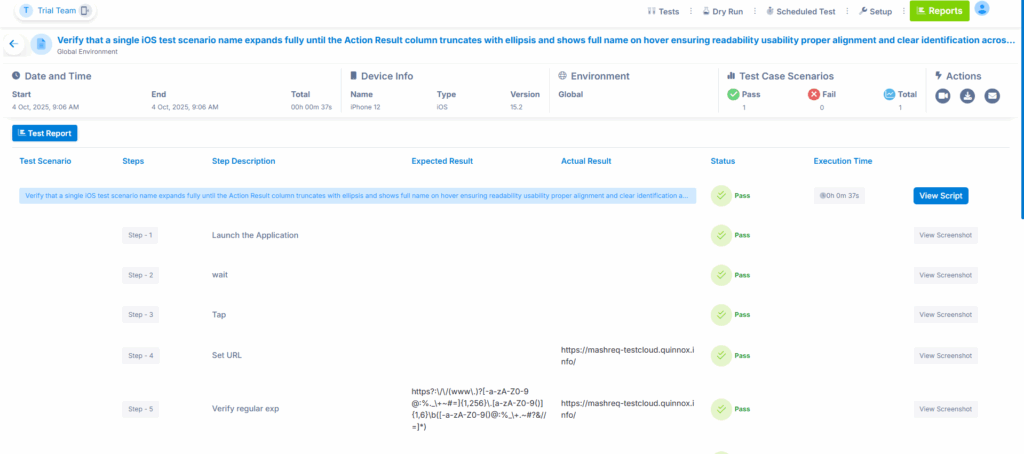
At-a-Glance Clarity: Longer Suite Names in Mobile Test Reports!
The Challenge:
Previously, on the execution results page for Mobile Testing, long test suite names were often truncated to fit in the designated space. This made it difficult for users to quickly identify which suite a report belonged to without hovering their mouse over the text to reveal the full name, creating a minor but persistent usability issue.
The Fix:
We have adjusted the user interface to increase the length of text displayed for the suite name in the execution report. This change allows for longer, more descriptive suite names to be shown without being cut off.
How will it help?
This is a straightforward quality-of-life improvement that enhances readability and usability. You can now identify your test suites at a glance without needing to hover, making it faster and easier to navigate and find the specific mobile execution report you are looking for.
New Feature
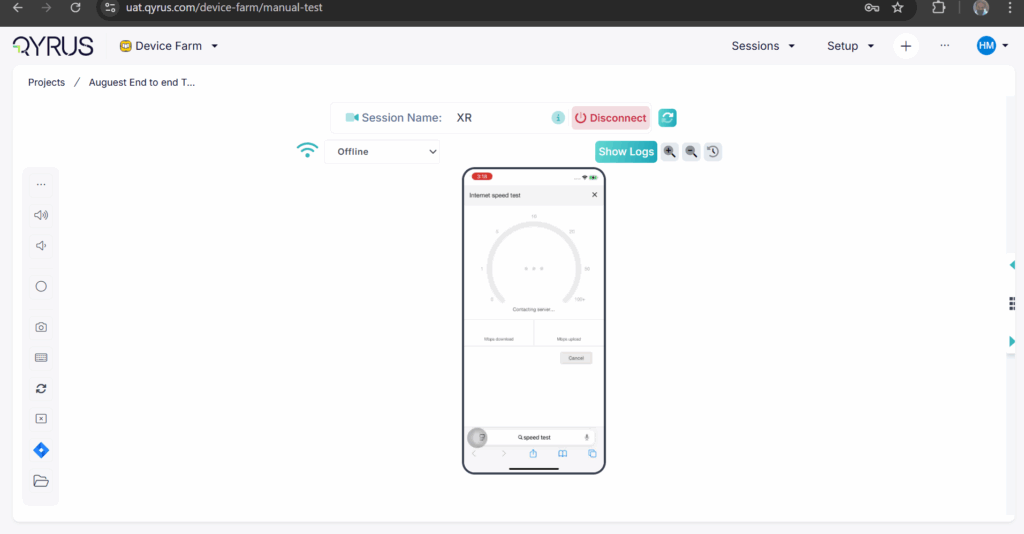
The Unviewable, Now Viewable: True Offline Simulation for iOS Devices!
The Challenge:
Accurately simulating a complete loss of internet connectivity on iOS devices presents a major technical hurdle: how do you continue to view and interact with a device’s video stream after you’ve taken its network offline? This made it incredibly difficult to test the real-time behavior of an app at the exact moment it loses connection.
The Fix:
We have implemented a sophisticated solution for offline network throttling on iOS devices. We’ve created a new “Offline” network profile that effectively simulates zero network speed. To overcome the viewing challenge, our system now seamlessly switches the video stream in the background: it uses low-latency WebRTC when the device is online and intelligently switches to a different stream (via FFmpeg/Ant Media) the moment you go offline, ensuring you never lose sight of the device screen.
How will it help?
This powerful new feature allows you to reliably and accurately test how your iOS application behaves in a true “no internet” scenario, while still being able to watch the app’s response in real-time. You can now easily validate:
Offline functionality and data caching.
Graceful error handling and user messaging during connection loss.
The application’s behavior when transitioning between online and offline states.
This makes a previously difficult-to-test condition simple and accessible, enabling you to build more resilient and robust iOS applications.
New Feature
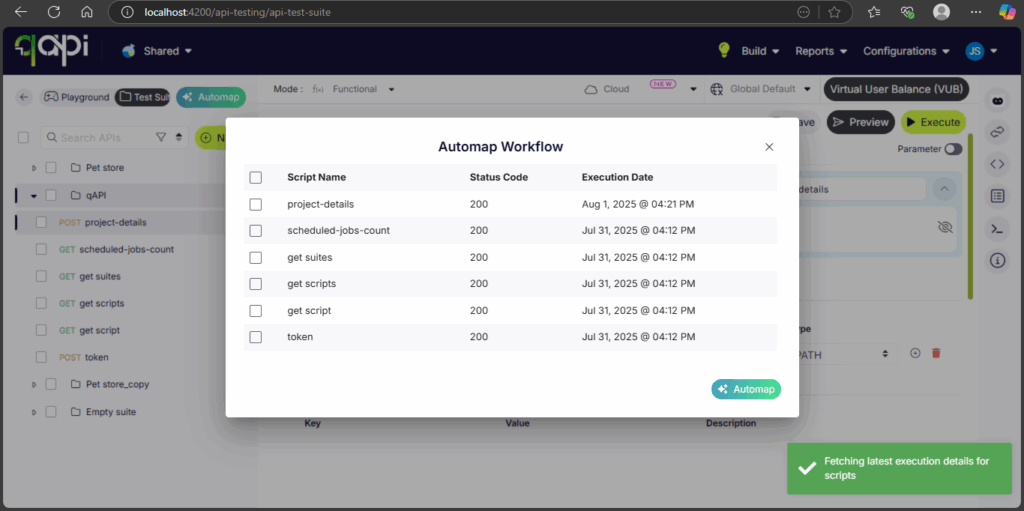
From Suite to Sequence: AI Now Auto-Builds Workflows From Your APIs!
The Challenge:
Previously, a user might have a Test Suite containing all the necessary APIs for a complete end-to-end test, but they existed as a simple, unordered list. To turn this list into a functional workflow, the user had to manually drag and drop each API into the correct sequence and painstakingly map the data dependencies between them (e.g., passing an auth token from a login API to subsequent requests). This manual process was time-consuming and prone to errors.
The Fix:
We have introduced a powerful new AI capability for Test Suites. Users can now use an “auto-map” or “build workflow” feature on their existing Test Suites. The AI will analyze all the APIs within the suite, intelligently identify their relationships and dependencies, and automatically construct a complete, ordered workflow with the data mappings already configured.
How will it help?
This feature dramatically accelerates the creation of complex API workflows. It saves a significant amount of time and effort by automating the most tedious parts of the process—sequencing the steps and mapping the data. This not only reduces the chance of manual errors but also empowers users to instantly convert their existing collections of APIs into powerful, executable end-to-end tests with a single click.
Improvement
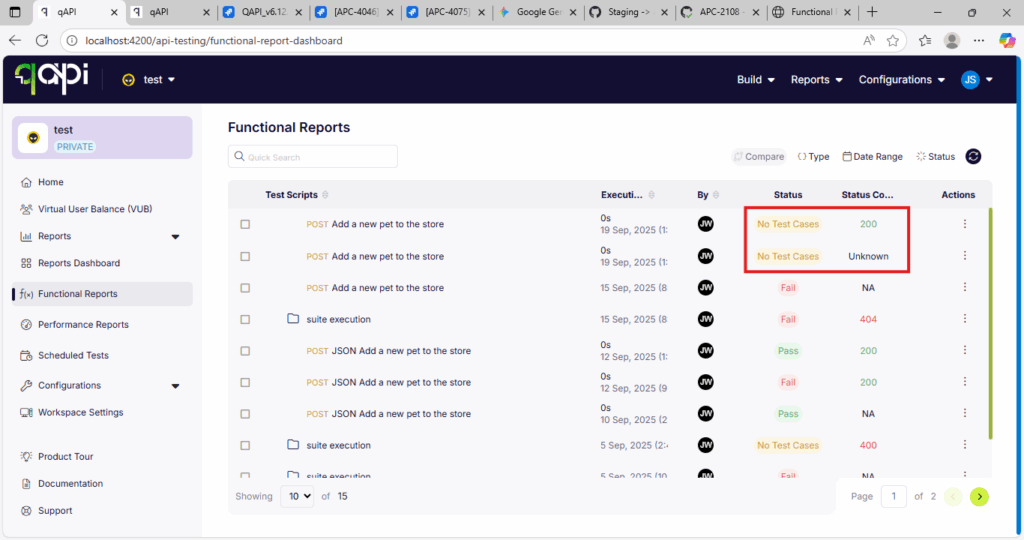
Consistent Clarity: Key Diagnostics Now in All qAPI Report Views
The Challenge:
Users needed a consistent and immediate way to diagnose API test results across different reporting interfaces. Key information like the HTTP Status Code was often hidden within detailed views, and tests that ran without any actual assertions could be ambiguously reported, making it difficult to get a quick, clear picture of the test outcomes.
The Fix:
We have rolled out a comprehensive reporting enhancement that is now consistently applied across all qAPI report views (including the Reports Table, Reports Summary, and Quick Summary). This update introduces:
A new “Status Code” column for at-a-glance diagnostics of the API response.
A new, explicit status to clearly identify any execution that was run without assertions (test cases).
How will it help?
This update provides a unified and much richer reporting experience. You can now instantly see crucial diagnostic information, like HTTP status codes, no matter which report view you are using, dramatically speeding up your analysis. The new status for tests without assertions eliminates ambiguity and encourages better testing practices, ensuring you have a clear and consistent understanding of your test results across the entire platform.
New Feature
Retry with Confidence: Improved Interactions with Local Agents!
The Challenge:
Previously, the “retry” functionality for functional test executions could sometimes be inconsistent, particularly when those tests were running on a local agent. The interaction between the platform and the agent during a retry attempt was not as smooth as it could be, occasionally leading to unreliable or clunky re-executions.
The Fix:
We have refactored and improved the logic behind our retry options for functional reports. These enhancements specifically optimize the communication protocol between the Qyrus platform and your local agents, ensuring that retry commands are handled more efficiently and reliably.
How will it help?
This update provides a significantly smoother and more dependable experience when re-running failed tests on a local agent. You can now retry with confidence, knowing that the re-execution will be triggered smoothly and reliably. This is crucial for an efficient debugging workflow, allowing you to quickly distinguish between transient environment issues and genuine application bugs.
New Feature
Test Smarter, Not Harder: Impact Analyzer Now Supports Your qAPI Suites!
The Challenge:
Previously, our powerful Java and Python Impact Analyzers were limited in scope and could only analyze tests generated through DeepAPITesting. This meant that users could not leverage this smart, targeted testing capability for their primary, user-created functional test suites within the qAPI Workspace, missing out on the opportunity to optimize their regression cycles.
The Fix:
We have now fully integrated our Impact Analyzers (both Java and Python) with the tests you create and manage in the qAPI Workspace and Test Suites. The analyzer can now scan your codebase for changes and intelligently map those changes to the specific qAPI tests that cover the affected areas.
How will it help?
This integration unlocks a much smarter and more efficient way to run your regression tests. Instead of executing an entire qAPI test suite after every small code change, the Impact Analyzer will now tell you exactly which specific tests you need to run. This enables:
Targeted Test Execution: Dramatically reduce the scope of your regression runs.
Massive Time & Resource Savings: Get faster feedback by running only the necessary tests.
Smarter Regression Analysis: Confidently validate your changes without the overhead of a full regression cycle.
Ready to Accelerate Your Testing with October’s Upgrades?
We are dedicated to evolving Qyrus into a platform that not only anticipates your needs but also provides practical, powerful solutions that help you release top-quality software with greater speed and confidence.
Curious to see how these October enhancements can benefit your team? There’s no better way to understand the impact of Qyrus than to see it for yourself.
In the modern digital economy, the user experience is the primary determinant of success or failure. Your app or website is not just a tool; the interface through which a customer interacts with your brand is the brand itself. Consequently, delivering a consistent, functional, and performant experience is a fundamental business mandate.
Ignoring this mandate carries a heavy price. Poor performance has an immediate and brutal impact on user retention. Data shows that approximately 80% of users will delete an application after just one use if they encounter usability issues. On the web, the stakes are just as high. A 2024 study revealed that 15% of online shoppers abandon their carts because of website errors or crashes, which directly erodes your revenue.
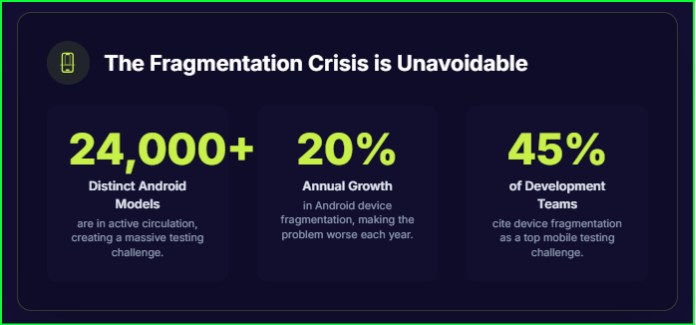
This challenge is magnified by the immense fragmentation of today’s technology. Your users access your product from a dizzying array of environments, including over 24,000 active Android device models and a handful of dominant web browsers that all interpret code differently.
This guide provides the solution. We will show you how to conduct comprehensive device compatibility testing and cross-browser testing with a device farm to conquer fragmentation and ensure your application works perfectly for every user, every time.
The Core Concepts: Device Compatibility vs. Cross-Browser Testing
To build a winning testing strategy, you must first understand the two critical pillars of quality assurance: device compatibility testing and cross-browser testing. While related, they address distinct challenges in the digital ecosystem.
What is Device Compatibility Testing?
Device compatibility testing is a type of non-functional testing that confirms your application runs as expected across a diverse array of computing environments. The primary objective is to guarantee a consistent and reliable user experience, no matter where or how the software is accessed. This process moves beyond simple checks to cover a multi-dimensional matrix of variables.
Its scope includes validating performance on:
A wide range of physical hardware, including desktops, smartphones, and tablets.
Different hardware configurations, such as varying processors (CPU), memory (RAM), screen sizes, and resolutions.
Major operating systems like Android, iOS, Windows, and macOS, each with unique architectures and frequent update cycles.
A mature strategy also incorporates both backward compatibility (ensuring the app works with older OS or hardware versions) and forward compatibility (testing against upcoming beta versions of software) to retain existing users and prepare for future platform shifts.
What is Cross-Browser Testing?
Cross-browser testing is a specific subset of compatibility testing that focuses on ensuring a web application functions and appears uniformly across different web browsers, such as Chrome, Safari, Edge, and Firefox.
The need for this specialized testing arises from a simple technical fact: different browsers interpret and render web technologies—HTML, CSS, and JavaScript—in slightly different ways. This divergence stems from their core rendering engines, the software responsible for drawing a webpage on your screen.
Google Chrome and Microsoft Edge use the Blink engine, Apple’s Safari uses WebKit, and Mozilla Firefox uses Gecko. These engines can have minor differences in how they handle CSS properties or execute JavaScript, leading to a host of visual and functional bugs that break the user experience.
The Fragmentation Crisis of 2025: A Problem of Scale
The core concepts of compatibility testing are straightforward, but the real-world application is a logistical nightmare. The sheer scale of device and browser diversity makes comprehensive in-house testing a practical and financial impossibility for any organization. The numbers from 2025 paint a clear picture of this challenge.
The Mobile Device Landscape
A global view of the mobile market immediately highlights the first layer of complexity.
Android dominates the global mobile OS market with a 70-74% share, while iOS holds the remaining 26-30%. This simple two-way split, however, masks a much deeper issue.
The “Android fragmentation crisis” is a well-known challenge for developers and QA teams. Unlike Apple’s closed ecosystem, Android is open source, allowing countless manufacturers to create their own hardware and customize the operating system. This has resulted in some staggering figures:
This device fragmentation is growing by 20% every year as new models are released with proprietary features and OS modifications.
Nearly 45% of development teams cite device fragmentation as a primary mobile-testing challenge, underlining the immense resources required to address it.
The Browser Market Landscape
The web presents a similar, though slightly more concentrated, fragmentation problem. A handful of browsers command the majority of the market, but each requires dedicated testing to ensure a consistent experience.
On the desktop, Google Chrome is the undisputed leader, holding approximately 69% of the global market share. It is followed by Apple’s Safari (~15%) and Microsoft Edge (~5%). While testing these three covers the vast majority of desktop users, ignoring others like Firefox can still alienate a significant audience segment.
On mobile devices, the focus becomes even sharper.
Chrome and Safari are the critical targets, together accounting for about 90% of all mobile browser usage. This makes them the top priority for any mobile web testing strategy.
Table 1: The 2025 Digital Landscape at a Glance
This table provides a high-level overview of the market share for key platforms, illustrating the need for a diverse testing strategy.
Platform Category
Leader 1
Leader 2
Leader 3
Other Notable
Mobile OS
Android (~70-74%)
iOS (~26-30%)
–
–
Desktop OS
Windows (~70-73%)
macOS (~14-15%)
Linux (~4%)
ChromeOS (~2%)
Web Browser
Chrome (~69%)
Safari (~15%)
Edge (~5%)
Firefox (~2-3%)
The Strategic Solution: Device Compatibility and Cross-Browser Testing with a Device Farm
Given that building and maintaining an in-house lab with every relevant device is impractical, modern development teams need a different approach. The modern, scalable solution to the fragmentation problem is the device farm, also known as a device cloud.
What is a Device Farm (or Device Cloud)?
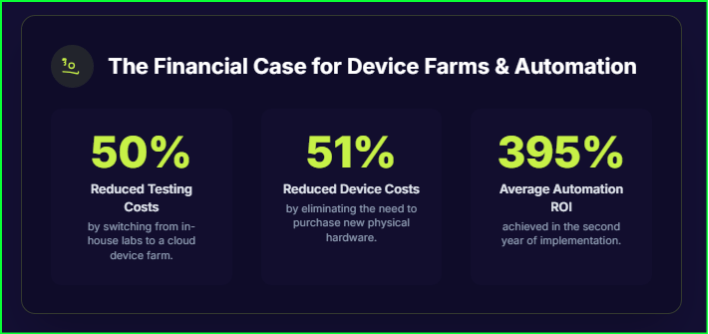
A device farm is a centralized, cloud-based collection of real physical devices that QA teams can access remotely to test their applications. This service abstracts away the immense complexity of infrastructure management, allowing teams to focus on testing and improving their software. Device farms make exhaustive compatibility testing both feasible and cost-effective by giving teams on-demand, scalable access to a wide diversity of hardware.
Key benefits include:
Massive Device Access: Instantly test on thousands of real iOS and Android devices without the cost of procurement.
Cost-Effectiveness: Eliminate the significant capital and operational expenses required to build and run an internal device lab.
Zero Maintenance Overhead: Offload the burden of device setup, updates, and physical maintenance to the service provider.
Scalability: Run automated tests in parallel across hundreds of devices simultaneously to get feedback in minutes, not hours.
Real Devices vs. Emulators/Simulators: The Testing Pyramid
Device farms provide access to both real and virtual devices, and understanding the difference is crucial.
Real Devices are actual physical smartphones and tablets housed in data centers. They are the gold standard for testing, as they are the only way to accurately test nuances like battery consumption, sensor inputs (GPS, camera), network fluctuations, and manufacturer-specific OS changes.
Emulators (Android) and Simulators (iOS) are software programs that mimic the hardware and/or software of a device. They are much faster than real devices, making them ideal for rapid, early-stage development cycles where the focus is on UI layout and basic logic.
Table 2: Real Devices vs. Emulators vs. Simulators
This table provides the critical differences between testing environments and justifies a hybrid “pyramid” testing strategy.
Feature
Real Device
Emulator (e.g., Android)
Simulator (e.g., iOS)
Definition
Actual physical hardware used for testing.
Mimics both the hardware and software of the target device.
Mimics the software environment only, not the hardware.
Moderate. Good for OS-level debugging but cannot perfectly replicate hardware.
Lower. Not reliable for performance or hardware-related testing.
Speed
Faster test execution as it runs on native hardware.
Slower due to binary translation and hardware replication.
Fastest, as it does not replicate hardware and runs directly on the host machine.
Hardware Support
Full support for all features: camera, GPS, sensors, battery, biometrics.
Limited. Can simulate some features (e.g., GPS) but not others (e.g., camera).
None. Does not support hardware interactions.
Ideal Use Case
Final validation, performance testing, UAT, and testing hardware-dependent features.
Early-stage development, debugging OS-level interactions, and running regression tests quickly.
Rapid prototyping, validating UI layouts, and early-stage functional checks in an iOS environment.
Experts emphasize that you cannot afford to rely on virtual devices alone; a real device cloud is required for comprehensive QA. A mature, cost-optimized strategy uses a pyramid approach: fast, inexpensive emulators and simulators are used for high-volume tests early in the development cycle, while more time-consuming real device testing is reserved for critical validation, performance testing, and pre-release sign-off.
Deployment Models: Public Cloud vs. Private Device Farms
Organizations must also choose a deployment model that fits their security and control requirements.
Public Cloud Farms provide on-demand access to a massive, shared inventory of devices. Their primary advantages are immense scalability and the complete offloading of maintenance overhead.
Private Device Farms provide a dedicated set of devices for an organization’s exclusive use. The principal advantage is maximum security and control, which is ideal for testing applications that handle sensitive data. This model guarantees that devices are always available and that sensitive information never leaves a trusted environment.
From Strategy to Execution: Integrating a Device Farm into Your Workflow
Accessing a device farm is only the first step. To truly harness its power, you need a strategic, data-driven approach that integrates seamlessly into your development process. This operational excellence ensures your testing efforts are efficient, effective, and aligned with business objectives.
Step 1: Build a Data-Driven Device Coverage Matrix
The goal of compatibility testing is not to test every possible device and browser combination—an impossible task—but to intelligently test the combinations that matter most to your audience. This is achieved by creating a device coverage matrix, a prioritized list of target environments built on rigorous data analysis, not assumptions.
Follow these steps to build your matrix:
Start with Market Data: Use global and regional market share statistics to establish a broad baseline of the most important platforms to cover.
Incorporate User Analytics: Overlay the market data with your application’s own analytics. This reveals the specific devices, OS versions, and browsers your actual users prefer.
Prioritize Your Test Matrix: A standard industry best practice is to give high priority to comprehensive testing for any browser-OS combination that accounts for more than 5% of your site’s traffic. This ensures your testing resources are focused on where they will have the greatest impact.
Step 2: Achieve “Shift-Left” with CI/CD Integration
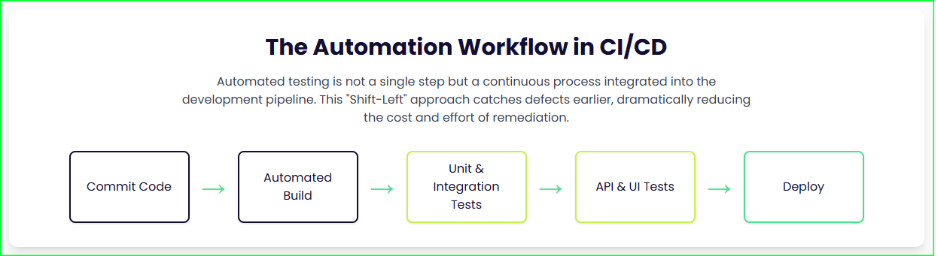
To maximize efficiency and catch defects when they are exponentially cheaper to fix, compatibility testing must be integrated directly into your Continuous Integration/Continuous Deployment (CI/CD) pipeline. This “shift-left” approach makes testing a continuous, automated part of development rather than a separate final phase.
Integrating your device farm with tools like Jenkins or GitLab allows you to run your automated test suite on every code commit. A key feature of device clouds that makes this possible is parallel execution, which runs tests simultaneously across multiple devices to drastically reduce the total execution time and provide rapid feedback to developers.
Step 3: Overcome Common Challenges
As you implement your strategy, be prepared to address a few recurring operational challenges. Proactively managing them is key to maximizing the value of your investment.
Cost Management: The pay-as-you-go models of some providers can lead to unpredictable costs. Control expenses by implementing the hybrid strategy of using cheaper virtual devices for early-stage testing and optimizing automated scripts to run as quickly as possible.
Security: Using a public cloud to test applications with sensitive data is a significant concern. For these applications, the best practice is to use a private cloud or an on-premise device farm, which ensures that sensitive data never leaves your organization’s secure network perimeter.
Test Flakiness: “Flaky” tests that fail intermittently for non-deterministic reasons can destroy developer trust in the pipeline. Address this by building more resilient test scripts and implementing automated retry mechanisms for failed tests within your CI/CD configuration.
Go Beyond Testing: Engineer Quality with the Qyrus Platform
Following best practices is critical, but having the right platform can transform your entire quality process. While many device farms offer basic access, Qyrus provides a comprehensive, AI-powered quality engineering platform designed to manage and accelerate the entire testing lifecycle.
Unmatched Device Access and Enterprise-Grade Security
The foundation of any great testing strategy is reliable access to the right devices. The Qyrus Device Farm and Browser Farm offer a vast, global inventory of real Android and iOS mobile devices and browsers, ensuring you can test on the hardware your customers actually use.
Qyrus also addresses the critical need for security and control with a unique offering: private, dedicated devices. This allows your team to configure devices with specific accounts, authenticators, or settings, perfectly mirroring your customer’s environment. All testing occurs within a secure, ISO 27001/SOC 2 compliant environment, giving you the confidence to test any application.
Accelerate Testing with Codeless Automation and AI
Qyrus dramatically speeds up test creation and maintenance with intelligent automation. The platform’s codeless test builder and mobile recorder empower both technical and non-technical team members to create robust automated tests in minutes, not days.
This is supercharged by powerful AI capabilities that solve the most common automation headaches:
Rover AI: Deploys autonomous, curiosity-driven exploratory testing to intelligently discover new user paths and automatically generate test cases you might have missed.
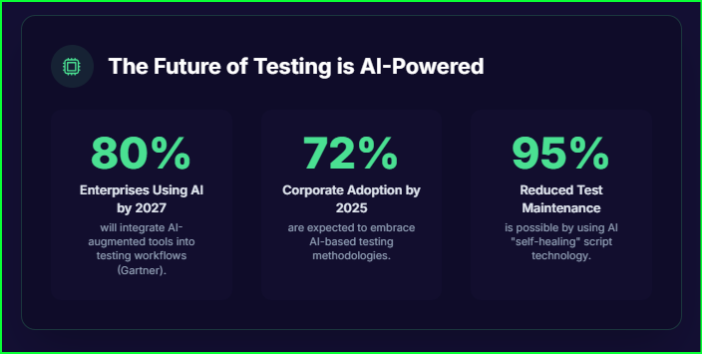
AI Healer: Provides AI-driven script correction to automatically identify and fix flaky tests when UI elements change. This “self-healing” technology can reduce the time spent on test maintenance by as much as 95%.
Advanced Features for Real-World Scenarios
The platform includes a suite of advanced tools designed to simulate real-world conditions and streamline complex testing scenarios:
Biometric Bypass: Easily automate and streamline the testing of applications that require fingerprint or facial recognition.
Network Shaping: Simulate various network conditions, such as a slow 3G connection or high latency, to understand how your app performs for users in the real world.
Element Explorer: Quickly inspect your application and generate reliable locators for seamless Appium test automation.
The Future of Device Testing: AI and New Form Factors
The field of quality engineering is evolving rapidly. A forward-looking testing strategy must not only master present challenges but also prepare for the transformative trends on the horizon. The integration of Artificial Intelligence and the proliferation of new device types are reshaping the future of testing.
The AI Revolution in Test Automation
Artificial Intelligence is poised to redefine test automation, moving it from a rigid, script-dependent process to an intelligent, adaptive, and predictive discipline. The scale of this shift is immense. According to Gartner, an estimated 80% of enterprises will have integrated AI-augmented testing tools into their workflows by 2027—a massive increase from just 15% in 2023.
This revolution is already delivering powerful capabilities:
Self-Healing Tests: AI-powered tools can intelligently identify UI elements and automatically adapt test scripts when the application changes, drastically reducing maintenance overhead by as much as 95%.
Predictive Analytics: By analyzing historical data from code changes and past results, AI models can predict which areas of an application are at the highest risk for new bugs, allowing QA teams to focus their limited resources where they are needed most.
Testing Beyond the Smartphone
The challenge of device fragmentation is set to intensify as the market moves beyond traditional rectangular smartphones. A future-proof testing strategy must account for these emerging form factors.
Foldable Devices: The rise of foldable phones introduces new layers of complexity. Applications must be tested to ensure a seamless experience as the device changes state from folded to unfolded, which requires specific tests to verify UI behavior and preserve application state across different screen postures.
Wearables and IoT: The Internet of Things (IoT) presents an even greater challenge due to its extreme diversity in hardware, operating systems, and connectivity protocols. Testing must address unique security vulnerabilities and validate the interoperability of the entire ecosystem, not just a single device.
The proliferation of these new form factors makes the concept of a comprehensive in-house testing lab completely untenable. The only practical and scalable solution is to rely on a centralized, cloud-based device platform that can manage this hyper-fragmented hardware.
Conclusion: Quality is a Business Decision, Not a Technical Task
The digital landscape is more fragmented than ever, and this complexity makes traditional, in-house testing an unfeasible strategy for any modern organization. The only viable path forward is a strategic, data-driven approach that leverages a cloud-based device farm for both device compatibility and cross-browser testing.
As we’ve seen, neglecting this crucial aspect of development is not a minor technical oversight; it is a strategic business error with quantifiable negative impacts. Compatibility issues directly harm revenue, increase user abandonment, and erode the trust that is fundamental to your brand’s reputation.
Ultimately, the success of a quality engineering program should not be measured by the number of bugs found, but by the business outcomes it enables. Investing in a modern, AI-powered quality platform is a strategic business decision that protects revenue, increases user retention, and accelerates innovation by ensuring your digital experiences are truly seamless.
Frequently Asked Questions (FAQs)
What is the main difference between a device farm and a device cloud?
While often used interchangeably, a “device cloud” typically implies a more sophisticated, API-driven infrastructure built for large-scale, automated testing and CI/CD integration. A “device farm” can refer to a simpler collection of remote devices made available for testing.
How many devices do I need to test my app on?
There is no single number. The best practice is to create and maintain a device coverage matrix based on a rigorous analysis of market trends and your own user data. A common industry standard is to prioritize comprehensive testing for any device or browser combination that constitutes more than 5% of your user traffic.
Is testing on real devices better than emulators?
Yes, for final validation and accuracy, real devices are the gold standard. Emulators and simulators are fast and ideal for early-stage development feedback. However, only real devices can accurately test for hardware-specific issues like battery usage and sensor functionality, genuine network conditions, and unique OS modifications made by device manufacturers. A hybrid approach that uses both is the most cost-effective strategy.
Can I integrate a device farm with Jenkins?
Absolutely. Leading platforms like Qyrus are designed for CI/CD integration and provide robust APIs and command-line tools to connect with platforms like Jenkins, GitLab CI, or GitHub Actions. This allows you to “shift-left” by making automated compatibility tests a continuous part of your build pipeline.
Your dinner is “out for delivery,” but the map shows your driver has been stuck in one spot for ten minutes. Is the app frozen? Did the GPS fail? We’ve all been there. These small glitches create frustrating user experiences and can damage an app’s reputation. The success of a delivery app hinges on its ability to perform perfectly in the unpredictable real world.
This is where real device testing for delivery apps become the cornerstone of quality assurance. This approach involves validating your application on actual smartphones and tablets, not just on emulators or simulators. Delivery apps are uniquely complex; they juggle real-time GPS tracking, process sensitive payments, and must maintain stable network connectivity as a user moves from their Wi-Fi zone to a cellular network.
Each failed delivery costs companies an average of $17.78 in losses, underscoring the financial and reputational impact of glitches in delivery operations.
An effective app testing strategy recognizes that these features interact directly with a device’s specific hardware and operating system in ways simulators cannot fully replicate. While emulators are useful for basic checks, they often miss critical issues that only surface on physical hardware, such as network glitches, quirky sensor behavior, or performance lags on certain devices.
A robust mobile app testing plan that includes a fleet of real devices is the only way to accurately mirror your customer’s experience, ensuring everything from map tracking to payment processing works without a hitch.
Building Your Digital Fleet: Crafting a Device-Centric App Testing Strategy
You can’t test on every smartphone on the planet, so a smart app testing strategy is essential. The goal is to focus your efforts where they matter most—on the devices your actual customers are using. This begins with market research to understand your user base. Identify the most popular devices, manufacturers, and operating systems within your target demographic to ensure you cover 70-80% of your users. You should also consider the geographic distribution of your audience, as device preferences can vary significantly by region.
With this data, you can build a formal device matrix—a checklist of the hardware and OS versions your testing will cover. A strong matrix includes:
Diverse Platform Coverage: Select a mix of popular Android devices from various manufacturers (like Samsung and Google Pixel) and several iPhone models.
Multiple OS Versions: Include the latest major OS releases for both Android and iOS, as well as some widely used older versions.
A Range of Device Tiers: Test on recent flagship phones, popular midrange models, and older, less powerful devices to catch device-specific UI bugs and performance bottlenecks.
Acquiring and managing such a diverse collection of hardware is a significant challenge. This is where a real device cloud becomes invaluable. Services like AWS Device Farm provide remote access to thousands of physical iOS and Android devices, allowing you to run manual or automated mobile testing on a massive scale without purchasing every handset.
However, even with the power of the cloud, it’s a good practice to keep some core physical devices in-house. This hybrid approach ensures you have handsets for deep, hands-on debugging while leveraging the cloud for broad compatibility checks.
Putting the App Through Its Paces: Core Functional Testing
Once your device matrix is set, it’s time to test the core user workflows on each physical device. Functional testing ensures every feature a user interacts with works exactly as intended. These delivery app test cases should be run manually and, where possible, through automated mobile testing to ensure consistent coverage.
Account Registration & Login
A user’s first impression is often the login screen. Your testing should validate every entry point.
Test the standard email and SMS signup processes.
Verify that social logins (Google, Apple, Facebook) work seamlessly.
Check the password recovery flow.
Attempt to log in with incorrect credentials and invalid multi-factor authentication codes to ensure the app handles errors gracefully.
Menu Browsing & Search
The core of a delivery app is finding food. Simulate users browsing restaurant menus and using the search bar extensively. Test with valid and invalid keywords, partial phrases, and even typos. A smart search function should be able to interpret “vgn pizza” and correctly display results for a vegan pizza.
Cart and Customization
This is where users make decisions that lead to a purchase.
Add items to the cart, adjust quantities, and apply every available customization, like “no onions” or “extra cheese”.
Confirm that the cart’s contents persist correctly if you switch to another app and then return, or even close and reopen the app.
Validate that all calculations—item price, taxes, tips, and promotional coupon codes—update accurately with every change.
Checkout & Payment
The checkout process is a mission-critical flow where failures can directly lead to lost revenue.
Execute a complete order using every supported payment method, including credit/debit cards, digital wallets, and cash-on-delivery.
Test edge cases relentlessly, such as switching payment methods mid-transaction, entering invalid card details, or applying an expired coupon.
Simulate a network drop during the payment process to see if the app recovers without incorrectly charging the user.
Verify that the final price, including all fees and tips, is correct.
Ensure all payment data is transmitted securely over HTTPS/TLS and that sensitive information is properly masked on-screen.
Real-Time Tracking & Status Updates
After an order is placed, the app must provide accurate, real-time updates.
Confirm that order statuses like “Preparing,” “Out for Delivery,” and “Delivered” appear at the appropriate times.
Watch the driver’s location on the map to ensure the pin moves smoothly and corresponds to the actual delivery route. Discrepancies here are a major source of user frustration.
You can test this without physically moving a device by using GPS simulation tools, which are available in frameworks like Appium and on real device cloud platforms.
Notifications & Customer Support
Finally, test the app’s communication channels. Verify that push notifications for key order events (e.g., “Your courier has arrived”) appear correctly on both iOS and Android. Tapping a notification should take the user to the relevant screen within the app. Also, test any in-app chat or customer support features by sending common queries and ensuring they are handled correctly.
It is vital to perform all these functional tests on both platforms. Pay close attention to OS-specific behaviors, such as the Android back button versus iOS swipe-back gestures, to ensure neither path causes the app to crash or exit unexpectedly.
Beyond Functionality: Testing the Human Experience (UX)
A delivery app can be perfectly functional but still fail if it’s confusing or frustrating to use. Usability testing shifts the focus from “Does it work?” to “Does it feel right?” Real-device testing is essential here because it is the only way to accurately represent user gestures and physical interactions with the screen.
To assess usability, have real users—or QA team members acting as users—perform common tasks on a variety of physical phones. Ask them to complete a full order, from browsing a menu to checkout, and observe where they struggle.
Is the navigation intuitive? Can users easily find the search bar, add toppings to an item, or locate the customer support section?
Are interactive elements clear and accessible? Are buttons large enough to tap confidently without accidentally hitting something else? Do sliders and carousels respond smoothly to swipes?
Does the app feel fast and responsive? Check that load times, screen transitions, and animations are smooth on all target devices, not just high-end models.
Does the UI adapt properly? Verify that the layout adjusts correctly to different screen sizes and orientations without breaking or hiding important information.
Is the app globally ready? If your app is multilingual, test different language and locale settings to ensure that dates, currency formats, and text appear correctly without getting cut off.
Beta testing with a small group of real users is an invaluable practice. These users will inevitably uncover confusing screens and awkward workflows that scripted test cases might miss. Ultimately, the goal is to use real devices to feel the app exactly as your customers do, catching UX problems that emulators often hide.
Testing Under Pressure: Performance and Network Scenarios
A successful app must perform well even when conditions are less than ideal. An effective app testing strategy must account for both heavy user loads and unpredictable network connectivity. Using real devices is the only way to measure how your app truly behaves under stress.
App Performance and Load Testing
Your app needs to be fast and responsive, especially during peak hours like the dinner rush.
Simulate Concurrent Users: Use tools like JMeter to simulate thousands of users browsing menus and placing orders simultaneously, while you monitor backend server response times. One food-delivery case study found that with ~2,300 concurrent users, their system could still process 98 orders per minute with a minimal 0.07% error rate—this is the level of performance to strive for.
Measure On-Device Metrics: On each device in your matrix, record key performance indicators like how long the app takes to launch, how smoothly the menus scroll, and the response time for critical API calls.
Monitor Resource Usage: Keep an eye on battery and memory consumption, especially during power-intensive features like live map tracking, to ensure your app doesn’t excessively drain the user’s device.
Network Condition Testing
Delivery apps live and die by their network connection. Users and drivers are constantly moving between strong Wi-Fi, fast 5G, and spotty 4G or 3G coverage. Your app must handle these transitions gracefully.
Test on Various Networks: Manually test the app’s performance on different network types to see how it handles latency and limited bandwidth.
Simulate Network Drops: A critical test is to put a device in airplane mode in the middle of placing an order. The app should fail gracefully by displaying a clear error message or queuing the action to retry, rather than crashing or leaving the user in a state of confusion.
Use Simulation Tools: Services like the real device cloud provider Qyrus allow you to automate these tests by setting specific network profiles.
Check Network Switching: Confirm that the user’s session remains active and the app reconnects smoothly when switching between Wi-Fi and a cellular network.
By performing this level of real device testing for delivery apps, you will uncover issues like slower load times on devices with weaker processors or unexpected crashes that only occur under real-world stress.
Final Checks: Nailing Location, Security, and Automation
With the core functionality, usability, and performance validated, the final step in your app testing strategy is to focus on the specialized areas that are absolutely critical for a delivery app’s success: location services, payment security, and scalable automation.
GPS and Location Testing
A delivery app’s mapping and geolocation features must be flawless. On real devices, your testing should confirm:
Accuracy: Addresses are geocoded correctly and the proposed routes are sensible.
Live Tracking: The driver’s icon updates smoothly on the map. If possible, physically walk or drive a short distance with a device to observe this in a real-world setting.
Edge Cases: The app correctly handles users who are outside the delivery zone or scenarios where dynamic pricing should apply.
GPS Signal Loss: The app behaves predictably and recovers gracefully if the GPS signal is temporarily lost.
You can test many of these scenarios without leaving the office. Most real device cloud platforms and automation frameworks like Appium allow you to simulate or “spoof” GPS coordinates. This lets you check if the ETA updates correctly when a courier is far away or test location-based features without physically being in that region.
Payment and Security Testing
Handling payments means handling sensitive user data, making this a mission-critical area where trust is everything.
Validate All Payment Flows: Test every payment gateway and method you support, including digital wallets and cash-on-delivery.
Simulate Failures: Check how the app responds to a payment gateway outage or API timeout. It should roll back the transaction and display a clear error, never leaving the user wondering if they were charged.
Verify Encryption: Use real devices to confirm that all transactions are secured with HTTPS/TLS and that sensitive data like credit card numbers are properly masked on all screens.
Check Authentication: Ensure the app requires users to re-authenticate payments or has appropriate session timeouts to protect user accounts.
Tools and Automation
While manual testing is essential for usability and exploration, automated mobile testing is the key to achieving consistent and scalable coverage.
Automation Frameworks: Use frameworks to automate your regression tests. Appium is a popular choice for writing a single set of tests that can run on both iOS and Android. For platform-specific testing, you can use Espresso for Android and XCTest/XCUITest for iOS.
Cloud Integration: You can run these automated test scripts across hundreds of devices on a real device cloud, dramatically increasing the scope of your mobile app testing without repetitive manual work.
CI/CD Pipeline: The ultimate goal is to integrate these automated tests into your Continuous Integration/Continuous Deployment (CI/CD) pipeline. Using tools like Jenkins or GitHub Actions, you can ensure that every new code change is automatically tested on a matrix of real devices before it ever reaches your customers.
By combining comprehensive functional checks, usability testing, and rigorous performance validation with a sharp focus on location, security, and automation, you create a robust quality assurance process. This holistic approach to real device testing for delivery apps ensures you ship a product that is not only functional but also reliable, secure, and delightful for users in the field.
Streamline Your Delivery App Testing with Qyrus
Managing a comprehensive testing process—across hundreds of devices, platforms, and test cases—can overwhelm even the most skilled QA teams, slowing down testing efforts. Delivery apps face unique complexities, from device fragmentation to challenges in reproducing defects.
A unified, AI-powered solution can simplify and accelerate this process. The Qyrus platform is an end-to-end test automation solution designed for the entire product development lifecycle. It provides a comprehensive platform for mobile, web, and API testing, infused with next-generation AI to enhance the quality and speed of testing.
Here is how Qyrus helps:
Codeless Automation: Drastically reduce the time it takes to create automated tests. Qyrus offers a no-code/low-code mechanism, including a mobile recorder that captures user actions and converts them into test steps in minutes. Your team can automate the entire user journey—from login to payment to order tracking—without writing extensive code.
True Cross-Platform Testing: Use a single, comprehensive platform to test your mobile applications (iOS & Android), web portals, and APIs, ensuring seamless integration and consistency.
Integrated Real Device Farm: Get instant access to a vast library of real devices to achieve maximum device coverage without the overhead of an in-house lab. Qyrus provides a diverse set of real smartphones and tablets, providing over 2,000 device-browser combinations, with 99.9% availability.
AI-Powered Autonomous Testing with Rover AI: Go beyond scripted tests. Deploy Qyrus’s Rover AI, a curiosity-driven autonomous solution, to explore your app, identify bugs, and uncover critical user paths you might have missed.
Seamless CI/CD Pipeline Integration: Integrate Qyrus directly into your CI/CD pipeline. The platform connects with tools like Jenkins, Azure DevOps, and Bitrise to run a full suite of regression tests on real devices with every new build, catching bugs before they reach customers.
Best Practices for Automation and CI/CD Integration
For teams looking to maximize efficiency, integrating automation into the development lifecycle is key. A modern approach ensures that quality checks are continuous, not just a final step.
Leverage Frameworks
For teams that have already invested in building test scripts, there’s no need to start from scratch. The Qyrus platform allows you to execute your existing automated test scripts on its real device cloud. It supports popular open-source frameworks, with specific integrations for Appium that allow you to run scripted tests to catch regressions early in the development process. You can generate the necessary configuration data for your Appium scripts directly from the platform to connect to the devices you need.
The Power of CI/CD
The true power of automation is realized when it becomes an integral part of your Continuous Integration and Continuous Deployment (CI/CD) pipeline. Integrating automated tests ensures that every new build is automatically validated for quality. Qyrus connects with major CI/CD ecosystems like Jenkins and Azure DevOps to automate your workflows. This practice helps agile development teams speed up release cycles by reducing defects and rework, allowing you to release updates faster and with more confidence.
Conclusion: Delivering a Flawless App Experience
Real device testing isn’t just a quality check; it’s a critical business investment. Emulators and simulators are useful, but they cannot replicate the complex and unpredictable conditions your delivery app will face in the real world. Issues arising from network glitches, sensor quirks, or device-specific performance can only be caught by testing on the physical hardware your customers use every day.
A successful testing strategy for delivery mobile applications must cover the full spectrum of the user experience. This includes validating all functional flows, measuring performance under adverse network and battery conditions, securing payment and user data, and ensuring the app is both usable and accessible to everyone.
In the hyper-competitive delivery market, a seamless and reliable user experience is the ultimate differentiator. Thorough real device testing is how you guarantee that every click, swipe, and tap leads to a satisfied customer.
Don’t let bugs spoil your customer’s appetite. Ensure a flawless delivery experience with Qyrus. Schedule a Demo Today!
Why 2026 Testing Needs One Platform, Not Many
A TestGuild x Qyrus Webinar Recording
The pace of software development has never been faster. AI-driven coding assistants like Devin, Copilot, and CodeWhisperer are accelerating release velocity, but QA hasn’t kept up.
Dev and Testing today are like two sides of a seesaw:
On one side → Dev teams are racing ahead with AI-powered speed.
On the other → QA teams overwhelmed by code explosion, flaky automation, disconnected tools, and brittle pipelines.
In the middle → The imbalance that slows releases and compromises quality.
On August 5, 2025, Qyrus teamed up with Joe Colantonio, founder of TestGuild, to explore how testing teams can finally bring balance back.
Why Watch the Recording?
In this session, Ameet Deshpande (SVP, Product Engineering at Qyrus) revealed why traditional testing stacks collapse at scale, and why agentic test orchestration — not tool count — is the real game changer.
You’ll learn:
✔️ The hidden costs of multi-tool chaos in QA ✔️ How AI Agents are reshaping automation and triage ✔️ Why agentic orchestration matters more than adding “just another tool” ✔️ How Qyrus SEER (Sense, Evaluate, Execute, Report) introduces a new era of autonomous testing
Meet the Experts
Ameet Deshpande
Senior Vice President, Product Engineering, Qyrus A technology leader with 20+ years in Quality & Product Engineering, Ameet is building the next generation of agentic, AI-driven quality platforms that deliver true autonomy at scale.
Ameet Deshpande
Senior Vice President, Product Engineering, Qyrus A technology leader with 20+ years in Quality & Product Engineering, Ameet is building the next generation of agentic, AI-driven quality platforms that deliver true autonomy at scale.
Access the Recording
This exclusive session has already taken place, but the insights are more relevant than ever. Fill out the form to watch the recording and discover how Qyrus SEER balances the Dev-QA seesaw once and for all.
[wpcode id=”7656″]
Save the Date 📅 October 8–9, 2025
📍 Bengaluru, India
India is leading one of the most ambitious digital transformations in the world, and APIs are at the center of that shift. From payments to healthcare, logistics to customer experience, APIs are the invisible engines driving billions of interactions every day. That’s why API Days India 2025 is the event to watch—and we’re excited to share that Qyrus will be there as a Silver Sponsor.
The event takes place at the Chancery Pavilion in Bengaluru, bringing together 800+ API experts, CTOs, product leaders, and developers from leading organizations. This year’s theme, “Future-proof APIs for billions: Powering India’s digital economy,” could not be more relevant.
qAPI, Powered by Qyrus
With qAPI, powered by Qyrus, APIs aren’t just about connecting systems. They’re about building digital experiences that are scalable, resilient, and rooted in quality.
qAPI is our end-to-end API testing platform designed to simplify and strengthen the way enterprises validate, monitor, and secure their APIs. From functional and performance testing to security and contract validation, qAPI helps teams accelerate releases, reduce risks, and deliver APIs that perform reliably at scale. By combining automation, intelligence, and real-time insights, qAPI empowers businesses to keep pace with innovation while ensuring flawless digital experiences.
Don’t Miss Our Keynote with Ameet Deshpande
We’re especially proud to share that Ameet Deshpande, Senior Vice President of Product Engineering at Qyrus, will deliver a keynote session at API Days India.
📅 October 8, 2025 ⏰ 4:00 PM – 4:20 PM IST 📍 Grand Ballroom 2, Chancery Pavilion 🎤 Session: “Rethinking Software Quality: Why API Testing Needs to Change”
In this session, Ameet will explore the unique challenges of API-driven ecosystems and explain why traditional QA strategies are no longer enough. With over two decades of experience leading large-scale transformation across financial services, cloud, and SaaS platforms, Ameet will share how enterprises can:
Move beyond outdated QA approaches
Adopt agentic orchestration
Leverage intelligence-driven automation for speed and resilience
If you’re looking to future-proof your API testing strategy, this is a session you won’t want to miss.
Meet the Qyrus Team at Booth #6
The conversation doesn’t stop at the keynote. Our team will be at Booth 6, ready to connect with API enthusiasts, developers, and enterprise leaders. Whether you’re curious about no-code, end-to-end API testing with qAPI, want to explore real-world solutions to API challenges, or simply want to exchange ideas, we’d love to meet you.
And here’s the fun part, visit our booth for surprise raffles and giveaway prizes. We promise it’ll be worth your time.
See You in Bengaluru
API Days India is the tech conference where the future of India’s digital economy takes shape, and we’re thrilled to be part of it.
Mark your calendar for October 8–9, 2025 and join us at the Chancery Pavilion.
Catch our keynote with Ameet Deshpande on October 8 at 4 PM.
Visit us at Booth 6 for conversations, demos, and giveaways.
We can’t wait to meet you in Bengaluru and start rethinking the future of API testing together.
The world of software testing moves fast, and staying ahead requires tools that not only keep pace but actively drive innovation. At Qyrus, we’re relentlessly focused on evolving our platform to empower your teams, streamline your workflows, and make achieving quality more intuitive than ever before. May was a busy month behind the scenes, packed with exciting new features and significant enhancements designed to give you even more power and flexibility in your testing journey.
Get ready to explore the latest advancements we’ve rolled out across the Qyrus platform!
Complex Web Tests, Now Powered by AI Genius!
Manual coding for complex calculations in web tests? Consider it a thing of the past! We’re thrilled to introduce a game-changing AI feature that lets you generate custom Java and JS code using simple, natural language descriptions. Just tell Qyrus what you need the code to do, and our AI gets to work, even understanding the variables you’ve already set up in your test. This AI Text-to-Code conversion is seamlessly integrated with our Execute JS, Execute JavaScript, and Execute Java actions, designed to produce accurate, executable snippets right when you need them. You maintain control, of course – easily review, modify, or copy the generated code before using it.
A quick note: This powerful AI code generation is currently a Beta feature, and we’re actively refining it based on your feedback!
Enhanced Run Visibility for Web Tests
But that’s not all for Web Testing this month. For our valued enterprise clients, managing your test runs just got clearer. You now have enhanced visibility into your test execution queues, allowing you to see detailed information, including the exact position of your test run in the queue. Gain better insight, plan more effectively, and stay informed every step of the way.
Sharper Focus for Your Mobile Visuals
Visual testing on mobile is crucial, but sometimes you need to tell your comparison tools to look past dynamic elements or irrelevant areas. This month, we’ve enhanced our Mobile Testing Mobile Testing capabilities to give you more granular control. You can now easily ignore specific areas within your mobile application screens, excluding those regions entirely from visual comparisons.
Additionally, you can ignore the header or footer of the screen meaning that you can easily compare different execution results and not run into issues due to differences in the notification bar or in a footer.
This means cleaner, more relevant results and less noise when you’re ensuring your app looks exactly as it should across devices. Focus on what truly matters for your app’s user interface integrity.
Device Farm: Smoother Streaming, Better Guidance
We know your time on the Device Farm Device Farm streaming screen is valuable, and a smooth experience is key. This month, we’ve rolled out several user experience improvements to make your interactions even more intuitive. The tour guide text has been refined to be more informative, guiding you clearly through the features.
We’ve also added a Global Navbar directly inside the device streaming page, providing consistent navigation right where you need it. Plus, for those times you’re working with a higher zoom percentage, we’ve included a handy scroll bar to make navigating the page much easier. Small changes, big impact on your workflow!
Desktop Testing: Schedule Your Success
We’re excited to announce that test scheduling is now available in Qyrus Desktop Testing. This highly requested feature, already familiar from other modules, brings a new level of automation to your desktop workflows. It’s particularly powerful for those complex end-to-end test cases that span across different modules, perhaps starting in a web portal, moving through a back office, and ending in servicing.
Now, you can schedule these crucial test flows, ensuring your regression suites run automatically, even aligning with deployment schedules. This means no more worrying about desktop availability at the exact moment of execution – Qyrus handles it for you. With this feature, efficiently managing tests for workflows impacting dozens of test cases becomes significantly simpler.
Smarter AI for Broader Test Coverage
Our commitment to leveraging AI to make testing more intelligent continues this month with key improvements to both TestGenerator and TestGenerator+. We’ve been refining these powerful features under the hood, and the result is simple but significant: you should now see more tests built by the AI compared to previous versions.
Remember, TestGenerator is designed to transform your JIRA tickets directly into actionable test scenarios, bridging the gap between development tasks and testing needs. TestGenerator+ takes it a step further, actively exploring untested areas of your application, intelligently identifying gaps, and helping you increase your overall test coverage. These enhancements mean our AI is working even harder to help you achieve comprehensive and efficient testing with less manual effort.
Ready to Experience the May Power-Ups?
This month’s Qyrus updates are all about putting more power, intelligence, and efficiency directly into your hands. From harnessing AI to generate complex web code to gaining sharper insights from mobile visual tests, scheduling your desktop workflows, and boosting the output of our AI test generators – every enhancement is designed with your success in mind. We’re dedicated to providing a platform that adapts to your needs, streamlines your processes, and helps you deliver quality software faster than ever before.
Excited to see these May power-ups in action? There’s no better way to understand the impact Qyrus can have on your testing journey than by experiencing it firsthand.
We’re constantly building, innovating, and looking for ways to make your testing life easier. Stay tuned for more exciting updates from Qyrus!
One of North America’s leading Coca-Cola bottlers manages a massive logistics network, operating more than 10 state-of-the-art manufacturing plants and over 70 warehouses. Their complex business processes—spanning sales, distribution, finance, and warehouse management—rely on SAP S/4HANA as the central ERP, connected to over 30 satellite systems for functions like last-mile delivery.
Before partnering with Qyrus, the company’s quality assurance process was a fragmented and manual effort that struggled to keep pace. Testing across their SAP desktop, internal web portals, and mobile delivery apps was siloed, slow, and inconsistent.
Qyrus provided a single, unified platform to automate their business-critical workflows from end to end. The results were immediate and dramatic. The bottler successfully automated over 500 test scripts, covering more than 19,000 individual steps across 40+ applications. This strategic shift slashed overall test execution time from over 10,020 minutes down to just 1,186 minutes—an 88% reduction that turned their quality process into a strategic accelerator.
The High Cost of Disconnected Quality
Before implementing Qyrus, the bottler’s quality assurance environment faced significant operational challenges that created friction and risk. The core issue was a testing process that could not match the integrated nature of their business. This disconnect led to several critical pain points.
Fragmented and Slow Manual Testing: Functional testing was performed manually across SAP GUI, internal web portals, and mobile delivery applications. This approach resulted in slow regression cycles and inconsistent test coverage across platforms.
Lack of End-to-End Confidence: There was limited integration between the desktop SAP modules and the mobile Last Mile Delivery workflows. This gap prevented true end-to-end testing, reducing confidence that a complete business journey would work correctly in production.
Burdensome Evidence Collection: Gathering evidence for audits and defect analysis was a manual, time-consuming process. This practice significantly slowed down both compliance checks and the ability to triage and fix bugs quickly.
Operational Drain on Experts: Frequent change requests continuously increased the testing burden. As a result, critical subject matter experts (SMEs) were constantly pulled away from their primary operational duties to participate in tedious test cycles.
The client needed a single platform that could automate their real business journeys across SAP, web, and mobile while producing audit-ready evidence on demand.
Connecting the Dots: A Unified Automation Strategy
Qyrus replaced the client’s fragmented tools with a single, centralized platform designed to mirror their real-world business journeys. Instead of testing applications in isolation, the bottler could now execute complete, end-to-end workflows that spanned their entire technology ecosystem, including SAP, Greenmile, WinSmart, VendSmart, BY, and Osapiens LMD. This was made possible by leveraging several key features of the Qyrus platform.
Codeless SAP Automation: Using the Desktop Recorder for SAP, the team quickly captured and automated critical SAP GUI flows without writing any code. Processes like order creation, delivery planning, and route allocation were automated and then reused across multiple tests with parameterized data, saving countless hours of scripting and maintenance.
End-to-End Test Orchestration: Qyrus connected individual scripts across SAP, web, desktop, and mobile into a single, cohesive workflow. Built-in waits ensured that backend updates from one system, like a shipment creation in SAP, were correctly synchronized before the next step began in another system, such as a mobile delivery app.
Dynamic Data Handling: The automation scripts were built to be resilient. The platform captured critical data like shipment IDs, driver assignments, and warehouse keys at runtime. This approach eliminated brittle, hard-coded values and enabled robust, data-driven test runs.
One-Click Audit and Evidence Trails: Every test step was automatically documented with screenshots and compiled into detailed PDF reports. This feature was used extensively for faster defect analysis, end-user training, and providing auditors with clear, irrefutable evidence of system validation.
This unified approach finally gave the client a true, top-down view of their quality, allowing them to test the way their business actually operates.
Speed, Scale, and Unshakable Confidence
The implementation of Qyrus delivered immediate, measurable results that fundamentally transformed the bottler’s quality assurance process. The automation initiative achieved a scale and speed that was previously impossible with manual testing, leading to significant gains in efficiency, risk reduction, and operational governance.
The most significant outcome was a dramatic 88% reduction in test execution time. A full regression cycle that once took over 10,020 minutes (more than 166 hours) to complete manually now finishes in just 1,186 minutes (under 20 hours) with automation.
This newfound speed was applied across a massive scope:
The client successfully automated over 500 test scripts.
These scripts encompassed more than 19,000 individual steps.
The automation suite provided coverage for over 40 distinct SAP, mobile, and web applications, including critical systems for route optimization, delivery, and warehouse management.
Beyond speed, the centralized execution and one-click PDF reports provided full traceability for every process. This comprehensive evidence proved invaluable not only for audit preparedness but also for end-user training, ultimately reducing time, effort, and operational risk across all platforms.
Beyond Automation: A Future-Proof Quality Partnership
With the foundation of a highly successful automation suite now in place, the bottler is looking to the future. As of mid-2025, with over 500 test cases and 19,000 steps automated, the client’s immediate goal is to complete the remaining functional automation by December 2025 through a fixed-price engagement. The objective is to establish a steady-state model where a fully automated regression suite is maintained without new scripting costs, seamlessly integrating script maintenance, and the addition of new test cases under their existing managed services.
Building on that foundation, the long-term vision is to evolve the partnership by leveraging AI to increase testing speed and intelligence. The client envisions a future state that includes:
AI-Driven Test Selection: Using AI to automatically select the most relevant test cases to run based on specific code and configuration changes.
Intelligent Impact Analysis: Applying AI to analyze the potential impact of changes across SAP and other connected applications.
AI-Assisted Test Creation: Generating new test cases automatically from support tickets and business process documentation.
Autonomous Continuous Testing: Implementing AI for autonomous test healing and the automatic triage of flaky tests.
Smarter Regression Cycles: Receiving AI-powered recommendations on when to run a full regression versus more targeted, modular testing.
By embedding Qyrus deeply into their release cycles, the client aims to reduce risk, accelerate delivery, and strengthen quality governance across every product touchpoint. Ultimately, they see Qyrus not just as a testing tool, but as an end-to-end quality platform capable of supporting their enterprise agility for years to come.
Experience Your Own Transformation
The challenges of manual testing across SAP and modern applications are universal, but the solution is simple. Qyrus provided this client with the speed and end-to-end confidence needed to thrive.
Lorem ipsum dolor sit amet, consectetur adipiscing elit. Sed do eiusmod tempor incididunt ut labore et dolore magna aliqua. Ut enim ad minim veniam, quis nostrud exercitation ullamco laboris nisi ut aliquip ex ea commodo consequat. Duis aute irure dolor in reprehenderit in voluptate velit esse cillum dolore eu fugiat nulla pariatur. Excepteur sint occaecat cupidatat non proident, sunt in culpa qui officia deserunt mollit anim.