Qyrus Named a Leader in The Forrester WaveTM: Autonomous Testing Platforms, Q4 2025 – Read More

APIs are business drivers.

The global market growth for APIs is set to cross the 1 Billion US Dollar market capitalization by 2026. The real question here is why is the market growing so big? It’s one thing to develop APIs and completely other to make money of them.

Yes, there are companies who are actively making money off their APIs. The important thing here is to understand the difference is the key to leveraging what APIs hold and that’s where Functional API testing becomes crucial.

We did a small survey of 50 participants where we found some interesting revelations. Many surveyed members dealt with APIs, and some made even money from their APIs. Example The largest payment gateway providers, Tech unicorns and etc.

Strikingly the one thing was common across all successful API implementations. They created frameworks and invested in API Functional testing tool that set the scale for them.

What Is Functional API Testing?

API testing is the process of validating whether an API works as expected — correctly, reliably, securely, and under different conditions. Instead of testing through the UI, API testing checks the core logic, data flows, and interactions between services that power your application.

And Functional testing focuses only on your API functions it ensures that it works from the business and users’ point of view.
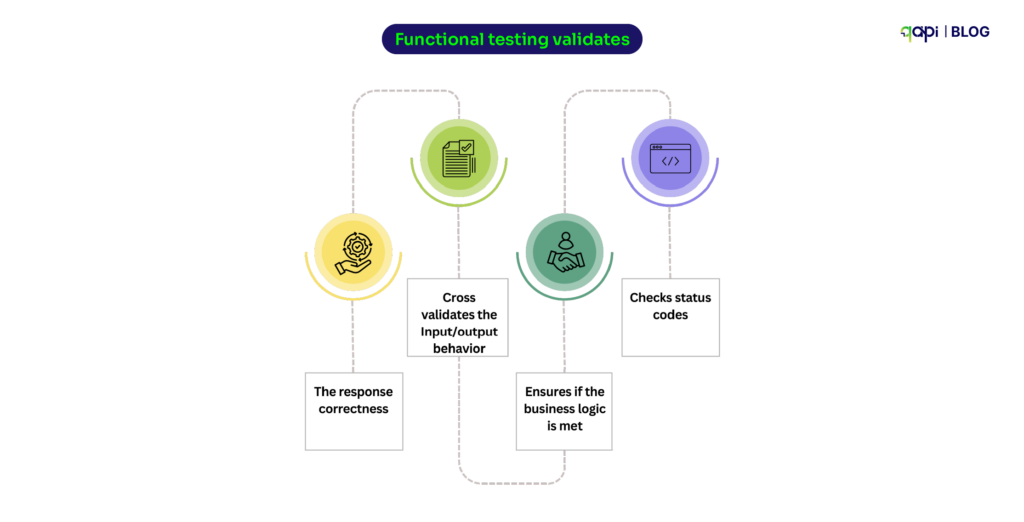
Functional testing validates: 

• The response correctness

• Cross validates the Input/output behavior

• Ensures if the business logic is met

• Checks status codes

Why Should You Invest in a Functional API Testing Tool?

During our survey we noticed that a lot of API users, they just build APIs. But the way the APIs are tested is inefficient or lacks a collective outcome.

They’re just checking status codes and hoping everything else works.

That’s the problem.

In our conversations and surveys with API teams, one pattern kept repeating:

Developers need to build APIs fast… but structured, automated API testing remains unclear for some.

And that gap becomes expensive — delay in releases, hidden logic failures, contract breaks in microservices, and production incidents that should’ve been caught earlier.

So here are some real questions developers ask (and the answers they actually need) 

Why do API tests fail even when the UI works?

Because UI tests can’t identify API failures. A loading spinner can mask a 500 error. This is why with functional API tests you can get the visibility— and you fix issues before users see them.

It exposes broken contract fields, inconsistent logic, or microservice failures long before users ever experience them. This gap is exactly why teams eventually adopt deeper API-first testing practices: you can’t rely on the UI to tell you whether the backend is healthy.

What are the best API testing tools for automation?

Depends on your stack.

When teams begin evaluating tools for automation, they quickly discover that “best API testing tool” depends entirely on their workflow.

Code-first teams often prefer libraries like Rest Assured, Karate, or Postman fraeworks because they align with developer-centric pipelines. Teams wanting easier API handling qAPI, where low-code workflows, shared workspaces, and faster onboarding matter more than writing assertions by hand.

The real upside though, is toward with qAPI because it provides scripting flexibility with cloud-native, automation-ready execution — a space where developer dependency is removed. As the application is skilled enough to take care of all the test cases and coding aspect.

Why do we say that

How do you test 1000+ API endpoints efficiently?

Things become significantly more challenging when you’re staring at an API surface with 1000+ endpoints. At that scale, manual test creation is let’s just say not ideal.

The only sustainable approach is automation-first: import your OpenAPI or Postman collections, let AI generate a baseline suite, and then refine coverage using analytics, usage patterns, and risk scoring.

qAPI does that by offering parallel execution and contract testing — the moment your API schema drifts, dozens of downstream services can break. So qAPI helps by automatically generating tests from imports, mapping coverage gaps, and running tests completely end-to-end in just a few clicks.

What’s the alternative to Postman for large teams?

Look for: RBAC, version control, CI/CD gates, audit trails, and centralized reporting.  Postman is great for development and debugging — but large teams face issues:
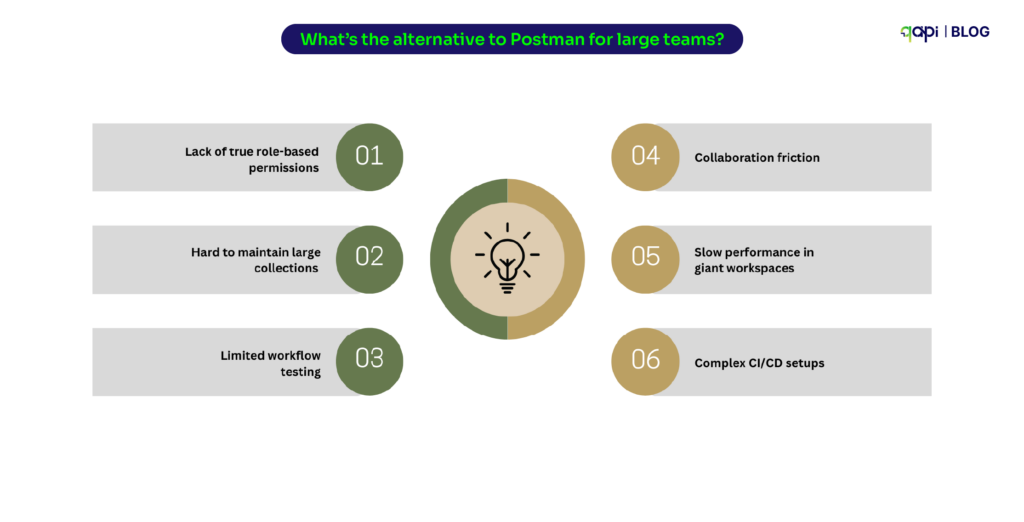
• Lack of true role-based permissions

• Hard to maintain large collections

• Limited workflow testing

• Collaboration friction

• Slow performance in giant workspaces

• Complex CI/CD setups

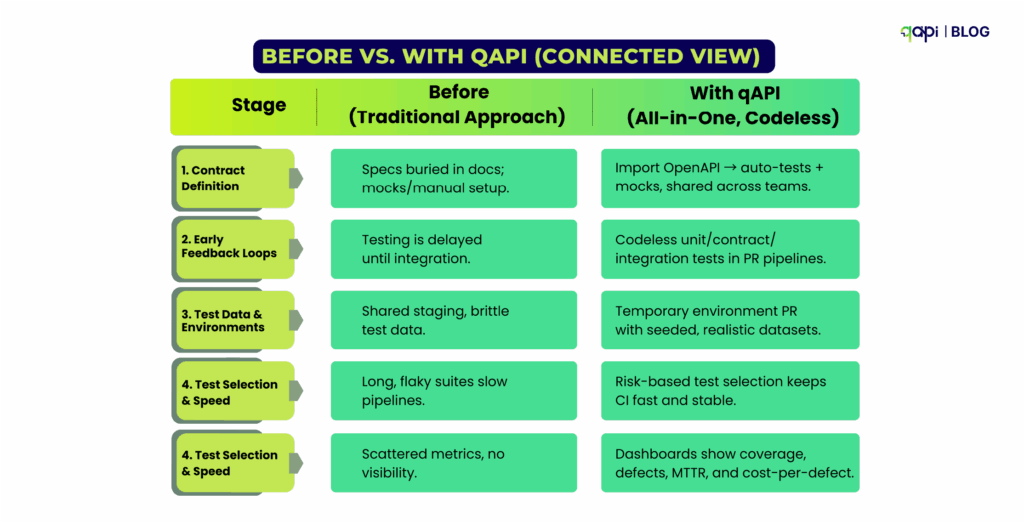
If Postman is for building APIs, qAPI is for building and testing APIs end-to-end at scale. It’s less about “replacing Postman” and more about evolving from a development tool to a testing platform that is affordable and built for scale.

How do you test APIs for mobile vs web?

Mobile APIs behave differently: they must handle network drops, offline caching, token refresh logic, background sync, and device-level fragmentation.

Web APIs on the other hand, run on more predictable networks and face browser-level constraints like CORS, cookie handling, and session expiry.

Your Testing strategies must adapt accordingly. Tools that allow network load testing, Functional API testing, chained workflows, and multi-environment validation—such as qAPI—are particularly useful here, because they capture all the needed edge cases mobile teams deal with daily.

Can AI really automate API testing accurately?

Yes — when guided by humans. AI excels at generating tests, detecting flakiness, and suggesting repairs. But coverage strategy, business logic validation, and risk-based prioritization still require human insight.

qAPI treats AI as a co-pilot instead of a replacement — increasing the speed and accuracy of testing while keeping engineers in control to drive the overall quality and testing outcome.

Versioning Conflicts How to Handle Them?

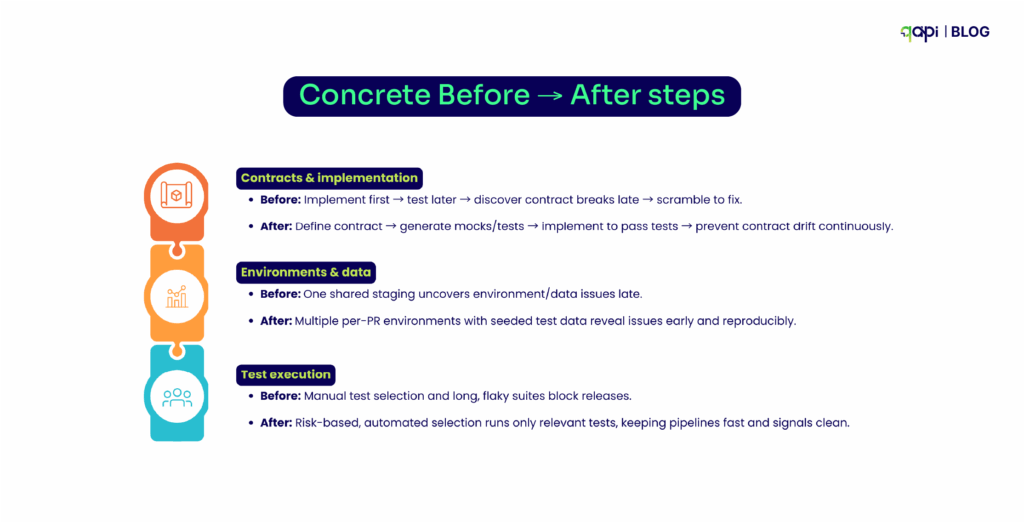
With the pace of APIs changes it’s hard as new fields appear, old parameters get removed, and validation rules shift quietly. The problem? Your test suite doesn’t automatically know this happened. So tests suddenly fail — not because the system is broken, but because the contract changed.

Teams search for this constantly because manual tracking is impossible. What’s needed is automated detection of what changed, why it changed, and how it affects existing tests. That’s why a version-aware testing tool matters as it can catch contract drift before it becomes a production issue.

Flaky Endpoints — when tests fail for reasons unrelated to the code

Flaky API tests are the biggest source of frustration in QA especially when running functional API tests, we’ve seen it as a common point among all the surveyed teams. There was a pattern: You run a test → it passes. You run it again → it fails. Nothing changed.

This usually happens because:

• The database returns inconsistent data

• Upstream services respond slowly

• Test environments aren’t stable

Teams search for this because flaky tests destroy trust.

What they need is a way to identify patterns behind failures — not just rerun tests 10 times hoping they pass.

qAPI helps by analysing run history and pinpointing where problem repeats.

How do you handle breaking changes across API versions during functional testing?

Versioning issues happen when an API’s request/response schema changes, but dependent services or tests still expect the old format. The solution is to:

• Test every version of the API that is still in use

• Automatically detect schema drift using contract testing

• Maintain version-specific test suites or test conditions

• Fail tests early when incompatible changes appear

Why do some API tests pass sometimes and fail other times ?

Even a small delay can cause timeouts, inconsistent data states, or partial responses. The way teams write their test cases can make teams lose confidence because they pass one moment and fail the next.

The solution is to stabilize dependencies, create dedicated datasets, add retries where appropriate, and use mocks for unreliable integrations. Once this is done, functional tests become far more predictable.

How can you simulate API rate limiting in functional API tests?

When applications send too many requests too quickly, APIs intentionally throttle them. Functional API Testing tools ensures your system can retry correctly, slow down gracefully, or notify the user instead of crashing.

Teams can simulate rate limits by sending parallel bursts of requests, recreating rate-limit headers, or using qAPI that can run controlled traffic spikes. This is especially important for fintech, e-commerce, and consumer apps.

How do you automate OAuth or JWT authentication in API testing?

Authentication is no longer a simple API key. You now deal with:

• OAuth 2.0 authorization flows

• JWT tokens with expiry rules

• Role-based or scope-based permissions

To automate auth:

• Auto-generate tokens inside your test suite

• Store secrets securely per environment

• Refresh tokens programmatically

• Test endpoints under different roles/scopes

This is where many functional tests break after long periods of stability.

Why do large Postman collections get slow, and how do you scale them?

Postman works great initially — until the collection crosses 300+ requests. Symptoms include:

• Slow run times

• Very large JSON files

• Hard-to-track assertions

• Increased maintenance effort

Teams scale beyond Postman by using qAPI to:

• Break collections into modules

• Run tests in parallel

• Skip rewriting test cases

• Shifting to schema-based / automated test generation

This becomes important choice for teams as they hit microservices-level scale.

How do you measure which APIs are covered by your tests?

Most organizations don’t know their coverage percentage.

To fix this:
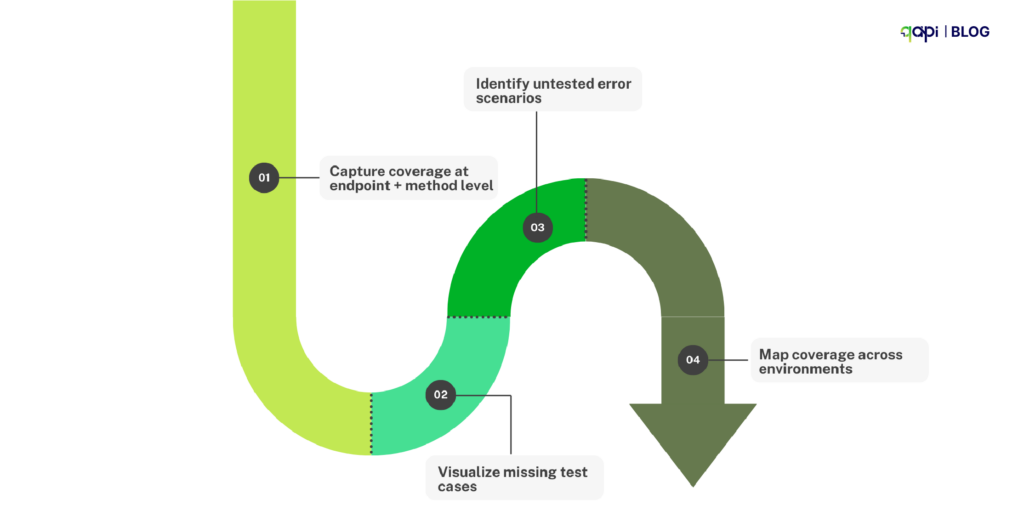
• Capture coverage at endpoint + method level

• Visualize missing test cases

• Identify untested error scenarios

• Map coverage across environments

Coverage analytics gives your QA and engineering a clear, shared picture of risk — something long missing in API testing tools.

Why do API tests pass in dev but fail in staging or production?

Environment inconsistencies are extremely common: different configs, missing data, disabled services, or outdated versions. An API test that passes in dev may hit a slightly different setup in staging, causing failures that look like bugs but aren’t.

Teams can solve this by syncing environment variables, standardizing configurations, validating endpoints before running tests, and maintaining consistent datasets. This reduces false failures and speeds up debugging dramatically.

How do you stop flaky API tests from breaking your CI/CD pipeline?

CI/CD instability often comes from slow APIs, wrong sequencing, token failures, and flaky dependencies. When tests randomly fail in CI, teams start ignoring real issues. To prevent this, teams should use smoke tests to validate health, run high-value tests early, remove unstable integration tests, and re-run only failed tests intelligently. This reliable CI/CD testing strategy will allow teams to release faster without compromising quality.

How can you speed up regression testing for 500–1000+ APIs?

Regression cycles stretch into hours, pipelines slow down, and releasing confidently becomes harder with every added endpoint. This is exactly where modern functional API testing platforms make a difference — and where qAPI is created to excel.

qAPI handles large-scale regression intelligently: tests run in parallel across the cloud, suites are generated from imports or AI-driven workflows, and only impacted tests execute when an API changes. Instead of waiting for full suites to run, teams get instant signals on what matters.

Coverage gaps become visible, environment stays in sync, and even complex workflows remain maintainable without heavy scripting.

Excellent point. The key is to provide value and solve the reader’s problem first, then subtly position qAPI as the ideal tool for implementing the solution.

How to Architect an API Functional Testing Strategy That Actually Works

Start Going Beyond Status Codes: Validate the Whole Transaction  

A “200 OK” means nothing if the data is wrong. Your tests must validate the entire contract: status, headers, response time, and the JSON payload itself. Is the `order_id` a string or an integer? Is `created_at` in the right format?

So, you catch data integrity issues before they corrupt downstream systems.

Systematically Test Happy Paths and Sad Paths  

Of course, test that a valid payment goes through. But also test:

– What happens with an expired credit card?

– A duplicate transaction ID?

– A request with a missing auth token?

qAPI can auto-generate these negative test cases from your API spec.

Mock Your Dependencies from Day One  

Don’t let your testing rely on a staging environment that’s always down or a third-party API that’s rate-limited. Use mock servers to simulate dependencies.

The result: Your tests are fast, reliable, and can run anywhere — including a developer’s laptop in 30 seconds. This is a core meaning of “shift-left” testing.

Make Tests a Non-Negotiable CI/CD Gate  

If a developer can merge code that breaks an API contract, your safety net has failed. Your core functional tests must run on every commit or pull request. No exceptions.

You should catch breaking changes in minutes, not days. This single practice can slash bug leakage by up to 80%.

Make the move

Adopting this architectural approach isn’t just “better testing” it’s the right move.

Functional API testing is no longer just about checking status codes. It’s about proving your business logic across distributed systems, managing change at speed, and delivering reliable experiences in a world where microservices evolve daily.

With AI-assisted test creation, codeless automation, contract validation, and cloud-native execution, qAPI helps teams shift from reactive defect hunting to proactive quality engineering.

The teams that invest in functional API testing today will be the ones shipping faster, fixing earlier, and building more resilient systems tomorrow. And qAPI makes that shift not only possible, but effortless.
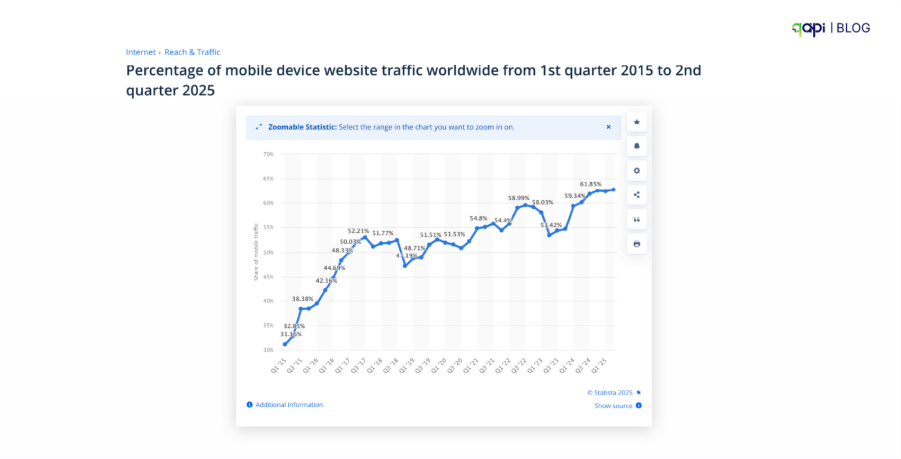
Do you know that more than 55% of the global internet traffic comes from mobiles, and the market share of applications developed as mobile-first is 35% higher than any other segment.

The datapoints clearly show, and the change in user behaviour shows that people today prefer using apps. There’s a reasonable probability that you’re reading this on your mobile device.

Why? Because it has the highest engagement, 88% of mobile time is spent in apps. Testing the performance of your mobile application is the only way to ensure that your product has a space in the market.

Mobile Device website traffic

Global mobile traffic 2025| Statista 

Your mobile app might have a beautiful UI, do what it’s built for, and be live in the app store. But you get a review that a user is abandoning the app within a few days.

Not ideal feedback, right?

We’re in a competitive market where users abandon an app if it takes more than 3 seconds to load. Performance testing for mobile apps is not just another item on your checklist; it’s the safeguard measure for your user experience and product life.

But testing mobile performance is tricky. It’s not just about how fast your server responds. It’s a complex interplay of the user’s device, their network connection, and your backend services.

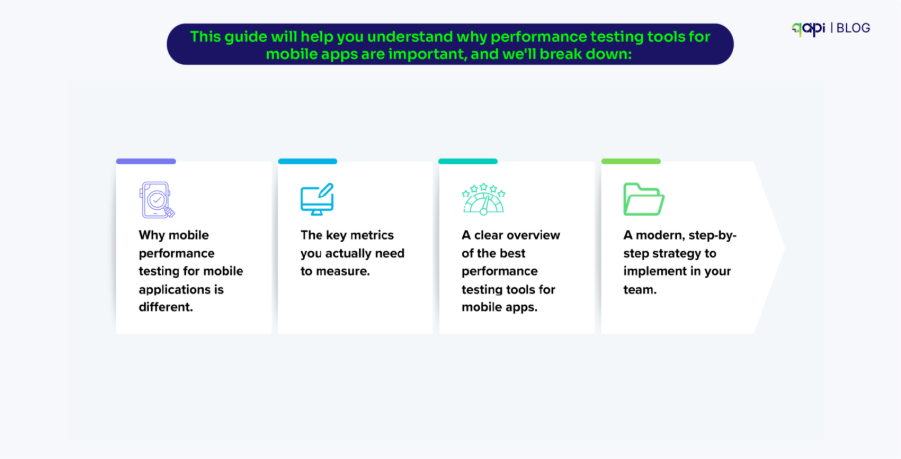
This guide will help you understand why performance testing tools for mobile apps are important, and we’ll break down:

Performance Testing Tools

• Why mobile performance testing for mobile applications is different.

• The key metrics you actually need to measure.

• A clear overview of the best performance testing tools for mobile apps.

• A modern, step-by-step strategy to implement in your team.

Let’s dive in.

Why Mobile Performance Testing is Different (And More Important Than Ever)

Mobile devices come in thousands of shapes and sizes, which makes consistent testing almost impossible. This fragmentation is especially true for Android, which has more than 24,000 device models in 2025 and holds around 70–72% of the global market. iOS is more controlled with 28–29%, but both platforms update and behave differently. Because new models keep appearing every year, most QA teams end up testing only 10–20% of real devices, unless they use large cloud device farms—leaving many untested phones vulnerable to crashes.

Different OS versions make things even harder. Android users run many versions at the same time—some even 10+ years old—while iOS is more consistent, with over 81% of users on iOS 17 or newer. Still, each OS handles rendering, animations, and memory differently, so versions need to be tested separately.

Phones also slow down due to heat and battery limits. When devices get hot or run low on power, they automatically reduce CPU speed—sometimes cutting performance by 50%. Older devices (about 25% of the market in 2025) struggle even more. Testing on real devices matters because throttling and battery issues often occur 40% more often on phones than in desktop simulators.

The Network: 3G, 4G, 5G, Wi-Fi, Latency, and Packet Loss

If devices are unpredictable, networks are even more chaotic. Real users jump between weak 3G spots (still 20% of rural traffic), busy 4G towers, and fast but inconsistent 5G networks (now 63% adoption in cities). Public Wi-Fi can slow down apps with 200ms delays, and even good 5G often delivers 20–50ms latency instead of the promised 10ms.

Latency and packet loss quietly break apps without anyone noticing why. Even modern 5G networks can see 5–10% packet loss during busy hours. Travelers face even worse conditions, with roaming causing up to 15% loss as their signal shifts between carriers.

This is why mobile performance testing must simulate real network conditions—slow 3G, unstable Wi-Fi, high latency—because these environments reveal more problems than a stable office connection.

The Backend: Throughput, Concurrency, and Traffic Spikes

Mobile apps rely heavily on backend APIs, and these APIs need to handle large amounts of traffic smoothly. Slow or poorly optimized endpoints can cause response times to jump from 200ms to several seconds, which frustrates users—most will leave an app if it takes more than 3 seconds to respond.

When many users are active at once, concurrency causes even more issues. A single mobile app may trigger 10 or more API calls at the same time, and underpowered servers can start failing at just 1,000+ users, causing 20–30% of requests to break.

Traffic spikes—like a flash sale or viral post—are even more dangerous.

A sudden 10x increase in users can overload servers, causing timeouts and major slowdowns. For e-commerce apps, this can cost over $100K per hour* in lost sales. This is why backend teams use load-testing capability from qAPI to simulate high traffic and uncover weak points before real users experience them.

Let’s say you’re testing a web app on a desktop with a stable Wi-Fi connection is one thing. Testing a mobile app is another beast entirely. You are battling what we call the “Triangle of Unpredictability”: the device, the network, and the backend.

Diagram: A Venn diagram showing three overlapping circles labeled “Client-Side (Device),” “Network,” and “Server-Side (API).” The middle center is labeled “User Experience.”

1. The Client-Side (The Device): Is your user on the latest iPhone or a 3-year-old Android with limited memory? A slow app on a high-end device is a performance bug. A fast app that drains the battery is also a performance bug.

2. The Network: Your user could be on a stable 5G connection one minute and a spotty 3G network in a subway the next. Your app must be resilient to high latency and packet loss.

3. The Server-Side (The APIs): These are the workhorses. If your APIs are slow to deliver data, your app will feel sluggish, no matter how optimized the client-side code is.

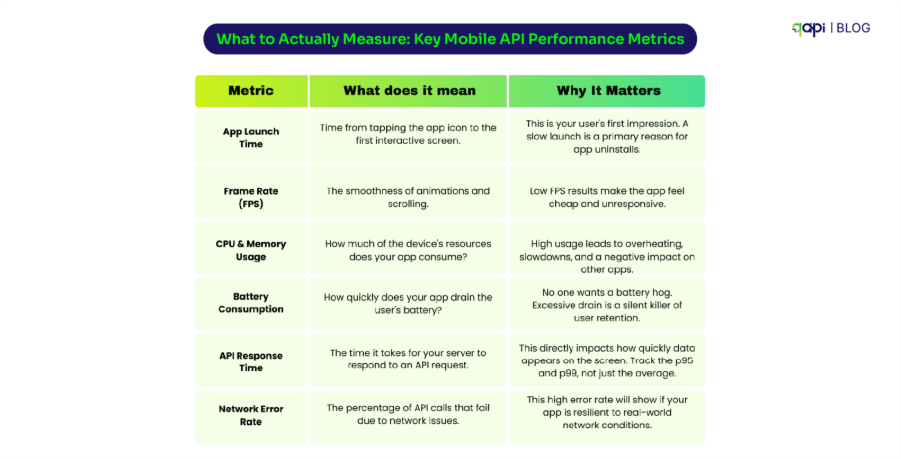
What to Actually Measure: Key Mobile API Performance Metrics

“Make the app faster” is just a blind comment a team can make. You need to measure specific, actionable metrics. Here are the ones that matter most:

Mobile Api performance metrics

5 Mobile Performance API Tests Every Team Should Run

Different tests uncover different problems—slow backend APIs, crashes on older devices, long-term memory leaks, or failures during traffic bursts. Below is a deep yet easy-to-understand breakdown of the five-core performance API test types every mobile team should run in 2025 and 2026.

1️⃣ Load Testing  

Load testing shows how your app and APIs behave under expected real-world usage, while 90% of the teams run these tests but they run it at the basic. For example:

• 1,000 concurrent users checking out

• A small chunk of 500 users logging in at the same time to check results

• A typical day’s traffic pattern replicated strategically

It will help answer:

• Will the app stay responsive during normal work hours?

• Are the APIs fast enough for real-world traffic?

• Do any endpoints slow down at even at medium volume?

Mobile apps generate more API calls per user session than web apps. Example, let’s say:

• Home screen loads about 6–12 API calls

• Your feed loads about 4–8 API calls on average.

Because even normal traffic can stress the backend more than teams expect. So, you need to test it.

How qAPI Supports Load Testing

• Reuse real functional user journeys as load scenarios (no need to write the test scripts).

• Run load tests that simulate hundreds to thousands of virtual users hitting the same workflows.

• Measure API latency, throughput, and error rates at scale.

• Auto-correlate slow APIs to specific steps in the mobile journey.

• Visualize p95, p99, and failure trends in real time.

2️⃣ Stress Testing (Pushing the System Beyond Limits)

We recommend the team to go deeper into their stress testing so we can intentionally break the system to find:

• The maximum capacity

• The failure point (when APIs start timing out)

• How gracefully the system recovers

As mobile apps experience unpredictable bursts:

• Holiday traffic

• Viral features

• Unplanned push-notification spikes

What we have seen is APIs fail under stress, the mobile UI becomes slow or unresponsive, even if the app itself is fine.

How qAPI Supports Stress Testing

• Ramp users far beyond normal load until APIs begin to degrade.

• Automatically detect when throughput drops, latency spikes, or failures increase.

• Provide clean reports showing exactly where and why breakpoints occur.

• Highlight the endpoints that fail first which will help teams prioritize fixes.

3️⃣ Spike Testing (The only way to check traffic surges) 

Spike testing applies sudden, unpredictable traffic movements that mimic real-world scenarios that happens on:

• Flash sales

• Live event ticket drops

• Notifications to millions of users

• Viral content surges

• App relaunch after downtime

Most mobile outages happen not during “high traffic,” but during those traffic spikes.

Mobile users tap repeatedly, reload pages, retry logins, or refresh feeds—all multiplied by thousands of people at the same moment spread across different time-zones.

How qAPI Supports Spike Testing

• Pay as you go model, choose how many users you want to test(e.g., 100 → 5,000 VUs in seconds).

• Compare system behavior before, during, and after the spike.

• Capture failure bursts that only appear under sudden pressure.

• Visual dashboards for spike-induced: by timeouts, queuing delays, memory saturation or cascading failures

4️⃣ Endurance Testing (Long Duration / Soak Tests)

Endurance testing runs the app or API under moderate traffic for hours (sometimes days) so that it can find out:

• Memory leaks

• Resource exhaustion

• CPU performance

• Slow degradation that isn’t visible in short tests

It will help us answer questions like:

• To check if performance degrades after 2 hours?

• Does memory usage increase slowly over time?

• Do APIs remain stable overnight?

As mobile device issues emerge only under long-term use:

• Apps that leak memory keep crashing.

• Background processes consume CPU.

• APIs start slowing down with persistent sessions.

These problems are invisible in a typical 10-minute test, which teams tend to trust.

This is where qAPI Supports Endurance Testing

You can run API workflows for hours without manual setup.

• Monitor long-term metrics and track:

• memory growth

• latency creep

• 401/403 token expiry issues

• connection resets

• Automatically track trend lines across the entire test window.

• Compare beginning vs. end-of-test performance.

5️⃣ Scalability Testing (How Well the System Grows)

Scalability testing checks whether your backend and infrastructure can scale up or down gracefully when traffic changes.

Key questions that you need to answer:

• If traffic doubles, does latency double—or stay stable?

• Does autoscaling kick in fast enough?

• Does the system scale horizontally or vertically?

• What are the cost implications of scaling?

Mobile users can spike in unpredictable ways, without us even guessing it by:

• Location-specific traffic during events

• Seasonal activity changes

• Social-media-driven boosts

• Regional behavior shifts

How qAPI Supports Scalability Testing

• Generate traffic patterns that increase gradually over time.

• Show how latency and error rates shift as load grows.

• Compare performance at 1x, 2x, 5x, and 10x load.

• Produce visual insights into scaling thresholds and cost trade-offs.

• Integrate into CI/CD for ongoing scalability checks.

A Modern Strategy for Mobile App Performance Testing

Here is a practical, step-by-step plan you can implement with your team.

Step 1: Define Your Performance Budget Before you test, set clear, measurable goals. For example:

• Client-Side: App launch time must be under 2 seconds.

• Server-Side: The p95 response time for the /login API must be under 400ms.

Step 2: Start with API Performance (Shift-Left) Don’t wait for a UI. As soon as your API contract is defined, use a tool to load test your critical endpoints. A slow API will always result in a slow app. Find and fix these backend bottlenecks first.

Step 3: Integrate Client-Side Profiling During Development Encourage your mobile developers to use Xcode Instruments and Android Profiler as part of their regular workflow to catch major CPU or memory issues before they’re even merged.

Step 4: Run Automated End-to-End Performance Tests This is where a unified platform shines. Set up a CI/CD job that runs a key user journey (e.g., login → browse → add to cart) on a few representative real devices while simultaneously simulating backend load with virtual users. This is the most realistic test you can run.

Step 5: Monitor in Production No test environment can perfectly replicate the real world. Use APM (e.g., Datadog, New Relic) and mobile-specific monitoring tools to track the performance your actual users are experiencing. Feed this data back into your testing strategy.

Conclusion: Adapt and Improve

Building a high-performance mobile app is a complex challenge, but it is achievable. It requires moving beyond siloed tools and adopting a unified strategy that considers the device, the network, and the backend together.

By focusing on the right metrics, choosing modern mobile application performance testing tools, and implementing a holistic testing strategy, you can stop guessing and start engineering a fast, reliable, and delightful user experience.

qAPI is your trusted API performance testing tool, try now.

FAQs

Q: What is the best free tool for mobile performance testing? A: For client-side profiling, the built-in Xcode Instruments and Android Profiler are the best free options. For backend load testing, JMeter is a powerful open-source choice, though it has a steep learning curve.

Q: How do you test for battery drain? A: Both Xcode Instruments and Android Profiler have built-in “Energy Log” or “Energy Profiler” tools that allow you to measure your app’s impact on the battery over a period of time.

Q: JMeter vs. qAPI for mobile API load testing? A: JMeter is a powerful, flexible open-source tool but requires significant technical expertise to script and maintain complex tests. qAPI is a unified, no-code platform that allows you to build both functional and performance tests much faster and provides correlated client-side metrics that JMeter cannot.

Flaky API tests are one of the biggest killers of trust in automation. They pass on one run, fail on the next, and trigger the same internal debate every time: “Is something actually broken, or is our test suite behaving odd again?” 

We’ve seen it a thousand times. Whenever a CI/CD pipeline turns red, it’s because a critical API test has failed. The developers stop their work, and everyone tries to figure out what’s broken. Then, someone re-runs the process, and… it passes.

Why? Because once you and your team lose confidence, they stop taking failures seriously—and your CI pipeline becomes and dead end instead of a gate.

What exactly is a flaky API test?

A flaky API test is one that behaves inconsistently under the same conditions—same code, same environment, same inputs. The key factor to notice here is non-determinism. You can re-run it five times and get a mix of passes and failures.  This isn’t bad test writing; it’s usually a signal that something deeper is unstable—timing, dependency calls, shared state, or the environment itself.

Understanding this helps teams shift from blaming QA to fixing systemic issues in API stability. 

Why are flaky API tests such a big deal in CI/CD?

CI/CD pipelines rely on fast, trustworthy feedback loops. Flaky API tests break that trust. They slow delivery, cause you to re-run them, hides real issues, and pushes developers toward shortcuts like adding retries just to get a green build. Eventually, people stop paying attention to failures altogether—creating a dangerous “green means nothing” tendency.

“Flakiness is one of the top silent blockers of fast-paced engineering teams.” 

How to identify if a failed test is flaky or a real defect?

Test diagnosis as a process, not a guess. Teams typically check:

• Does the test pass on immediate re-run?

• Are related API tests also failing?

• Did the environment show latency spikes?

• Has this test shown inconsistent behavior before?

Step 1: Capture the Failure Context Immediately

• Record:

     • Endpoint, payload, headers

     • Environment (dev/stage, build number, commit SHA)

     • Timestamps, logs, and any upstream/downstream calls

• In qAPI, ensure each run stores full request/response, environment, and log metadata for every test so you always have a forensic snapshot of failures.

Step 2: Re-run the Same Test in Isolation

• Re-run the exact same test:

• Same environment and with the same payload and preconditions

• Do this in a way that the execution path matches the original:

• If it fails consistently then there’s strong signal of a real defect.

      • If it passes on immediate re-run then we can suspect flakiness.

Step 3: Check the Test’s History and Stability

• Look at the past runs for this specific test:

    • Has it been green for weeks and suddenly started failing?

    • Has it flipped pass/fail multiple times across recent builds?

In qAPI, use trend/historic test reports and there are two ways to direct this towards:

   • If the failure starts exactly at a specific commit/build, lean toward real defect.

   • If the same test has intermittent failures across unchanged code, mark it as a flakiness candidate.

Step 4: Correlate With Related Tests and Endpoints

• Check whether:

      • Other tests hitting the same endpoint or business flow also failed.

      • Only this single test failed while others touching the same API stayed green.

• In qAPI, you can filter by:

      • Endpoint (e.g., /orders/create)

      • Tag/feature (e.g., “checkout”, “auth”)

Step 5: Inspect Environment and Dependencies

• Validate:

       • Was there an outage or spike in latency on the backend or a thirdparty service?

       • Were deployments happening during the run?

        • Any DB, cache, or network issues?

• In qAPI, correlate test failure timestamps with:

        • API performance metrics

        • Error rate charts

Step 6: Analyze Test Design for Flakiness Triggers

Review the failing test itself to see if it:

• Does it:

       • Depends on shared or preexisting data?

       • Uses fixed waits (sleep) instead of polling/conditions?

       • Assumes ordering of records or timing of async operations?

Step 7: Try Reproducing Locally or in a Controlled Environment

• Run the same test:

     • Locally (via CLI/qAPI agent) and in CI

    • Against the same environment or new.

• Compare the results to see:

     • If it fails everywhere with the same behavior then it’s a real defect.

     • If it fails only in specific pipeline/agent or at random then it’s flakiness or environment issue.

Step 8: Decide and Tag: Flaky vs Real Defect

Make an clear call and record it:

• As real defect when:

    • Failure is reproducible on repeated runs.

    • It correlates with a recent code/config change.

    • Related tests for the same flow are also failing.

• Classify as flaky when:

    • Re-runs intermittently pass.

    • History shows pass/fail flips with no relevant change.

    • Root cause factors are timing/data/env rather than logic.

In qAPI you can

• Tag the test (e.g., flaky, env-dependent, investigate).

    • Move confirmed flaky tests into a “quarantine” suite so they don’t block merges but still run for data.

    • Create a new testing environment directly from qAPI to track fixing the flakiness.

Step 9: Feed the Learning Back Into Test & API Design

Once you’ve identified a test as flaky:

• Fix root causes, not just symptoms by:

    • Improving test data isolation.

    • Replacing hard coding time delays with condition-based waits.

    • Strengthen environment stability or add mocks where needed.

• For real defects:

    • Link qAPI’s failed run, logs, and payloads to a ticket so devs have complete context.

What are the most common causes of flaky API tests?

The majority of API flakiness falls into predictable categories:

• Timing issues: relying on fixed waits instead of real conditions.

• Shared or dirty data: test accounts reused across suites.

• Unstable staging environments: multiple teams deploying simultaneously.

• Third-party API calls: rate limits, sandbox inconsistencies.

• Race conditions: async operations not completing in time.

Once you classify failures into these buckets, you can start projecting patterns—and based on that teams can solve the root cause.

Can we detect flaky API tests proactively instead of waiting for failures?

Yes—teams worldwide are doing it. Here’s a short summary of their detection techinques:

• Running critical tests multiple times and measuring variance.

• Tracking historical pass/fail trends per API.

• Flagging tests with inconsistent outcomes.

• Creating a “Top Flaky API Tests” report weekly.

Flakiness becomes manageable when it is visible, measured, and reviewed—just like any other quality metric.

How do we design API tests that are less flaky from day one?

Stable API automation comes from building tests that are:

• Deterministic: same input, same output.

• Data-independent: each test owns and cleans up its state.

• Condition-based: waiting for the system to reflect the correct state.

• Reproducible: no hidden randomness or external surprises.

• API-layer focused: validating contracts and flows, not UI noise.

A good rule that we follow: A test should run in any environment, on any machine, and give the same result every time.

How much flakiness is actually caused by environment issues?

Far more than most teams admit. Shared staging environments are notorious for:

• Partial deployments

• Old configuration

• DB resets

• Parallel loads from other teams

• Third-party dependency failures

You can curate the perfect automation strategy and still get flaky results in a noisy environment. This is why modern engineering cultures prefer dedicated environments that are lean, isolated, and consistent.

When the environment stabilizes, the flakiness rate drops dramatically.

How do you fix flaky tests without slowing delivery?

Research and industry experience show that flaky tests aren’t just inconvenient — they can disrupt your CI/CD pipelines and waste engineering time. In fact, industry data indicates that flaky tests account for a significant portion of CI failures and engineer effort: one study found that flaky and unstable tests contributed to as much as ~13–16% of all test failures in mature organizations’ pipelines.

Quarantine flaky tests — but still run them. Instead of letting flaky tests block merges, isolate them in a separate suite. Run them regularly so you still collect data and trends, but don’t let a flaky failure stop your pipeline.

Prioritize by impact and frequency. Not all flaky tests are equal. Fix the tests that fail most often and those covering critical business flows first. A small number of high-impact flakes often cause most CI noise.

Fix in batches. Group fixes by root cause — timing/synchronization, async behavior, data isolation, environment instability — and tackle them together. This reduces context switching and produces measurable improvements faster.

Flakiness Isn’t a QA Problem—It’s an Engineering Culture Problem

API flakiness exposes weaknesses in environments, data management, architecture, and team processes.

Fixing it requires collaboration across QA, DevOps, and backend teams—not just “better test scripts.”

By adopting a systematic approach to diagnosing, prioritizing, and fixing instability, you can transform your automation suite from a source of frustration into a trusted, high-signal safety net. And by choosing a modern API testing platform that provides the toolkit for flakiness detection, environment management, and AI-assisted diagnosis so that you have lesser problems down the line.

According to Gartner, 74% of organizations now use microservice architecture, with an additional 23% planning adoption—showing strong, real-time growth well beyond the projected predictions made in 2019.

Now that microservices and cloud-native apps usage is at an all-time high, every enterprise application relies on an average of 40-60 APIs.

Most of the time, organizations that are doing well in their API management programs are simply too busy to share their experiences with others. On the other hand, other organizations are still connecting the dots and are too careful to make the move.

You are constantly building APIs and writing tests, so it’s only safe and logical that you test them every time.

ChatGPT has been the go-to source for many, but it’s only as useful if you know what you’re testing for, what parameters you want to set.  But what you don’t realize is that the text queries (prompts) a user enters into AI models and the responses the models generate are always not what you can expect.

For example, say a user asks ChatGPT, “Attached is my JSON file. I want you to create test cases around it.”

Now, you would obtain the test cases and run a subsequent query to test them, but how trustworthy is ChatGPT’s answer? Or how detailed are the test cases? Are they genuinely solving the problem or making things worse?

Also, one thing to note here is that each time there’s a change in the API, you end up repeating all the same processes and tracking how the responses change over time.

What’s the key difference between testing it directly on qAPI? Instead of re-running every test and worrying about test cases and different APIs, you can test your APIs for free, completely end-to-end.

Let’s look at it closely.

The Limitations of ChatGPT for API Test Automation

Generative AI is impressive, but here’s what it can’t do (yet) when it comes to end-to-end API testing:

1️⃣ No Real-Time Environment Integration

ChatGPT can generate test scripts, but it can’t execute them in your staging or QA environments.   So you’re doing the log work of copying the contents from one place to another.  There’s no runtime context, meaning it doesn’t know your authentication tokens, environment variables, or dynamic data setups.

You’re getting a test code that:

•  Has never been executed

•  Hasn’t verified a single API response

•  Can’t prove it actually works.

2️⃣ Inconsistent and Generic Script Generation

Prompts produce different outputs each time. You will have to work more on curating your prompts.  ChatGPT’s generated test scripts may vary in syntax, framework, or structure — a major red flag for teams maintaining hundreds of APIs. For obvious reasons, because:

Test Suite A might be of Postman syntax

Test Suite B uses Python requests

Test Suite C uses REST Assured.

Your team will now have maintains three different testing approaches for the same API.

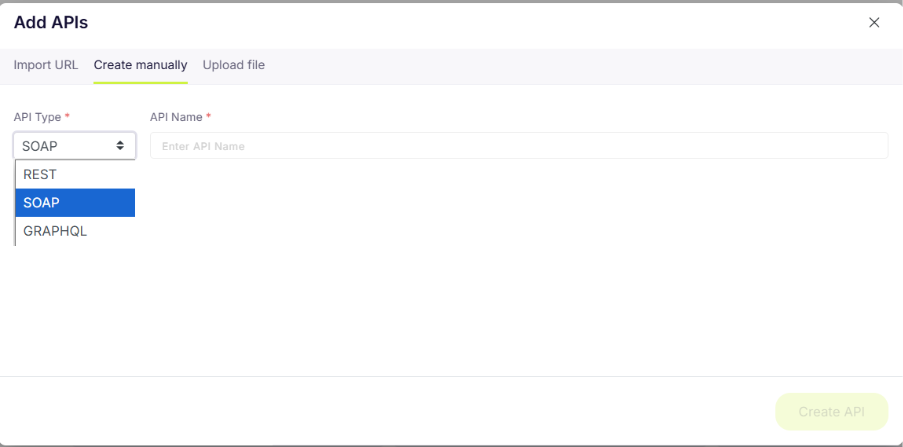
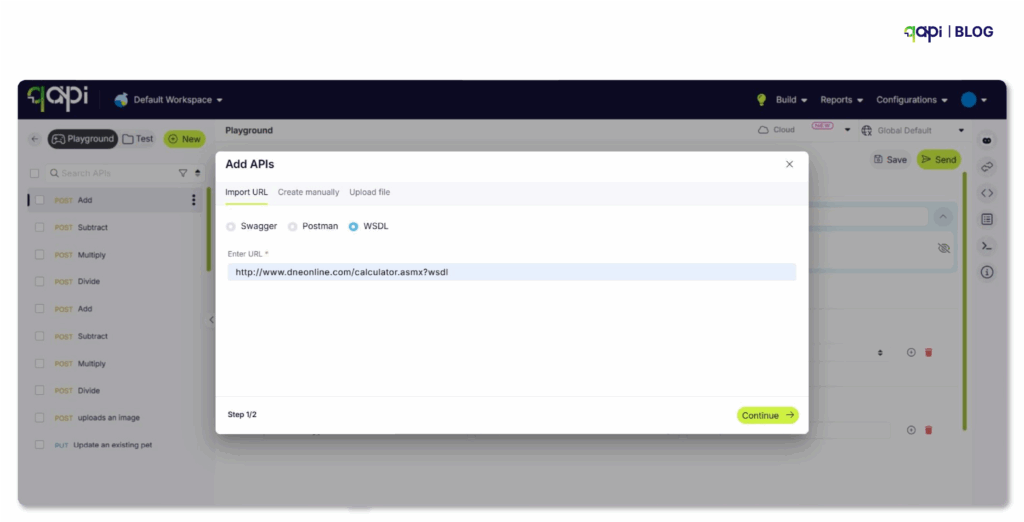
But with qAPI, you can skip all these worries because it supports all API types and formats.  You can either directly upload the URL or file or create the API manually and test it.

You can either directly upload the URL or file or create the API manually and test it.

3️⃣ Data Privacy and Security Risks

Feeding real API payloads or credentials into ChatGPT raises serious privacy concerns. Sensitive tokens or data may be stored or logged externally — an unacceptable risk in regulated industries.

For industries under GDPR, HIPAA, PCI-DSS, or SOC 2 compliance, this is grounds for termination, not really a productivity hack.

qAPI maintains compliance and keeps your data secure in safe environments. You can run the application locally or in the cloud.

4️⃣ Limited Test Validation and Reporting

ChatGPT can tell you what to test, but not how well it ran. It doesn’t provide execution logs, schema validation, or analytics dashboards for pass/fail metrics.

What ChatGPT will miss:

•  Boundary conditions (negative numbers, zero values, maximum limits)

•  Schema validation (is the response structure correct?)

•  Data type validation (is that integer an integer?)

•  Sequence dependencies (does this API require calling three others first?)

•  Negative scenarios (401s, 403s, 500s, rate limit errors)

•  Performance baselines (Is 5 seconds acceptable for this endpoint?)

You will again keep writing new prompts to test these out.

5️⃣ No Collaboration or Workflow Scalability

Testing is a team sport — testers, developers, and QA lead and even product managers need shared access, version control, and regression tracking. ChatGPT offers none of that.

qAPI on the other hand lets you create dedicated workspaces so you and your team are always in the loop. And the entire team has the access to the latest dataset.

What Makes qAPI better for API Testing

qAPI bridges the gap between AI-generated suggestions and enterprise-grade automation. Here’s how it stands apart:

1️⃣Native API Test Builder + Dedicated Environments

qAPI connects directly with your API environments — staging, sandbox, or production — letting you run and validate tests in real time with live response data.

2️⃣Codeless or Code-Assisted Workflows

Whether you’re a tester or developer, qAPI’s interface adapts to your comfort level. Write tests visually or extend them with code — both are equally supported.

3️⃣Auto-Generation, Discovery, and Coverage Metrics

With AI-powered test discovery, qAPI scans your API collection, identifies untested endpoints, and auto-generates cases to boost coverage.

4️⃣ Advanced Assertions and Schema Validation

Validate every API response with built-in assertion libraries, JSON schema checks, and negative testing capabilities — no manual setup required.

5️⃣Built for Teams

Collaborate across shared workspaces, review execution history, assign roles, and view unified reports — everything built for QA at scale.

6️⃣CI/CD and Regression Integration

Plug qAPI into your existing DevOps setup. Run tests automatically during every deployment to catch regressions before they hit production.

7️⃣AI Tailored for API Testing

Unlike ChatGPT’s general text-generation approach, qAPI uses domain-specific AI trained to optimize dependency mapping, sequence automation, and dynamic data generation — all within testing workflows.

Practical Comparison: ChatGPT vs. qAPI

Feature/Capability ChatGPT-Generated Script qAPI Platform Why it Matters for Scaling
 Setup Time  ~2 minutes (for one script) ~5 minutes (for a full workflow) qAPI can build more complex, ready-to-use tests in the same amount of time. 
Maintainability  High Effort: Code changes needed for each API update.  Low Effort: Visual updates, make changes in an instant.  Users can reduce test maintenance overhead by up to 60% with qAPI 
 Environment Handling  Manual: Hardcoded URLs and variables.  Automated: Switch environments with a dropdown.  You can eliminate manual errors and enables seamless testing across the lifecycle. 
 Test Coverage   Minimal: Typically only the “happy path.”  Comprehensive: AI generates positive, negative, and data-driven tests.  Catches more bugs in the early stages, testing edge cases and invalid inputs. 
 Reusability   Low: Scripts are single-purpose and isolated. High: Workflows and test steps are modular and reusable components.  Speeds up the creation of new test suites by leveraging existing assets. 
Reporting & CI/CD  None: Requires custom frameworks (e.g., PyTest, Allure). Built-in: Rich dashboards, historical data, and good CI/CD integration.  Provides immediate, actionable feedback to the entire team. 

ChatGPT has made our lives easier; there’s no doubt; it is excellent on various levels, generating code snippets and ideas. But with qAPI, a production-ready testing platform—it makes it easy to create maintainable, scalable, and end-to-end testing suites that drives value and saves time.

Here’s what qAPI offers:

1️⃣Endpoint Discovery: You import your OpenAPI/Swagger spec or Postman collection. qAPI automatically discovers the endpoints and its dependencies.

2️⃣AI Automap: You select the endpoints for a user journey (e.g., Login, GetUser, CreatePayment).

qAPI’s AI Automap analyzes the relationships and automatically chains them, passing the authToken from Login and the userId from GetUser to the final step.

1️⃣End-To-End Testing: You link the entire API collection or internal data source to run hundreds of variations (different amounts, payment methods, user roles) in a single execution.

2️⃣Environment Management: You run the exact same test against Dev, Staging, or UAT by simply selecting the environment from a dropdown menu. All environment-specific variables are managed separately so you and your teams can collaborate with ease.

3️⃣The ROI and Business Impact

•  Switching to qAPI isn’t just a technical upgrade — it’s an operational advantage and a smart move:

•  60% faster test generation with AI-assisted automation

•  50% fewer bugs in production from improved test coverage

•  30–40% reduction in release time with integrated CI/CD

•  Higher team velocity and cross-functional visibility through collaborative reporting

Key Takeaway: The ROI of a platform like qAPI isn’t just about saving QA hours. It’s about moving towards faster innovation, protecting customer trust, and ensuring that your application works when it matters most.

Measures to Improve API Testing Results with qAPI

If you’ve been experimenting with ChatGPT-generated test scripts, then you’ll love what qAPI has to offer because it’s simple and intuitive. All you need to do is:

1️⃣Import your API specs/Swagger/Postman collections into qAPI

2️⃣Execute all the imported APIs; qAPI will generate the test cases around it.

3️⃣Map your endpoints to live environments or use AI Automap to skip the manual effort workflows in minutes

4️⃣ Add assertions and schedule tests(Functional, Performance and Process tests) in CI/CD

5️⃣Review detailed reports and fine-tune your coverage.

Traditional manual testing or using these LLMs will only take you a step ahead, but if you want to play the long game, it’s always better to start investing in tools that make your life easier.

Conclusion

To see a change in performance, start looking beyond getting things done early and focus on doing things right. Pushing your APIs through qAPI not only provides you with an initial picture of the capabilities of your application and how it may perform in the real world.

Since the development behaviour is shifting, testing APIs faster and efficiently is as crucial.

As development behavior shifts toward faster iterations and AI-assisted builds, testing APIs efficiently has become just as crucial as writing them.  To truly elevate your API testing strategy, you’ll need a detailed strategy, because platforms like ChatGPT, Gemini, and Perplexity show variations in responses and favored sources.

That means your testing strategy can’t afford to be one-dimensional.

You need depth. You need coverage.

You need a platform built to adapt to API complexity, scale with your workflows, and automate intelligently. For teams that want reliability, traceability, and real execution power, qAPI delivers what generative AI can’t: hands-free test generation, environment-level validation, and true automation at scale.

Ready to move beyond prototypes? Try qAPI for your next API release—and see the difference purpose-built automation makes.

End-to-End API testing is a phrase or a dream that developers and testers type into search engines like Google or ChatGPT to find a tool or a service that can deliver that.

Most teams today juggle multiple tools—Postman for functional checks, Swagger or OpenAPI for contracts, custom scripts for performance, and other utilities for virtual user simulation.

The problem? Switching between tools is slowing you down, increasing maintenance overhead, and leaving gaps in coverage. Hard to get around it?

Now, imagine having everything in one platform: writing tests, running functional and performance checks, simulating complex user workflows, handling asynchronous calls, and managing dependencies—all without stitching together a dozen tools.

Whether you’re debugging a critical payment flow, scaling a SaaS backend, or validating a complex microservices chain, the goal is simple: make your APIs unbreakable, reliable, and production-ready—every single time.

In this guide, we’ll break down the core concepts, best practices, and essential features you need to build a robust end-to-end API testing strategy that actually works in 2025 and 2026.

1️⃣ What is End-to-End API Testing?

End-to-end API testing is the process of validating the complete flow of an API-driven application, from start to finish, without touching the UI. In simple terms, it connects multiple API calls—think sending a request, processing data through services, and verifying the final response—it ensures that the API responds at each stage.

This is precisely what qAPI offers; it’s the only end-to-end API testing tool that’s capable enough to handle all your API testing needs in one place.

E2E Testing addresses broader issues, such as data consistency across chains, real-world failures (e.g., timeouts in asynchronous calls), and system-wide reliability. It catches issues that lower-level tests miss, such as a login API followed by a purchase portal, failing due to session mismatches.

2️⃣ What is Covered in End-to-End API Testing

In 2025, trends such as AI-powered automation, shift-left testing, and low-code platforms are making End-to-End (E2E) API testing non-negotiable. With APIs handling real-time data in edge computing and serverless architectures, a single glitch can cascade into outages.

To use an API effectively, you need targeted checks that test the specific aspects of the API you are using. Here are the different types of API tests, along with what you should know about them.

Functional Testing

You must start with functional tests to validate that each API endpoint behaves as intended. It checks status codes, response formats, error handling, and business logic.

• Example: A /login endpoint should return 200 OK with a token when valid credentials are provided, and 401 Unauthorized when they are not.

Contract Testing 

In contrast, you ensure that APIs adhere to their agreed-upon specification, typically defined in an OpenAPI or Swagger document. This prevents breaking changes between providers and consumers.

• Example: If the contract specifies that the currency must be in ISO format, responses returning USD instead of $ should fail the test.

Workflow (Process) Testing

Validates that a complete business process works as expected when APIs interact with each other and external systems. Unlike simple end-to-end tests, workflow testing often spans multiple domains, services, and even user roles.

Performance Testing 

Finally, the most important of all, the Performance test measures how well APIs perform under different loads and conditions. It checks response times, throughput, scalability, and system stability.

Example: The /checkout endpoint should handle thousands of concurrent requests without exceeding agreed latency thresholds.

All of these major requests can be found in one single cloud tool, so that you don’t have to juggle your API collections from one place to another.

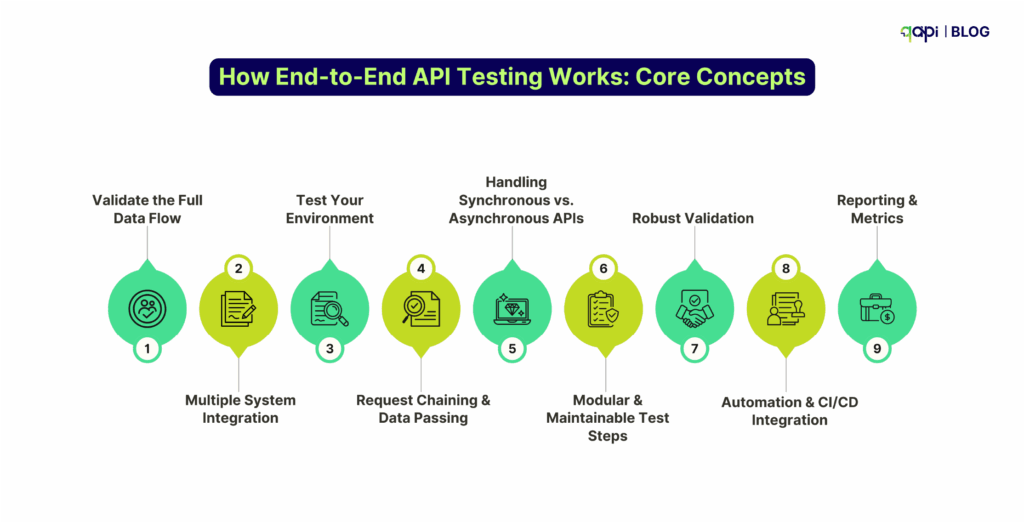
3️⃣ How End-to-End API Testing Works: Core Concepts

Think of end-to-end API testing as recreating a real user journey—step by step, but at the API layer.

1️⃣Validate the Full Data Flow

Example flow:

•  A mobile user logs in → API call to the authentication service

•  Their profile data loads → API call to the user service

•  They place an order → API calls to the payment gateway and inventory service

•  The system responds with an order confirmation

An end-to-end test simulates this chain, making sure each call works individually and that the entire process delivers the right outcome.

2️⃣ Multiple System Integration

E2E tests confirm that all components work together:

• Internal microservices

• Third-party APIs (payments, SMS, email)

• Databases and caching layers

• Message queues and event-driven systems

This builds resilience against failures in external systems and uncovers integration issues early.

3️⃣ Test Your Environment 

Tests are only as good as the environment, so start by creating: 

• Dedicated environments that mirror production

• Sanitized real-world data

• Matching API versions and configurations

Highly unstable environments will reduce environment-specific failures and improve confidence in results.

4️⃣ Request Chaining & Data Passing

E2E workflows rely on passing data between steps, so take care of:

Request chaining: Use tokens, IDs, or session values returned by one API in subsequent calls.

• Variables and environments: Store reusable data like user IDs, order numbers, or auth tokens for dynamic, realistic tests.

• Reddit insight: Developers often mention that chaining and dynamic data are the trickiest parts of end-to-end (E2E) testing, but they are essential for reliability.

5️⃣Handling Synchronous vs. Asynchronous APIs

Decide, test how you want your APIs to interact in the entire ecosystem

• Synchronous APIs: Immediate responses—simply chain the next request.

• Asynchronous APIs: Background jobs, webhooks, or queues—use polling (asking “is it done yet?”) or callbacks (system signals completion) to verify outcomes.

6️⃣Modular & Maintainable Test Steps

•  Break tests into reusable, composable steps

•  Keep one assertion per concern

•  Use parameterized inputs to cover different data scenarios without bloating the suite

This ensures maintainability, reduces flakiness, and allows teams to expand coverage efficiently.

7️⃣Robust Validation

End-to-end testing goes beyond just checking HTTP responses; it should check:

•  Status codes (200, 400, 401, 500, etc.)

•  Response body structure and fields

•  Database state changes

•  External system interactions (emails, logs, notifications)

Also, include edge cases and failure scenarios, such as invalid inputs, network errors, and service outages.

8️⃣Automation & CI/CD Integration

Your plan should be to automate tests for speed and consistency:

•  Run tests on every pull request

•  Fail fast if workflows break

•  Ensure integration of pipelines via GitHub Actions, Jenkins, or GitLab CI

Automation enables the early detection of regressions and facilitates faster delivery cycles.

9️⃣Reporting & Metrics

An effective end-to-end api testing tool should be able to track, summarize, and report the following:

• Test pass/fail rates

• Execution times

• Root cause analysis

• Performance trends

Relying on dashboards and reporting tools (such as Allure, Sentry, and Jira) is no longer necessary, as qAPI provides visibility for both developers and QA teams.

Key Takeaways

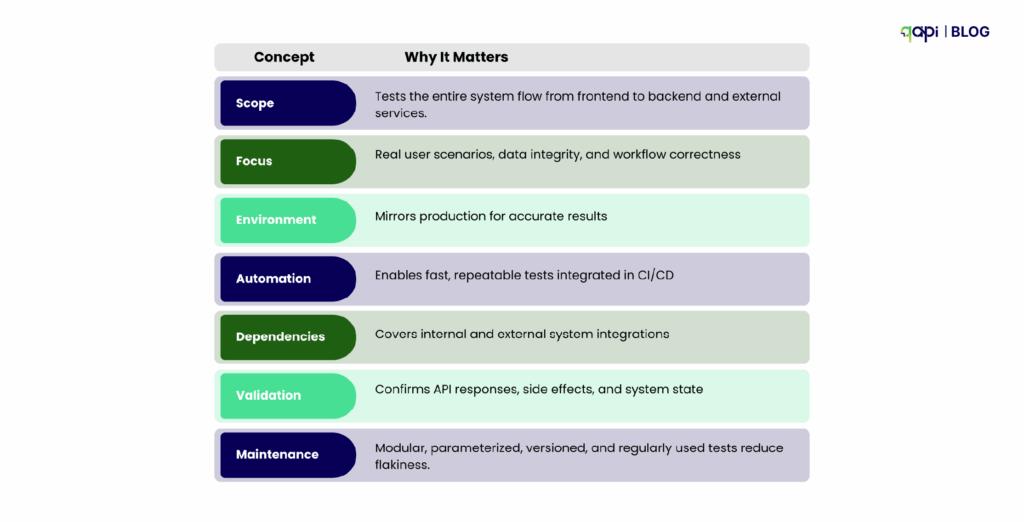
Reddit-inspired insight: Developers frequently note that E2E testing becomes maintainable and actionable only when workflows are modular, parameterized, and versioned, with proper environment setup and realistic test data. Without these, E2E tests often break or provide false confidence.

4️⃣ Preparing for E2E API Testing

Many testers on Reddit stress that setup makes or breaks your test strategy. Without the right environment and data, tests either break constantly or give false confidence.

To start, you’ll need staging environments mirroring production, realistic test data (synthetic or anonymized), and setup scripts for dependencies. qAPI is your best bet for all your needs  Before you start punching requests and validating workflows, you need the right strategy. A strong setup will save you from wasting your time. Here are the essentials:

1️⃣Test Environment Setup

• Staging environment → A safe space for production where breaking things won’t affect users.

• Test database → Filled with clean, predictable data you can reset between runs.

• Third-party service mocks → Stand-ins for external systems (like payment gateways) so tests don’t trigger real charges.

2️⃣Test Data Strategy

• Static data → Fixed users, accounts, or products that stay the same across runs for predictability.

• Dynamic data → Freshly generated values (like unique emails or order IDs) to avoid collisions.

• Data cleanup → Reset or clean out records after each run so tests remain reliable.

q tip: Use a dedicated “test tenant” or “test organization” to keep test data completely separate from production data.

3️⃣Dependency Management

APIs rarely work alone. External services—such as payment gateways, third-party APIs, or other systems beyond your control—pose challenges for stable testing. That’s where parametrization comes in.

Instead of hardcoding values or relying on unpredictable responses, qAPI lets you define parameters that make tests flexible, reproducible, and scalable.

Why parametrization matters:

•  Create parameterized mock APIs directly from your OpenAPI spec. Pass parameters to generate realistic responses instead of hitting live services—because it’s safer, faster, and cheaper during early testing.

•  Define expected outputs through parameters (e.g., always return a valid payment ID) to keep workflows stable and reproducible.

•  Find a tool where you can simulate high-volume requests with parameterized mocks, avoiding quotas or per-call charges on external APIs.

With qAPI, you don’t need separate tools for mocks, virtual users, environments, or test data management; you get it all!

To avoid confusion, here’s a simplified strategy for E2E API testing, which begins with planning and prioritization.

•  Identify critical workflows: For example, login → order placement → payment → notification.

•  Define success criteria: Status codes, JSON fields, latency limits, and business rules.

•  Adopt risk-based testing: Cover the most critical and high-risk endpoints first.

•  Document workflows: Keep expected behavior, edge cases, and error handling clear for developers and testers.

5️⃣Best Practices and Pro Tips for Effective E2E API Testing

Sustainable E2E testing is more than writing scripts—it’s about modular design, version control, stabilization, and continuous pruning.

Here’s how to develop one step-by-step:

•  Define Clear Requirements: Start with well-defined specs using OpenAPI or Swagger. This sets the foundation for contract testing, ensuring producers and consumers agree on requests/responses.

•  Adopt a Layered Approach: Combine unit tests for single endpoints, integration for service interactions, and end-to-end for full flows. Prioritize based on risk—focus on high-traffic or critical paths first.

•  Incorporate Automation Early: Use AI-powered tools like qAPI to auto-generate tests from specs, covering happy paths, negatives, and edges. Automate in CI/CD to run on every PR for fast feedback.

•  Include Non-Functional Testing: Don’t skip load, stress, and security—set SLOs for response times and use fuzzing for robustness.

•  Measure and Iterate: Track metrics like coverage percentage, flake rate, and escaped defects. Review quarterly to refine.

This methodology will reduce rework by 60-80%, making your strategy agile and effective.

Documentation Requirements

•  Use Standardized Specs: Adopt OpenAPI/Swagger for detailed endpoints, parameters, responses, and examples. This enables the generation of auto-tests and contract validation.

•  Include Test Cases: Document happy/negative paths, edge cases, auth flows, and error models. Tools like Postman can embed these in collections for living docs.

•  Version Control: Keep docs in the same repo as code—review in PRs to catch drift. Use semantic versioning for APIs to manage changes without breaking tests.

•  Security and Compliance Notes: Detail auth (OAuth/JWT), data masking, and standards like OWASP to guide security testing.

•  Accessibility for Teams: Make docs collaborative—qAPI’s shared workspaces let developers and testers update in real-time.

In the fresh rollout, qAPI will release the AI summarizer tool, which will help explain the workflows you create. All you have to do is copy the explanation and send it internally, so all your teams are on track and know how the APIs are designed and how data flows across the pipeline.

Test Coverage Optimization

Optimizing coverage means testing smarter, not more—aim for 80-90% coverage in critical areas without overstuffing your test suites. In 2025-26, AI and data-driven methods help maximize this.

Strategies to optimize:

•  Risk-Based Prioritization: Focus on business-critical endpoints (e.g., payments) and high-risk scenarios like invalid inputs or rate limits.

•  Data-Driven Testing: Parameterize tests with datasets for varied coverage—synthetic data generators in qAPI can handle edges like special characters or nulls without manual effort.

•  Performance and Security Inclusion: Cover load thresholds and OWASP checks to ensure non-functional optimization.

This approach enhances reliability while maintaining fast test times, resulting in 60% better bug detection, as observed in real-world cases.

Collaboration Between Testers and Developers

Great API testing thrives on teamwork—breaking silos leads to better quality and faster cycles. In 2025, DevOps and shift-left foster this.

Ways to enhance collab:

•  Shared Tools and Workflows: Use qAPI (up to 5 users free) for joint test creation and reviews. Devs write unit tests; testers handle E2E—review together in PRs.

•  Contract-First Development: Devs define specs early; testers generate tests from them. This aligns expectations and reduces handoffs.

•  Blame-Free Culture: Focus on issues, not people—use retros to improve processes.

Elevate Your API Strategy

The future of software quality is API-first, and organizations that adopt end-to-end testing early gain a decisive advantage.

By now, you know it, and your teams know it.

Let’s start by testing comprehensive workflows, simulating real-world user behavior, and handling dependencies seamlessly. You ensure your APIs are dependable, scalable, and production-ready.

•  Refine test coverage across critical workflows and edge cases

•  Automate meaningful validations rather than superficial checks

•  Monitor real-world performance and adjust tests proactively

Start now: audit your workflows, implement end-to-end testing with qAPI, the only unified platform, and track holistic metrics that capture true API reliability.

Teams that invest in comprehensive E2E testing today will build systems that scale safely, perform consistently, and delight users tomorrow.

There’s a moment every QA engineer faces — when the current testing setup finally cracks.

Maybe it’s yet another broken regression suite.  Maybe it’s a release delayed because of flaky API validations.  Or maybe it’s just that one thought: “There has to be a better way to do this.”

That moment is when you stop treating API testing as just another task — and start seeing it as a system.

And like any well-oiled system, it needs the right tools, backed by the right strategy. Not just something that “runs tests,” but something that learns with your team, scales with your architecture, and adapts to change without slowing you down.

You don’t need a tool full of bells and whistles.  You need one that’s practical. One that saves time instead of creating more work. One that doesn’t just fit into your CI/CD pipeline — it accelerates it.

In this guide, we’ll break down the 10 essential features that separate good API testing tools from great ones — without overwhelming you with jargon or vendor fluff.

By the end, you’ll have a clear, actionable checklist to evaluate any tool and confidently choose the one that’s the right fit for your tech stack, your workflows, and your future goals.

Let’s get into it.

1️⃣ First things first. 

What is API testing?

Once you build your APIs, testing your APIs is the process to evaluate them based on their functionality. It involves running tests to send requests, validating responses, and verifying workflows across various systems. The goal is to ensure APIs can handle data correctly, follow business logic, and move smoothly between software components.

A good API testing tool should cover functional, security, performance, and contract testing, integrate with CI/CD, support mocking, data-driven tests, and provide insightful reporting capabilities.

But not all tools are built the same. Each tool in the market has some upside and downside.

Start by getting clear on what you need: 

•  Are you looking for a new tool? What does your current tool stack miss out on?

•  Do you want to abandon your current tool stack or just need an add-on?

•  Want to stay in the loop on the latest trends and efficient practices?

This will set the tone and make things easier: where to spend your time.

For example:

Before you ask,

What is the difference between API testing and UI testing

The difference between API and UI testing lies in their scope and approach. UI testing is focused on the entire user experience directly from the graphical interface, while API testing, on the other hand, puts focus on business logic and the data layer.

API Testing Advantages:

• Speed: API tests execute faster as they bypass the UI layer

• Early detection: Issues can be identified before UI development is complete

• Stability: Less likely to get affected due to environmental changes and UI modifications

• Data focus: Direct validation of business logic and data processing

UI Testing Strengths:

• User experience validation: Ensures end-to-end user workflows function properly

• Visual verification: Helps confirm proper rendering and interface behavior

• Integration testing: You can validate the complete application stack, including the frontend

2️⃣ Start With the People You Know

You don’t have to start from scratch; sometimes, the best thing is to just adapt what works for others, so learn and improvise.

Think about the problems you’ve had, someone else would have had it too at some point of time.

Don’t overthink, just start watching product tour videos, use all the tools with free trials. All it takes is just one click.

3️⃣ Here’s What an API Testing Tool Should Provide

Manual testing will only take you so far, but if you’re serious about setting the foundation for the future, using an API testing tool will be a good investment.

Because as your app grows, tools become hard to match efficiency and accuracy. In such cases, an API testing tool can automate repetitive tasks, integrate with your pipeline, and provide insights that manual methods can’t match—ultimately saving time and reducing errors.

Faster cycles, stronger reliability, and less downtime. It’s no longer a dream; it’s the bare minimum.

In 2025 itself, AI-powered features in qAPI like auto-generated tests have made our customers to move 3–5x faster without sacrificing quality.

Top 10 qualities needed in a API testing tool

1️⃣Flexible and Capable to test all API types: REST, SOAP, GraphQL

• Protocol Support: REST, SOAP, GraphQL, gRPC

• CRUD Testing: Create, Read, Update, Delete operations

• Negative Testing: User can verify error handling with invalid inputs

• Schema Validation: Ensure responses match OpenAPI or WSDL specs

• Assertions: Rich libraries for response content, status codes, and timing

2️⃣Security Testing: Protect What Matters To You

Modern tools must cover both authentication flows and threat detection.

•  Auth Support: OAuth 2.0, JWT, API keys, rotating secrets

•  OWASP Checks: Coverage of the OWASP API Security Top 10

Parameterization: Run security checks with varied datasets (tokens, credentials, wrong values) to validate performance under different inputs.

3️⃣Performance Testing: Prove Reliability at Scale

Users don’t just want working APIs—they want fast and reliable ones.

•  Load Testing: Validate performance under expected traffic

•  Stress Testing: Find breaking points

•  Soak Testing: Detect memory leaks during long sessions

•  Distributed Load: Generate traffic across regions to mimic real-world scenarios

•  SLA/SLO Monitoring: Ensure performance targets are consistently met across all conditions

qAPI intelligent simulation helps teams to select virtual users as much as they need to identify problems before they hit you and your production!

4️⃣ Contract Testing: Keep Services in Sync

In microservices, a breaking change in one service stop a across dozen others a domino effect.

• OpenAPI/Swagger Support: Auto-generate tests from contracts

• Pact & Consumer-Driven Contracts: Validate expectations across teams

• CI/CD Integration: Run contract checks on every pull request

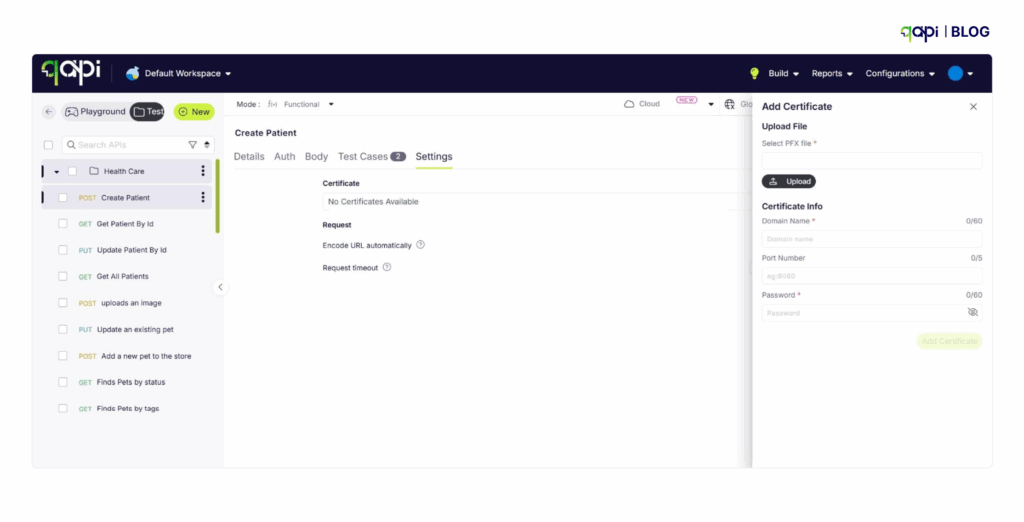
Authentication & Trust: Certificates (like TLS/SSL certs) prove that the API you’re talking to is really who it claims to be.

With qAPI you can add certificates in just a click, so you’re APIs are as secure as they can be.

This ensures both sides of the connection (client + server) have proved their identity before exchanging data.

5️⃣Mocking & Virtualization: Test Without Waiting

No need to pause development while dependencies are still being built.

•  Mock Servers: Lightweight simulations of API endpoints

•  Service Virtualization: More complex, realistic simulations

•  Parallel Tests: Run tests side by side so you save time and efforts

•  Fault Injection: Simulate users or failure to harden systems

6️⃣Data-Driven Testing: Scale Scenarios with Ease

The tool you use should be able to easily handle different file types and data.

•  Datasets: Import from CSV, JSON, or databases

•  Parameterization: Run tests with multiple values automatically

•  Synthetic Data: So that you can simulate realistic, privacy-safe datasets

•  Data Lifecycle Management: Handle setup, cleanup, and isolation

7️⃣CI/CD Integration: Fit Into DevOps Pipelines

A modern tool shouldn’t “just work” with your delivery workflows, but it should be capable enough to integrate and work fine alongside your development cyclem

•  CLI Support: So you can run tests from any pipeline

•  Basic Integrations: GitHub Actions, GitLab, Jenkins, Azure DevOps

8️⃣Reporting & Analytics: Turn Results into Insights

Testing data results should fuel smarter decisions, not just pass/fail marks and shouldn’t confuse you further.

•  Dashboards: Visualize trends and API health in a glance

•  Flaky Test Detection: Spot and fix unreliable tests

•  Trend Analysis: Track regressions over time

•  Performance Analytics: Historical metrics for capacity planning

9️⃣Collaboration & Governance: Align Teams

Scaling teams need alignment and accountability. We’ve been seeing teams just playing catch-up, whether it’s Teams, Slack, or GitHub.

If you, your team, and your API collection are in one place, it pushes out more work and less confusion.

•  Versioning: So everyone is aware of test history and rollback options

•  Review Workflows: No need to share and wait for peer reviews before merging

•  RBAC: Role-based access for compliance and security

•  Audit Logs: Track changes and maintain governance

qAPIs shared workspaces are ideal for small, collaborative QA teams. And it can accommodate larger groups too, if you prefer.

🔟AI Assistance: The 2025 Differentiator

AI is no longer futuristic—it’s now already in your systems, so it’s only poetic and just that your API testing tool also has it.

•  Auto Test Generation: Build tests based on your API specs or traffic

•  Anomaly Detection: Flag unusual behavior before failures spread

•  Workflow Explanation: Translate logs, API workflows into readable story so everyone can understand what’s happening and how the data is supposed to flow.

•  Workflow Generation: With one click AI can stitch your APIs together in the right flow so you can directly focus on the performance of the entire setup. (qAPI offers that)

4️⃣How to Choose the Right API Testing Tool

Selecting the right API testing tool isn’t just about features—it’s about finding the right fit for your team, your tech stack, and your long-term goals. Here’s a practical checklist to making the choice easier.

1️⃣Ease of Use vs. Depth: UI, CLI, Extensibility

Choose a tool that balances usability with flexibility:

•  Intuitive UI: Ideal for beginners or non-coders. Low-code platforms let teams get started quickly.

•  CLI & Scripting: Advanced users need deep scripting capabilities for complex workflows.

•  The qAPI advantage: Supports all API types, including REST, SOAP, and GraphQL. You can test Postman and Swagger collections directly—no coding required.

Tip: Look for a tool that grows with your team—from simple tests to advanced automation.

2️⃣The Tool Should Fit Into Your Tech Stack

Your API testing tool should seamlessly integrate with your existing stack:

•  API protocols: REST, SOAP, GraphQL, gRPC

•  Programming languages: Java, Python, JavaScript, etc.

•  CI/CD tools: Jenkins, GitHub Actions, GitLab CI

Tip: For GraphQL-heavy stacks, Postman or Katalon can work well. But qAPI is a step ahead by eliminating compatibility worries by supporting every API type and version out of the box.

3️⃣Pricing, Licensing, and Support

Total cost of ownership goes beyond the initial license:

•  Licensing models: Compare subscription vs. perpetual licenses, and user-based vs. execution-based pricing.

•  Hidden costs: Training, infrastructure, integration, and ongoing maintenance.

•  Support quality: Evaluate vendor support, documentation, update frequency, and community resources.

Example: Postman offers a free tier with 1M calls/month, but enterprise features and support come at a cost. qAPI offers a free tier with 5-user collaboration and a pay-as-you-go model, making it easy to scale so you can focus on testing and not on the bank.

4️⃣Proof of Value: Trial Criteria and Selection Checklist

Before committing, run realistic tests and define success metrics:

Trial Scenarios:

•  Simulate your actual workflows

•  Test complex API interactions

•  Measure performance and reliability

Success Metrics:

•  Test creation speed

•  Execution time

•  Defect detection rate

•  Team adoption

Selection Checklist:

•  Supported protocols and integrations

•  Team size and skill level

•  Performance and scalability needs

•  Security and compliance requirements

•  Budget and total cost of ownership

•  Vendor stability and roadmap alignment

Pro tip: A trial can reveal whether a tool truly fits your team’s workflow and future growth—don’t skip this step.

qAPI stands out by combining simplicity, extensibility, and enterprise-ready features in a single platform, letting teams focus on testing—not troubleshooting tools.

5️⃣Build an Ecosystem You’re Proud To Be a Part Of

API testing has an approach problem. It has always been an assumption that API testing has to be done by a skilled workforce; it needs to be done only manually, and automation alone is not enough.

But, automation in API testing isn’t about running the same tests. The best way towards it is leveraging AI-automation to run tests faster, effectively to avoid re-runs, build scalable APIs and run tests end-to-end all at one place.

You don’t need to run behind different tools; you just need a one-stop solution for all your API testing needs, where real testing happens.

That will help you understand your APIs better and build scalable applications the kind that puts you on track for long-term success.

You can use qAPI at every step to streamline your API building process

Sign up for a free trial today.

There was a time when API testing sat quietly at the end of the release cycle—treated like a final checkpoint rather than a strategic advantage. Developers shipped code, testers scrambled to validate integrations, and deadlines slipped because bugs were discovered too late.

But everything changed the moment AI entered the SDLC.

Across the globe, nearly 90% of testers now actively seek tools that can simplify and accelerate their API testing workflows. Not because testing suddenly became harder—but because expectations skyrocketed. Today’s teams are expected to ship faster, catch defects earlier, and deliver flawless digital experiences—all at once.

That’s where AI-powered Shift-Left API testing emerges as a game-changer.

Testing tools today aren’t just passive listeners capturing requests and responses. They’re becoming intelligent co-pilots—learning from previous test patterns, suggesting assertions automatically, generating test suites from documentation, predicting failure points, and even self-healing scripts when APIs evolve.

In short: AI isn’t just improving testing—it’s rewiring how teams think about quality.

And if you’re still treating API testing as a post-development activity, you’re already behind.

The good news? Shifting left doesn’t have to be complex. Whether you’re starting from scratch or optimizing an existing pipeline, here are practical steps to immediately level up your API testing game—and build an SDLC that’s faster, smarter, and future-ready.

What Is Shift-Left API Testing and Should You Plan for It?

Shift-left API testing is all about starting to test and validate in the design and coding phases, rather than waiting for QA handoffs or production deploys.

For developers, it means writing testable APIs from day one; for testers and QA, it’s about collaborating early to define expectations and automate checks.

In simple words, by shifting left you can prevent defects upstream to avoid downstream disasters in your distributed architectures.

We asked some people on how they see this change and here’s what they had to say:

From the Developer’s Desk: “Shift-left API testing means I’m writing tests alongside my API code, not after deployment. It’s about catching breaking changes before my teammates do—which saves everyone’s energy and our sprint goals.”

From the Tester’s Perspective: “Instead of being the security guard at the end, I’m now a collaborator from day one. Shift-left means I’m helping define what ‘working’ means before a single line of API code gets written.”

From the QA Leader’s View: “We’ve seen a 67% reduction in production incidents since implementing shift-left API testing. It’s not just blind faith—it’s actually essential for our teams to ship daily in microservices architectures.”

So, why is “shifting-left” crucial in Agile/DevOps teams today?

Overall, the thrust of your development strategy has changed.

Now it’s way too in the past where developers write code over the wall; now there’s shared ownership from the start. Why now? Because APIs are now at the heart of almost everything, from mobile backends to cloud services, early validation ensures reliability in complex ecosystems.

To ensure it easily happens in Agile and DevOps teams, shift-left is crucial because it aligns with fast iterations—gives continuous feedback loops that keeps everyone on the same page.

Google searches for “shift-left API testing” keyword/query have risen to 45% year-over-year, clearly showing the push for early validation in automation trends. Here’s why 

1️⃣ Agility only works with early truth. Agile workflows today are designed to shorten planning cycles, but if critical defects surface late in the pipeline, it’s like moving in speed but in circles. Shift-left gives developers an “early preview” of contract alignment, reality, and performance/security checks while the code is still fresh in their heads.

2️⃣ DevOps needs confidence to automate. Continuous delivery pipelines are only as trustworthy as the signals that feed them. If tests are not well thought through or feedback is delayed, teams will be unsure before moving to production. API testing gives that confidence (unit, contract, and policy-as-code checks) to move forward with automation.

3️⃣ It redefines cost beyond dollars. The cost of late defects isn’t just rework—it’s delayed features, lost trust in CI/CD, and mental overhead from reworking everything. Early detection reduces your workload, keeps teams focused on new value delivery, and builds a culture of proactive ownership.

4️⃣ The left-right loop should be balanced. Shift-right is all about observability, feature flags, error budgets but those signals are only useful if they are implemented(yes, I already mentioned this). Shift-left API testing ensures those learnings don’t just sit in dashboards—they become guardrails that prevent repeat incidents.

Build Authority Through Testing: From Waterfall to Shift-Left

Once again, do you remember the old days when your teams used to say

Developer Experience: “In the old model, I’d spend weeks building an API, only to discover integration issues during system testing. The feedback loop was brutal—sometimes 2-3 weeks between writing code and knowing if it actually worked.”

Tester Challenges: “We were always the bottleneck. Receiving complex APIs with no context, trying to understand business logic through trial and error, and finding critical issues when there was no time to fix them properly.”

QA Leadership Struggles: “Late-stage defects cost 10x more to fix than early-stage ones. We were fighting fires instead of preventing them, and our teams were burning out from constant crisis mode.”

So, if you and your teams are still having these conversations, you need to start implementing on shortening the loop.

Waterfall: How It Used to Work

In old-school waterfall development, testing came at the very end of the process:

•  Up-front lock-in: Requirements and design were finalized early, with little room for iteration.

•  Late validation: Developers coded for weeks before handing off to testers.

•  Surprise failures: Cross-service and contract issues surfaced late in system testing, often close to release.

•  Slow, costly cycles: Feedback took weeks, defects were expensive to fix, and hotfixes or rollbacks became common.

The result? It’s pretty clear that teams, product developers, and users were all unhappy.

Shift-Left: How It Works Today

A good API development plan doesn’t have to be long. But it should be clear and driven by real outcomes, from the very start of development:

•  Contracts first: Teams should define or refine OpenAPI specs, set acceptance criteria, and align on contracts before coding begins.

•  Collaboration in flow: Developers and testers work together on unit, contract, and integration tests that run locally and on every pull request.

•  Smarter pipelines: CI/CD gates run in layers—fast checks (unit, contract) first, followed by targeted integration, performance, and security tests. Feedback arrives in near real time, and you are back on track

This creates a proactive loop where issues are prevented, not just detected.

Concrete Before → After Steps

•  Contracts & implementation

         •  Before: Implement first → test later → discover contract breaks late → scramble to fix.

        •  After: Define contract → generate mocks/tests → implement to pass tests → prevent contract drift continuously.

•  Environments & data

         •  Before: One shared staging uncovers environment/data issues late.

         •  After: Multiple per-PR environments with seeded test data reveal issues early and reproducibly.

•  Test execution

         •  Before: Manual test selection and long, flaky suites block releases.

         •  After: Risk-based, automated selection runs only relevant tests, keeping pipelines fast and signals clean.

The Benefit of Shifting Left: Speed, Quality, and Cost

•  Faster Defect Detection and Lower Cost to Fix: Catch bugs during coding, not QA. Studies show shift-left reduces defects by 60-80%, slashing fix costs easily.

•  Better Code Quality and Reliability: Developers get instant feedback via automated tests, leading to robust APIs. Testers focus on exploratory work, boosting overall reliability in distributed apps.

•  Accelerated Release Cycles: With CI/CD integration, releases go from weeks to hours. For instance, teams can cut cycles by 70% using qAPI’s shift-left automation.

•  Improved Collaboration Between Developers, Testers, and Stakeholders: qAPI helps teams share access so everyone is in on the developments everyone makes and can contribute simultaneously.

How to Embed Shift-Left API Testing—Best Practices for 2025

Shift-Left API Testing Starter Pack 

You’ve seen the “why.”

Here’s the “what to do next” — see how qAPI makes each step easier by giving you one end-to-end, codeless platform where tests, data, environments, and results live in one place.

Step 1: Pick One API and Make It Bulletproof

What to do: Choose your most important API. Define clear “contracts” (rules of behavior). With qAPI: Upload your OpenAPI spec → qAPI instantly generates tests + mocks for dev and consumer teams. Result: Contract drift is caught immediately, not in production.

Step 2: Get Fast Feedback on Every Change

What to do: Run lightweight tests every time code changes. With qAPI: All test types (unit, contract, integration, security) run automatically in CI/CD. No coding needed. Result: Developers know within minutes if they broke something.

Step 3: Test in Realistic Environments

What to do: Use data and environments that feel like production. With qAPI: Spin up temporary PR environments with safe, realistic datasets qAPI lets you choose as many virtual users as you want so you’re in control at each step. Result: Integration issues surface early and can be reliably reproduced.

Step 4: Test Smart, Not Everything

What to do: Don’t waste time running every test on every change. With qAPI: Risk-based selection runs only relevant tests, while still covering critical paths. Result: Pipelines stay fast, signals stay clean, so does your Jira.

Step 5: Prove It’s Working

What to do: Track improvement over time. With qAPI: Built-in dashboards show bug escape rates, MTTR, coverage, and release velocity. Result: Leadership sees ROI in months, not years.

Now along this path, you’re sure to have some problems along the way.

Top 5 Problems You Might Face (and How to Fix Them)

1️⃣ Tests take too long to run

•  Fix: Focus first on the most critical APIs and run only essential tests on each change. You can run parallel tests if needed.

2️⃣Team resists adopting new testing practices

•  Fix: Start small with one API or feature, demonstrate quick wins, and gradually expand. Show how easy, simple and streamlined it can be.

Free trial. 

3️⃣Tests break frequently or are unreliable

•  Fix: Use qAPI’s test case generation to automatically write new tests when minor changes occur, so you’re just clicking and saving time. Rather than thinking and writing code.

4️⃣Learning curve is too steep

•  Fix: Take advantage of qAPI’s codeless interface—no programming is needed to create and run tests.

You can get used to it in no time.

5️⃣ Current tools don’t integrate well

•  Fix: Connect qAPI to your existing CI/CD pipelines and tools so testing fits into your workflow seamlessly.

Before vs. With qAPI (Connected View)

Most guides explain what shift-left is. This one shows you how to actually do it—with qAPI as the single place to plan, run, and track every test type, without writing code.

Next step: Pick one API and run Step 1 in qAPI. You’ll see measurable results in your first week.

Act today.

I’ve seen teams build applications, products and services for startups and companies, and no matter the industry size and budget, the best ones start with one thing.

Clarity/Vision.

Clarity stands about what you’re trying to achieve, Vision is all about how you’re approaching it.

So, if you’re building your own, don’t aim for perfection. Look for impact. And build something that is making a difference, but before that, test it.

FAQs

Start small by picking a critical API, defining its contract (OpenAPI/Swagger), and adding automated tests early in development. Use tools like qAPI to run codeless unit, contract, and integration tests in your CI/CD pipeline.

Look for tools that support codeless test creation, contract-driven testing, and CI/CD integration. Examples include qAPI it can integrate any API collection like Postman, and Swagger. Prioritize tools that let you run all tests in one place and generate reusable mocks.

Yes. Wrap legacy APIs gradually with contracts, run automated tests against them, and integrate into PR-level pipelines. Start with new or high-impact endpoints first, then expand coverage.

Not at all. They complement each other. Shift-left catches issues early in dev, while shift-right validates real-world behavior with feature flags, canary releases, and monitoring. Combining both creates a full quality loop, reducing production bugs and rollbacks.

Is AI a gamechanger? Yes, it is replacing some jobs, but not for API testing. In fact, it’s the best opportunity to leverage AI and step ahead of the competition.

If you’re like most developers, testers, QA engineers, you’ve read the subreddits, and stack overflow comments then you know the space we are in right now.

The way teams approach testing has fundamentally changed. Ten years ago, testing was a checkpoint—a stage that happened before a release went live.

Ten years ago, is a long shot, just compare it with the scenario three years ago.

Today, in a world where APIs connect nearly every experience, testing has become the oil that keeps the engine(products) moving forward without breaking.

APIs isn’t just a supporting asset anymore; they are the product. A single broken endpoint can stall your application, interrupt a login, and derail an entire workflow. In a time where users expect(want!) seamless digital experiences, the cost of API failure is just too high- frustrated customers, and damaged brand trust.

But here’s the good news: API testing has also evolved. Thanks to automation, integration with CI/CD pipelines, and now artificial intelligence (AI), QA teams no longer need to choose between speed and quality.

If you’re curious and willing to take action, this is the right time to use the tools that don’t require expensive licences or hardcore training. You just a plan on how to use them

With the right approach, you can move fast and build resilient products. qAPI is calling this new playbook as the End-to-End API testing, and anyone can use it. In this guide we’re explaining the new partnership that combines API testing with AI efficiency to grow your business.

At Qyrus, we’ve seen this shift firsthand with qAPI, our AI-powered API testing platform. The most successful teams don’t think of testing as linear— “build, test, release.”

Instead, they work in a loop: setting quality standards, building tests as per real-world behavior, doubling down on automation through CI/CD, and evolving continuously with insights.

This loop doesn’t just catch bugs—it becomes a feedback engine that fuels faster development, better collaboration, and smarter decisions. Let’s explore how it works.

A lot of businesses are missing the important and basic step. The first thing you should do it define the functionality, limitations and performance parameters of your APIs.

Qyrus research shows that nearly 7 out of 10 developers spend 60% of their sprint time only on API testing.

1) Define Upfront

Every strong API testing strategy starts with a foundation. For APIs, that foundation is clarity—clearly stating what “good” looks like before you ever run a test.

The numbers above, shows that lot of people don’t even have an idea on how to use or start building APIs.

It’s easy to fall into the trap of running requests without rules. “Did the API respond?” isn’t enough. It’s because you have always done the same way, so the results have always been the same.

What a lot of those teams do not realize is it can be resolved easily with a relatively inexpensive AI tool and a good strategy in place. Everyone has access to the same AI tools. You and your team only need the context and perspectives about your business that can make a difference.

With qAPI, teams can import OpenAPI or Postman collections and immediately layer in schema validations and assertions without worrying about scripting. Instead of plain checks, every endpoint now has defined rules. For example:

•  The 200 OK status code is not just a success—it must return a JSON response that matches the schema.

•  The login endpoint must respond within 300ms or it’s flagged as a performance issue.

•  The checkout flow must return a valid transaction ID every time, across all environments.

Tokens, variables, and parameters make it easy to handle credentials and environments. That means you’re not just testing with hardcoded data—you’re validating real-world conditions.

💡 Think of this step as drawing the map. Without it, your tests may run, but you’ll never know if you’re heading in the right direction.

2) Tailor: Make Tests Match Reality 

The next step is to test your APIs the right way.

Here’s the truth: APIs rarely fail in isolation.

More than you realize, issues come from workflows—multi-step processes where one bad call creates bigger failures. A payment might succeed, but if the confirmation email isn’t received in within 5 minutes, you’ve lost the customer.

That’s why the second loop stage is about tailoring tests to recreate real-world journeys.

In qAPI, you can create customized process tests that lets you chain requests together to simulate how users actually interact with your product. You can validate:

•  Business logic (e.g., a discount applies correctly at checkout).

•  Dependency chains (e.g., user authentication before data retrieval).

•  3rd-party services (e.g., shipping APIs, payment gateways).

This gives you confidence not just in endpoints, but in entire flows.

And here’s where AI steps in: qAPI’s Automap feature automatically discovers endpoints by mapping interactions, while it can also create workflows automatically expand your coverage without hours of manual work.

Instead of writing rules line by line, qAPI suggests validation points based on actual traffic and expected behavior. The good thing here is that instead of making guesses about thousands of people, you can simulate users and understand how your APIs perform under different conditions.

3) Simplify: Automate Across Your Pipeline

You might be thinking, “I can just run some tests locally on different tools” use the setup as it is, but you can do a lot better now.

A loop is only as strong as its motion. For API testing, that motion comes from automation—ensuring tests run continuously, not just when someone remembers to hit “run.”

While most of you might be confused as you have been running automated tests but, AI automation will give you a lot than you ask.

Too often, teams run tests locally, find issues late, and scramble before release. But the best teams integrate API testing directly into their CI/CD pipeline.

With qAPI, you can:

•  Run tests automatically in Jenkins, Azure DevOps.

•  Run suites per branch, per environment, and per release stage.

•  Block problematic merges with quality gates that stop regressions from moving ahead.

This will not just reduce risk—it will build trust. Developers know their code won’t break critical APIs because the system won’t allow it. QA teams can shift from being gatekeepers to enablers, helping releases move faster while protecting quality.

4) Evolve: Learn Faster with AI + Reporting

The final stage of the loop—and arguably the most important—is learning.

This means caring about how your business shows up in the market. Think about it from a consumer’s perspective:

•  A traveler is trying to book a ticket. The airline API must confirm seat availability, validate payment, and issue an e-ticket—within seconds.

•  A shopper is buying a sofa online. Multiple APIs come into play: product catalog, pricing, payment gateway, shipping provider, even inventory checks in real time.

•  Even something as simple as logging in or resetting a password relies on authentication APIs working flawlessly.

This is where AI shines. In qAPI, you don’t just see what passed or failed—you get AI-generated workflow summaries that explain what happened in plain language. That means:

•  A developer new to the project can instantly understand a complex flow.

•  A product manager can review test outcomes without diving into logs.

•  A QA lead can spot gaps in assertions or flaky tests immediately.

Beyond summaries, qAPI reports include runtime stats, detailed charts, and insights that feed directly back into the first loop stage. You’re not just closing tickets—you’re closing the loop by improving future tests.

With qAPI’s reporting features, teams get a full picture of API performance and reliability:

Detailed endpoint-level insights show you exactly which APIs are healthy, which are slow, and which are returning unexpected responses.

Downloadable reports make it easy to share results across teams and stakeholders, so developers, testers, and product managers all see the same truth.

AI-generated workflow summaries translate complex test outcomes into plain language, helping teams quickly spot gaps in coverage or areas of risk.

How to Connect qAPI (Quick Start)

If you’re ready to try the API Testing Loop in your own team, here’s a simple path:

•  Create a workspace → Import APIs from OpenAPI, Postman, or WSDL.

•  Set environments → Store variables, tokens, and secrets.

•  Build functional + process tests → Use schema/response assertions and AI-assisted discovery.

•  Automate with CI/CD → Run tests via Jenkins, Azure, or TeamCity pipelines; block failing builds.

•  Review, summarize, iterate → Use AI-powered summaries and reports to evolve tests with each cycle.

Need a helping hand? Watch this video

Why the API Testing Loop Will Work?

The API Testing Loop isn’t just a methodology—it’s a mindset. We have seen it making things possible for our client’s. Here’s why it delivers results:

•  Shared understanding – Explicit contracts and AI-generated summaries align developers, QA, and product teams.

•  Real-world coverage – Process testing ensures you’re validating the workflows users experience.

•  Consistency at speed – CI/CD integration guarantees that testing isn’t an afterthought—it’s built into every release.

When these elements work together, testing stops being a bottleneck. Instead, it becomes a growth engine—powering faster shipping, better quality, and more resilient software.

Closing Thought

The future of API testing isn’t about running more tests—it’s about running smarter loops. By blending AI with automation, qAPI helps teams test in a way that’s continuous, contextual, and collaborative.

The shift is already happening. Teams that embrace the loop are finding they can move faster, reduce risk, and build products users’ trust. Teams that don’t risk being left behind.

So, the real question isn’t if you should adopt an API Testing Loop. It’s when. And the sooner you start, the sooner you’ll ship with confidence—on every commit.

Ready to see how qAPI can power your loop? Get started here.

Is manual testing still relevant in 2025-26? We often hear that manual testing is struggling big time to keep up with the pace of development with AI led tools today. Most testers would agree to this.

As the number of digital tools and services keeps growing, it’s natural that API testing will become a critical skill for modern QA professionals. For manual testers who have always focused on UI testing, transitioning to API automation can be challenging—especially when coding skills are limited or non-existent.

However, when done right, a codeless API testing tool can bridge this gap by helping manual testers automate API testing without writing a single line of code.

With 84% of developers now using AI tools in some way, and API-driven development becoming the norm, manual testers who leverage codeless automation can position themselves for significant career growth and expanded opportunities.

Below are what testers have shared with me in recent years about what is important to them when it comes to API testing.

But first, to make sure we’re synced, let’s look at why API testing is so important.

Why API Testing Should Be Your First Priority

The software testing industry today faces a significant skills gap, with manual testers often feeling left behind as organizations increasingly prioritize faster output, thus trusting automation.

We’ve seen product leaders and owners getting frustrated when operations are disrupted, new features that are supposed to be launched are delayed.

Modern applications integrate with dozens of APIs, each requiring validation of multiple endpoints, parameters, and response scenarios. Manual testing approaches cannot keep pace with this complexity.

Because each code change requires manual verification of multiple API endpoints, it consumes developer time that should focus on feature development.

In the How Big Tech Companies Manage Multiple Releases study, we conducted. It was found that nearly 72% of testers and developers are interested in using a tool that helps them save time writing and testing APIs.

Automating API tests has the upside of reducing expensive post-release fixes, reducing the risk of downtime and additional support costs. In that study, one tester said they wish they knew “The amount of efforts that can be saved by Intelligent API testing automation”. Another said they wished “They knew about end-to-end API testing earlier, because at times they spent just rewriting the same tests, which were just a click away on qAPI”

These feelings are still quite actively found on social media. One Redditor asked, “How do you decide how much API testing is enough?”

I think this says a lot about what the tester community feels about API testing. Everyone is aware of the challenges they have.

Only a handful of people have a clear understanding of how to leverage automation and a fraction of them know how to use AI for API testing without writing code.

With time, companies have both the power and responsibility to guide the masses to adapt and improvise but also support them and understand their concerns. Qyrus saw the problems their teams faced with API testing, they saw it happening across industries.

Following this insight, they created solutions for enterprises and individuals—making API testing accessible for all.

How To Move Towards End-To-End API Testing the Right Way

Contrary to popular belief, manual testers possess do have the right skills that give them an advantage in API testing:

•  Deep understanding of business logic and user behavior

•  Experience identifying edge cases and unexpected scenarios

•  Strong analytical skills for interpreting test results

•  Domain expertise that AI cannot replicate

•  Intuitive grasp of what constitutes meaningful test coverage

Manual testers can use this exposure in user behavior, business logic, and edge cases that automated tools cannot intuit. When combined with qAPI, these skills become amplified rather than replaced.

Your APIs often communicate with each other, retrieve data from various systems, and initiate downstream processes. This inclusivity needs to come out during the API testing process.

That’s where end-to-end API testing comes in. Instead of testing just one piece, you’re validating the entire workflow—making sure APIs, databases, and services all work together seamlessly.

Think about it like this:

•  A simple test can verify whether a login API returns a 200 status200-status code.

•  An end-to-end test goes further: login → fetch user profile → update profile → confirm that the change reflects in the database and UI.

This approach will give you confidence that your product works the way your users expect!

Why Testing Your API End-to-End Makes a Difference?

•  Catches integration bugs early – It’s not enough to know each API works independently; you need to validate that they work in sequence.

•  Reduces reliance on UI testing – UI automation is fragile and time-consuming. API workflows test the same logic faster and with fewer false failures.

•  Supports scalability – As your app grows, so does the number of APIs. End-to-end coverage ensures that as you scale, your foundations remain stable.

•  Get Virtual users– To understand the limitations of your APIs, you need virtual users, and qAPI offers a way to choose how many you need. So you only pay for what you need.

•  Bridges QA and Dev – Developers focus on unit testing APIs; testers extend that into real business scenarios across multiple APIs.

How Manual Testers Can Progress Towards End-to-End API Testing

Take the time to ensure that the product you plan to develop is well thought out.

1) Start with single endpoint validations.

•  Validate basic responses: status codes, response times, key fields in the payload.

•  Example: “Does the login API return the correct token format?”

2) Chain multiple requests together.

•  Simulate actual workflows by passing data from one response into the next request.

•  Example: Use the login token to fetch user details → then update user details.

3) Introduce data-driven testing.

•  Instead of testing with one fixed value, try multiple inputs (valid, invalid, empty).

•  Example: Test login with different credential sets or edge cases.

4) Expand to regression suites.

•  Build reusable collections of API tests that can run after every deployment.

•  Example: Automatically validate critical APIs (auth, payments, search) after each release.

5) Add monitoring or scheduled runs.

•  Treat your API tests as ongoing health checks, not just one-time validations.

•  Example: Run tests daily or hourly to detect issues in production environments early.

With qAPI, you can directly import your Postman/Swagger collection, and the system will not only create test cases but also automatically help chain them into workflows. Instead of manually coding logic for “use token from API A in API B,” qAPI handles that for you.

Mindset Shift for Manual Testers

The biggest change when moving toward end-to-end API testing isn’t technical—it’s conceptual. Instead of asking Why should you automate? Ask what I will get if I automate:

Instead of asking “Does this API work?” You start asking:

“Does this workflow work the way a real user needs it to?”

This shift makes manual testers more valuable. You’re not just checking buttons and forms—you’re validating the core logic of the application in a way that scales with the product.

So, How Does qAPI Work

•  Reuse: qAPI lets you capture API interactions and convert them into reusable test cases

•  Template-Based Creation: Pre-built templates for common API testing scenarios

•  Visual Workflow Builders: Drag-and-drop interfaces for creating complex test scenarios

•  AI-Powered Test Generation: Intelligent systems that suggest test cases based on API documentation

•  Deploy Virtual Users: qAPI helps you test your APIs for functionality and performance with as many users as you want.

Here’s how it works-

All you need to do is sign up on qapi.qyrus.com

Select the new icon to add your API collection. In this case let’s use a Postman collection.

Click on add APIs, choose the import API option, and add the link.

Once added, select all the endpoints you need. Here, I’ll select all and click on add to test.

Select the API, check all the details and ensure all details are as per the requirements. You don’t need to edit anything. qAPI auto-fills all the boxes.

All you need to do is click a few buttons, as you can see that the test cases tab is empty.

To generate test cases, click on the bot icon in the right section of the screen, as shown in the image above. Click to generate test cases.

Now there’s a faster way to deal with these if you want to generate test cases for all of them at once.

All you need to do is put them in a test suite, select all APIs, and create one group as shown in the image below.

Once added, select the test suite and click on the bot icon in the right section of the screen.

Select the test cases you want; simply tick the ones you want. In this case, I’m selecting all of them.

All test cases have now been added to the test suite.

Hit on execute to run tests.

The Application will take you to the reports dashboard, where you can open it to get a detailed breakdown.

You can even download the reports for further evaluation.

qAPI – the Only End-to-End API testing tool

The transition from manual to codeless API testing represents not just a career enhancement opportunity but a necessity in today’s rapidly evolving software development landscape. Manual testers possess unique skills—business domain knowledge, user behavior understanding, and critical thinking capabilities—that become exponentially more valuable when combined with codeless automation tools.

The key to success lies in recognizing that codeless API testing doesn’t replace manual testing expertise; it amplifies it. By starting with qAPI and following a simple learning path, and focusing on high-value automation scenarios, manual testers can successfully bridge the skills gap and position themselves for long-term career growth.

The statistics are clear: organizations implementing API test automation see substantial ROI, and the demand for professionals who can effectively combine manual testing insights with automated testing capabilities continues to grow. The question isn’t whether manual testers should embrace codeless API testing—it’s how quickly they can begin their transformation journey.

For manual testers: take the next step, the path forward is clear: start with using qAPI, choose the ideal process to help you keep on track of your deliverables and remember that your existing testing expertise is not a liability to overcome, but an asset that you need to leverage in the age of intelligent test automation.

The misalignment between what you intend for your APIs and how they perform is sometimes bigger than you imagine. Have you ever witnessed that? Have you thought why is that way?

Well, the gap starts to widen along the testing and shipping process. APIs that look fine in development often stumble in production—causing downtime, you lose appear fine in development often stumble in production—causing downtime, losing customers, and endless pressure on sales. For QA, it feels like chasing problems that could’ve been prevented. For developers, it’s the frustration of watching good code fail because testing came in too late.

Performance testing is straightforward. It ensures that your APIs are scalable and can handle any amount of traffic and instability thrown towards them.

However, manually testing APIs or generating test cases can be a time-consuming and inefficient process. You’d end up spending more time accessing breakdowns than you would generating them.

That’s why it’s important to simulate users in your API testing process. It ensures your APIs are aligned to your product goals, you know before performance degrades and helps you plan infrastructure needs.

In this blog, we will learn how to test API performance, latency, throughput, and error rates under load. And how you can set your APIs to build scalable and efficient applications.

What is Performance Testing in APIs?

Performance testing for APIs is a process we use to understand how well your API handles load, stress, and various usage patterns. Unlike functional testing, performance testing measures how quickly and how much load your API can handle before it breaks. Such as:

•  Response Time – How quickly the API responds to requests

•  Throughput – How many requests per second the API can process

•  Latency – Time delay between request and first byte of response

•  Error Rate – Percentage of failed requests under load

•  Resource Utilization – CPU, memory, and database usage during testing.

The following factors help developers and SDETs understand how to build APIs that are more likely to fail. By ensuring the API account well on these aspects, you ensure that your APIs bring the trust you need.

Types of API Performance Testing:

•  Load Testing – Normal expected traffic levels

•  Stress Testing – Beyond normal capacity to find breaking points

•  Spike Testing – Sudden traffic increases (like flash sales)

•  Volume Testing – Large amounts of data processing

•  Endurance Testing – Sustained load over extended periods

What is the role of Virtual Users in Performance Testing?

Virtual users are simulated users that performance testing tools create to mimic/re-create real user behavior without needing actual people.

How Virtual Users Work:

•  Each virtual user executes a script that makes API calls

•  They simulate realistic user patterns (login → browse → purchase → logout)

•  Multiple virtual users run simultaneously to create a load

•  They can simulate different user types, locations, and behaviors

For example, instead of hiring 1,000 people to test your e-commerce API, you create 1,000 virtual users that:

•  Log in with different credentials

•  Browse products via API calls

•  Add items to cart

•  Process payments

•  Each following realistic timing patterns

Virtual User Benefits:

•  Cost Effective – No need to recruit real users for testing

•  Scalable – Can simulate thousands or millions of users

•  Consistent – Same test patterns every time

•  Controllable – Adjust user behavior, timing, and load patterns

•  24/7 Testing – Run performance tests anytime

Virtual User Simulation: Challenges Where Current Tools Fall Short

Realistic User Behavior 

•  Static scripting limitations – Most tools use fixed scripts that don’t adapt to real user variations and decision-making patterns. All virtual users are designed to act identically but, real users change their minds, make mistakes, retry actions.

•  Session complexity gaps – Real users browse, abandon carts, return later – current tools struggle with complex user journey modelling. Virtual users lose context between API calls, unlike real users who maintain browsing state

Authentication and Session Management

•  Token refresh complexity – Most tools struggle with realistic JWT token expiration and refresh cycles during long test runs

•  Multi-factor authentication simulation – Current tools can’t properly simulate MFA flows that real users experience

Data Management and Variability

•  Synthetic data limitations – Test data doesn’t reflect real-world data distributions, edge cases, and anomalies

•  Data correlation problems – Virtual users use random data instead of realistic data relationships (user preferences, purchase history)

•  Geographic distribution gaps – Most tools don’t simulate realistic global user distribution and network conditions

Technical Infrastructure Limitations

•  Resource consumption explosion – Simulation of virtual users consumes significant memory and processing power, causing performance lapses or crashes.

•  Network conditions– Tools don’t simulate realistic mobile networks, slow connections, or intermittent connectivity

•  Parallel execution problems – Current tools hit hardware limits when simulating thousands of concurrent users

•  Increasing cloud costs – Scaling virtual users in cloud environments becomes prohibitively expensive for realistic load testing

These are just challenges that you often face but are avoidable. We’ll explore how smart tactics can put you steps ahead. However, let’s examine how automating API performance tests can simplify the process.

How do I set up virtual users for API performance testing?

qAPI an end-to-end API testing tool offering free Virtual users each month so you can test your APIs for free.

You can also add more virtual users if needed.

Here’s how it works-

Set Up Test Data

•  Create varied and realistic test data:

•  Use data files (CSV, JSON) for parameterization. Or directly import your API collection.

  • Include details, edge cases and boundary values
  • Add/define test cases

•  Define data relationships between requests (if needed)

Configure Monitoring

•  Number of virtual users: How many concurrent users to simulate

•  Ramp-up period: How quickly to start all virtual users

•  Loop count: How many times each virtual user should execute the script

•  Time between iterations of the script

Execute and Refine

•  Monitor for errors or unexpected behavior

•  Adjust configuration as needed

•  Document any issues or anomalies.

Best Practices for Performance Testing APIs with Virtual Users

Before writing a single test script, establish what you’re trying to accomplish:

•  Are you validating that your API can handle expected peak traffic?

•  Are you looking to identify breaking points?

•  Are you testing a specific endpoint or the entire API ecosystem?

  1. Based on that, set the following parameters like:

•  API must handle 1,000 concurrent users with <2s response time

•  System should maintain 99.9% uptime under load

•  Error rate must remain below 0.1% during peak load

  1. Start Small and Scale Gradually

Build your test incrementally:

1️⃣ Baseline test: Verify functionality with a single virtual user

2️⃣ Smoke test: Run with a small number of users (10-50) to ensure basic stability

3️⃣ Load test: Apply expected normal load (what you expect during regular usage)

4️⃣ Stress test: Push beyond normal load to find breaking points

  1. Test in Production-Like Environments

Your test environment should mirror production as closely as possible:

• Match hardware specifications

• Replicate network configurations

• Use similar database sizes and configurations

• Ensure monitoring and logging match production

      4. Run Multiple Test Cycles

Performance testing isn’t a one-time activity:

• Run tests at different times of day

• Test after every major code deployment

• Re-test after infrastructure changes

• Create a performance baseline and track against it

5. Consider Security Implications

When load testing APIs:

• Use test credentials that have appropriate permissions

• Avoid generating real user data

• Ensure you’re not exposing sensitive information in test scripts

• Consider rate limiting and how your API handles abuse scenarios

These steps help ensure your API scales reliably without overcomplicating the process.

Metrics to Monitor During API Performance Tests

Focus on key metrics that reveal how your API performs under load. Monitor these in real-time:

– Response Time: Measures how long the API takes to reply (aim for under 200-500ms for most cases).

– Throughput/Requests Per Second (RPS): Tracks how many requests the API handles per unit of time.

– Error Rate: Percentage of failed requests (e.g., 4xx/5xx errors); keep it below 1% for reliability.

– CPU and Memory Usage: Monitors server resource consumption to spot overloads.

– Latency: Time from request to first response byte; critical for user experience.

How to Analyze the Results of API Performance Tests

Follow these clear steps: 

Compare against benchmarks: Check if metrics like response time meet your predefined thresholds (e.g., avg < 300ms); flag deviations.

Review trends and graphs: Use visualizations to spot patterns, such as rising errors as the load increases, or percentiles (e.g., p90 for 90% of responses).

Identify problems: Look for high CPU usage or slow queries causing delays; correlate metrics (e.g., high latency with error spikes).

Iterate and optimize: Retest after fixes, focusing on improvements like reduced response times, to validate changes.

How Performance testing ensures your APIs are scalable and dependable

By simulating VUs, you predict failures, optimize resources, and maintain 99.9% uptime—reducing outages by up to 50% in real cases. In 2025, with API security and performance trends surging (CAGR 32.8% for security testing), tools like qAPI can make this accessible, by cutting costs and boosting confidence.

Conclusion: Level Up with qAPI 

Performance testing with VUs transforms APIs from fragile to fortress-like. qAPI’s codeless approach addresses traditional pain points, enabling faster and more realistic tests. Ready to optimize? Sign up for free VUs at qAPI and test today. See the difference for yourself.

Test APIs faster and simpler with qAPI.