SAP Performance Testing: Tools, Best Practices & Complete Guide
 Varun RS
SAP ECC support ends in 2027. That deadline has turned what was once a long-term roadmap item into an active, urgent project for enterprises across every sector. Tens of thousands of organizations are mid-migration right now — rebuilding their most critical business processes on SAP S/4HANA under real time pressure.
But here’s what most migration plans underestimate: S/4HANA is not just an upgrade. It’s an architectural shift. The in-memory HANA database, the redesigned data model, the Fiori user interface layer — all of it changes how your system performs under load. And if performance testing isn’t built into the migration program from the start, the risks don’t disappear. They get deferred to go-live, where fixing them is far more expensive and far more disruptive.
The stakes are real. One hour of SAP system failure can cost an organization several thousands of dollars. Every second of response delay reduces user productivity by 7%, according to research. These aren’t edge-case numbers — they’re what happens when a platform managing mission-critical business operations hits a wall it was never tested against.
SAP performance testing is the discipline that prevents that outcome. It validates how your SAP system — whether on-premise, cloud-based, or hybrid — behaves under real-world load before those conditions reach production. Done right, it surfaces bottlenecks during design, not during month-end close or a post-migration go-live.
This guide covers everything QA leads and IT decision-makers need to know: the types of SAP performance tests that matter, why SAP HANA testing requires a different approach, how to evaluate the right tools, and the best practices that separate teams who catch issues early from those who discover them in production.
What Is SAP Performance Testing?
SAP performance testing is the process of evaluating how your SAP system behaves under defined load conditions — measuring response times, transaction throughput, system stability, and resource utilization before those conditions appear in production.
That definition sounds straightforward. The execution is anything but.
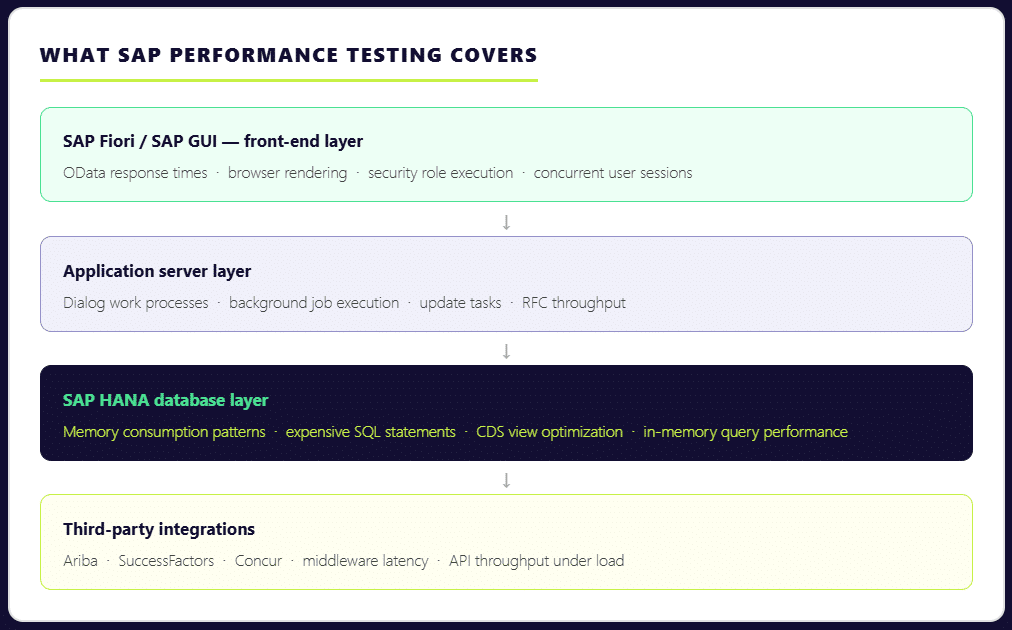
Testing SAP performance is not simply a matter of simulating users clicking through transactions. A realistic SAP performance test runs dialog work processes, background jobs, update tasks, HANA memory growth, and integration traffic simultaneously — because that’s what production looks like. Isolate any one of those layers and your results stop reflecting reality.
The complexity compounds when you consider the scale of a typical SAP environment. Over 440,000 organizations globally run SAP to manage core business operations, spanning finance, supply chain, procurement, HR, and more. Each implementation is deeply customized. Each module carries its own transaction patterns, data dependencies, and user load profiles. A sales order creation in VA01 behaves nothing like an MRP run. A financial posting during daily operations performs very differently from mass postings during period close. Your sap performance testing strategy has to account for all of it.
This is why SAP performance testing matters at every stage of the system lifecycle — not just at go-live. It’s essential when a system is first being launched to validate it can carry the expected load. It’s equally critical after the system is live, when module changes, platform updates, or infrastructure shifts can quietly degrade performance that was previously stable. And during SAP S/4HANA migrations, performance validation is non-negotiable: the architectural changes are significant enough that past performance data from ECC gives you very little reliable guidance about how the new system will behave under the same business process volumes.
Types of SAP Performance Testing
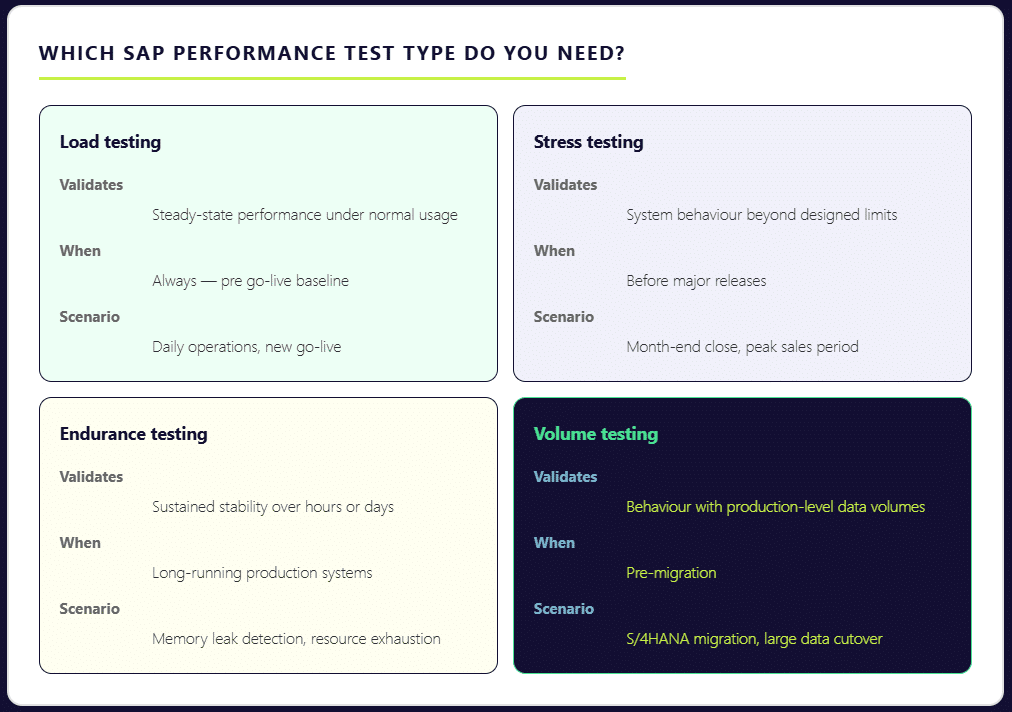
Not every SAP performance test serves the same purpose. Grouping them all under a generic “load test” is one of the most common mistakes QA teams make — and one of the most costly. Each test type is designed to surface a different category of risk. Skip the wrong one, and that risk stays hidden until production exposes it.
Load Testing
Load testing validates how your SAP system performs under steady, expected usage. It answers the most fundamental question: can your landscape support normal day-to-day business operations — order entry, financial postings, procurement workflows — without degradation? This is the baseline that every SAP performance program should establish first. Teams often underestimate its importance for finance and logistics modules, where transaction volumes are high and response time expectations are tight. According to ImpactQA, every second of delay in SAP’s response time reduces user productivity by 7% — a number that compounds quickly across hundreds of concurrent users.
Stress Testing
Stress testing pushes the system beyond its designed limits — deliberately. The goal is to find the breaking point before the business does. This is how you determine whether your current infrastructure sizing decisions are actually sufficient, or whether they hold up only under controlled conditions. If your users hit system walls during month-end close or a peak sales period, it almost certainly means stress testing was skipped or scoped too conservatively.
Endurance Testing
Also called soak testing, endurance testing runs your SAP system under sustained load over an extended period — anywhere from eight hours to two weeks. Its primary purpose is to surface memory leaks and resource exhaustion patterns that only appear after prolonged operation. A system can pass a short load test and still fail during a sustained production run. Endurance testing catches that gap.
Volume Testing
Volume testing validates system behavior when tables carry realistic data volumes. This is a frequently underestimated risk area. A sap system can handle 300 concurrent users smoothly when database tables contain limited historical data. Once production carries years of transactional records, index scans and database joins behave fundamentally differently — and what passed in testing starts failing in real world operations. The test environment must reflect actual production data volumes to produce meaningful results.
Understanding which combination of these tests applies to your specific scenario — go-live, S/4HANA migration, regular platform update, or peak period preparation — is the first step toward a testing process that actually protects your business operations.
SAP HANA Performance Testing — What’s Different
Most performance testing guidance was written for SAP ECC. If you’re running S/4HANA — or migrating to it — that guidance only gets you part of the way there.
S/4HANA’s architectural shift is significant. The HANA in-memory database processes massive volumes of data in real time. Aggregate and index tables that ECC relied on have been removed. The Fiori user interface layer introduces browser-based front-ends, OData calls, and CDS views into transactions that previously ran purely through SAP GUI. Each of these changes alters how your system performs under load — and how you need to test it.

The most common mistake teams make is running standard HTTP-based load tests and assuming the results reflect true SAP HANA performance. They don’t. In HANA-based systems, memory consumption patterns and expensive SQL statements are often the real bottleneck — not application server throughput. Transaction ST03N may show high database time, while the HANA expensive statements trace reveals inefficient CDS views or poorly optimized custom queries running underneath. If your testing doesn’t go that deep, those bottlenecks stay invisible until production surfaces them.
The risks are more tangible than they might appear. HANA memory thresholds can be breached during peak analytical queries with as few as 25 concurrent users — particularly when embedded analytics and transactional loads are running simultaneously. This is a scenario that most standard load tests never simulate, because they don’t account for the reporting layer sitting on top of the transactional layer in S/4HANA environments.
SAP HANA performance testing also demands a different validation standard. It’s not enough to confirm that data is correct. It has to be correct and delivered fast enough to support real-time business operations. A financial posting that produces accurate results in eight seconds still fails the user if the business process expectation is under three.
There are additional layers specific to S/4HANA that require dedicated test coverage: Fiori apps must be tested through the browser with real security roles, not just at the RFC layer; cloud integrations with platforms like Ariba, SuccessFactors, and Concur introduce new latency variables; and for organizations on SAP RISE Private Edition, performance management remains the customer’s responsibility — the cloud deployment model doesn’t eliminate the need for validation.
For a deeper look at how to structure your approach, our guide to optimizing SAP HANA testing covers the key considerations specific to HANA environments.
SAP Performance Testing Tools — LoadRunner, NeoLoad & Beyond
There is no single best tool for SAP performance testing. There is only the tool that matches your architecture, your team’s capability, and your delivery model. The mistake many teams make is starting with a brand name rather than starting with technical requirements. Before comparing tools, the more important questions are: What SAP protocols do you need to test — GUI, Fiori, API, or all three? Does your team have scripting expertise, or do you need low-code options? And critically — is it a periodic, project-driven activity?
With those realities in mind, here is how the leading SAP performance testing tools stack up.
SAP Performance Testing Using LoadRunner
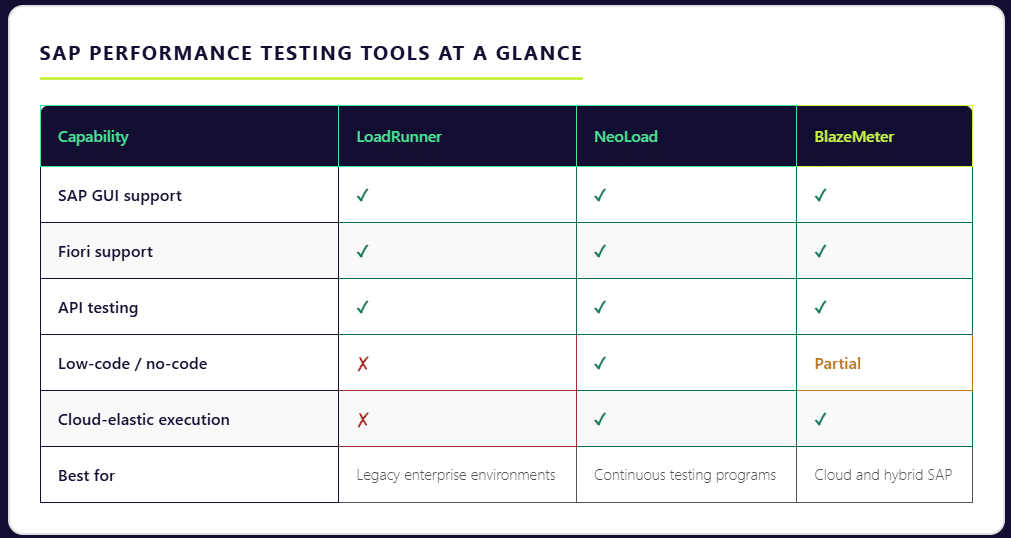
LoadRunner — now under OpenText after the Micro Focus acquisition — remains the most widely used enterprise tool for SAP performance testing. Its depth of protocol support is unmatched: it covers SAP GUI, SAP Web, and SAP Fiori natively, allowing teams to simulate end-to-end sap applications across the full user interface stack. For organizations running complex, legacy-heavy SAP environments with diverse protocol requirements, LoadRunner is often the only tool that handles the full breadth of what needs to be tested.
The trade-offs are real, however. LoadRunner scripts are written in C-based VuGen, which carries a steep learning curve and demands specialized performance engineers to build and maintain. Licensing costs can reach mid-six figures for average deployments.
Tricentis NeoLoad
NeoLoad is the tool most frequently selected when SAP performance testing needs to align with a continuous testing strategy. It provides strong SAP protocol support — including SAP GUI and Fiori — with a low-code and no-code test design interface that makes performance testing accessible beyond specialist engineers. In a controlled comparison, teams using NeoLoad reported a 70% improvement in test design efficiency compared to LoadRunner for the same test suite. Its native integration with Jenkins, Azure DevOps, and Bamboo makes it a strong fit for organizations embedding performance validation into their release pipelines.
BlazeMeter (Perforce)
BlazeMeter takes a cloud-elastic approach to SAP performance testing. It natively supports SAP GUI, Fiori, and API testing in a single platform, with execution infrastructure that scales up and down on demand — eliminating the need to provision and maintain dedicated load generation hardware. For teams that need to test SAP BTP cloud applications or hybrid environments, BlazeMeter’s cloud-native architecture maps well to the deployment model they’re already operating in.
The Broader Shift Toward Low-Code and Scriptless Testing
The tool landscape is shifting in a clear direction. By 2024, 33% of SAP testing workflows had adopted scriptless automation frameworks, and modern testing platforms now support automated script generation for more than 68% of standard SAP business processes. Between 2023 and 2025, new testing tools reduced manual testing effort by nearly 34%. The direction of travel is toward platforms that make performance testing faster to set up, easier to maintain, and accessible to QA teams without deep scripting expertise — while still producing the protocol-level fidelity that sap environments demand.
Whichever tool you select, the principle is the same: tool choice should follow architecture and team reality, not the other way around.
SAP Performance Testing Best Practices
Having the right tools is only part of the equation. How you structure and execute your SAP performance testing program determines whether it actually protects your business — or just produces reports that look thorough without catching the issues that matter. These are the practices that separate testing programs that work from those that only appear to.
Define Performance KPIs Before Writing a Single Script
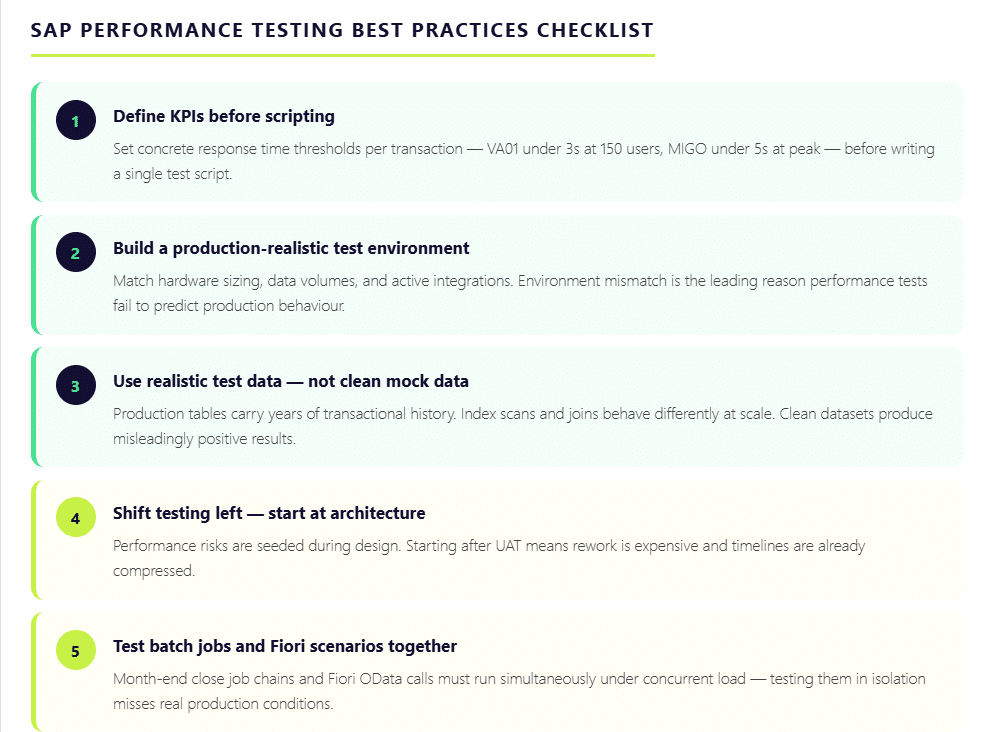
The most common reason SAP performance testing fails to deliver value is the absence of clear success criteria. Without defined thresholds, results become subjective — and subjective results don’t drive decisions. Before any test execution begins, document what acceptable performance looks like in concrete terms. VA01 order creation should complete within three seconds under 150 concurrent users. MIGO posting should not exceed five seconds during peak warehouse activity. Batch job runtimes during month-end close should stay within a defined threshold. When KPIs are clear upfront, every test run produces a measurable verdict rather than a collection of data points open to interpretation.
Build a Production-Realistic Test Environment
Environment mismatch is the single biggest reason performance tests fail to predict production behaviour. A test environment with lower hardware capacity, reduced data volumes, or missing integrations will produce results that look acceptable — right up until go-live. The test environment must reflect the actual production landscape as closely as possible: similar sizing, realistic data volumes, and active third-party integrations. Where full replication is impractical, service virtualization can simulate external dependencies without requiring the entire connected ecosystem to be live during testing.
Use Realistic Test Data — Not Clean Mock Data
Test data quality has more impact on result accuracy than tool choice. A sap system can process transactions smoothly against a clean, limited dataset and then struggle badly once production tables carry years of transactional history. Index scans and database joins behave differently at scale. Master data dependencies — material masters, business partners, purchase orders — introduce complexity that synthetic data rarely replicates accurately. The test data strategy needs to account for this, using masked production data or carefully constructed data sets that reflect real world transaction volumes and relationships.
Shift Testing Left — Start After Architecture, Not After UAT
One hour of SAP system failure can cost an organization up to $400,000. Yet most performance issues are seeded during the design phase — through architecture choices, report structures, and how much logic is pushed into ABAP — long before UAT begins. By the time performance testing happens post-UAT, rework is expensive and timelines are compressed. Starting performance validation immediately after architecture is finalized allows teams to catch structural problems when fixing them is still relatively straightforward.
Test Batch Jobs and Fiori Scenarios Together
Two areas that are routinely under-tested in isolation: month-end close batch job chains and Fiori front-end scenarios. Period-close processing triggers simultaneous background job execution — when these overlap, job collisions create bottlenecks that have nothing to do with individual transaction performance. Similarly, a transaction like ME21N may perform acceptably in the SAP GUI backend but slow significantly when tested through Fiori on a browser with real security roles and full dropdown rendering. Both layers must be tested together, under realistic concurrent load, to produce results that reflect actual business process behavior.
How Qyrus Helps with SAP Performance Testing
The tool landscape for SAP performance testing has historically forced a difficult trade-off: depth of SAP protocol coverage on one side and ease of use on the other. Traditional tools like LoadRunner deliver the protocol depth but demand specialist scripting engineers and significant infrastructure investment. Newer cloud-based tools prioritize speed and pipeline integration but often fall short on SAP-specific coverage. Most QA teams end up compromising on one or the other.
Qyrus is built to close that gap.
As a no-code test automation platform, Qyrus enables QA teams to build, execute, and manage SAP performance tests without the scripting overhead that makes traditional tools slow to set up and expensive to maintain. Teams that previously needed specialist LoadRunner engineers to develop and maintain test scripts can instead work directly within a visual interface, reducing the time from test design to execution significantly.
Where Qyrus stands apart from point solutions is in its coverage across the full SAP testing spectrum. Web, mobile, and API testing are handled within a single platform — meaning the same tool that validates your SAP Fiori front-end can test the API integrations connecting SAP to third-party systems like Ariba or SuccessFactors. For organizations running hybrid SAP environments or managing cloud-based SAP deployments, unified coverage eliminates the tool sprawl that typically inflates both cost and coordination overhead.
Critically, SAP performance validation can run continuously alongside every release cycle, catching regression before it reaches production rather than discovering it during a go-live or peak business period. This is precisely the shift that sap performance testing best practices now demand — and it’s the gap that most traditional SAP testing tools were not designed to fill.
For SAP teams preparing for S/4HANA migration, managing regular platform updates, or building toward a continuous testing model, Qyrus offers a starting point worth exploring.
Build a SAP Performance Testing Program That Holds Up When It Matters
SAP is not a system you can afford to guess about. It manages financial closes, supply chains, procurement cycles, and workforce operations — often simultaneously, often across multiple geographies. When it performs well, it’s invisible. When it doesn’t, the impact moves fast and reaches far.
The organizations that avoid costly performance failures share a common approach: they treat SAP performance testing as an ongoing discipline, not a pre-go-live checklist item. They define clear KPIs before scripting begins. They test against realistic data volumes in production-like environments. They cover load, stress, endurance, and volume scenarios — not just the ones that are easiest to run. They validate SAP HANA performance at the database layer, not just the application layer. And they embed performance validation into their release pipelines so that every change is tested, not just the major ones.
With SAP ECC support ending in 2027 and tens of thousands of S/4HANA migrations underway right now, the window for getting this right is narrower than it has ever been. Performance issues discovered during migration are manageable. The same issues discovered after go-live are not.
The right testing program starts with the right platform. If your team is evaluating how to build a faster, more continuous approach to SAP performance testing — one that doesn’t require specialist scripting engineers or separate tools for every test type — request a Qyrus demo and see how no-code SAP test automation works in practice.
Frequently Asked Questions: SAP Performance Testing
What is SAP performance testing and why is it important?
SAP performance testing is the process of evaluating how an SAP system behaves under real-world load conditions — measuring transaction response times, system stability, throughput, and resource utilization before those conditions appear in production. It matters because SAP manages mission-critical business operations across finance, supply chain, procurement, and HR. Performance failures in these environments are expensive: one hour of SAP system downtime can cost an organization up to $400,000, and every second of response delay reduces user productivity by 7%. Performance testing identifies bottlenecks before they become business disruptions.
What are the main types of SAP performance testing?
There are four primary types of SAP performance testing, each designed to surface a different category of risk. Load testing validates system behavior under normal, expected user volumes. Stress testing pushes the system beyond its designed limits to find the breaking point before production does. Endurance testing — also called soak testing — runs sustained load over hours or days to surface memory leaks and resource exhaustion patterns. Volume testing validates how the system performs when database tables carry realistic production-level data volumes, which often behave very differently from the clean, limited datasets used in standard test environments.
How is SAP HANA performance testing different from traditional SAP testing?
SAP HANA introduces architectural changes that standard load testing approaches were not designed to handle. The in-memory database processes data in real time, aggregate and index tables have been removed, and the Fiori user interface layer adds browser-based front-ends and OData calls to transactions that previously ran through SAP GUI alone. In HANA-based systems, the real bottlenecks are often memory consumption patterns and expensive SQL statements — inefficient CDS views or poorly optimized custom queries — that standard HTTP-based testing never reaches. SAP HANA performance testing requires validating at the database layer, not just the application layer, and must account for embedded analytics running simultaneously with transactional loads.
What tools are used for SAP performance testing?
The most widely used tools for SAP performance testing are LoadRunner (OpenText), Tricentis NeoLoad, and BlazeMeter (Perforce). There are modern no-code/low-code tools like Qyrus that are beneficial for users with a shift-left approach. The right tool depends on your SAP architecture, team capability, and whether performance testing needs to be run as a periodic activity.
What are the best practices for SAP performance testing?
Effective SAP performance testing starts with defining clear KPIs before any scripting begins — specific response time thresholds for critical transactions like VA01 or MIGO under defined concurrent user loads. Tests should run in a production-realistic environment using realistic data volumes, not clean mock datasets that produce misleadingly positive results. Performance testing should start after architecture is finalized, not after UAT, since performance risks are seeded at the design stage. Batch job chains and Fiori front-end scenarios must be tested together under concurrent load, not in isolation. Regular business changes and platform updates can introduce performance regression incrementally, and only continuous testing catches it before it reaches production.

 October 15, 2026
  4 min
4 min