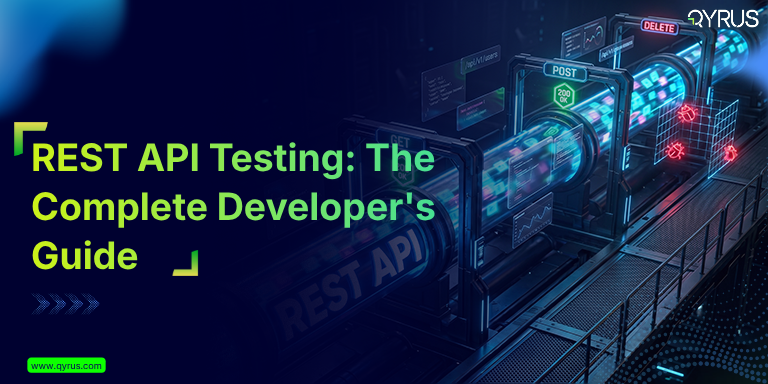
REST API Testing: The Complete Developer’s Guide
 Varun RS
83% of public APIs are built using REST architecture
REST API testing is the process of validating the requests, responses, authentication mechanisms, error handling, and performance characteristics for a RESTful web service — without touching the user interface.
It is one of the most powerful techniques a development team can implement to catch defects early, add contracts between services, and ensures product works before every release.
This guide explains everything you need to know about REST API testing. It covers:
- What REST API testing actually checks
- The important HTTP methods and status codes you should test
- The main types of testing (functional, performance, security, and contract)
- How to automate your tests effectively
- The right tools to use — and what separates professional testing from basic, random testing
If you’re trying to build your very first API test or improving an existing test suite, you’ll find practical techniques that you can start using right away.
What Does REST API Testing Mean?
REST (Representational State Transfer) APIs interact with each other over HTTP. They accept structured requests and return structured responses — usually with JSON. Because they sit between the frontend and the backend, it’s the most important integration point in a application. Every mobile app, every web dashboard, and every microservice dependency runs through them.
REST API testing verifies that this contract behaves exactly as documented. It checks that the API returns the right data, puts the authentication correctly, handles invalid input properly, performs within acceptable latency limits, and exposes no security vulnerabilities.
The business case is direct. According to Forrester’s research on autonomous testing platforms, while there are more than 50% companies targeting coverage but only 23–25% of them have actually automated test coverage. The gap is not due to tooling issues it’s in testing strategy.
Teams that run happy-path functional tests while ignoring contract validation, negative-path coverage, and performance baselines. Qyrus helps reduce that gap.
Key Stat
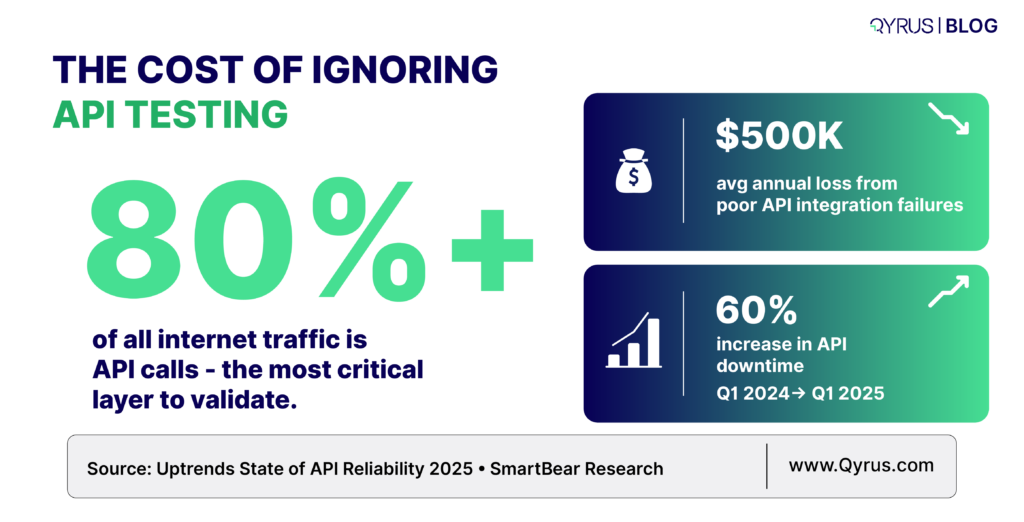
A single integration failure can cost companies up to $500,000 per year — yet most teams still under-invest in API test coverage beyond basic functional checks.
Understanding HTTP Methods: The Foundation of Test Cases
Every REST API test case begins with an HTTP method. Understanding what each method is supposed to do — and what invariants it must uphold — explains what you need to verify.
HTTP Method | Operation | Idempotent? | Safe? | Key Test Focus |
GET | Retrieve a resource | Yes | Yes | Response body shape, status 200/404, query param handling |
POST | Create a resource | No | No | Request validation, 201 on success, duplicate handling |
PUT | Replace a resource | Yes | No | Full body replacement, 200/204, missing field behavior |
PATCH | Partially update a resource | No | No | Partial update accuracy, unchanged field preservation |
DELETE | Remove a resource | Yes | No | 204/200 on success, 404 on missing, idempotency |
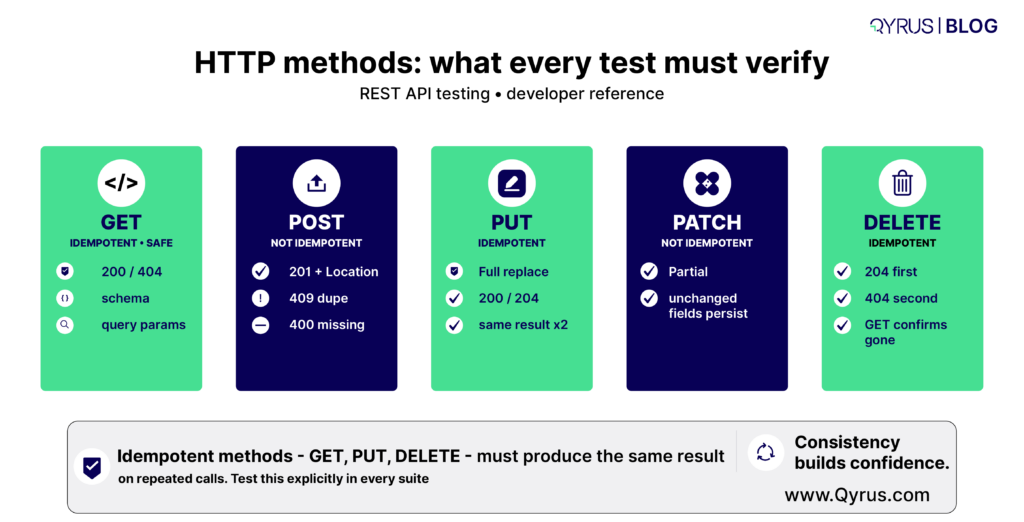
Idempotency is a critical testing invariant: If you call GET, PUT, or DELETE multiple times with the same inputs must produce the same result. Your test suite should verify this — particularly for DELETE, as here a second call against an already-deleted resource should return 404, not 500.
HTTP Status Codes: What Your Tests Must Verify
Status codes are the only way to understand what happened with the API. Just checking for a 200 OK response is not enough. A good test must also verify if the response body contains the correct data, the expected side effects actually happened and if the error cases are properly handled.
Relying only on a 200 status means you’re missing the full picture. That’s why you need to know about codes.
2xx — Success Codes
- 200 OK: Standard success for GET, PUT, PATCH. It means the response body matches the expected schema.
- 201 Created: Must accompany POST requests that create resources. Verify the Location header points to the new resource.
- 204 No Content: Common for DELETE and some PUT operations. The body must be empty — assert that explicitly.
4xx — Client Error Codes
- 400 Bad Request
We get it when the request is badly formed — for example, invalid JSON, missing fields, or wrong data types. Always test these “negative” cases.
- 401 Unauthorized
Triggered when no login token is sent or the token is invalid. Test this on every protected endpoint.
- 403 Forbidden
It happens in cases where the user has a valid token but doesn’t have permission for that action. We need to check that role-based access control and see if it works correctly.
- 404 Not Found
Returned when the requested resource doesn’t exist. Test with both correct-looking and incorrect IDs.
- 409 Conflict
Happens during duplicate actions or when a business rule is broken (e.g., creating the same record twice). Make sure the error message is clear and helpful.
- 422 Unprocessable Entity
Gets triggered when the request looks correct but fails specific validation rules. We need to check that each field shows a proper error message.
- 429 Too Many Requests
We get it when someone exceeds the rate limit. You must verify that the Retry-After header is included so the user knows when to try again.
5xx — Server Error Codes
5xx errors should never be a designed response to valid or invalid client input. If your tests produce 500 responses against documented inputs, that is a defect. Test suites should treat any unexpected 5xx as an automatic failure, regardless of the specific code.
The Six Dimensions of REST API Testing
A comprehensive REST API test strategy covers six distinct test types. Most teams focus on functional testing and leave the rest partially or completely uncovered — which is where production incidents originate. And that’s exactly where we should start.
1. Functional Testing
In functional testing we verify that the API does what its documentation says. This means testing every endpoint with valid inputs (happy paths) and asserting on the response status, body structure, data types, and field values. It also means testing with boundary values, edge cases, and combinations of optional parameters.
Key assertions that we must include:
- Status code matches the documented response for this scenario
- Response body matches the documented schema (field names, types, required vs. optional)
- Returned data matches the data that was submitted or the known state of the system
- Headers include correct Content-Type and any documented custom headers
- Response time is within an acceptable threshold (even in functional tests, set a loose SLA assertion)
Functional testing answers the question — “Does the API do what it’s supposed to do?”
2. Negative Testing and Input Validation
Negative testing verifies that the API fails safely and informatively when given invalid inputs. This is where most functional test suites stop short — and where the most damaging production bugs hide.
For each endpoint, design tests that send:
- Missing required fields
- Wrong data types to check strings where integers are expected, and vice versa.
- Boundary violations — values one step beyond the documented minimum and maximum
- Special characters, Unicode edge cases, and SQL-like injection strings in string fields
- Extremely large payloads to probe size limits
- Malformed JSON or XML
In all of of the cases above your API should return a 4xx status code with a structured error message that shows which field failed and why. A 500 response to any of these inputs is a defect.
Best Practice Here is to
Use equivalent partitioning to merge inputs into valid and invalid classes, then select representative test cases from each class. Combined with boundary value analysis, this approach will help generate the highest defect-detection output based on per test case written.
3. Contract Testing
Contract testing is process that ensures the API’s actual responses matches with the specification it publishes. In most cases typically an OpenAPI (previously known as Swagger) document. This is different from functional testing, which checks behavior. Contract testing checks the shape.
A developer who changes a field’s type from integer to string, renames a field, or removes a response property may not realize how many consumers that silently breaks. Contract tests catch these breaking changes before they reach production.
In a microservices architecture, consumer-driven contract testing goes further: each consumer service publishes the specific fields and behaviors it depends on, and those contracts become automated tests run against the provider. Tools like Pact implement this pattern. The OpenAPI specification is your contract artifact — treat it as a first-class test input, not just documentation.
4. Performance Testing
Performance testing checks if the API can match its latency and throughput requirements under real and peak loading conditions. A functional test that passes at one user can recreate catastrophic performance regressions that only appear at scale.
Key metrics that we need to check for:
- p50, p95, p99 response latency — not just averages, which mask tail latency
- Throughput in requests per second (RPS) at target load
- Error rate under load — any increase above the baseline is a regression
- Database query time and CPU time breakdown to identify specific bottlenecks
You should run your performance tests with realistic data volumes. Because an endpoint that returns a response in just 50 milliseconds with 100+ records can suddenly take 8 seconds or more when working with 90,000+ records.
These kinds of performance issues often only appear when you use production-scale data. That’s why it’s important to create and define performance baselines early so you can enforce them in your CI/CD pipeline.
5. Security Testing
REST API Security Testing is done to make sure your authentication and authorization are put across correctly and sensitive data is protected and the API is not vulnerable to usually known attack patterns. The OWASP API Security Top 10 is the good resource to check on what to test.
What needs to be covered:
- Authentication Bypass
Test every protected endpoint by trying: no token, an expired token, a malformed token, and a token from a different environment.
- Broken Object-Level Authorization (BOLA)
Check that a user cannot view or change another user’s data by simply changing IDs in the URL or request body.
- Excessive Data Exposure
Make sure the API doesn’t return more information than it should — especially sensitive data like personal information (PII), internal IDs, or secrets.
- Mass Assignment
Try sending extra fields that are not documented in the API (via POST or PUT) and verify the API safely ignores or rejects them.
- Rate Limiting
Confirm the API limits how many requests you can make and returns a 429 Too Many Requests response with a Retry-After header.
- Injection Attacks
Send dangerous inputs like SQL code, command injection strings, or SSRF payloads into text fields to ensure the API blocks them.
6. Integration and End-to-End Testing
Integration testing is the process to validate a sequence of API calls and to check if it produces the correct system state. This goes beyond testing individual endpoints in isolation — it tests workflows.
For example: create a user, authenticate as that user, create a resource under that user’s account, verify the resource appears in a list endpoint, then delete it and verify it no longer appears.
End-to-end tests check the entire flow by connecting multiple services together.They make sure data moves correctly from one service to another. In a microservices setup, this means the output from one API becomes the input for the next API — and the final result matches the expected business outcome. This is why API process testing or API chaining tools are so important.
Automating REST API Testing: Strategy and CI/CD Integration
Manual API testing with tools like Postman or cURL is good for exploration and debugging — but it does not scale to production-grade quality assurance. But once your API has more than a handful of endpoints, manual verification becomes inconsistent, time-consuming, and impossible to repeat reliably across every code change.
So with automated API testing we can solve this by turning your test scenarios into repeatable, machine-executable checks that run without human intervention — on every commit, every pull request easily.
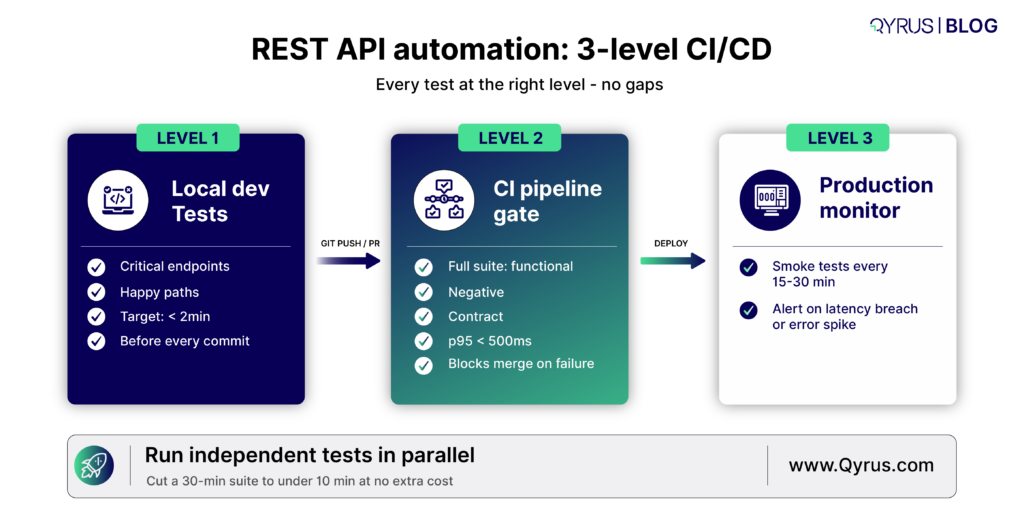
There are three levels to this:
Level 1: Local Developer Tests
Developers run a fast subset of API tests before committing code. This suite should complete in under two minutes and cover the most critical endpoints and happy paths. The goal is immediate feedback during development, not comprehensive coverage.
Level 2: CI Pipeline Gate
Every pull request triggers the full test suite. This suite includes all functional tests, negative tests, contract tests, and a lightweight performance assertion (e.g., p95 < 500ms). The pipeline blocks merges on any failure. This is where the bulk of your defect detection happens.
Level 3: Scheduled and Production Monitoring
A smaller set of smoke tests runs continuously against staging and production environments to catch regressions that only appear in live infrastructure — configuration drift, third-party dependency failures, or data-volume-related degradations.
Architecture Note
Independent nodes in your test workflow should run in parallel. Sequential execution is the default in most frameworks but is rarely necessary — most API tests have no dependency on each other’s execution order. Parallelization can reduce a 30-minute suite to under 10 minutes with no additional infrastructure cost.
Parameterization and Data-Driven Testing
A single test script contains logic: it sends a request, receives a response, and checks whether the result matches expectations. What changes between scenarios is the input — the payload, the query parameters, the authentication credentials, the edge case values.
Data-driven testing separates that variable input from the fixed logic, so one script can help to validate multiple other scenarios without repeating a line of assertion code.
This is useful when:
- We are testing the same endpoint with valid inputs from different user roles
- You merge boundary and equivalence class testing with a controlled input matrix
- Regression testing against a library of historical production requests that previously caused failures
Service Virtualization for Dependency Management
REST APIs frequently depend on other services — third-party APIs, payment gateways, authentication providers, or downstream microservices. When those dependencies are unavailable, unreliable, or expensive to call in test environments, service virtualization (also called API mocking) allows you to simulate their responses with controlled, deterministic behavior.
Service virtualisation solves this by replacing real dependencies with simulated stand-ins that return controlled, predictable responses. Instead of calling the actual payment gateway, your test calls a mock that always responds with a specific status code, payload, or latency.
REST API Testing Checklist
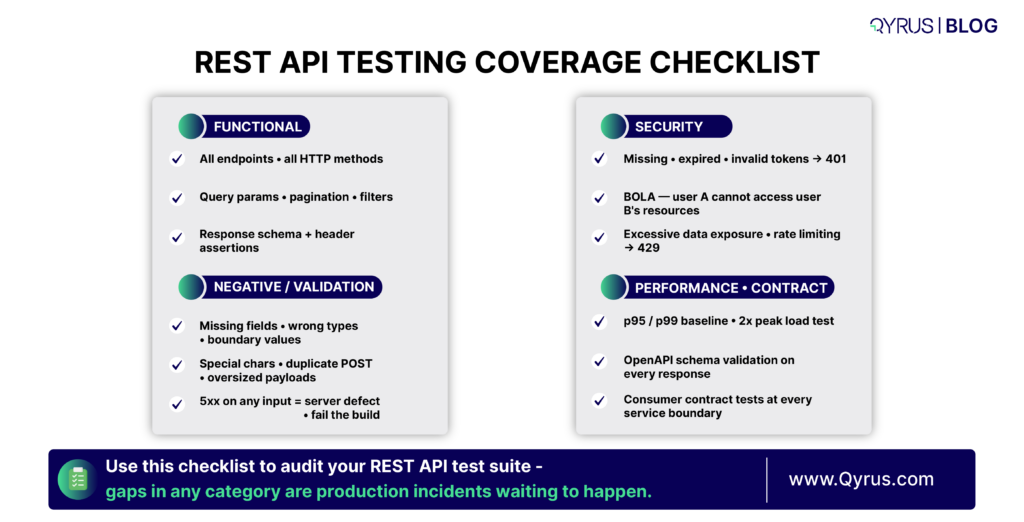
Use our Qyrus designed checklist when designing test coverage for a new or existing API:
Functional Coverage
- All documented endpoints covered with at least one happy-path test
- GET, POST, PUT, PATCH, DELETE each tested per endpoint where applicable
- Query parameters tested individually and in combination
- Pagination tested: first page, last page, beyond last page, invalid page values
- Filtering and sorting parameters tested with valid and invalid values
Negative and Validation Coverage
- All required fields tested for absence
- All fields tested for wrong data types
- Boundary values tested for numeric and string-length constraints
- Special characters and encoding edge cases tested in string fields
- Duplicate creation attempts tested for POST endpoints
Security Coverage
- All protected endpoints tested with missing, expired, and invalid tokens
- Object-level authorization tested: can user A access user B’s resources?
- Response bodies audited for excessive data exposure
- Rate limiting verified on public-facing endpoints
Performance Coverage
- Baseline latency established for all critical endpoints
- Load test run at 2x expected peak traffic
- p99 latency asserted in CI pipeline
- Large dataset response times tested
Contract Coverage
- All responses validated against OpenAPI schema
- Breaking change detection integrated into CI
- Consumer contracts validated against provider for each microservice boundary
Common REST API Testing Mistakes to Avoid
Even experienced teams fall into these patterns. Each one creates a blind spot that eventually produces a production incident.
- Testing only the happy path
This is the biggest mistake. If your tests never try invalid tokens or bad inputs, you don’t actually know if your authentication works.
- Asserting only on status codes
Just checking for a 200 OK response is not enough. A 200 with wrong data, missing fields, or old information is still a bug. Always check the full response body too.
- Ignoring idempotency
Not checking that GET, PUT, and DELETE give the same result when you call them multiple times with the same data.
- Hardcoding test data
Tests that rely on specific data already existing in the system are very fragile. Instead, create and clean up your test data automatically in every test.
- Skipping performance baselines
Adding a simple check like “response time under 500ms” only takes a few minutes. Without it, you won’t notice when a slow database query gets released to users.
- Treating all 5xx errors as acceptable
Any 5xx server error on a valid request (or even invalid ones that are documented) should fail your test. It means something is wrong on the server.
- Not testing authentication expiry
Tokens expire. You must test that your API correctly returns 401 Unauthorized for expired tokens and that the token refresh process works properly.
How Qyrus Accelerates REST API Testing
Building and maintaining a comprehensive REST API test strategy at the scale described in this guide is non-trivial. The discipline requires careful test design, robust parameterization, reliable service virtualization, and tight CI/CD integration — all of which accumulate maintenance overhead over time.
Qyrus is a unified, AI-powered testing platform that addresses the full lifecycle of REST API testing without requiring deep scripting expertise. Its codeless environment supports functional, performance, and security test runs against REST, SOAP, and GraphQL APIs. Nova AI analyzes API responses and automatically generates assertions for headers, JSON body, JSON Path expressions, and schema validation — dramatically accelerating the test creation phase.
For teams dealing with external dependencies, the Qyrus API Builder can generate mock APIs from a natural language description, providing immediate service virtualization without manual configuration. API Process Testing supports end-to-end workflow validation by chaining multiple REST calls, extracting response data using JSON path expressions, and passing it into subsequent requests — precisely the kind of integration testing that catches real-world defects.
The platform integrates natively with CI/CD pipelines including Jenkins and Azure DevOps, and connects directly to test management tools like Jira, Xray, and TestRail. Performance runs capture p50, p95, p99 latency, throughput, and active thread counts with built-in graphical reporting.
If your team is looking to build a REST API testing program that goes beyond happy-path functional checks — one that covers contract validation, security, performance baselines, and automated regression — explore what Qyrus API Testing can do for your team.
Summary: Key REST API Testing Concepts
Concept | Why It Matters |
HTTP Method Idempotency | GET, PUT, DELETE must return the same result on repeated calls — a critical invariant to verify. |
Status Code Assertions | Always assert the exact expected status code per scenario — not just 2xx vs non-2xx. |
Negative Testing | Invalid inputs must return structured 4xx errors, never 5xx. |
Contract Testing | OpenAPI schema validation catches silent breaking changes before they reach consumers. |
Performance Baselines | Establish p95/p99 thresholds early and enforce them in CI. |
Security Test Cases | Auth bypass, BOLA, and excessive data exposure must be tested on every protected endpoint. |
Service Virtualization | Mock unavailable dependencies to test error-path behavior deterministically. |
Data-Driven Automation | Parameterized tests multiply coverage with minimal maintenance overhead. |
Frequently Asked Questions:
Q: What is the difference between REST API testing and UI testing?
UI testing validates the application through its graphical interface by checking clicks, forms, and visual elements. REST API testing validates the backend service directly by sending HTTP requests and checking responses, without any browser or UI. API tests are usually 3–10x faster, can run early in development, and help find bugs more precisely. The two approaches complement each other: API tests catch backend logic issues while UI tests verify the end-user experience. Most teams achieve the best results with a 70/30 split — more API tests than UI tests.
Q: How do I test REST API authentication and authorization correctly?
Authentication testing ensures the API accepts valid credentials and rejects invalid ones. For every protected endpoint, you should test at least four cases: a valid token (expects success), no token (expects 401), an expired token (expects 401), and a malformed token (expects 401). Authorization testing checks that a valid token only allows actions permitted by the user’s role. The most important test is Broken Object-Level Authorization (BOLA) — verifying that User A cannot access or modify User B’s data by changing IDs in the request. It should return 403 Forbidden, not 200.
Q: What is contract testing and when should I add it to my test suite?
Contract testing verifies that the API’s actual responses match the schema defined in your OpenAPI specification. It checks field names, data types, and required fields. You should add contract testing once you have a published OpenAPI spec and at least one consumer (frontend, mobile app, or another service) depending on the API. In microservices, it is especially valuable early on to catch breaking changes that functional tests might miss.
Q: What HTTP status codes should my negative test cases target?
Your negative tests should cover these status codes: 400 Bad Request (malformed payload, missing fields, type mismatch), 401 Unauthorized (missing or invalid token), 403 Forbidden (authenticated but not permitted), 404 Not Found (resource doesn’t exist), 409 Conflict (duplicate or business rule violation), 422 Unprocessable Entity (valid syntax but fails validation), and 429 Too Many Requests (rate limiting). Any 5xx response to a documented request is considered a server-side defect and should fail the test.
Q: How should I approach REST API performance testing?
Start by establishing a latency baseline for your critical endpoints under low load. Record p50, p95, and p99 response times. Then run load tests at expected peak traffic and at twice that volume. Focus on key metrics: throughput (requests per second), error rate under load, and tail latency (p95/p99). Add simple performance assertions (e.g., p95 < 500ms) into your CI pipeline. Always test with realistic data volumes, as performance can degrade significantly with larger datasets.

 October 15, 2026
  4 min
4 min