Android 17 Beta 4 Is the Final Call — Is Your App Ready?
 Varun RS
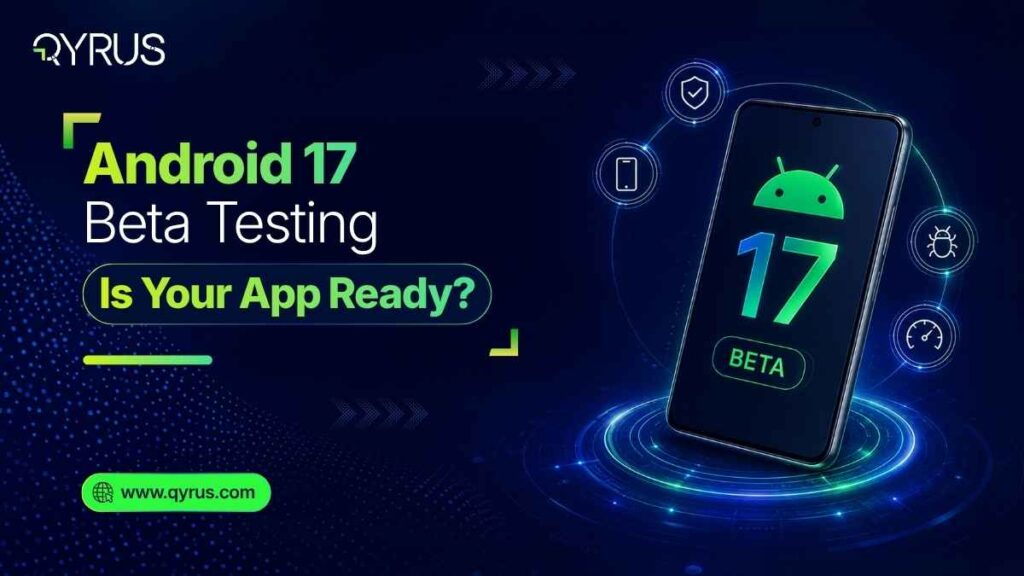
Android 17, codenamed Cinnamon Bun, is weeks away from going stable. Google released Beta 4 on April 16, 2026 — the last scheduled beta before the full public launch expected in June. That is not a soft deadline. The API is locked. Behavior changes are final. There are no more grace periods left in this cycle.
For QA teams and mobile developers, this moment is the last clear window to validate against what will ship to over three billion active Android devices. And unlike previous cycles, Android 17 is not a cosmetic update. It carries four breaking changes that will silently break mainstream app categories — banking, streaming, fintech, and e-commerce — if they haven’t been tested.
The good news: Qyrus has already validated Android 17 Beta 4 on its Device Farm. Android 17 devices are available to your team today. The testing environment is ready — the only question is whether your app is.
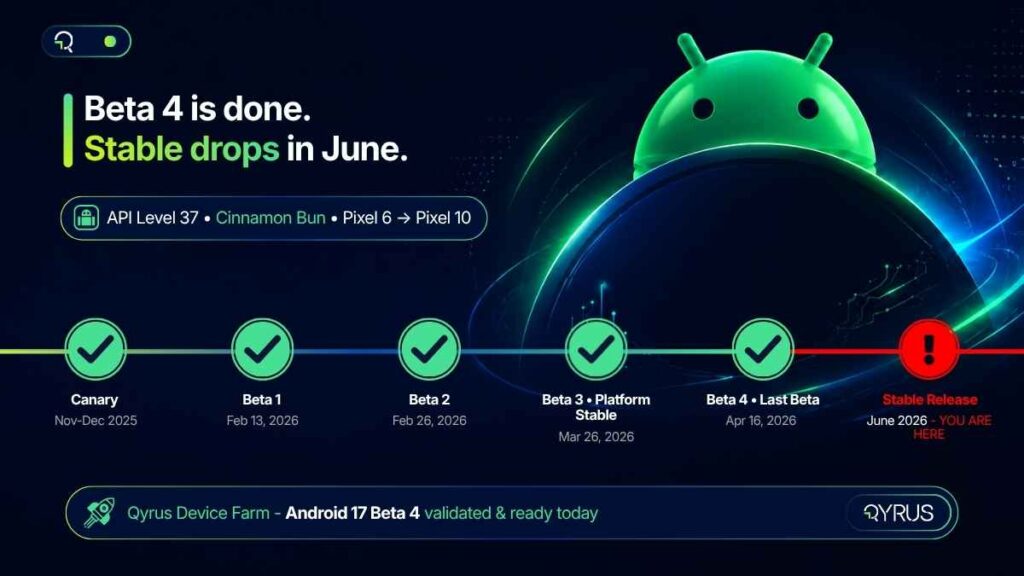
Android 17 Release Timeline at a Glance
Milestone | Date | Status | Action for QA Teams |
Canary / DP Builds | Nov–Dec 2025 | ✅ Complete | Early API exploration |
Beta 1 | Feb 13, 2026 | ✅ Complete | Start compatibility scans |
Beta 2 | Feb 26, 2026 | ✅ Complete | Handoff API testing |
Beta 3 (Platform Stable) | Mar 26, 2026 | ✅ Complete | Lock test baselines |
Beta 4 (Last Beta) | Apr 16, 2026 | ✅ Complete | Final regression runs |
Stable Release | June 2026 | ⏳ Imminent | YOUR APP MUST BE READY |
What’s New in Android 17 (Cinnamon Bun): A QA Engineer’s Briefing
Android 17 (API level 37) is Google’s most significant platform restructuring in several years. Before diving into what breaks, here is what is new — and why each feature creates immediate testing obligations.
App Bubbles — Any App Can Now Float
Google has extended the Bubbles system beyond messaging apps to every application on the platform. Users can now long-press any app icon and open it as a floating window that overlays whatever is currently on screen. On tablets and foldables, a Bubble Bar anchors to the taskbar and holds recently bubbled apps.
For QA teams, this introduces a new class of test scenarios: z-order conflicts (does your app behave correctly when partially obscured by another app’s bubble?), multi-window state preservation when a bubbled session is interrupted, and layout integrity when your app itself is opened as a bubble on a foldable device.
Handoff API / ‘Continue On’ — Cross-Device State Transfer
Announced at Google I/O 2026 as ‘Continue On,’ the Handoff API allows users to transfer the active state of an app from one Android device to another. Start composing an email on a Pixel 9 phone, and a suggestion appears on a nearby Pixel Tablet to pick up exactly where you left off. The system synchronizes state via CompanionDeviceManager and supports both native app-to-app transitions and app-to-web fallback.
The testing implications are significant. Apps that participate in Handoff need to correctly serialize state, handle graceful fallback when the native app isn’t installed on the receiving device, and maintain session continuity over WiFi under variable network conditions.
Native App Lock — System-Level Biometric Protection
For the first time, Android ships a built-in App Lock that requires no third-party vault app. Users long-press any app icon, select ‘App lock,’ and choose their authentication method — PIN, pattern, password, or biometric. Notifications from locked apps are masked: instead of showing content, users see ‘New message’ or ‘New notification.’
This is a critical feature for fintech, healthcare, and banking apps. Testing must cover the full authentication flow, correct masking of notification content for locked apps, and behavior after failed authentication attempts.
Desktop Interactive PiP — External Monitor Support
Building on Android 16’s desktop mode foundations, Android 17 Beta 3 introduced Interactive Picture-in-Picture (iPiP) for external display sessions. When a Pixel device is connected to a monitor, apps run as fully interactive floating windows — not static mirrors. Widgets scale correctly, and the Bubble Bar is available for multitasking.
Apps that interact with external displays now need to be tested in this mode, validating input handling, widget rendering, and interactive state when the app runs as a floating iPiP window.
Frosted Glass / Material 3 Expressive UI
Android 17 applies a system-wide translucent Gaussian blur effect — a frosted glass aesthetic — to the volume panel, power menu, notification shade, and Quick Settings. This is the most visually disruptive change for screenshot-based test assertions. Any test suite relying on exact pixel matching against Android 16 baselines will fail immediately. Visual regression baselines need to be reset entirely before your first Android 17 test run.
Digital Wellbeing: Pause Point
Android 17 introduces Pause Point — a 10-second interstitial screen that appears before opening an app the user has marked as distracting. For QA teams, this is relevant for any automation flow that launches an app after a user has configured digital wellbeing restrictions. Test scripts that assume immediate app launch will break if the device under test has Pause Point enabled.
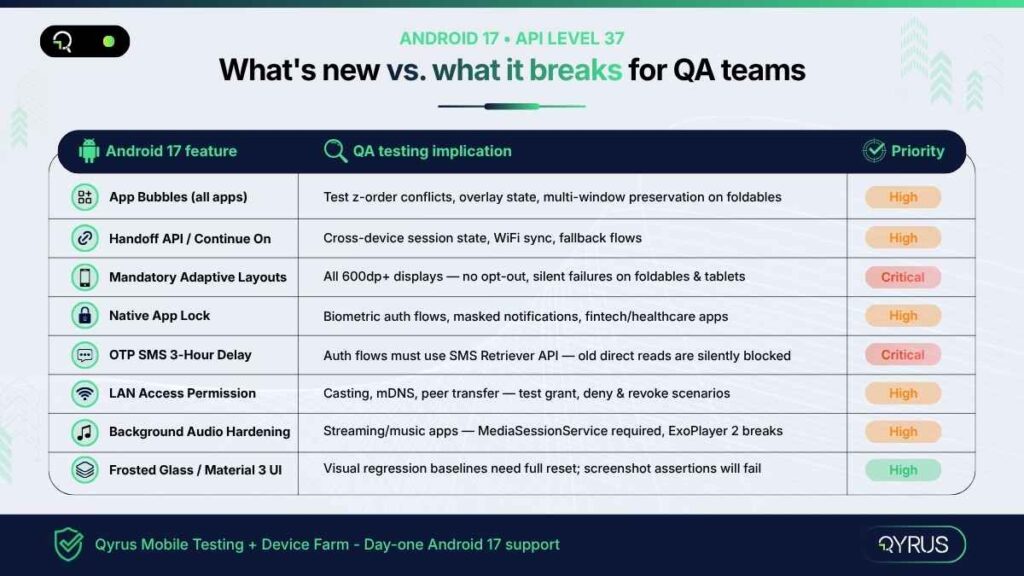
Android 17 Features vs. QA Testing Implications
Android 17 Feature | QA Testing Implication | Complexity |
App Bubbles (All Apps) | Test z-order conflicts, overlay state, multi-window preservation | High |
Handoff API / Continue On | Cross-device session state, fallback flows, WiFi sync | High |
Mandatory Adaptive Layouts | All tablet/foldable UI — no opt-out, silent breakage risk | Critical |
Native App Lock | Biometric auth flows, masked notifications, fintech/healthcare apps | High |
OTP SMS 3-Hour Delay | Auth test flows must use new SMS Retriever API path | Critical |
LAN Access Permission | Casting, mDNS, peer transfer — all need explicit grant now | High |
Background Audio Restrictions | Streaming/music apps — MediaSessionService foreground service required | High |
Frosted Glass / Material 3 UI | Visual regression baselines will need full reset | Medium |
The Silent App-Killers: Android 17 Breaking Changes You Cannot Ignore
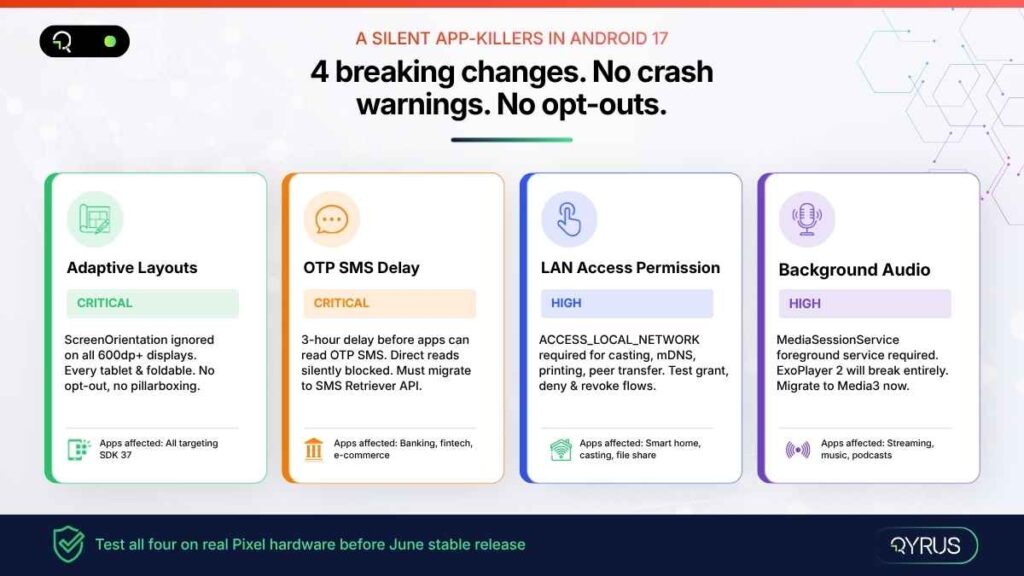
New features generate headlines. Breaking changes generate production incidents. Android 17 ships four behavior changes that will affect mainstream app categories at scale — and none of them announces itself with a crash. They surface as subtle regressions, failed test flows, and user-facing errors after the stable release ships.
⚠ If your app does any of these four things and you have not tested on Android 17 Beta 4, you have a production incident waiting in June.
1. Mandatory Adaptive Layouts — No Opt-Out, No Warning
Starting with API level 37, Android completely ignores the screenOrientation, resizeableActivity, minAspectRatio, and maxAspectRatio manifest attributes on any display wider than 600dp. That means every tablet and every foldable device on the market.
Your app will fill the entire screen window regardless of what your manifest says. There is no pillarboxing, no opt-out. The failure mode is not always a crash — it is often far subtler. A camera preview stretched sideways. Navigation buttons pushed off-screen on a Pixel Fold. User state lost silently when the device is rotated. These are the kinds of bugs that reach production and damage reviews before anyone realizes what happened.
Every app targeting SDK 37 must be tested across at least three screen form factors: a standard phone, a foldable, and a tablet. This is not optional from a Play Store compliance perspective.
2. OTP SMS 3-Hour Delay — Banking and Fintech Alert
Android 17 introduces a mandatory three-hour delay before most apps can programmatically read SMS messages containing a one-time password. The SMS_RECEIVED_ACTION broadcast is withheld, and SMS provider database queries are filtered for apps targeting API level 37.
Exemptions are narrow: the default SMS app, assistant apps, and apps that have correctly implemented the SMS Retriever or SMS User Consent APIs. Apps that read OTP codes directly from SMS — a common pattern in banking, e-commerce checkout flows, and two-factor authentication — will silently fail after the update.
The QA implication is direct: your OTP authentication test flows must be updated to simulate the new API path, not the legacy direct SMS read. Any test that validates a login or checkout OTP flow using the old pattern will produce a false pass on Android 16 and a production failure on Android 17.
3. Local Network Access Requires Explicit Runtime Permission
Apps can no longer discover or communicate with devices on the local network without an explicit user grant. Android 17 introduces the ACCESS_LOCAL_NETWORK permission (part of the NEARBY_DEVICES group), which triggers a system permission prompt identical to the photo and contacts pickers.
The scope of impact is broad: screen mirroring and casting, wireless printing, Chromecast integration, smart home device discovery via mDNS, and peer-to-peer file transfer all require this explicit grant. Apps that use any of these features need to test three scenarios: the user grants the permission, the user denies it, and the user revokes it mid-session. Graceful degradation — not crashes — must be the result in all three cases.
4. Background Audio Hardening — Streaming Apps Must Adapt
Android 17 strictly enforces new restrictions on background audio interactions for apps targeting API level 37. Audio playback, audio focus requests, and volume adjustments made while the app is not visible to the user now require a foreground service using MediaSessionService.
Apps that still use the deprecated ExoPlayer 2 library (com.google.android.exoplayer2) will break entirely — not degrade gracefully. Google’s Media3 library (stable since March 2026) is the required migration path. If your streaming, podcast, or music app has not migrated from ExoPlayer 2 to androidx.media3, Android 17’s stable release is the forcing function.
Test scenarios must cover background audio initiation, audio focus handling when another app takes focus, and correct foreground service lifecycle management.
Why Real Device Testing Matters More Than Ever with Android 17
Emulators have their place in development. They do not have a place as your primary Android 17 test environment.
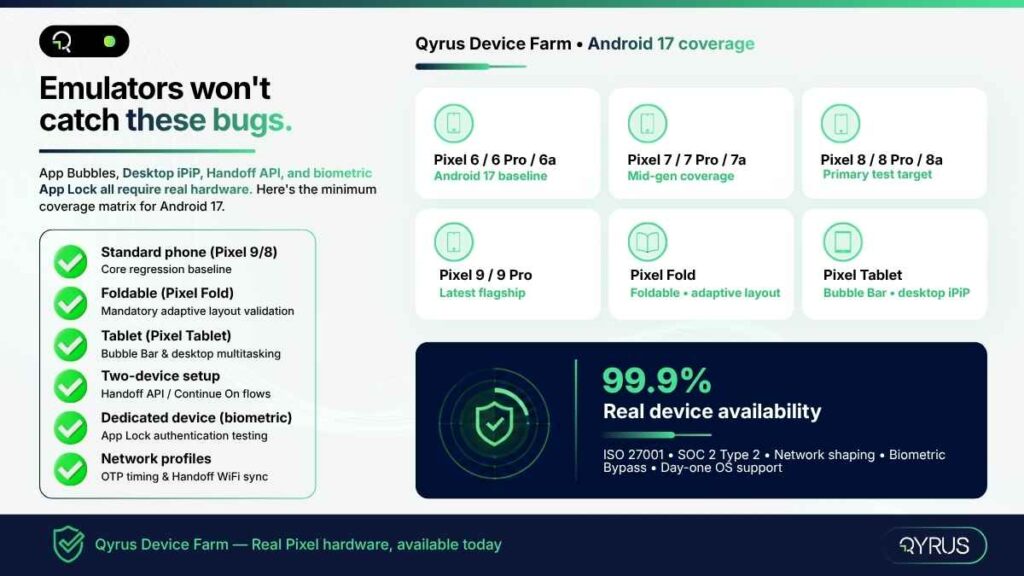
Android 17’s most significant changes — App Bubbles, Desktop iPiP, Handoff API, and adaptive layout enforcement — all involve hardware-specific behavior that emulators cannot replicate faithfully. The Bubble Bar behaves differently on a Pixel Fold than it does on a Pixel Tablet. Desktop Interactive PiP requires a physical external monitor connection. The Handoff API depends on real WiFi communication between two physical devices. Biometric bypass for App Lock testing is simply not possible on an emulator.
There is also the fragmentation dimension. Android 17 supports Pixel 6 through Pixel 10 — five hardware generations with meaningfully different screen sizes, aspect ratios, foldable form factors, and chipsets. The adaptive layout changes that look fine on a Pixel 9 can silently break the camera interface on a Pixel Fold. Testing a single device is not a regression suite.
Network conditions matter too. The Handoff API synchronizes state over WiFi via CompanionDeviceManager. The three-hour OTP delay creates new timing dependencies in authentication flows. Testing these scenarios on a real device with configurable network profiles — simulating 4G, LTE, congested WiFi — is the only way to catch timing-sensitive failures before they affect users.
Real Device Testing Checklist for Android 17: |
✓ Standard phone (Pixel 9 or Pixel 8) — core regression baseline |
✓ Foldable device (Pixel Fold) — mandatory adaptive layout validation |
✓ Tablet (Pixel Tablet) — Bubble Bar and desktop multitasking |
✓ External display session — Desktop Interactive PiP |
✓ Two-device setup — Handoff API / Continue On flows |
✓ Network profiles — OTP timing, Handoff sync under variable connectivity |
Qyrus Has Already Validated Android 17 Beta 4 — Here’s What That Means for You
The Qyrus team validated core platform compatibility with Android 17 Beta 4 on the Device Farm. Android 17 devices are available to clients today — no waiting for the stable release to begin testing.
But device availability is just the starting point. Each of Android 17’s breaking changes maps directly to a specific Qyrus capability that makes testing it faster, more thorough, and more maintainable.
Android 17 Challenges Mapped to Qyrus Capabilities
Android 17 Testing Challenge | Qyrus Capability |
Adaptive layout regression on foldables & tablets | Visual Testing on real Pixel Fold / Pixel Tablet devices in the Device Farm |
OTP SMS delay — new auth flow testing | Verify OTP action type + real Pixel devices with proper SMS Retriever flow |
App Lock biometric testing | Biometric Bypass (Beta) + Instrumentation on dedicated devices |
Handoff API / cross-device state testing | Multi-device sessions with network shaping via Device Farm |
Background audio restrictions | Automated scripts with Healer AI for locator maintenance after media API changes |
Frosted Glass UI visual regression | Visual Testing baseline comparison — auto-flag rendering differences |
Full regression across Pixel 6–10 | Parallel execution across device pool — all generations available Day One |
Device Farm: Day-One Access, Real Hardware, Secure Cloud
- 99.9% real device availability — no emulators, no queuing surprises
- Pixel 6 through Pixel 10 across all generations, including Pixel Fold and Pixel Tablet
- Network shaping: configure bandwidth, latency, and packet loss to simulate real-world Handoff API and OTP timing conditions
- Dedicated private devices available for clients requiring biometric configuration (App Lock testing)
- ISO 27001 and SOC 2 Type 2 compliant cloud — enterprise security, no compromise
- Day-one OS support: Qyrus delivered Android 16 on its release date; Android 17 follows the same commitment
How to Start Android 17 Beta Testing on Qyrus in 4 Steps
Your team does not need to wait for the stable release. Android 17 Beta 4 devices are available on the Qyrus Device Farm now. Here is how to get your first test run done today.
- Log in to Qyrus — or request Android 17 Beta 4 device access if you are a new client. Android 17 is available on compatible Pixel devices in the Device Farm.
- Upload your APK and configure your project — create a new project or import your existing test suite. Qyrus supports JSON and XLSX import for existing scripts.
- Select your Android 17 device pool — choose Pixel 6 through Pixel 10 for a full generational sweep, or target Pixel Fold and Pixel Tablet specifically for adaptive layout and Bubble Bar validation.
- Run your regression suite — prioritize the four breaking-change areas first — adaptive layouts on foldables, OTP authentication flows, LAN-dependent features, and background audio playback. Enable Healer AI on your first run to auto-correct any locators broken by the Material 3 Expressive UI changes.
Use network profiles to simulate variable connectivity for Handoff API testing. Schedule parallel runs across your device pool to compress what would be a multi-day regression into a single execution window.
Frequently Asked Questions: Android 17 Beta Testing
What is Android 17’s codename and API level?
Android 17 is codenamed ‘Cinnamon Bun’ and uses API level 37. It is the seventeenth major release of the Android platform, following Android 16 (Baklava, API level 36) which shipped in June 2025.
When does Android 17 stable release?
The stable release is expected in June 2026, aligned with Google’s new Q2 major SDK release cadence. Pixel 6 through Pixel 10 devices will receive it first. Samsung, OnePlus, Motorola, and other OEMs typically follow three to six months after Google’s stable launch.
Which Pixel devices support Android 17 Beta?
Android 17 Beta is supported on Pixel 6, Pixel 6 Pro, Pixel 6a, and all newer Pixel models through the Pixel 10 lineup. Pixel 5 and older are not eligible. Select Motorola devices in certain regions have also launched a manufacturer beta program.
What apps are most at risk of breaking on Android 17?
Four app categories face the highest risk: (1) Banking and fintech apps that read OTP codes directly from SMS without using the SMS Retriever API; (2) Apps that restrict screen orientation on tablets and foldables — this opt-out no longer exists at API level 37; (3) Streaming and music apps that rely on ExoPlayer 2 for background audio; (4) Any app that uses LAN discovery for casting, printing, or peer-to-peer transfers without requesting the new ACCESS_LOCAL_NETWORK permission.
How is Android 17 different from Android 16 for QA teams?
Android 16 focused primarily on UI adaptability — making apps resizable by default on large screens. Android 17 goes further: it removes the opt-out entirely, adds cross-device state transfer via the Handoff API, introduces system-level App Lock with biometric masking, and enforces three new privacy defaults (OTP delay, LAN permission, contacts picker) that directly affect how authentication and networking flows must be tested. The breaking changes in Android 17 are more widespread and less visible than Android 16’s.
Can I test Android 17 without a physical Pixel device?
You can use the Android Emulator for initial API compatibility checks. However, the most impactful Android 17 changes — App Bubbles on foldables, Desktop Interactive PiP, Handoff API cross-device flows, and App Lock biometric testing — cannot be reliably validated on an emulator. Real device testing on a cloud-based device farm is the only way to catch hardware-specific regressions and multi-device interaction scenarios before they reach your users.
What happened to Android 17 Developer Previews?
Google replaced the traditional Developer Preview program with continuous Android Canary builds starting with the Android 17 cycle. Canary builds are updated throughout the year as features pass internal testing, rather than being bundled into quarterly preview releases. This change is designed to give developers earlier and more continuous access to new platform capabilities.
The Clock Is Running
Beta 4 is done. The API is locked. June is not a future event — it is the current month.
The four breaking changes in Android 17 — mandatory adaptive layouts, OTP SMS delay, LAN access permissions, and background audio restrictions — are not edge cases that affect niche apps. They affect banking flows, streaming sessions, casting features, and every app that targets tablets and foldables. That is most production apps in most enterprise portfolios.
The window to catch these regressions in a controlled testing environment, fix them before users see them, and push a compliant update to the Play Store is open right now. In a few weeks, it closes.
Qyrus Device Farm has Android 17 Beta 4 validated and ready. Real Pixel devices across all supported generations — from Pixel 6 through Pixel 10, including Pixel Fold and Pixel Tablet — are available today. Your team does not need to wait for stable to start.
|
Start your Android 17 testing on Qyrus today. |

 October 15, 2026
  4 min
4 min