SAP Solution Manager Test Automation After 2027: Why CBTA Doesn’t Just Move to Cloud ALM
 Varun RS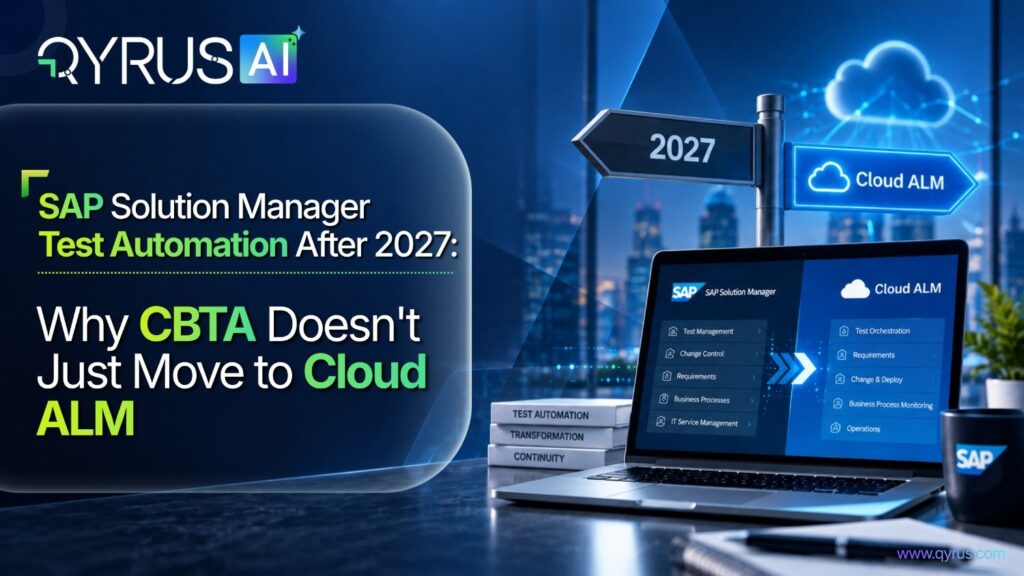
If your regression suite lives in Component-Based Test Automation (CBTA) inside SAP Solution Manager, you’ve probably already heard the deadline: mainstream maintenance for Solution Manager ends in 2027, with a paid extension available only through 2030.
The important thing here is what actually happens to your test automation when that clock runs out ?
Cloud Application Lifecycle Management (ALM) is positioned as the next big thing but for test automation specifically, that positioning will create a functional gap: Cloud ALM was built to manage and track tests, not to execute them the way CBTA does. Combining the two leads teams to assume the transition is a configuration exercise, when for test automation it’s closer to a rebuild.
At QyrusAI we believe in bringing in the change as and when required. So we’ll walk you through what’s actually ending, what Cloud ALM does and doesn’t replace, where teams get stuck in practice, what a realistic migration path looks like, and what to evaluate in a replacement — whichever one you land on.
What’s Actually Ending in 2027
SAP has confirmed that Solution Manager 7.2 stays in mainstream maintenance until the end of 2027, with Customer Specific Maintenance available as a paid extension through 2030 — but only for systems already on Enhancement Package 6 through 8. Customers and users who are still running earlier Enhancement Package levels will have to complete an upgrade project first just to qualify for the extension. This adds a barrier that most teams haven’t planned for in an already tight timeline.
The bigger complication is what happens to usage rights outside a classic on-premises setup. Solution Manager access is bundled into on-premises maintenance agreements by default.
If you move to S/4HANA Cloud or RISE with SAP Private Cloud, and that default access disappears — SAP treats cloud ERP as covered by its own cloud maintenance agreement, which doesn’t automatically include Solution Manager.
Customers in that position will have to separately subscribe to Solution Manager Private Cloud Edition (PCE) if they want to keep the platform running at or use SAP Focused Run for the operational monitoring pieces that don’t overlap with test automation.
CBTA itself doesn’t exist as a standalone product with its own license or roadmap. It’s a component of Solution Manager’s Test Suite, and under the hood its test configurations are eCATT objects, subject to the same transport and object-repository rules as any other development object in Solution Manager.
When Solution Manager’s time runs out, CBTA will lose the platform it depends on to store test components, manage the Test Composition Environment (TCE), and execute configurations. There is no CBTA continuity path that doesn’t run through keeping Solution Manager itself alive, one way or another.
Cloud ALM Is an Orchestration Layer, Not a CBTA Replacement
SAP has been fairly direct about this, even if the messaging around “successor” platforms hides it: Cloud ALM’s Test Management capability is built for planning, assigning, tracking, and reporting on manual and automated tests. It is not a test automation engine, and it was never designed to be one.
There’s no scripting language, no component model, and no execution runtime built into Cloud ALM equivalent to CBTA’s Test Composition Environment.
What Cloud ALM does provide is a Test Automation API, configured through its Landscape Management Service, that lets external tools register as automation endpoints. Once registered, an endpoint shows up as a selectable “automation provider” inside Cloud ALM’s test preparation and execution screens — but the actual test logic, execution engine, and object handling live entirely inside whatever third-party tool you’ve connected. The key point is simple: Cloud ALM manages and reports; it doesn’t automate.
SAP’s own bundled answer to that gap is Tricentis Test Automation for SAP (TTA), included at no additional licensing cost for SAP Enterprise Support customers, and Tricentis holds official partner status for Cloud ALM integration.
That’s a needed head start, but it’s worth being precise about scope. The bundled entitlement automates web-based SAP applications — Fiori, Ariba, SuccessFactors — using a model-based, largely UI-driven execution approach.
Validation in that tier will be UI-result based: it captures what displayed on screen and compares it against an expected value, rather than independently confirming what happened in the backend.
Covering classic SAP GUI transactions, deeper API-level checks, or complex cross-module end-to-end scenarios typically means stepping up to a separate, higher-tier Tricentis license beyond what’s bundled. A handful of other vendors — Worksoft and Panaya among them — also maintain Cloud ALM connectivity, but the pattern holds across most of them: Cloud ALM is the coordination layer, and the automation depth depends entirely on which paid tool sits behind the API.
If your CBTA suite today covers GUI-heavy back-office processes alongside Fiori transactions — which is the norm for any landscape that hasn’t fully moved to S/4HANA Cloud — the free bundled tool solves, at best, half the problem.
Where Teams Face Problems
Four patterns show up repeatedly in Solution Manager-to-Cloud-ALM transitions, and they compound each other if left unaddressed.
Fiori-only coverage assumptions. CBTA’s core value was breadth: SAP GUI, Web Dynpro, BSP, SAP Portal, and SAPUI5 in one framework. Tools built primarily for the cloud-and-Fiori era quietly assume that’s all that’s left to test — a reasonable assumption for a greenfield S/4HANA Cloud Public Edition rollout, and a poor one for any brownfield or hybrid landscape still running ECC-derived transactions alongside newer Fiori apps.
Coverage gaps here don’t show up during the evaluation demo; they show up mid-regression, when a critical back-office process turns out to have no automated coverage at all.
UI-replay fragility. Screen-replay automation binds test scripts to specific UI elements — field IDs, control positions, layout structure. SAP updates Fiori apps on a quarterly cadence as a matter of course, and RISE/GROW with SAP cloud environments push updates on an even tighter cycle than comparable on-premises systems.
Every release becomes a script-repair cycle. That maintenance tax compounds across a large regression suite, and it’s the same brittleness problem CBTA’s component model was originally built to reduce in the first place — resurfacing in the replacement tool if it relies on the same underlying execution approach. For more on this maintenance challenge, read How Can AI Reduce Test Maintenance Effort?.
Seat-capped or throughput-limited execution. Some replacement tools price and throttle by concurrent execution seats, agents, or grid capacity, which directly caps how much of a regression suite can run inside a fixed testing window.
Upgrade and cutover windows don’t expand to fit a licensing model — when a suite can’t finish in time, teams are left choosing between delaying go-live or cutting coverage, and neither is a real choice under audit or compliance pressure.
Broken traceability and reporting continuity. CBTA test execution results feed directly into Solution Manager’s test plans, business process change analysis, and downstream reporting — the audit trail SAP-regulated organizations depend on for change documentation.
None of that reporting structure carries over automatically to a new tool. Unless traceability is designed into the replacement from day one, teams often discover, well into a project, that they’ve solved automation but broken the audit and sign-off chain that made testing defensible in the first place.
What Actually Transfers From CBTA
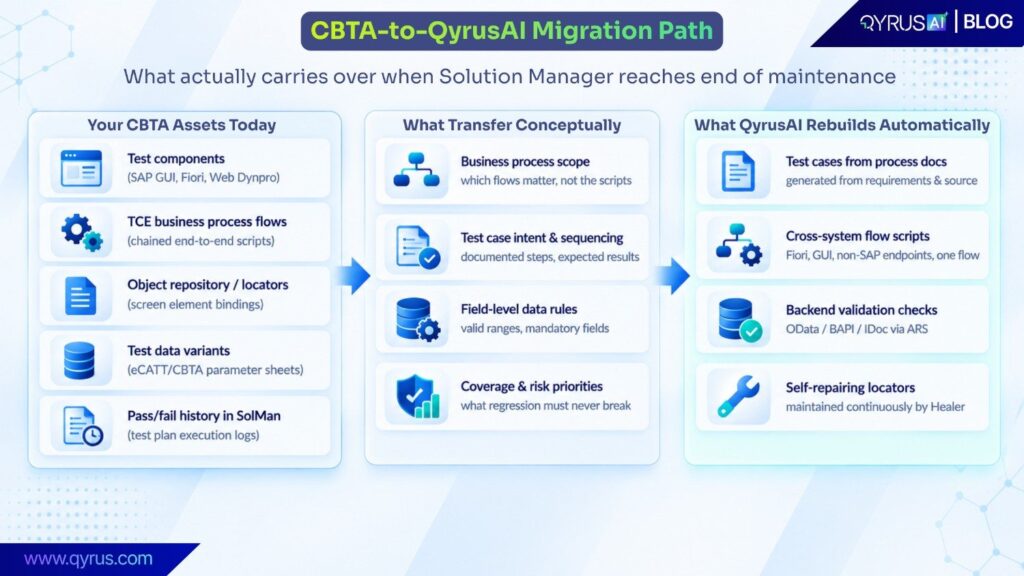
The reality about CBTA migration is that there is no automatic conversion path, and no vendor genuinely offers one. CBTA test configurations are eCATT objects under the hood, tied to Solution Manager’s transport and object-repository model. That object binding, the TCE step logic, and the execution engine itself don’t move to any other platform — they simply have no equivalent representation outside Solution Manager. Anyone promising a one-click script conversion is glossing over that reality.
What does transfer are the assets CBTA represents, rather than the assets themselves: the business process scope, the sequencing and intent behind each test case, the field-level data rules, and — often the most valuable part — years of accumulated institutional knowledge about what regression coverage actually matters and why. Treat the migration as a documentation-driven rebuild, not a lift-and-shift, and the 2027 deadline becomes a planning problem instead of a crisis.
Our Realistic Phased Approach
In practice, our teams that handle this well tend to work through three phases rather than a single cutover:
- Harvest before you migrate. Before Solution Manager access becomes a problem, export what CBTA already documents — TCE flow structure, component step descriptions, associated test data variants, and historical pass/fail patterns from test plan execution logs.
This becomes the specification for the rebuild, and it’s far easier to extract while the system is still fully accessible than to reconstruct from memory later. If your team is rebuilding scripts from documented test intent, this guide to writing effective test scripts can help standardize the output. - Prioritize by business risk, not by script count. Not every CBTA script deserves a like-for-like rebuild. Ranking process coverage by business criticality — financial postings, order-to-cash, regulatory reporting — focuses early rebuild effort on the tests that actually protect the business, rather than burning the migration budget reproducing low-value coverage first.
- Run parallel before you cut over. Wherever the timeline allows, run the new automation alongside CBTA for at least one full regression cycle before decommissioning the old suite. Discrepancies between the two surface real gaps in the rebuild while there’s still a working system to compare against.
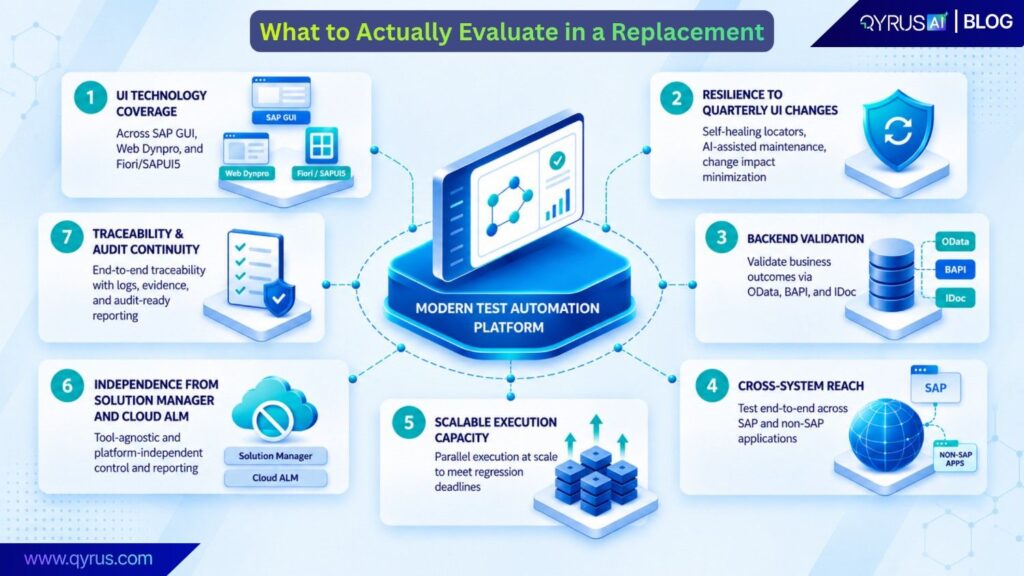
What to Actually Evaluate in a Replacement
Before comparing specific vendors, it helps to fix the criteria independently of who you end up choosing. We at QyrusAI suggest asking questions that tend to separate a tool that looks good in a demo from one that survives three years of quarterly Fiori updates. For a broader SAP testing framework, see our SAP Test Automation: The Complete 2026 Guide.
- UI technology coverage. Does it handle SAP GUI, Web Dynpro, and Fiori/SAPUI5 within the same tool and the same test flow, or only the newest interface layer — leaving GUI-heavy processes to a second tool or manual testing?
- Execution stability under UI churn. Is the tool structurally resilient to routine Fiori field and layout changes, or does every quarterly update trigger a wave of script maintenance? Ask specifically how the tool behaves the first time a control ID changes mid-suite, not just how it behaves on day one.
- Depth of validation. Can it verify what actually happened in the backend — the OData service response, the BAPI return code, the IDoc that posted — or does it only confirm that a screen rendered the expected value? UI-result validation and backend validation catch fundamentally different classes of defects.
- Cross-system reach. Can a single test flow span SAP and connected non-SAP systems in one execution, or does coverage stop cleanly at the SAP UI boundary, forcing separate tools and manual handoffs for integration testing?
- Execution capacity against real deadlines. Can the licensing and execution model actually run your full regression volume inside a realistic upgrade or cutover window, or does a seat-capped or grid-limited model force a coverage-versus-timeline tradeoff?
- Independence from Solution Manager and Cloud ALM. Does the tool require either platform to function at all, or can it operate as a standalone layer regardless of what SAP does next with its ALM roadmap? Given how much the ALM landscape has already shifted once, betting automation continuity entirely on one platform’s future direction is a real risk to price in.
- Traceability and audit continuity. Does the tool preserve a defensible execution history and reporting trail comparable to what Solution Manager provided, or does adopting it mean rebuilding your compliance evidence chain from scratch alongside the automation itself?
How QyrusAI Fits as a CBTA Replacement
QyrusAI addresses the CBTA gap directly rather than treating it as a Fiori-only problem. SAP Scribe is the reverse-engineering layer: it ingests process documentation, functional requirements, and application source to generate ready-to-run test cases automatically — the practical equivalent of rebuilding CBTA’s test intent without hand-authoring every script from scratch. That’s the mechanism behind the harvest-and-rebuild approach described above: your CBTA documentation and TCE process definitions become the input to the new suite, not a discarded artifact you start over without.
Where our approach goes further than screen-replay tools are backend validation. QyrusAI’ ARS layer checks OData services, BAPI calls, and IDoc postings directly, rather than inferring correctness from what rendered on screen.
That distinction matters specifically for SAP testing: a Fiori screen can display correctly while the underlying document posts with the wrong values, incorrect status, or a failed IDoc in the background — and UI-only automation, including UI-result-based validation, will never catch that class of defect. Validating the OData/BAPI/IDoc layer catches failures that screen-replay tools are structurally unable to see, because they never look past the interface in the first place.
Our Healer component addresses the maintenance tax that made UI-replay tools fragile to begin with. When a Fiori control ID or layout shifts on a quarterly update, Healer identifies the change and repairs the affected script automatically, rather than leaving the failure for someone to triage and re-record by hand after the fact — turning what used to be a recurring maintenance project into a background process.
QyrusAI also offers cross-system flows as a default case rather than an edge case: a single test can span Fiori, SAP GUI, backend APIs, and connected non-SAP applications in one execution, which matters for any process that doesn’t stop cleanly at the SAP UI boundary — order-to-cash flows that touch a CRM or logistics platform, for instance. And because execution isn’t gated by a seat-capped model, regression volume becomes a planning question rather than a licensing constraint working against a fixed cutover window.
None of this requires Cloud ALM to be in place first. QyrusAI can sit alongside it, close the automation gap it deliberately leaves open, or run entirely independently of it — which matters given how much the ALM landscape has already shifted.
Conclusion
The 2027 deadline is real, and it isn’t far off once you account for the time a proper test automation rebuild actually takes. But the “Cloud ALM replaces Solution Manager” framing oversimplifies what happens to test automation specifically. Cloud ALM inherits the project and orchestration side of ALM — planning, tracking, reporting — while CBTA’s actual execution engine, component model, and UI coverage have no direct successor inside SAP’s own tooling.
The bundled Tricentis tier closes part of that gap for Fiori-centric landscapes, but most CBTA suites cover more ground than that, and the difference between UI-result validation and backend validation is not a minor detail for regulated SAP environments.
Planning for that gap now — harvesting what CBTA already documents, prioritizing by business risk, and treating the migration as a rebuild rather than a conversion — is what turns 2027 from a looming crisis into a manageable, scoped project.
QyrusAI is one option built specifically to close that gap: SAP Scribe rebuilds test cases from what you already have, ARS validates the backend layer that screen-replay tools structurally can’t see, Healer keeps scripts stable against routine Fiori changes instead of breaking every quarter, and none of it depends on a seat-capped execution model or a completed Cloud ALM rollout to start working.
FAQ
Does Cloud ALM replace CBTA? For related SAP QA planning guidance, you may also find Qyrus’ User Acceptance Testing Best Practices for SAP Teams useful.
No, not for automation specifically. Cloud ALM’s Test Management is a planning, assignment, and reporting layer for manual and automated tests — it has no built-in scripting language or execution engine comparable to CBTA’s Test Composition Environment. It relies entirely on an external Test Automation API and connected third-party tools to actually run automated tests, so “moving to Cloud ALM” solves test management, not test automation.
Can I keep using CBTA past 2027?
Only for as long as you keep Solution Manager itself running — either through paid Customer Specific Maintenance, available through 2030 for systems on Enhancement Package 6 through 8, or a Solution Manager Private Cloud Edition subscription if you’ve already moved to cloud infrastructure. CBTA has no license or existence independent of Solution Manager, so there’s no separate “keep CBTA” path.
What’s the difference between eCATT and CBTA?
eCATT is the older, more script-driven tool, largely limited to SAP GUI and Web Dynpro as testable interface technologies. CBTA is the more modern, component-based successor built on top of the same eCATT object model, extending coverage to Fiori/SAPUI5, SAP Portal, and BSP through reusable test components rather than hand-written scripts. Both live inside Solution Manager’s Test Suite, and both sunset on the same 2027/2030 timeline since neither exists outside that platform.
What happens to my existing CBTA scripts?
They don’t migrate automatically to any other platform — CBTA configurations are eCATT objects tied to Solution Manager’s own transport and object-repository model, and there’s no export path to an equivalent structure elsewhere, regardless of which tool you move to. What does carry forward is the documented process knowledge behind the scripts: business process scope, step sequencing, expected results, and field-level data rules, which any credible replacement tool uses as the specification for a rebuild rather than a literal conversion.
Do I need Cloud ALM to use QyrusAI?
No. QyrusAI connects directly to SAP systems — Fiori, SAP GUI, and backend services via OData/BAPI/IDoc — independent of any ALM platform sitting on top. It can run standalone, alongside an existing Cloud ALM rollout, or ahead of one, so adopting it isn’t contingent on Cloud ALM being fully implemented first.
 September 22, 2026
  14 min