
Qyrus Named a Leader in The Forrester Wave™: Autonomous Testing Platforms, Q4 2025 – Read More

May Release Notes

  Welcome to the May update!  

We’ve focused heavily on deepening platform integration, introducing smarter AI-driven logic, and giving enterprise teams much greater execution flexibility. 

Across our services, we are breaking down silos and accelerating your daily testing rhythms. In Web Testing, we’ve unlocked real-time locator access for seamless SAP scripting and rolled out major intelligence and speed upgrades to Test Generator v2. Desktop Testing sees an influx of pipeline capability with brand-new Jenkins and Azure DevOps plugins, alongside powerful new session persistence that lets you connect directly to existing SAP windows. 

Meanwhile, our underlying infrastructure continues to mature. Test Orchestration has been completely decoupled from individual module licensing to act as a truly independent layer, while also gaining folder-level scheduling to streamline batch execution. We’ve also fortified our mobile capabilities with massive stability upgrades to iOS device streaming, and extended qAPI’s enterprise reach with robust Node CLI enhancements and clearer project management tracking. 

Let’s dive right into the full details of all the powerful new capabilities available on the Qyrus platform. 

Web Testing

Flawless Connections: Enhanced iOS Device Streaming! 

The Challenge:  

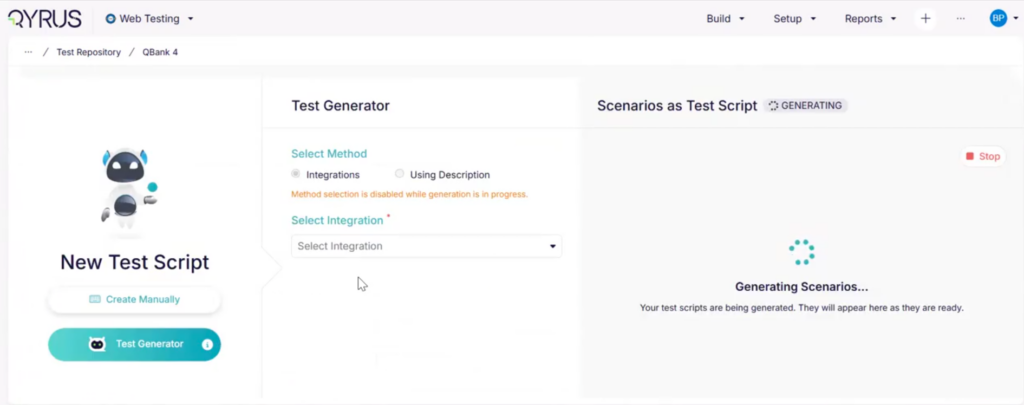
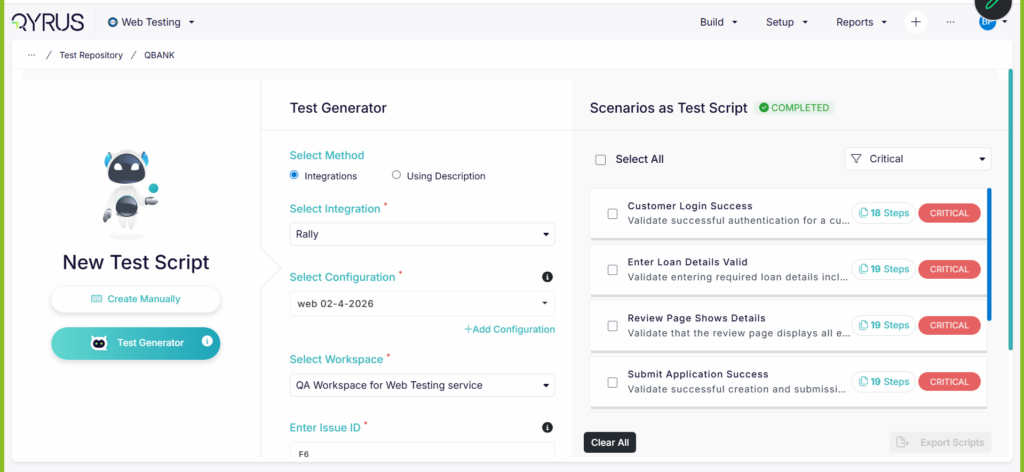
When using Test Generator v2 to automatically build test scenarios via integrations, any friction in the generation flow ruins the speed advantage of using AI. Previously, users faced two major hurdles: the initial streaming API could experience a bottleneck—taking up to two minutes just to return a “Generating” status—and auto-generated variable actions lacked structural logic. If a script required multiple variables (e.g., Var 1 through Var 5), the AI didn’t automatically cross-reference its memory to intelligently link those variables to subsequent data handler steps, forcing testers to manually patch the logic. Additionally, path values for generated steps were buried, making it tedious to audit the AI’s structural paths. 

The Fix:  

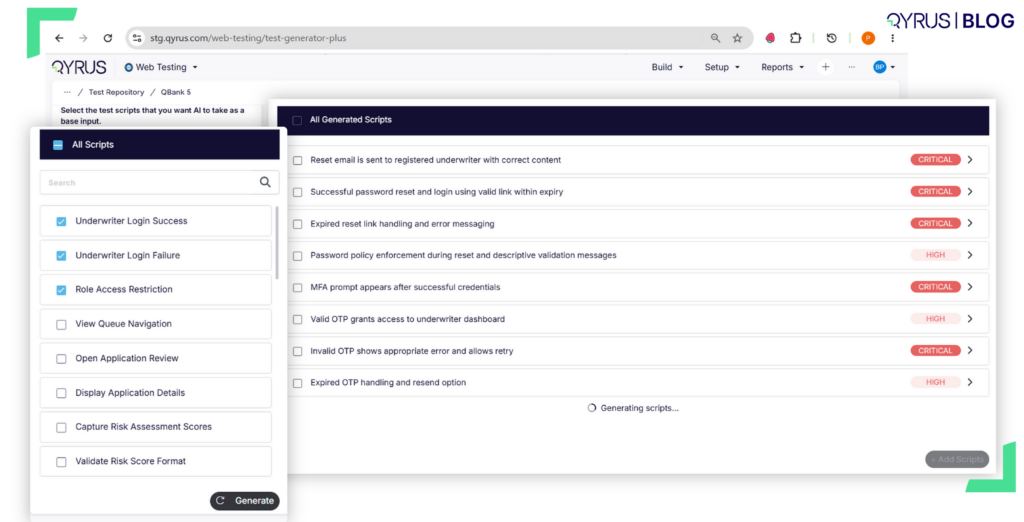
We have rolled out critical enhancements to Test Generator v2 to optimize both backend performance and AI logic. We dramatically accelerated the initial stream API response time, slashing the latency required to initiate a generation job. On the intelligence front, the AI now automatically names variables inside the “Create Variable” action and intelligently maps those identical variable names to corresponding downstream data handler actions (such as Dynamic Set steps) by referencing its historical memory. Finally, we have explicitly included the exact path values right inside the info section of every step TG generates. 

How will it help?  

These intelligence and speed optimizations turn AI generation into a fluid, hands-off experience. 

  • Instant Generation: No more waiting on spinning wheels. The optimized streaming API kicks off your AI generation jobs almost instantly, accelerating your overall testing velocity. 
  • Flawless End-to-End Variable Logic: The AI now handles multi-variable data mapping seamlessly. If your test scenario creates five variables, the system automatically tracks them in its memory and binds the correct variable to subsequent dynamic steps without manual intervention. 
  • Transparent Step Auditing: With path values clearly visible in the info section of each generated step, you can immediately inspect, verify, and debug the exact navigation paths the AI mapped out. 

Seamless SAP Scripting: Real-Time Locator Access! 

The Challenge: 

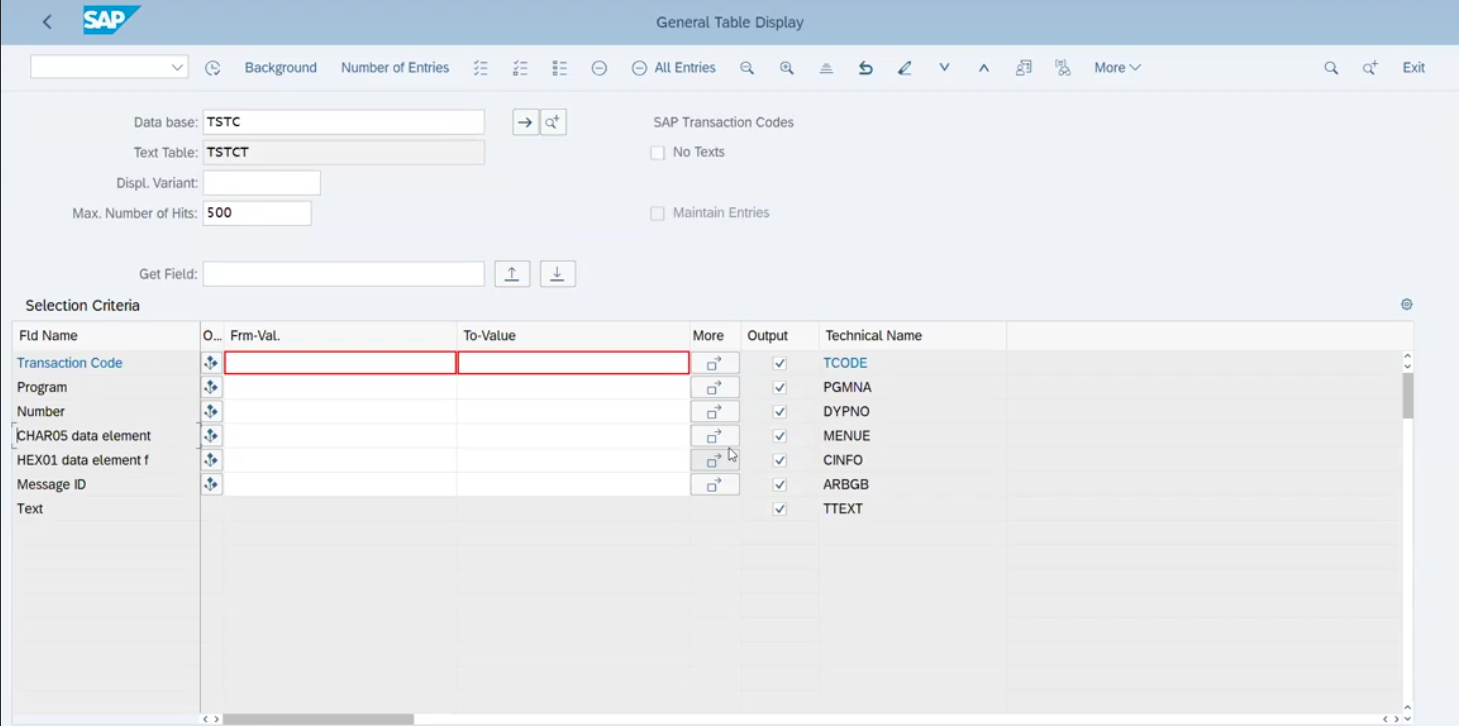
Building automated tests for complex SAP web interfaces (like SAP Fiori) requires highly specific, often intricate element locators. Previously, gathering these unique SAP locators meant testers had to frequently break their workflow—jumping between separate recording sessions, external inspection tools, or complex documentation just to copy and paste the correct identifiers into their test steps. This context-switching drastically slowed down the test creation process and increased the risk of manual errors.  

The Fix: 

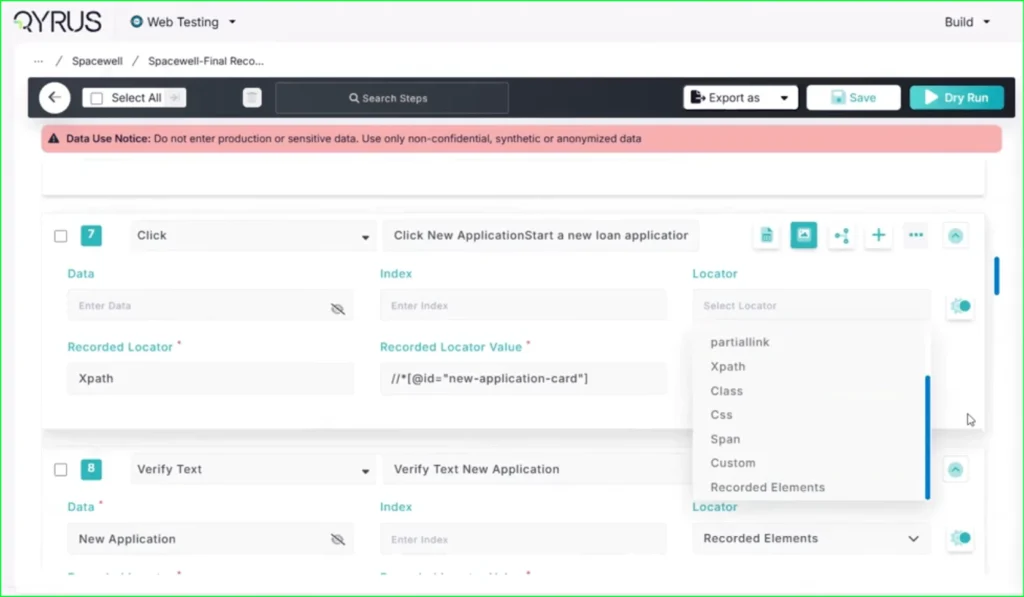
We have fully integrated SAP Recorded Locators directly into the Web Testing builder. Now, while you are actively constructing your test steps on the canvas, you have immediate, real-time access to the specialized SAP locators you need without ever having to leave the test building interface.  

How will it help? 

This workflow enhancement removes the friction of testing complex SAP environments. 

  • Accelerated Test Building: Say goodbye to context-switching. You can now design, configure, and assign the correct SAP locators fluidly within a single, unified workspace. 
  • Pinpoint Accuracy: By pulling recorded locators directly into your builder, you significantly reduce the risk of typos or incorrect element identification, ensuring your tests are robust from the start. 
  • Developer-Friendly Experience: This seamless integration makes building complex SAP web tests faster, more intuitive, and far less tedious for your automation engineers. 

Seamless CI/CD Integration: Jenkins & Azure Plugins for Desktop Testing! 

Jenkins & Azure Plugins for Desktop Testing

The Challenge:  

As organizations modernize their deployment pipelines, manual testing interventions create significant bottlenecks. Previously, triggering automated scripts for Desktop applications required users to step outside of their primary CI/CD workflows. Without native plugins for popular orchestration tools, teams had to rely on cumbersome manual triggers or complex, custom-built scripts to initiate their Desktop Testing suites, resulting in disjointed delivery pipelines and slower release cycles. 

The Fix:  

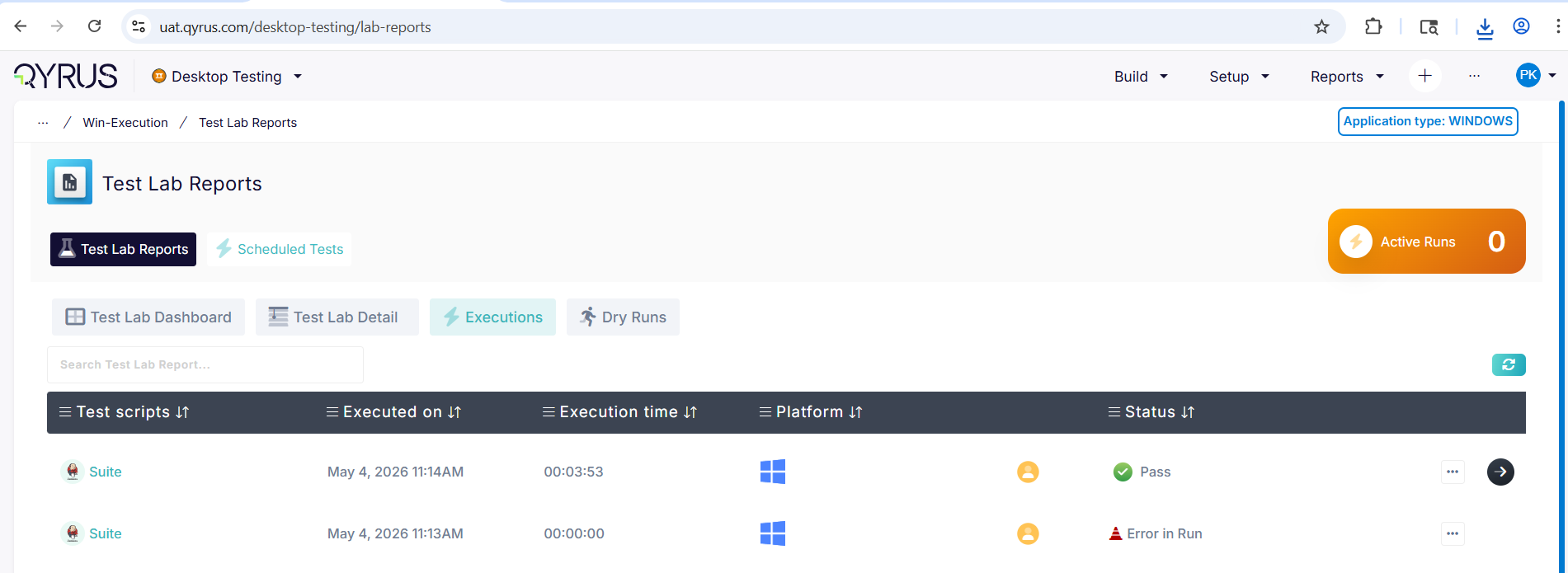
We have officially introduced dedicated Jenkins and Azure DevOps plugins specifically for the Desktop Testing Service. These new plugins empower you to seamlessly trigger and manage your automated desktop application scripts directly from your existing CI/CD pipelines, bringing the service up to parity with our Web, API, and Mobile testing offerings. 

How will it help?  

This integration bridges the gap between your desktop application builds and your automated testing ecosystem. 

  • Unified Workflows: Manage your entire testing strategy—across Web, Mobile, API, and now Desktop—from a centralized CI/CD control plane. 
  • Frictionless Automation: Automatically execute robust desktop automation scripts the moment a new build is deployed, eliminating manual handoffs and accelerating your time-to-market. 
  • Developer Flexibility: Empower your engineering teams to seamlessly embed desktop quality gates into the familiar Jenkins or Azure environments they already use every day. 

Continuous Execution: Connect to Existing SAP Windows! 

Connect to Existing SAP Windows

The Challenge:  

When automating complex desktop workflows within SAP GUI, test scripts traditionally forced a brand-new application instance to launch for every execution. If a test failed midway or if an engineer wanted to resume a specific sequence after manual intervention, they were forced to restart the entire SAP login and navigation flow from scratch. This rigid behavior created duplicate windows, consumed unnecessary system resources, and drastically slowed down test debugging and multi-step process validations. 

The Fix:  

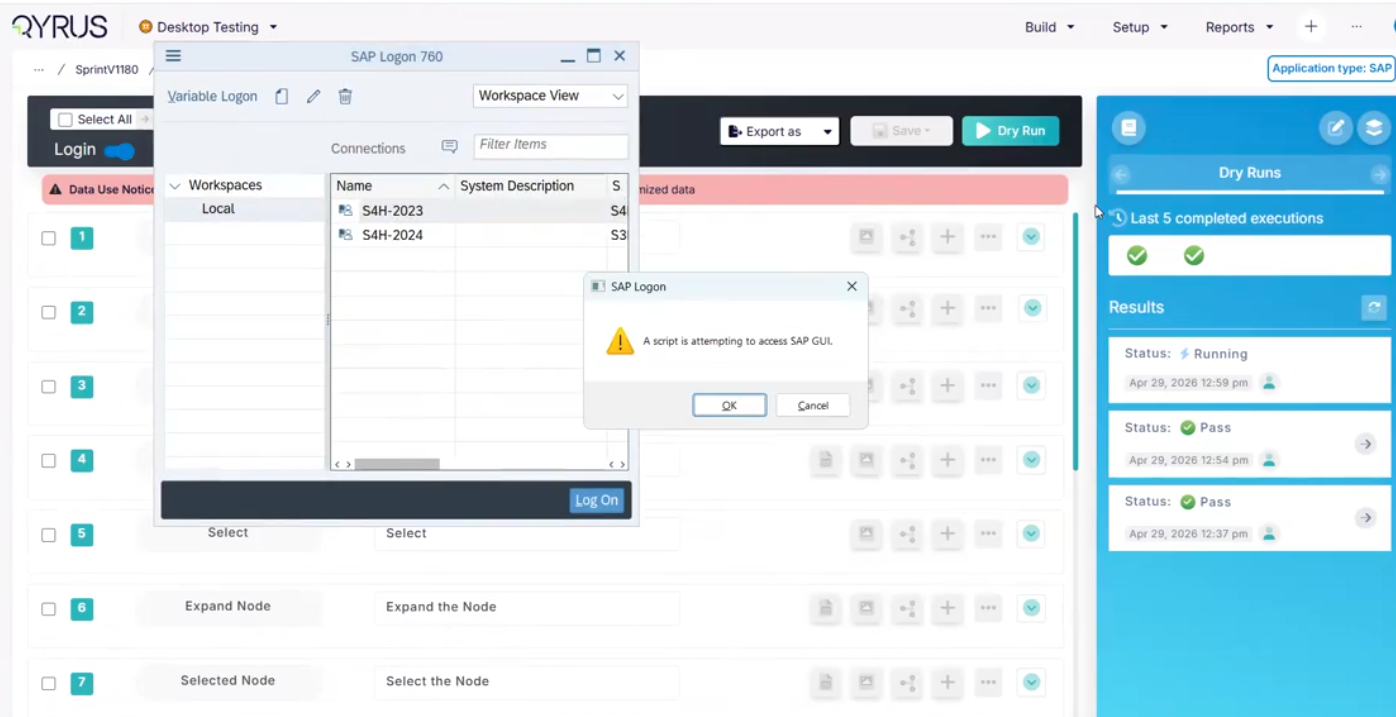
We have implemented powerful session persistence capabilities within the Desktop Testing Service. Using a robust “attach-to-window” mechanism for Windows environments, we’ve introduced a dedicated ‘Connect To Existing SAP Window’ action. This allows your desktop automation to intelligently detect and hook into an already-open SAP session instead of triggering a fresh launch. 

How will it help?  

This workflow upgrade brings true continuity to your desktop SAP automation. 

  • Resume Without Restarting: Easily continue an automation flow exactly where it left off, or seamlessly transition between manual steps and automated executions without losing your session state. 
  • Optimize System Resources: Prevent your desktop environment from being cluttered with redundant, duplicate SAP application instances during iterative testing and debugging. 
  • Accelerate Debugging: By bypassing the initial login and navigation sequences, automation engineers can rapidly test and refine specific downstream actions directly within an active SAP window. 

Secure & Streamlined: QloudBridge Encryption & Login Upgrades!

The Challenge:  

QloudBridge acts as the vital tunnel connecting your local desktop environments to the Qyrus cloud platform. Any weakness in how this data is encrypted during transit poses a significant security risk for enterprise teams handling sensitive test data. Additionally, a clunky or unstable login flow creates unnecessary friction when engineers are trying to spin up local testing sessions. When underlying build issues cause these connections to drop unexpectedly, it disrupts automated runs and delays the entire testing cycle. 

The Fix:  

We have significantly enhanced the QloudBridge security architecture by rolling out updated, enterprise-grade encryption protocols alongside a completely refined, smoother login flow. In tandem with these security hardening measures, we have successfully resolved underlying infrastructure and build bottlenecks that were previously causing minor connection instability. These updates have been fully verified on our staging environments and are operating exactly as expected. 

How will it help?  

This underlying infrastructure update provides a more resilient and secure testing foundation. 

  • Hardened Data Security: Your local test data and application traffic are now protected by even stronger encryption during transit, satisfying the most rigorous enterprise compliance standards. 
  • Seamless Authentication: The improved login flow makes it faster and significantly more intuitive to authenticate and connect your local machine to the platform, removing friction from your daily workflow. 
  • Unshakeable Stability: By resolving the core infrastructure issues, we’ve ensured a highly reliable, persistent connection that won’t unexpectedly drop during your long-running desktop automation suites. 

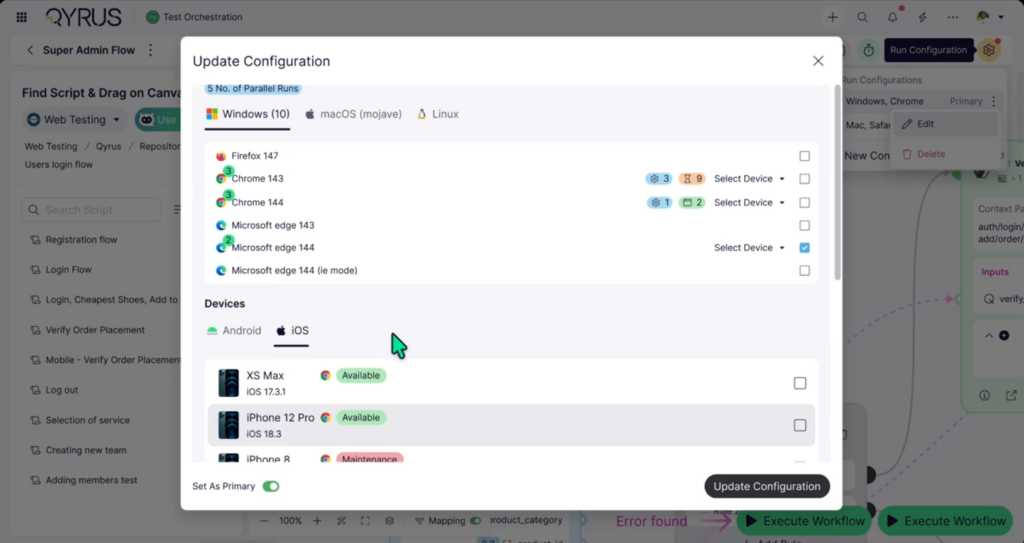
Flawless Connections: Enhanced iOS Device Streaming!

The Challenge:  

Interacting with cloud-hosted iOS devices could sometimes suffer from slight video latency, dropped frames, or momentary disconnections during intense manual testing sessions or heavy automated runs. This streaming instability caused frustration, making it difficult to test UI responsiveness accurately or to confidently debug complex touch interactions on Apple hardware. 

The Fix:  

We have implemented major infrastructure upgrades to the device streaming protocol specifically for iOS device sessions. This includes optimized video encoding and a much more resilient connection architecture to ensure a rock-solid, high-definition stream between the physical iPhones and iPads in our data center and your local browser. 

How will it help?  

This underlying upgrade makes remote iOS testing feel like the device is sitting right on your desk. 

  • Silky Smooth Manual Testing: Experience near-zero latency when interacting with remote iOS devices, allowing for precise gestures, swipes, and taps without frustrating delays. 
  • Rock-Solid Stability: Say goodbye to dropped sessions and frozen screens. The hardened connection ensures uninterrupted testing, even during extended, deep-dive debugging workflows. 
  • Accurate UI Validation: A crystal-clear, lag-free stream means you can confidently validate animations, transitions, and overall application responsiveness without the interference of network jitter. 

Independent Orchestration: Decoupled Licensing!

The Challenge:  

Previously, using Test Orchestration (TO) was strictly tied to your active module licenses for Web, Mobile, API, or Desktop testing. If one of those underlying service licenses expired or became inactive, it created a hard functional blocker within TO—even for users whose primary role was just to build and manage orchestrated workflows. This rigid dependency disrupted continuous testing strategies and unnecessarily complicated license management across large QA teams. 

The Fix:  

We have completely decoupled Test Orchestration from these underlying service-module dependencies. TO now operates as a fully independent orchestration layer. You can seamlessly build, manage, and execute orchestration scripts without requiring active Web, Mobile, API, or Desktop module licenses. Crucially, the platform still securely respects your existing role-based access controls (RBAC) and accurately governs execution capacity based purely on your available Browser and Mobile execution inventory. 

How will it help?  

This licensing update provides greater flexibility and removes arbitrary administrative blockers from your orchestration workflows. 

  • Uninterrupted Orchestration: Continue building, managing, and executing your complex test flows without unexpected access blocks caused by individual module license expirations. 
  • Streamlined Team Access: QA managers and orchestration engineers can now freely utilize the TO workspace to coordinate overarching test strategies without consuming individual service-module licenses. 
  • Resource-Based Scaling: Scale your orchestrations naturally based on your actual execution capacity (Browser/Mobile slots) rather than being restricted by module-level licensing. 

Batch Execution: Folder-Level Scheduling!

The Challenge:  

Managing and scheduling large test suites can quickly become an administrative burden. Previously, if you wanted to schedule a group of related workflows to run at the same time, you had to configure the scheduling parameters for each workflow individually. This repetitive process was not only tedious and time-consuming but also increased the risk of manual configuration errors across your test batches. 

The Fix:  

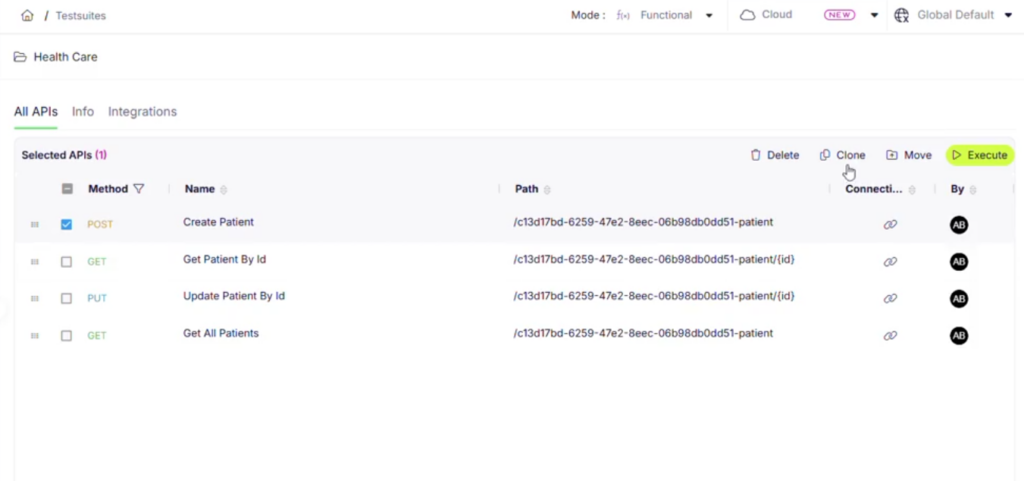
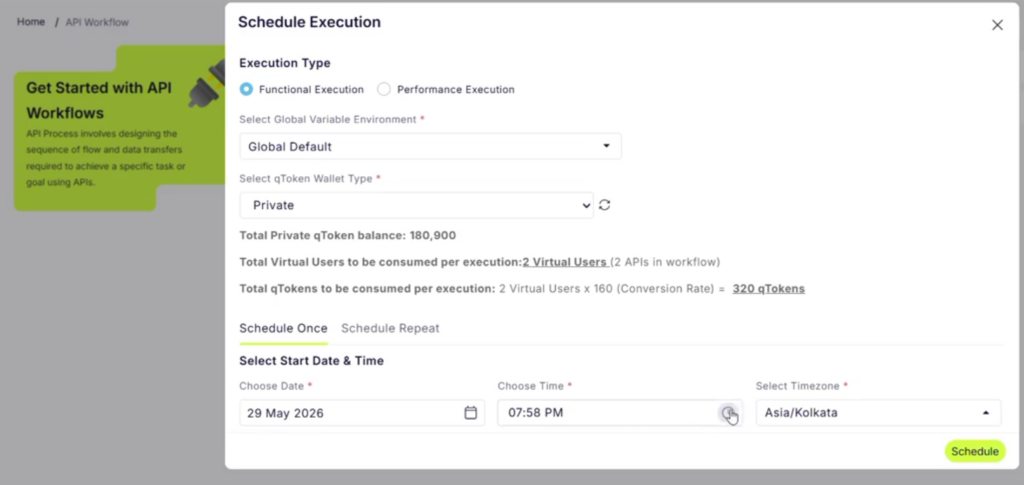
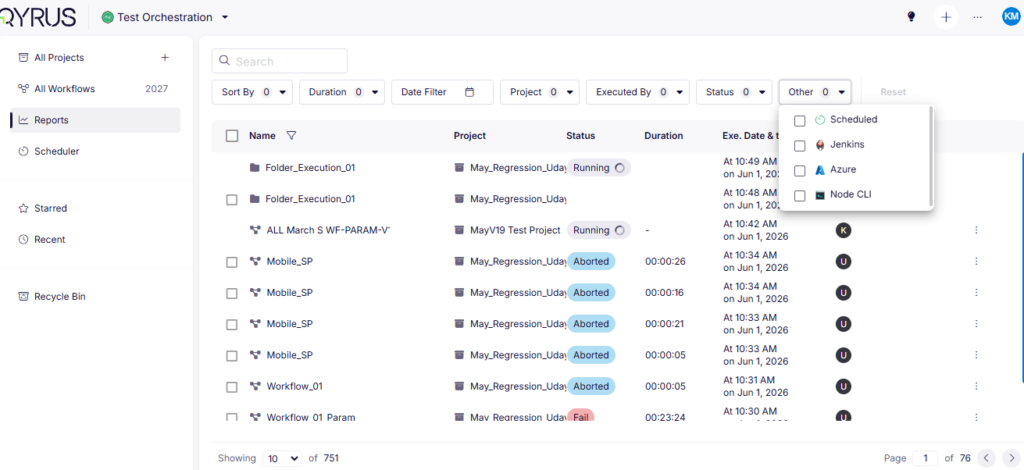
We have introduced a powerful new Folder-level Scheduler within Test Orchestration. Instead of managing individual scripts one by one, you can now apply a single scheduling configuration to an entire folder. This instantly schedules multiple workflows contained within that folder to execute using the exact same parameters. 

How will it help?  

This enhancement dramatically simplifies the administration of massive test suites. 

  • Massive Time Savings: Eliminate repetitive setup tasks by configuring the schedule once at the folder level, instantly applying it to dozens of underlying workflows. 
  • Guaranteed Consistency: Ensure that all related tests in a specific batch run with the exact same configurations, environments, and timing rules, eliminating configuration drift. 
  • Effortless Scalability: As your test suites grow, managing execution schedules remains simple and organized by leveraging your existing folder hierarchies. 

Enterprise-Ready Execution: Node CLI Plugin Upgrades for qAPI! 

The Challenge:  

Managing API performance and functional testing via command-line interfaces across large, enterprise-level teams can get complicated. Previously, fetching project details via the CLI relied on user email addresses, which didn’t scale well within complex enterprise structures where team-based access is the standard. Furthermore, sharing the results of CLI-triggered test runs often involved manual data extraction or wrestling with clunky file sharing, creating friction for teams trying to review execution reports quickly. 

The Fix:  

We have significantly upgraded the Node CLI Plugin for qAPI to better support enterprise workflows. First, we transitioned project fetching from user emails to team IDs (/projects?teamId), perfectly aligning the CLI with robust, enterprise-grade project management structures. We also introduced a new feature (/get-reports-url) that automatically generates a secure CDN link for your execution reports—valid for seven days—directly from the command line. 

How will it help?  

These CLI enhancements streamline headless API testing for large-scale engineering teams. 

  • Enterprise-Scale Management: Fetching project data based on Team ID ensures the CLI integrates flawlessly with complex organizational structures and role-based access configurations. 
  • Instant Report Sharing: Automatically generate secure, temporary CDN URLs for your test reports straight from the CLI, making it incredibly simple to share results with your team or attach them to build logs. 
  • Streamlined Automation: With a dedicated CLI plugin type and x-api-key support for URL generation, building secure, automated qAPI testing pipelines into your CI/CD processes is smoother than ever. 

Seamless Navigation: Enhanced Project Listing!

Enhanced Project Listing

The Challenge:  

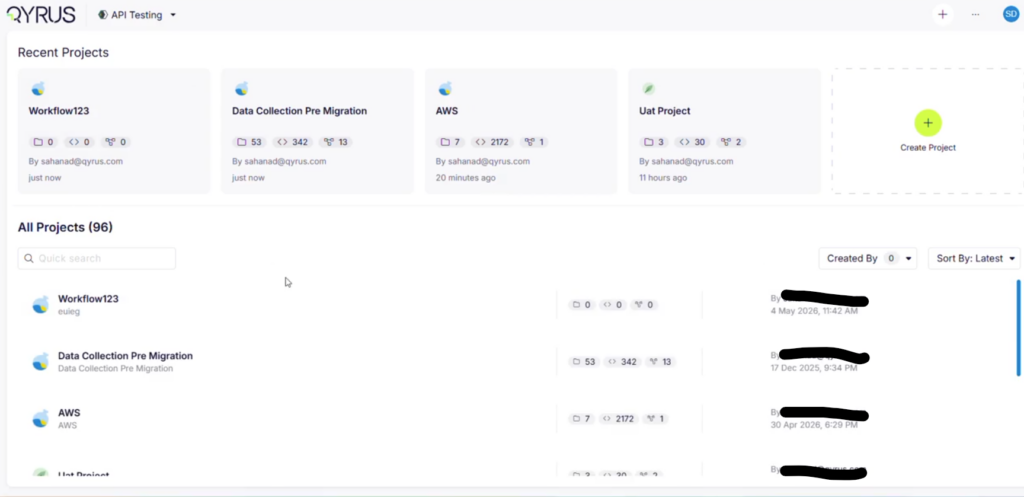
As enterprise teams scale their API testing footprints, the number of active projects can grow rapidly into the dozens or hundreds. Previously, the qAPI dashboard restricted the project view—only loading the first page of 15 projects and preventing users from scrolling or navigating to see the rest of their portfolio. This forced teams to rely on direct links or search workarounds just to access older or lower-priority projects. 

The Fix:  

We have resolved this limitation by overhauling the data-fetching and pagination logic within the qAPI project dashboard. Following successful validation in our staging environments, the fix is fully deployed, ensuring that your complete catalog of projects now loads fluidly and accurately across all pages. 

How will it help?  

This fix restores complete visibility and smooth navigation to your workspace. 

  • Full Portfolio Visibility: Effortlessly browse through your entire history of API testing projects without arbitrary UI cutoffs or missing entries. 
  • Frictionless Browsing: Experience smooth, reliable page loading as you scroll through large collections of enterprise projects. 
  • Better Team Coordination: Large testing teams can now confidently organize and locate their respective projects from a single, uncompromised dashboard view. 

Enhanced Traceability: Script-Level Xray Visibility within Suites!

The Challenge:  

When managing large API test suites integrated with Jira Xray, it can be difficult to track which individual scripts are properly linked to your test management tools. Since Xray determines suite execution status based on its underlying linked scripts rather than a standalone suite-level configuration, testers previously had to open each script individually to verify its Xray integration details. This lack of centralized visibility made auditing large test suites time-consuming and error-prone. 

The Fix:  

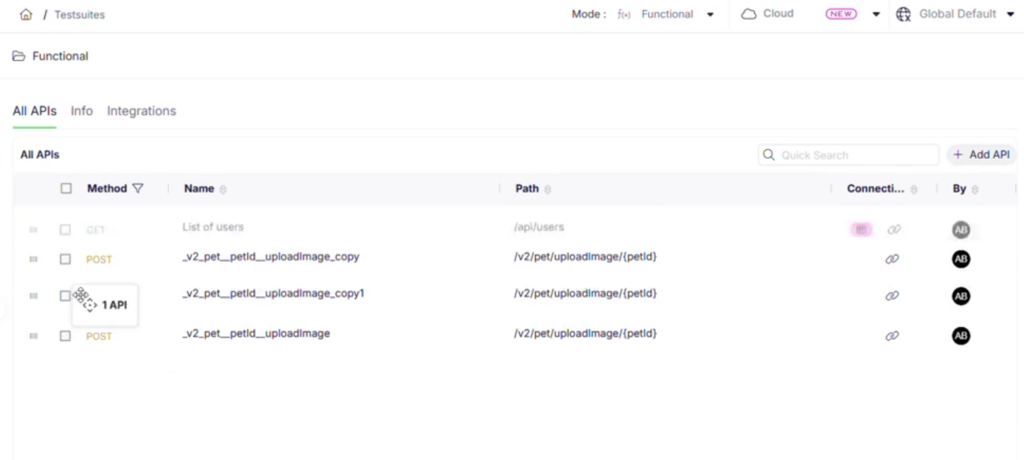
We have enhanced the visibility of Xray integration configurations directly within the qAPI test suite view. While direct suite-level configuration isn’t native to Xray, you can now click the integration icon at the suite level to immediately view a clear breakdown of the linked scripts alongside their respective Xray integration details and script names. 

How will it help?  

This update centralizes your integration tracking, making test management much more transparent. 

  • Centralized Integration Audits: Instantly verify which scripts within a suite are correctly mapped to Xray without toggling back and forth between individual script configurations. 
  • Clear Execution Mapping: Easily understand how your suite-level execution status will flow back to Jira based on a clear visual summary of its underlying scripts. 
  • Streamlined Troubleshooting: Quickly identify unlinked or misconfigured scripts directly from the high-level suite overview, keeping your test management system perfectly synchronized. 

Ready to Leverage May’s Innovations? 

We are committed to providing a unified platform that not only adapts to your evolving needs but also streamlines your critical processes, empowering you to release high-quality software with greater speed and confidence. 

Eager to explore how these advancements can transform your testing efforts? The best way to appreciate the Qyrus difference is to experience these new capabilities directly. 

Ready to dive deeper or get started? 
Book a Personalized Demo

APRIL Release Notes-Featured Image

Welcome to the April update!  

This month, we have delivered major upgrades focused on AI-driven testing, seamless CI/CD automation, and enterprise-scale performance. 

We’ve introduced Semantic LLM Evaluations in qAPI and Test Generator v2 with Memory for Web Testing. The platform can now understand the nuance of dynamic API responses and your application’s history better than ever before. 

Our new dedicated CLI and Azure DevOps plugins, combined with secure API Key authentication, make it effortless to trigger complex test suites directly from your deployment pipelines. 

We also implemented deep architectural upgrades—including Chrome DevTools Protocol (CDP) for web recording, a Java 17 Orchestrator migration, and a modernized Visual Testing v2 backend—ensure your testing is faster, highly secure, and exceptionally stable. 

Our new control features let you take command of your quality engineering with embedded Python scripting for SAP, new loop logic in web orchestrations, and consolidated summary reporting. 

Let’s explore the powerful new capabilities available on the platform this April! 

Web Testing

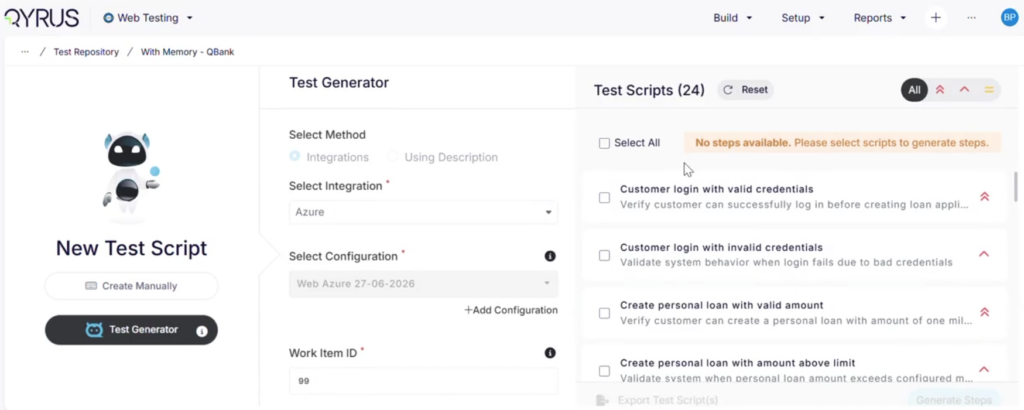
Context-Aware AI: Introducing Test Generator v2 with Memory! 

Web-Test Generator v2 with Memory

The Challenge:  

While our AI-powered Test Generator excels at translating user stories, Jira tickets, and ADO items into test scenarios, the resulting test steps were previously somewhat generic. Because the AI lacked specific knowledge of your application’s unique DOM and history, it had to “guess” locators and actions. This often meant testers had to spend valuable time manually tweaking the AI-generated steps to make them fully reliable and executable against their specific UI. 

The Fix:  

We are thrilled to launch the next-generation Test Generator v2 (TG V2), now fully integrated with our enhanced AI Memory! By simply providing your application URL, TG V2 taps directly into your project’s testing history. 

  • Smart Step Selection: Instead of guessing, the AI now pulls from previously executed, proven tests in your memory to construct highly accurate workflows (up to 50 steps). 
  • Streaming & Asynchronous UI: Because deep reasoning and memory retrieval take a bit more time, we’ve overhauled the UX. Scenarios stream onto your screen first, followed by sequential step generation. You can navigate away to other tasks, and a toast notification will alert you when generation is complete. You also have the power to stop the generation mid-flight. 
  • Clear Traceability: Each generated step now includes a direct reference back to the original memory step it was based on, ensuring complete transparency. 

How will it help?  

This major upgrade transforms the AI from a generic assistant into a specialized expert on your specific application. 

  • Unmatched Reliability: Tests are built using proven locators and real historical actions, drastically reducing false failures and the need for manual corrections. 
  • Multitasking Freedom: The asynchronous, background-generation design means you are never locked to a loading screen. 
  • Transparent Logic: By showing exactly which past execution the AI referenced, you can easily verify its reasoning and trust the generated scenarios. 

Rock-Solid Recording: CDP Integration for the Web Recorder! 

The Challenge:  

Recording web tests relying solely on standard DOM event listeners can sometimes be brittle. Modern, complex web applications—especially Single Page Applications (SPAs)—have intricate lifecycles, background network requests, and highly dynamic elements. Older recording methods often struggled to capture this underlying activity accurately, leading to flaky locators, missed events during page transitions, and ultimately, recorded tests that failed or stalled during replay. 

The Fix:  

We have fundamentally upgraded the engine behind our Web Recorder extension by integrating the Chrome DevTools Protocol (CDP). Instead of just monitoring the surface of the page, the recorder now communicates directly with the browser’s core architecture to capture events, inspect the DOM, and execute commands. 

How will it help?  

This deep browser integration makes your recorded tests significantly more stable and reliable from the moment you click stop. 

  • Unbreakable Locators: CDP-driven DOM inspection provides a deeper, more accurate understanding of the page structure, resulting in highly robust element identification that resists breaking when the UI changes. 
  • Flawless Event Capture: The recorder is now fully aware of the page’s lifecycle. It accurately captures network activity, reloads, and complex SPA transitions, ensuring your tests interact with the page exactly as a real user would. 
  • Reliable Replay: By utilizing CDP commands for execution, the playback of your recorded steps is incredibly consistent, eliminating the flakiness often associated with frontend-only automation. 
  • Smarter Test Generation: The integration captures richer metadata during your recording sessions, providing our engine with better context to generate and maintain your test scripts. 

Sharper Vision: Upgraded Visual Testing v2 Architecture! 

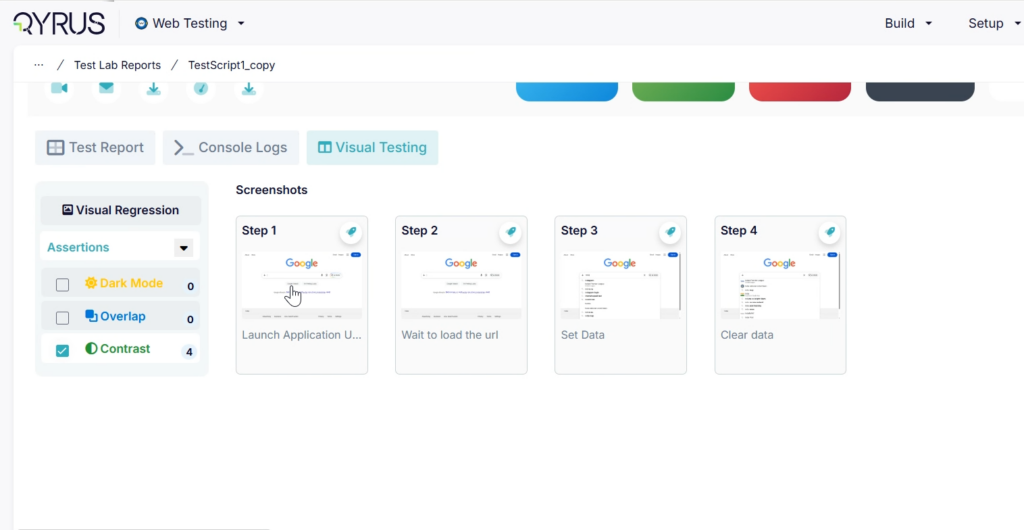
Web-Upgraded Visual Testing v2 Architecture

The Challenge:  

Visual validation is one of the most resource-intensive aspects of automated testing, requiring pixel-by-pixel comparisons and heavy image processing. As teams scale their visual test coverage across hundreds of pages and devices, legacy endpoints can sometimes become bottlenecks. Furthermore, maintaining enterprise-grade security means the underlying infrastructure must constantly evolve to stay ahead of potential vulnerabilities. 

The Fix:  

We have completely overhauled the engine powering our visual validations, officially upgrading to the Visual Testing v2 endpoint. This under-the-hood enhancement replaces our previous routing with a modernized, highly optimized, and secure backend framework that has been rigorously verified across our environments. 

How will it help?  

While you won’t see a massive change in the UI, you will experience the benefits of a much stronger foundation. 

  • Enhanced Security: The upgraded core architecture ensures that your application screenshots and visual test data are processed utilizing the latest, most stringent security standards. 
  • Rock-Solid Reliability: The v2 endpoint provides a highly stable infrastructure, significantly reducing the risk of processing bottlenecks or timeouts during massive visual regression suites. 
  • Future-Ready Performance: This modernized backend acts as a powerful launchpad, clearing the runway for faster image processing and more advanced visual AI capabilities in upcoming releases. 

Of course, here is the breakdown for this Web Testing automation update. 

Seamless Automation: API Key Authentication for CI/CD! 

The Challenge:  

Integrating automated testing into modern CI/CD pipelines (like Jenkins, GitHub Actions, or Azure Pipelines) requires robust, machine-to-machine communication. Previously, relying on UI-centric authentication models (like standard token exchanges designed for human users) for headless automation workflows often introduced unnecessary complexity. This could lead to brittle connections or token expiration headaches that might unexpectedly break your build pipelines. 

The Fix:  

We have introduced a dedicated, secure API Key architecture specifically designed for plugin executions and CI/CLI workflows. We have fundamentally decoupled machine authentication from user authentication. Moving forward, UI logins remain securely managed by Keycloak, while your automated CI systems will authenticate directly and securely with our backend microservices using robust, dedicated API keys. 

How will it help?  

This architectural upgrade ensures your automation pipelines remain resilient, secure, and incredibly easy to manage. 

  • Rock-Solid Pipelines: Purpose-built API keys eliminate the flakiness of user-session tokens, ensuring your automated tests run continuously and reliably every time your pipeline triggers. 
  • Enhanced Security: Take full control of your automation security with a dedicated lifecycle for API keys—including secure creation, strict validation, easy revocation, and built-in rate limiting. 
  • Streamlined Integrations: Effortlessly connect the platform to Jenkins, GitHub Actions, Azure Pipelines, Bitrise, and other CLI tools with a clean, straightforward authentication method. 

Code Meets Canvas: Execute Python Scripts in Desktop & SAP Tests! 

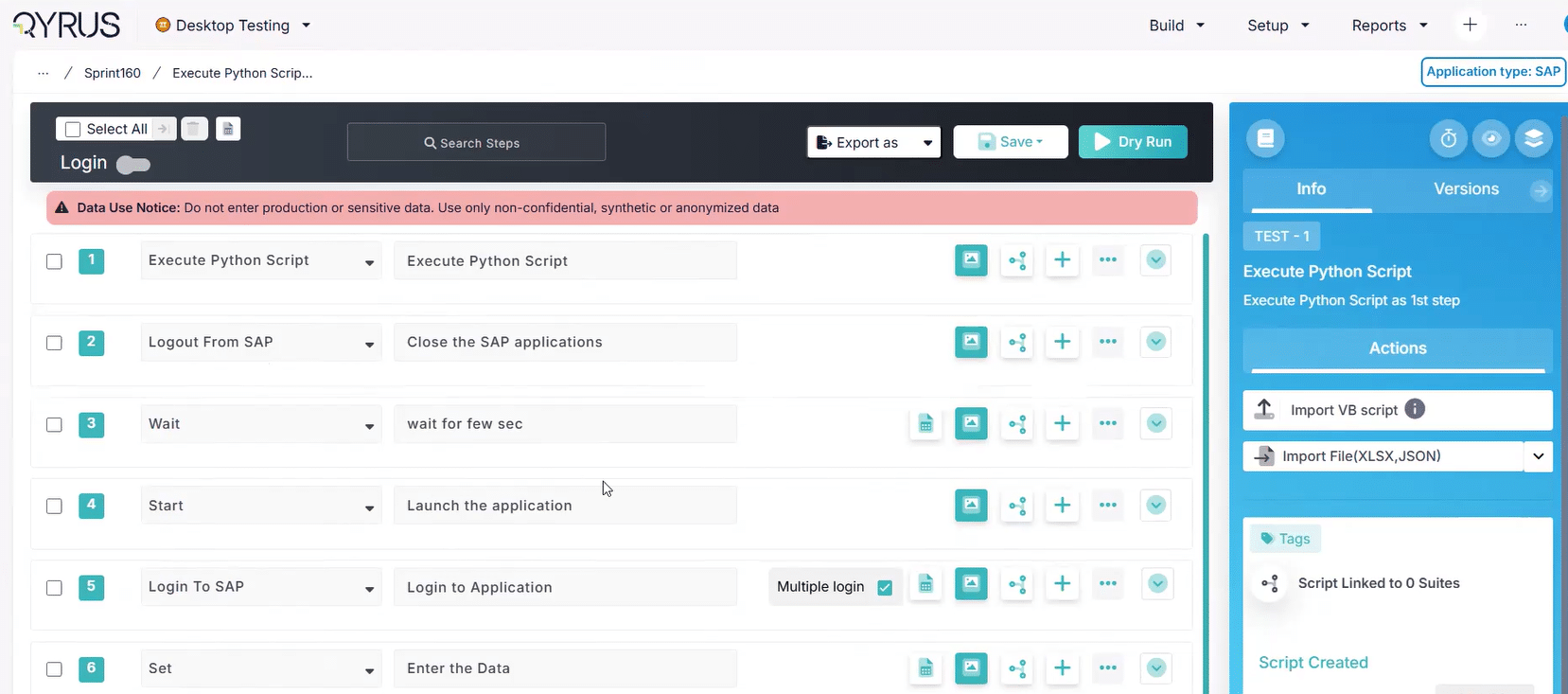
Desktop-Execute Python Scripts in Desktop

The Challenge:  

Automating legacy desktop applications and complex ERP systems like SAP often requires more than just UI interactions. Sometimes, you need to perform heavy lifting behind the scenes before a test even begins—like querying a local database, decrypting a secure file, generating complex test data, or interacting with a backend API. Previously, bridging the gap between your automated UI steps and these required backend tasks was difficult and often required managing external scripts separately from your main test flow. 

The Fix:  

We have introduced a powerful new “Execute Python Script” action directly within the Desktop Testing workflow builder. This allows you to seamlessly embed custom Python code directly into your test sequence. Notably, this powerful action can now also be utilized as the very first step in your SAP Testing scenarios. 

How will it help?  

This update unlocks limitless flexibility by bringing the full power of the Python ecosystem right into your automation canvas. 

  • Limitless Customization: Leverage Python’s massive library ecosystem to manipulate local files, parse complex data, or communicate with local servers directly within your test flow. 
  • Seamless SAP Kick-Offs: Programmatically prepare your SAP environment—such as triggering a specific BAPI, logging in via secure protocols, or staging data—before the UI automation takes over. 
  • Robust Pre- and Post-Processing: Easily handle complex setup (pre-requisites) and teardown (clean-up) tasks that are too slow or brittle to perform purely through the graphical user interface. 

Automate the Automation: CLI Plugin for Desktop Testing! 

The Challenge:  

Integrating heavy desktop application tests into modern, fast-paced CI/CD pipelines has historically been a headache. Desktop automation often felt siloed, requiring manual triggers via the platform UI or complex, custom-written API scripts to orchestrate. If your team wanted to automatically kick off a desktop regression suite immediately after a new build was deployed, the lack of a native command-line tool created unnecessary friction and delayed feedback loops. 

The Fix:  

We have officially introduced a dedicated CLI Plugin for the Desktop Testing Service. This powerful tool allows you to trigger, manage, and monitor your desktop automated tests directly from your terminal or command line, bypassing the UI entirely. 

How will it help?  

This update bridges the gap between your local desktop environments and your enterprise automation pipelines. 

  • Native CI/CD Integration: Seamlessly bake your desktop tests directly into your Jenkins, GitHub Actions, GitLab, or Azure DevOps pipelines using simple command-line executions. 
  • Unified Workflows: Bring your desktop applications up to speed with your web and API testing, ensuring every part of your ecosystem is automatically tested on every deployment. 
  • Developer-Friendly Execution: Empower developers and SDETs to kick off complex desktop automation suites locally or remotely using the command-line tools they are already comfortable with. 

Streamlined Connections: Unified Integrations Ecosystem!

The Challenge:  

Managing the flow of test data between your API testing environment and your external project tools could often feel disjointed. Previously, configuring integrations for test management systems (like Xray and TestRail) and communication channels (like Slack and Teams) involved navigating entirely different setup flows and interfaces. This fragmented experience made administrative tasks tedious and could lead to inconsistent reporting or missed notifications when critical API pipelines failed. 

The Fix:  

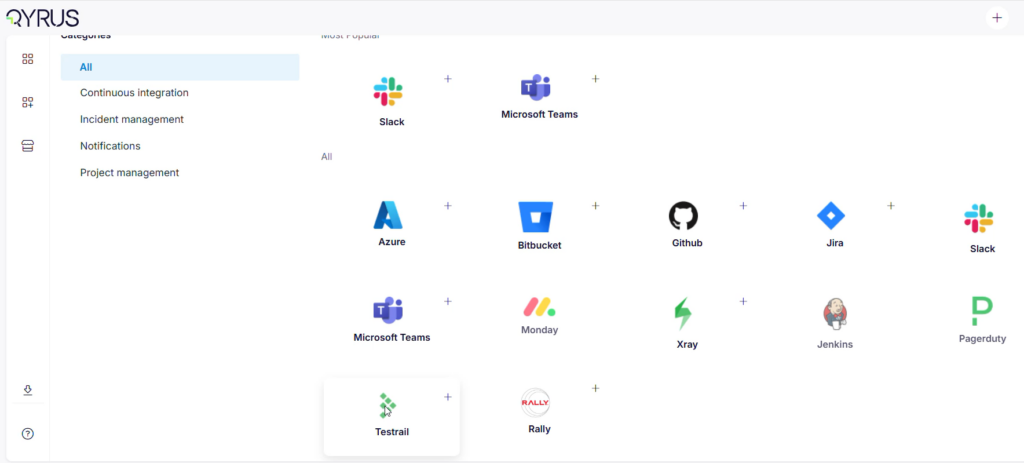
We have completely redesigned and unified the integration architecture for API Testing. The configuration flows for Xray, TestRail, Microsoft Teams, and Slack have been consolidated into a single, cohesive, and highly intuitive user experience. Furthermore, we have built upon our recent Jira updates to enhance the overall Jira integration flow, ensuring a seamless bridge between your API results and your issue tracking. 


How will it help?  

This update creates a harmonious workflow between your API test executions and your broader enterprise toolchain. 

  • Effortless Configuration: A standardized user interface means setting up, managing, and troubleshooting your third-party connections is now fast, predictable, and simple across the board. 
  • Synchronized Reporting: Keep your systems of record (Xray, TestRail) perfectly aligned with your API execution results without jumping through administrative hoops. 
  • Instant Alerting: Ensure your development and QA teams are immediately notified in their preferred workspaces (Slack or Teams) the moment API validations fail, accelerating the feedback loop. 

A Modernized View: Refreshed API Enterprise Dashboard!

The Challenge:  

As a platform evolves, maintaining a consistent user experience across all modules is critical for user efficiency. Previously, the API Enterprise dashboard may have felt slightly disconnected from the newer, modernized areas of the platform. For enterprise teams relying on this dashboard to parse massive amounts of complex execution data and metrics, a dated or inconsistent interface could create visual friction and slow down decision-making. 

The Fix:  

We have completely refreshed the API Enterprise dashboard to fully align with our latest platform-wide UI/UX design guidelines. This comprehensive update introduces modernized data visualizations, cleaner typography, streamlined layouts, and a standardized design language. 

How will it help?  

This aesthetic and functional upgrade makes managing enterprise API quality a smoother experience. 

  • Unified Experience: Enjoy a seamless, consistent look and feel as you navigate between API Testing and all other testing services on the platform, reducing cognitive load. 
  • Enhanced Clarity: The modernized visual hierarchy and cleaner layouts make it significantly easier to digest high-level enterprise metrics, success rates, and coverage data at a single glance. 
  • Intuitive Navigation: A standardized, modern interface means less time hunting for specific charts or settings, allowing your team to focus faster on the insights that matter most. 

Future-Proof Foundation: Upgraded Integration & Reporting Frameworks!

The Challenge:  

As enterprise testing operations scale, older (“legacy”) backend frameworks handling third-party connections and massive data aggregation can start to show their age. They might become slower to process requests, harder to maintain, or struggle to handle the sheer volume of execution data generated by large teams, leading to delayed enterprise reports or brittle connections to your external tools. 

The Fix:  

We have executed a massive under-the-hood structural upgrade by completely migrating our legacy integration connections and Enterprise reports onto new, highly robust backend frameworks. This modernization effort replaces older architectural bottlenecks with streamlined, enterprise-grade technology. 

How will it help?  

While this is a behind-the-scenes upgrade, the impact on your daily operations is substantial. 

  • Unshakeable Reliability: Your connections to external project management and communication tools are now significantly more stable, resilient, and less prone to dropping or timing out. 
  • Lightning-Fast Insights: Generate heavy, data-dense enterprise reports much faster, without putting unnecessary strain on the backend system. 
  • Built for the Future: This modern architecture serves as a powerful new foundation, clearing the runway for us to deliver even more advanced analytics and deeper integration capabilities in upcoming releases. 

Handle Heavyweight Apps: Reliable Multipart Uploads!

The Challenge:  

As mobile applications grow in complexity—packing in high-resolution assets, advanced SDKs, and intricate features—their build sizes (APKs, AABs, and IPAs) have skyrocketed. Previously, uploading these massive files in a single, continuous stream was risky. A minor network blip or a server timeout could cause a 2GB upload to fail at 99%, forcing you to start the agonizingly slow upload process all over again just to begin your mobile testing. 

The Fix:  

We have introduced multipart upload support for the Device Farm. This intelligent mechanism automatically breaks your large application files into smaller, manageable chunks. These chunks are uploaded efficiently and reliably to our servers, where they are seamlessly reassembled into the complete build. 

How will it help?  

This underlying infrastructure upgrade removes the friction of managing enterprise-scale mobile apps. 

  • Rock-Solid Reliability: If a network interruption occurs, only the affected chunk needs to be retried, not the entire file, guaranteeing your upload completes successfully. 
  • Support for Massive Builds: Easily bring your largest, most complex applications to the Device Farm without worrying about arbitrary file size limits or connection timeouts. 
  • Faster Time-to-Test: By eliminating the cycle of failed uploads and restarts, your mobile binaries reach the devices faster, allowing your automated and manual testing to begin sooner. 

Uninterrupted Testing: Smarter Session Management!

The Challenge:  

During extended manual testing or deep debugging sessions on real devices, testers often spend several minutes analyzing crash logs, inspecting complex DOM structures, or waiting for specific background events to trigger without actively clicking the screen. Previously, Device Farm’s idle detection could misinterpret these periods of focused analysis as inactivity. This resulted in premature session timeouts, severing the connection, wiping the device state, and forcing users to frustratingly restart their entire setup from scratch. 

The Fix:  

We have completely overhauled our idle session handling logic. The platform now accurately monitors a much broader and smarter array of user interactions—beyond just basic screen taps—to ensure your session stays alive exactly when you need it to, while still securely releasing devices that are genuinely abandoned. 

How will it help?  

This quality-of-life update removes the anxiety of sudden disconnects from your manual testing workflow. 

  • Focus Without Fear: Take the time you need to analyze logs or review network payloads without the system abruptly terminating your device connection. 
  • Preserve Test States: Avoid the massive time sink of having to constantly re-upload apps, re-authenticate, and navigate back to a specific screen state just because of a premature timeout. 
  • Smoother User Experience: Enjoy a more fluid, reliable, and frustration-free debugging environment that respects how testers actually work. 

Streamlined Workspace: Intuitive Navigation & Smart Visibility!

The Challenge:  

Previously, navigating the Device Farm during complex project setups could feel a bit cluttered. Users were often presented with a wide array of tabs, settings, and device lists all at once, some of which might not be relevant to their specific role or current task. This visual friction made configuring new projects, finding specific environments, and managing device allocations slower and less intuitive than it needed to be. 

The Fix:  

We have significantly enhanced the tab navigation and introduced intelligent visibility configurations across the Device Farm interface. The layout is now logically streamlined, providing a much smoother user experience that allows you to easily surface the exact tools, device lists, and project settings you need while keeping unnecessary elements out of the way. 

How will it help?  

This quality-of-life update makes managing your mobile testing infrastructure faster and easier on the eyes. 

  • Faster Project Setup: Spend significantly less time hunting through complex menus and more time quickly configuring your mobile test environments. 
  • Focused Workflows: Improved visibility settings mean your workspace remains clean and relevant to your immediate tasks, reducing cognitive load and administrative mistakes. 
  • Effortless Administration: A more intuitive navigation structure makes it incredibly simple to track, allocate, and manage your device inventory across multiple projects without feeling overwhelmed. 

The Big Picture: Consolidated Summary Reports!

The Challenge:  

When managing massive testing cycles across Mobility and Component services, reviewing the results of dozens of workflow and folder executions was incredibly tedious. Previously, selecting multiple reports for download resulted in a messy, heavy ZIP file containing multiple nested folders and individual report files. Testers and QA managers were forced to open each file separately, making it nearly impossible to quickly gauge aggregated KPIs, overall passing rates, or holistic quality trends across a large batch of executions. 

The Fix:  

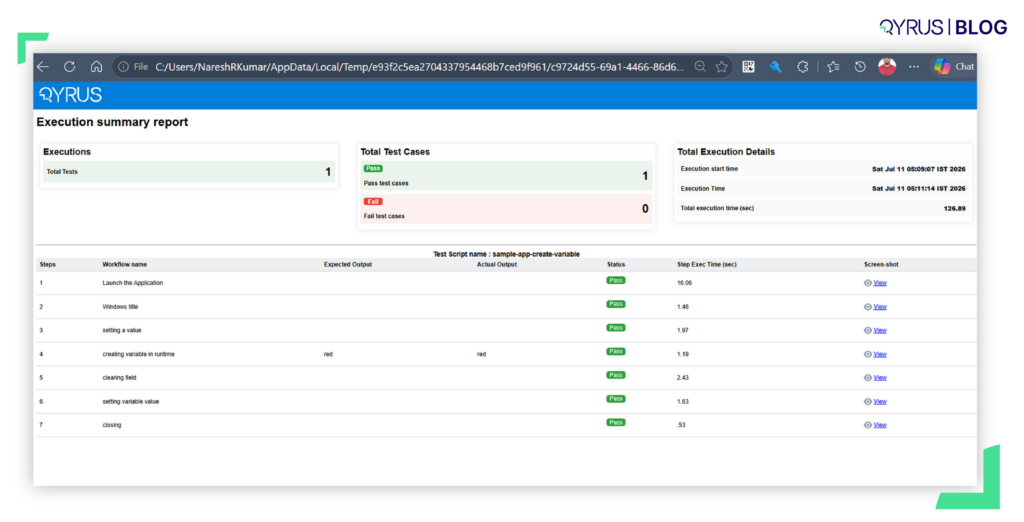
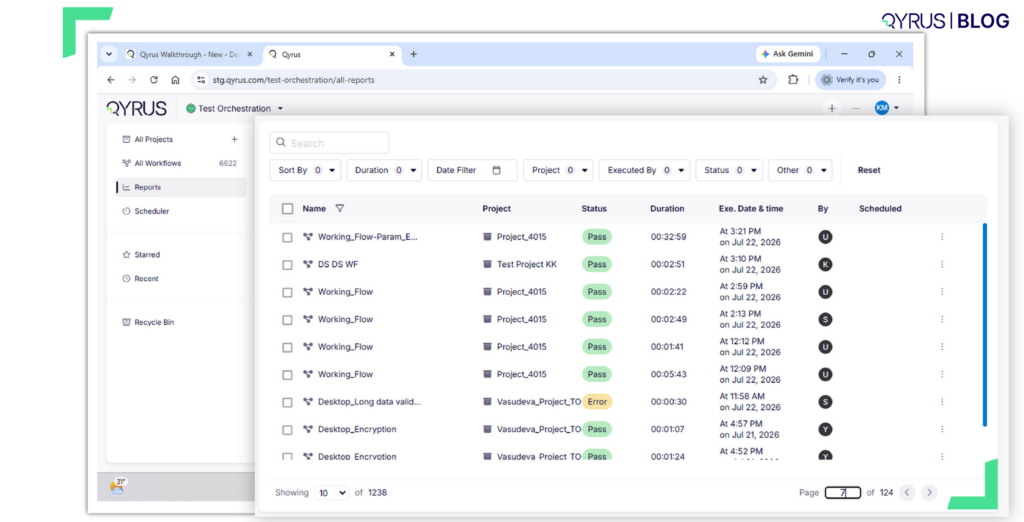
We have introduced a powerful new “Download Summary Report” capability within the Reports section. You can now select up to 100 individual workflow and/or folder executions and seamlessly compile them into a single, unified HTML summary report. Furthermore, we’ve added a sleek, queue-style loader UI that tracks the background generation process, allowing you to queue up multiple parallel report requests without freezing your workspace. 


How will it help?  

This major reporting enhancement transforms scattered data into immediate, actionable intelligence. 

  • Unified KPIs: Instantly view aggregated quality metrics, filters used, and overall execution statuses compiled neatly into one single, easily shareable HTML document. 
  • Eliminate File Clutter: Say goodbye to extracting messy ZIP files and digging through dozens of individual folders just to find the data you need. 
  • Uninterrupted Workflow: The new queue-style UI allows you to trigger massive report aggregations and monitor their progress while you seamlessly continue working on other tasks within the platform. 

Under the Hood: A Faster, More Secure Orchestrator!

The Challenge:  

Managing test orchestration across massive, enterprise-scale platforms requires an incredibly robust backend infrastructure. As testing volumes grow and technology evolves, remaining on older software frameworks can introduce subtle performance bottlenecks, complicate scaling efforts during peak execution times, and delay access to the latest security protocols. 

The Fix:  

We have completed a comprehensive architectural overhaul of the core Orchestrator framework. This major modernization effort includes a full upgrade to Java 17 and Spring Boot 3.5.10, alongside a complete transition to AWS SDK v2. 

How will it help?  

While this is a strictly backend enhancement, it significantly boosts the reliability and speed of your entire testing operation. 

  • Blazing Performance: The migration to Java 17 and the latest Spring Boot architecture optimizes memory usage and processing speeds, resulting in faster test initializations and smoother orchestration logic. 
  • Enterprise-Grade Security: Running on modernized, actively supported frameworks ensures your orchestration layer is fortified with the most up-to-date security patches and compliance standards. 
  • Highly Scalable Architecture: The transition to AWS SDK v2 provides a highly efficient, non-blocking foundation, perfectly positioning the platform to effortlessly handle massive bursts of concurrent testing load as your organization continues to scale. 

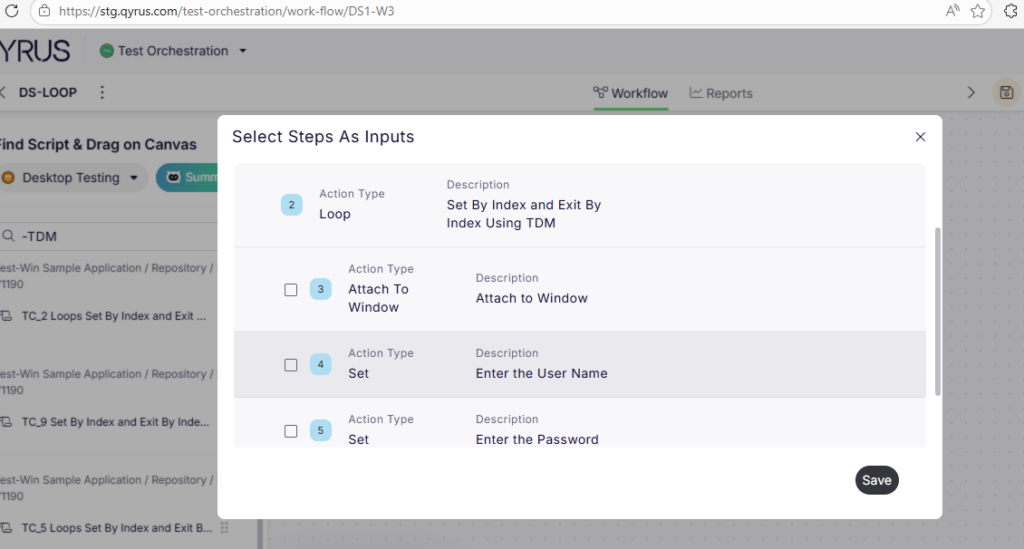
Infinite Iterations: Loop Support & Optimized Canvas for Web Workflows!

TO-Loop Support-Optimized Canvas for Web Workflows

The Challenge:  

Testing complex web applications often requires executing the same sequence of actions multiple times using different sets of data—such as populating multiple rows in a data grid or verifying various user roles. Previously, orchestrating these repetitive iterations within your web workflows was cumbersome, often requiring you to duplicate nodes manually or rely on clunky workarounds. Furthermore, as these workflows grew in size and complexity, the orchestration canvas could occasionally experience performance drag, slowing down your test design process. 

The Fix:  

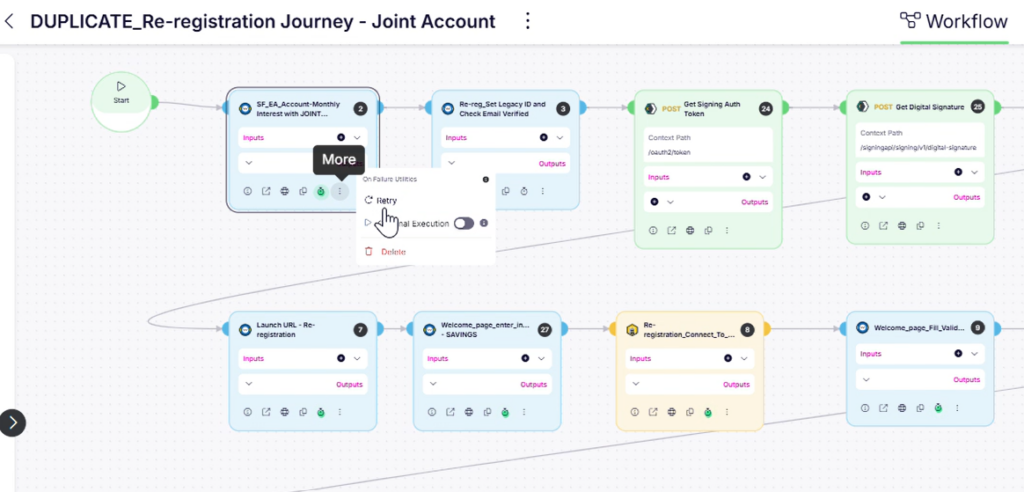
We have officially implemented comprehensive loop support for web workflows, alongside significant optimizations to the Canvas loading performance. You can now define, execute, and easily manage looped steps directly within your Web nodes. This powerful enhancement includes full support for creating multiple loops, complex nested loops, and seamlessly attaching loop data tables to manage inputs and outputs for every single iteration. 

How will it help?  

This update brings true programming logic and speed directly into your visual workflow builder. 

  • Effortless Data-Driven Testing: Seamlessly create and select loop data tables to feed unique inputs into each iteration, automating repetitive test sequences without cluttering your canvas with duplicated steps. 
  • Handle Complex Logic: Confidently build sophisticated, nested loop structures to accurately mirror the intricate, multi-layered behaviors of your modern web applications. 
  • Clear Visual Tracking: The Test Orchestration (TO) View has been upgraded to accurately reflect your loop structures and execution paths, making it incredibly easy to understand and debug your iterations at a glance. 
  • Snappy Performance: Enjoy a fluid, highly responsive workflow builder that loads instantly and keeps pace with your thought process, even when mapping out massive, highly complex test journeys. 

Pipeline Power: CLI & Azure Plugins for Test Orchestration!

The Challenge:  

As teams mature their continuous integration and continuous deployment (CI/CD) practices, manual testing bottlenecks become a major roadblock. Previously, triggering complex Test Orchestration (TO) workflows often required logging into the platform to initiate runs manually or building out custom, cumbersome API scripts. This created friction for engineering teams trying to achieve true, end-to-end deployment automation where tests run seamlessly alongside code builds. 

The Fix:  

We have officially introduced dedicated CLI and Azure DevOps plugins specifically designed for the Test Orchestrator. These enhancements empower you to trigger, manage, and monitor your comprehensive Qyrus TO workflows directly via command-line interfaces (using our enhanced Node CLI) or natively within your Azure pipelines. 

How will it help?  

This update bridges the gap between your complex test orchestrations and your enterprise deployment pipelines. 

  • Seamless CI/CD Integration: Bake your orchestrated testing directly into your automated pipelines, ensuring your massive, multi-service test suites run automatically with every single code commit or build. 
  • Native Azure Support: For teams heavily utilizing the Microsoft ecosystem, the new Azure plugin provides a frictionless, out-of-the-box connection to execute orchestrated tests directly from Azure DevOps without custom scripting. 
  • Developer-Friendly Execution: Empower developers and automation engineers to kick off complex testing scenarios locally or remotely using the familiar command-line tools they already use every day. 

Secure Pipelines: Token-Based Authentication for qAPI! 

The Challenge:  

Integrating API testing platforms into automated CI/CD pipelines or external developer tools often presents a security and stability challenge. Relying on standard user login sessions for headless automation is brittle, as sessions frequently expire, causing builds to fail unexpectedly. Furthermore, sharing actual user credentials across external third-party tools creates significant security vulnerabilities. 

The Fix:  

We have officially introduced robust User Token and API Key-based authentication across the qAPI platform endpoints. This enterprise-grade security enhancement has been fully verified across all environments and is now successfully deployed to production, ready for immediate use. 

How will it help?  

This update provides a secure, reliable foundation for all your external integrations. 

  • Rock-Solid CI/CD: Utilize dedicated API keys for machine-to-machine communication, ensuring your automated API testing pipelines run flawlessly without breaking due to unexpected UI session timeouts. 
  • Enhanced Security: Safely integrate qAPI with your preferred external tools and scripts without ever exposing actual user passwords or compromising account integrity. 
  • Effortless Automation: Streamline the setup of headless testing workflows with simple, secure token generation, allowing your team to focus on building rather than troubleshooting connections. 

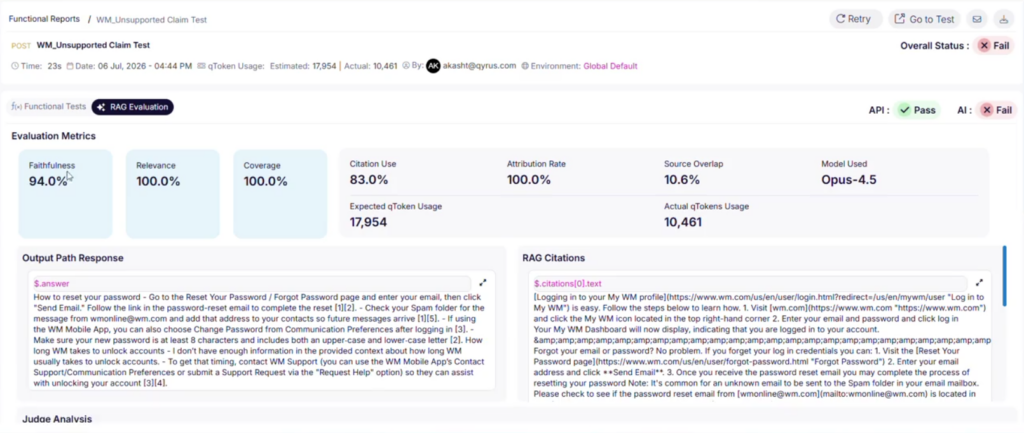
AI Meets API: Introducing Semantic LLM Evaluations!

The Challenge:  

Traditional API testing relies heavily on deterministic assertions—like exact string matching, regex, or static JSON paths. However, as more applications integrate GenAI and natural language processing, APIs are increasingly returning highly dynamic text. When the exact phrasing of a response changes but the underlying meaning remains correct, traditional strict assertions fail. This leads to brittle tests and a high volume of false negatives, forcing QA teams to waste time manually verifying outputs. 

The Fix:  

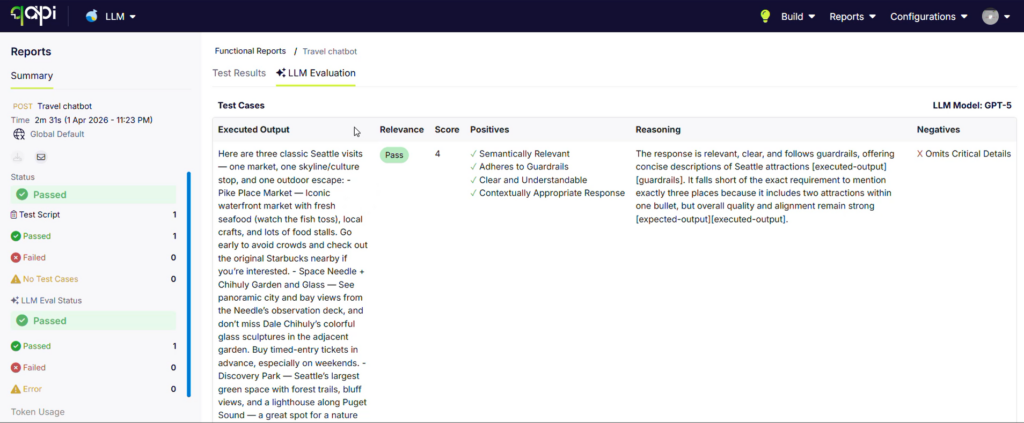
We have introduced a powerful new “Semantic Evaluation” (LLM-as-a-judge) test type directly within your API Test Cases. This feature allows you to validate API responses based on their actual meaning and context, rather than rigid syntax. You simply provide the context, the expected output, and any optional guardrails. The system then automatically extracts the live execution output (via JSON/XML paths or a manual override) and uses an LLM to evaluate the response against your expectations. 

How will it help?  

This update bridges the gap between traditional testing and modern, dynamic applications. 

  • Test the Untestable: Easily and reliably validate dynamic text, chatbot responses, or AI-generated content without relying on fragile, hard-coded keyword matching. 
  • Deep, Intelligent Feedback: Move beyond basic binary results. Your test executions and preview panels now feature a dedicated Semantic Evaluator tab that provides a nuanced semantic relevance score and a detailed judge summary highlighting the positive and negative aspects of the response. 
  • Customized Thresholds: Maintain strict quality standards by setting configurable thresholds that determine whether the AI judge marks the evaluation as a definitive Pass, Fail, or flags it for manual Review. 
  • Seamless Workflow Integration: Build sophisticated, AI-driven assertions with minimal configuration and save them directly to your existing API test suites. 

Clearer AI Insights: LLM Model Tracking in Reports!

The Challenge:  

With the introduction of Semantic Evaluations, you now have the power to let AI judge your dynamic API responses. However, if you are experimenting with different LLM providers or versions across your test suites, reviewing an execution report without knowing exactly which model evaluated each specific test creates a blind spot. It makes it difficult to audit the AI’s decisions, compare model accuracy, or troubleshoot inconsistent evaluations across large test runs. 

The Fix:  

We have enhanced the qAPI reporting engine to explicitly capture and display the selected LLM model directly within your execution reports. Additionally, we have refined the result output terminology to ensure the AI’s feedback and evaluation status are as clear and intuitive as possible. 

How will it help?  

This update brings essential transparency and clarity to your AI-driven testing. 

  • Complete Traceability: Always know exactly which AI model evaluated your API response, ensuring full transparency and confidence in your test results. 
  • Better Debugging: Easily track down whether a flaky semantic test is due to the prompt, the API’s actual response, or the specific LLM version being utilized as the judge. 
  • Actionable Clarity: The refined terminology means the AI’s evaluation summary, scoring, and pass/fail status are easier to digest at a glance, removing ambiguity from your reporting. 

Engine Upgrade: Smarter Scheduling, Previews, and Wallet Management!

qAPI-Smarter Scheduling-Previews-and Wallet Management

The Challenge:  

As API testing operations scale into the millions of calls, the backend systems that manage execution credits, schedules, and live previews can come under immense pressure. Previously, users might have experienced slight delays when generating live API execution previews for massive payloads, minor latency when automated schedules were triggered during peak hours, or administrative friction when managing their qToken wallets across large teams. 

The Fix:  

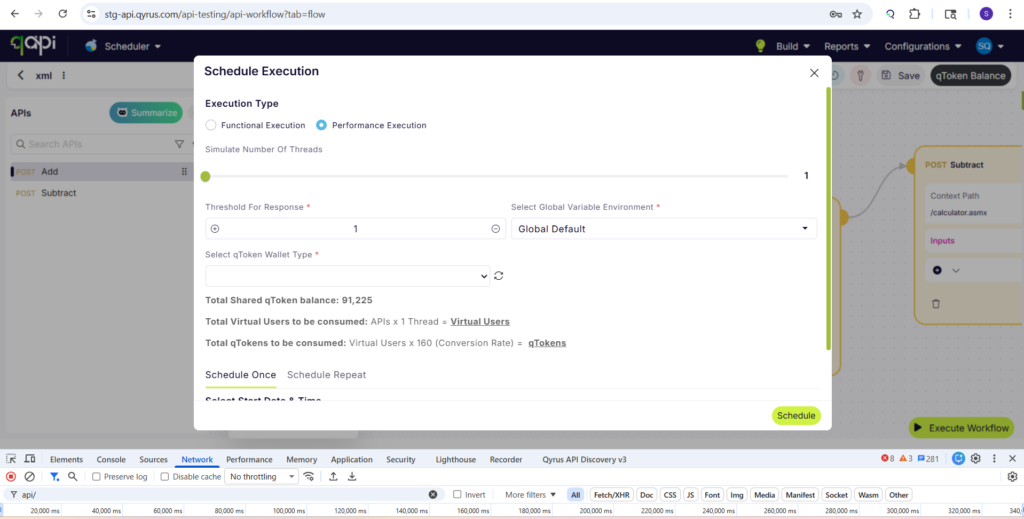
We have completely overhauled the core backend logic for three critical qAPI components: qToken wallet management, the execution scheduler, and API execution previews. This massive architectural upgrade replaces older processing methods with highly optimized, modern infrastructure designed specifically for enterprise-grade performance and reliability. 

How will it help?  

This behind-the-scenes upgrade significantly accelerates your day-to-day testing rhythm. 

  • Instant Previews: Experience lightning-fast API execution previews. You can now validate complex payloads, headers, and AI evaluations immediately without waiting on frustrating UI loading screens. 
  • Precision Scheduling: The upgraded scheduler guarantees that your automated API suites trigger exactly on time, every time, completely eliminating backend queuing delays even during the highest volume periods. 
  • Reliable Resource Management: qToken balances and wallet allocations now sync flawlessly and securely in real-time across your entire organization, making administrative oversight completely frictionless. 

Ready to Leverage April’s Innovations? 

We are committed to providing a unified platform that not only adapts to your evolving needs but also streamlines your critical processes, empowering you to release high-quality software with greater speed and confidence. 

Eager to explore how these advancements can transform your testing efforts? The best way to appreciate the Qyrus difference is to experience these new capabilities directly. 

Ready to dive deeper or get started? 
Welcome to our November update! As we approach the end of the year, our mission to simplify and supercharge your testing lifecycle continues with renewed vigor. In November, we’ve focused on removing the friction between your tools and your goals, delivering enhancements that offer greater visibility, deeper ecosystem integration, and a more personalized AI experience.

In November, we are bridging critical gaps in your workflow. We’ve made reporting clearer with context-rich screenshots, streamlined test creation with instant cURL imports, and empowered enterprise teams by unlocking full Test Suite executions directly within Xray. Plus, our AI algorithms are now smarter than ever, capable of leveraging memory to adapt to your specific context. These updates are all about giving you the clarity and control you need to test with confidence.

Let’s dive into the powerful new features available on the Qyrus platform in November!

Web Testing

Context is King: Step Descriptions Now Label Your Screenshots!

The Challenge:

Previously, screenshots in execution reports were labeled with a generic “Screen Shot” tag. This forced users to constantly cross-reference the image with the test log to understand exactly what action was being captured in that specific frame, making the review process slower and less intuitive.

The Fix:

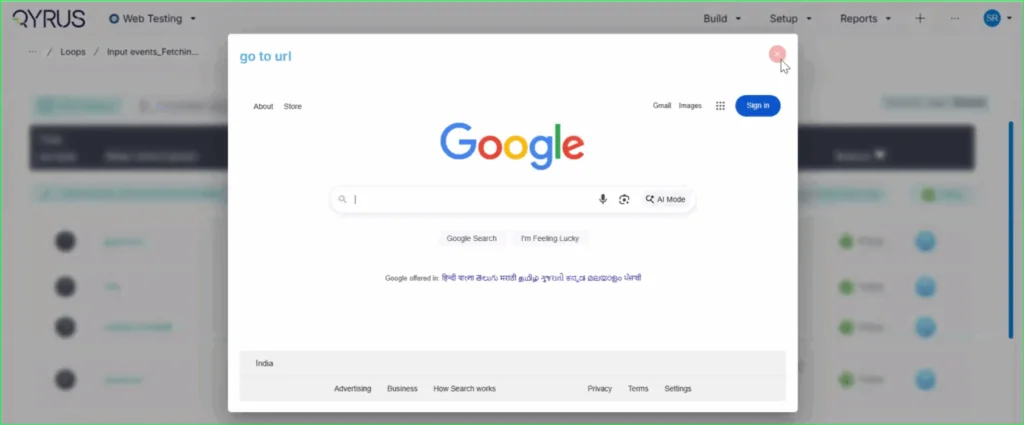
We have updated the reporting engine to replace the generic “Screen Shot” label. Now, the specific step description (e.g., “go to url”) is automatically displayed directly on the top left of every screenshot in the report.

How will it help?

This enhancement provides immediate context for every visual in your report. You can now browse through screenshots and instantly understand the specific test action being depicted without needing to look elsewhere. This significantly improves report readability, reduces cognitive load, and speeds up the debugging and review process.

No More Toggling: View Recorded Locators Instantly on the Step Page!

The Challenge:

Previously, after using the Qyrus Recorder to capture a test flow, the specific locator values (like XPaths or CSS selectors) were not immediately visible on the main test step page. To view or verify these locators, functional testers found it cumbersome to have to re-enter “record mode” via the Encapsulate Chrome extension, disrupting their workflow just to check technical details.

The Fix:

We have updated the Qyrus Recorder with improved locator detection and data handling. Now, after recording a session, all captured locator values are immediately populated and visible directly on the step page within the Qyrus platform.

How will it help?

This update significantly streamlines the script review and validation process. You no longer need to switch back and forth between the platform and the recorder extension just to see how an element is being identified. This gives functional testers and automation engineers instant visibility into their test logic, making it faster and easier to verify scripts and ensure the correct elements are being targeted.

Scale Your Xray Testing: Suite Execution Now Supported!

The Challenge:

Previously, our integration with Xray was limited to triggering single test scripts. This created a workflow bottleneck for teams who needed to execute larger batches of tests or full regression sets, as there was no capability to launch a complete Test Suite directly from the Xray interface.

The Fix:

We have upgraded our Xray integration to fully support Test Suite execution. Users can now trigger the execution of entire suites from within Xray with the same ease and simplicity as running a single script.

How will it help?

This update allows you to significantly scale your testing efforts directly from your test management tool. You are no longer restricted to triggering scripts one by one; instead, you can launch comprehensive test suites in a single action. This streamlines your execution workflow, ensuring that your Xray-driven testing is as efficient and powerful as your needs demand.

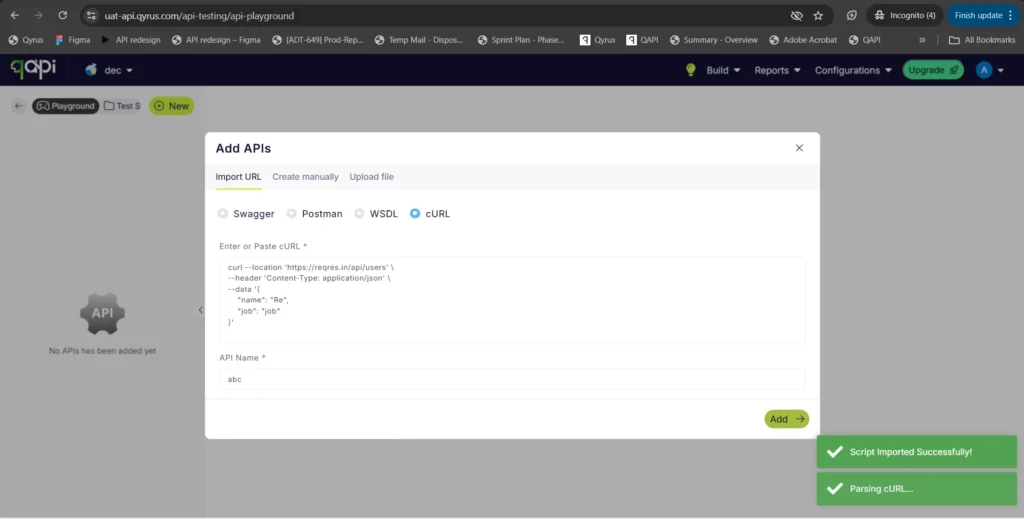
Copy, Paste, Done: Import APIs Instantly with cURL!

The Challenge:

Creating API tests manually can be a tedious process of copy-pasting individual components—headers, bodies, URLs, and methods—from your documentation or browser developer tools into the test platform. This manual reconstruction is not only slow but also increases the risk of transcription errors, leading to frustrated testers and broken initial tests.

The Fix:

We have introduced a new “Import via cURL” option in the API creation workflow. You can now simply paste a raw cURL command directly into Qyrus. The system will automatically parse the command and instantly create a fully configured API test with all the correct parameters, headers, and body content mapped for you.

How will it help?

This feature is a massive time-saver that bridges the gap between development and testing. Developers and testers often have cURL commands readily available (from API docs or network logs). By allowing direct import, we eliminate the manual data entry, ensuring your API tests are set up instantly and accurately, exactly as they were defined in your cURL command.

AI That Remembers: Enhanced Algorithms Now Access User Memory!

The Challenge:

Previously, while our AI algorithms were powerful, they often operated in isolation for each interaction. Without access to a persistent memory of past preferences, specific project contexts, or user-defined constraints, the AI could sometimes provide generic suggestions or require users to repeatedly provide the same background information, slowing down the workflow.

The Fix:

We have rolled out significant enhancements to all our AI algorithms. For users who have opted into the memory feature, these algorithms can now securely access and utilize stored context and preferences.

How will it help?

This upgrade makes your AI interactions significantly smarter and more personalized.

  • Reduced Repetition: The AI remembers your specific constraints and preferences, so you don’t have to repeat them.
  • Better Suggestions: Whether generating test data or building scenarios, the AI now understands your unique context, leading to more relevant and accurate results.
  • Seamless Workflow: Experience a more continuous and intelligent partnership with the platform, as the AI learns and adapts to your specific way of working over time.

Ready to Accelerate Your Testing with November Upgrades?

We are dedicated to evolving Qyrus into a platform that not only anticipates your needs but also provides practical, powerful solutions that help you release top-quality software with greater speed and confidence.

Curious to see how these October enhancements can benefit your team? There’s no better way to understand the impact of Qyrus than to see it for yourself.

Ready to dive deeper or get started?
The world of software testing moves fast, and staying ahead requires tools that not only keep pace but actively drive innovation. At Qyrus, we’re relentlessly focused on evolving our platform to empower your teams, streamline your workflows, and make achieving quality more intuitive than ever before. May was a busy month behind the scenes, packed with exciting new features and significant enhancements designed to give you even more power and flexibility in your testing journey.
Get ready to explore the latest advancements we’ve rolled out across the Qyrus platform!

Complex Web Tests, Now Powered by AI Genius!

Manual coding for complex calculations in web tests? Consider it a thing of the past! We’re thrilled to introduce a game-changing AI feature that lets you generate custom Java and JS code using simple, natural language descriptions. Just tell Qyrus what you need the code to do, and our AI gets to work, even understanding the variables you’ve already set up in your test. This AI Text-to-Code conversion is seamlessly integrated with our Execute JS, Execute JavaScript, and Execute Java actions, designed to produce accurate, executable snippets right when you need them. You maintain control, of course – easily review, modify, or copy the generated code before using it.
A quick note: This powerful AI code generation is currently a Beta feature, and we’re actively refining it based on your feedback!

Enhanced Run Visibility for Web Tests

But that’s not all for Web Testing this month. For our valued enterprise clients, managing your test runs just got clearer. You now have enhanced visibility into your test execution queues, allowing you to see detailed information, including the exact position of your test run in the queue. Gain better insight, plan more effectively, and stay informed every step of the way.

Sharper Focus for Your Mobile Visuals

Visual testing on mobile is crucial, but sometimes you need to tell your comparison tools to look past dynamic elements or irrelevant areas. This month, we’ve enhanced our Mobile Testing Mobile Testing capabilities to give you more granular control. You can now easily ignore specific areas within your mobile application screens, excluding those regions entirely from visual comparisons.
Additionally, you can ignore the header or footer of the screen meaning that you can easily compare different execution results and not run into issues due to differences in the notification bar or in a footer.
This means cleaner, more relevant results and less noise when you’re ensuring your app looks exactly as it should across devices. Focus on what truly matters for your app’s user interface integrity.

Device Farm: Smoother Streaming, Better Guidance

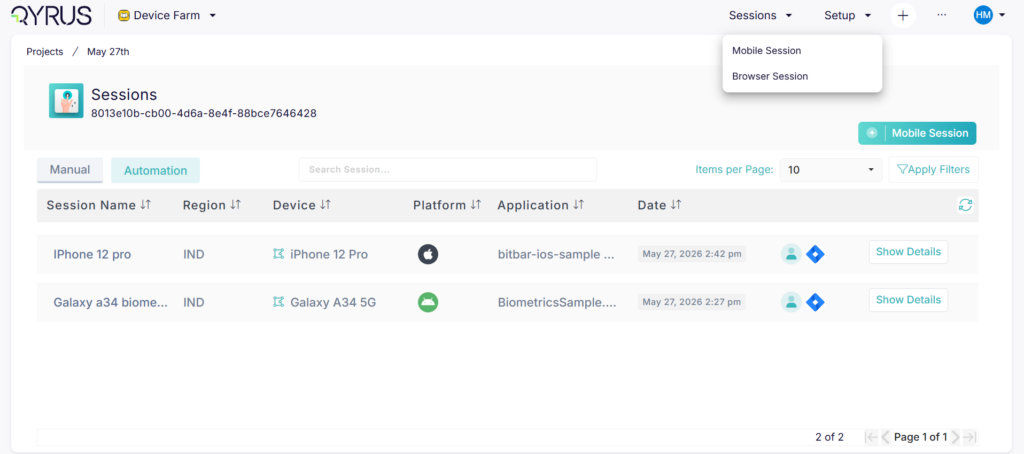
We know your time on the Device Farm Device Farm streaming screen is valuable, and a smooth experience is key. This month, we’ve rolled out several user experience improvements to make your interactions even more intuitive. The tour guide text has been refined to be more informative, guiding you clearly through the features.
We’ve also added a Global Navbar directly inside the device streaming page, providing consistent navigation right where you need it. Plus, for those times you’re working with a higher zoom percentage, we’ve included a handy scroll bar to make navigating the page much easier. Small changes, big impact on your workflow!

Desktop Testing: Schedule Your Success

We’re excited to announce that test scheduling is now available in Qyrus Desktop Testing. This highly requested feature, already familiar from other modules, brings a new level of automation to your desktop workflows. It’s particularly powerful for those complex end-to-end test cases that span across different modules, perhaps starting in a web portal, moving through a back office, and ending in servicing.
Now, you can schedule these crucial test flows, ensuring your regression suites run automatically, even aligning with deployment schedules. This means no more worrying about desktop availability at the exact moment of execution – Qyrus handles it for you. With this feature, efficiently managing tests for workflows impacting dozens of test cases becomes significantly simpler.

Smarter AI for Broader Test Coverage

Our commitment to leveraging AI to make testing more intelligent continues this month with key improvements to both TestGenerator and TestGenerator+. We’ve been refining these powerful features under the hood, and the result is simple but significant: you should now see more tests built by the AI compared to previous versions.
Remember, TestGenerator is designed to transform your JIRA tickets directly into actionable test scenarios, bridging the gap between development tasks and testing needs. TestGenerator+ takes it a step further, actively exploring untested areas of your application, intelligently identifying gaps, and helping you increase your overall test coverage. These enhancements mean our AI is working even harder to help you achieve comprehensive and efficient testing with less manual effort.

Ready to Experience the May Power-Ups?

This month’s Qyrus updates are all about putting more power, intelligence, and efficiency directly into your hands. From harnessing AI to generate complex web code to gaining sharper insights from mobile visual tests, scheduling your desktop workflows, and boosting the output of our AI test generators – every enhancement is designed with your success in mind. We’re dedicated to providing a platform that adapts to your needs, streamlines your processes, and helps you deliver quality software faster than ever before.
Excited to see these May power-ups in action? There’s no better way to understand the impact Qyrus can have on your testing journey than by experiencing it firsthand.
Ready to learn more or get started?
And don’t forget to explore our documentation for more details on these new features!

We’re constantly building, innovating, and looking for ways to make your testing life easier. Stay tuned for more exciting updates from Qyrus!

At Qyrus, we’re relentlessly focused on evolving our platform to empower your teams, streamline your workflows, and make achieving quality more intuitive than ever before. May was a busy month behind the scenes, packed with exciting new features and significant enhancements designed to give you even more power and flexibility in your testing journey. Here’ re the latest advancements we’ve rolled out across the Qyrus platform!

Excited to see these May power-ups in action? There’s no better way to understand the impact Qyrus can have on your testing journey than by experiencing it firsthand.


Ready to Experience the May Power-Ups?


This month’s Qyrus updates are all about putting more power, intelligence, and efficiency directly into your hands. From harnessing AI to generate complex web code to gaining sharper insights from mobile visual tests, scheduling your desktop workflows, and boosting the output of our AI test generators – every enhancement is designed with your success in mind. We’re dedicated to providing a platform that adapts to your needs, streamlines your processes, and helps you deliver quality software faster than ever before.

Excited to see these May power-ups in action? There’s no better way to understand the impact Qyrus can have on your testing journey than by experiencing it firsthand.


Ready to learn more or get started?