Qyrus Named a Leader in The Forrester WaveTM: Autonomous Testing Platforms, Q4 2025 – Read More

Flaky API tests are one of the biggest killers of trust in automation. They pass on one run, fail on the next, and trigger the same internal debate every time: “Is something actually broken, or is our test suite behaving odd again?” 

We’ve seen it a thousand times. Whenever a CI/CD pipeline turns red, it’s because a critical API test has failed. The developers stop their work, and everyone tries to figure out what’s broken. Then, someone re-runs the process, and… it passes.

Why? Because once you and your team lose confidence, they stop taking failures seriously—and your CI pipeline becomes and dead end instead of a gate.

What exactly is a flaky API test?

A flaky API test is one that behaves inconsistently under the same conditions—same code, same environment, same inputs. The key factor to notice here is non-determinism. You can re-run it five times and get a mix of passes and failures.  This isn’t bad test writing; it’s usually a signal that something deeper is unstable—timing, dependency calls, shared state, or the environment itself.

Understanding this helps teams shift from blaming QA to fixing systemic issues in API stability. 

Why are flaky API tests such a big deal in CI/CD?

CI/CD pipelines rely on fast, trustworthy feedback loops. Flaky API tests break that trust. They slow delivery, cause you to re-run them, hides real issues, and pushes developers toward shortcuts like adding retries just to get a green build. Eventually, people stop paying attention to failures altogether—creating a dangerous “green means nothing” tendency.

“Flakiness is one of the top silent blockers of fast-paced engineering teams.” 

How to identify if a failed test is flaky or a real defect?

Test diagnosis as a process, not a guess. Teams typically check:

• Does the test pass on immediate re-run?

• Are related API tests also failing?

• Did the environment show latency spikes?

• Has this test shown inconsistent behavior before?

Step 1: Capture the Failure Context Immediately

• Record:

     • Endpoint, payload, headers

     • Environment (dev/stage, build number, commit SHA)

     • Timestamps, logs, and any upstream/downstream calls

• In qAPI, ensure each run stores full request/response, environment, and log metadata for every test so you always have a forensic snapshot of failures.

Step 2: Re-run the Same Test in Isolation

• Re-run the exact same test:

• Same environment and with the same payload and preconditions

• Do this in a way that the execution path matches the original:

• If it fails consistently then there’s strong signal of a real defect.

      • If it passes on immediate re-run then we can suspect flakiness.

Step 3: Check the Test’s History and Stability

• Look at the past runs for this specific test:

    • Has it been green for weeks and suddenly started failing?

    • Has it flipped pass/fail multiple times across recent builds?

In qAPI, use trend/historic test reports and there are two ways to direct this towards:

   • If the failure starts exactly at a specific commit/build, lean toward real defect.

   • If the same test has intermittent failures across unchanged code, mark it as a flakiness candidate.

Step 4: Correlate With Related Tests and Endpoints

• Check whether:

      • Other tests hitting the same endpoint or business flow also failed.

      • Only this single test failed while others touching the same API stayed green.

• In qAPI, you can filter by:

      • Endpoint (e.g., /orders/create)

      • Tag/feature (e.g., “checkout”, “auth”)

Step 5: Inspect Environment and Dependencies

• Validate:

       • Was there an outage or spike in latency on the backend or a thirdparty service?

       • Were deployments happening during the run?

        • Any DB, cache, or network issues?

• In qAPI, correlate test failure timestamps with:

        • API performance metrics

        • Error rate charts

Step 6: Analyze Test Design for Flakiness Triggers

Review the failing test itself to see if it:

• Does it:

       • Depends on shared or preexisting data?

       • Uses fixed waits (sleep) instead of polling/conditions?

       • Assumes ordering of records or timing of async operations?

Step 7: Try Reproducing Locally or in a Controlled Environment

• Run the same test:

     • Locally (via CLI/qAPI agent) and in CI

    • Against the same environment or new.

• Compare the results to see:

     • If it fails everywhere with the same behavior then it’s a real defect.

     • If it fails only in specific pipeline/agent or at random then it’s flakiness or environment issue.

Step 8: Decide and Tag: Flaky vs Real Defect

Make an clear call and record it:

• As real defect when:

    • Failure is reproducible on repeated runs.

    • It correlates with a recent code/config change.

    • Related tests for the same flow are also failing.

• Classify as flaky when:

    • Re-runs intermittently pass.

    • History shows pass/fail flips with no relevant change.

    • Root cause factors are timing/data/env rather than logic.

In qAPI you can

• Tag the test (e.g., flaky, env-dependent, investigate).

    • Move confirmed flaky tests into a “quarantine” suite so they don’t block merges but still run for data.

    • Create a new testing environment directly from qAPI to track fixing the flakiness.

Step 9: Feed the Learning Back Into Test & API Design

Once you’ve identified a test as flaky:

• Fix root causes, not just symptoms by:

    • Improving test data isolation.

    • Replacing hard coding time delays with condition-based waits.

    • Strengthen environment stability or add mocks where needed.

• For real defects:

    • Link qAPI’s failed run, logs, and payloads to a ticket so devs have complete context.

What are the most common causes of flaky API tests?

The majority of API flakiness falls into predictable categories:

• Timing issues: relying on fixed waits instead of real conditions.

• Shared or dirty data: test accounts reused across suites.

• Unstable staging environments: multiple teams deploying simultaneously.

• Third-party API calls: rate limits, sandbox inconsistencies.

• Race conditions: async operations not completing in time.

Once you classify failures into these buckets, you can start projecting patterns—and based on that teams can solve the root cause.

Can we detect flaky API tests proactively instead of waiting for failures?

Yes—teams worldwide are doing it. Here’s a short summary of their detection techinques:

• Running critical tests multiple times and measuring variance.

• Tracking historical pass/fail trends per API.

• Flagging tests with inconsistent outcomes.

• Creating a “Top Flaky API Tests” report weekly.

Flakiness becomes manageable when it is visible, measured, and reviewed—just like any other quality metric.

How do we design API tests that are less flaky from day one?

Stable API automation comes from building tests that are:

• Deterministic: same input, same output.

• Data-independent: each test owns and cleans up its state.

• Condition-based: waiting for the system to reflect the correct state.

• Reproducible: no hidden randomness or external surprises.

• API-layer focused: validating contracts and flows, not UI noise.

A good rule that we follow: A test should run in any environment, on any machine, and give the same result every time.

How much flakiness is actually caused by environment issues?

Far more than most teams admit. Shared staging environments are notorious for:

• Partial deployments

• Old configuration

• DB resets

• Parallel loads from other teams

• Third-party dependency failures

You can curate the perfect automation strategy and still get flaky results in a noisy environment. This is why modern engineering cultures prefer dedicated environments that are lean, isolated, and consistent.

When the environment stabilizes, the flakiness rate drops dramatically.

How do you fix flaky tests without slowing delivery?

Research and industry experience show that flaky tests aren’t just inconvenient — they can disrupt your CI/CD pipelines and waste engineering time. In fact, industry data indicates that flaky tests account for a significant portion of CI failures and engineer effort: one study found that flaky and unstable tests contributed to as much as ~13–16% of all test failures in mature organizations’ pipelines.

Quarantine flaky tests — but still run them. Instead of letting flaky tests block merges, isolate them in a separate suite. Run them regularly so you still collect data and trends, but don’t let a flaky failure stop your pipeline.

Prioritize by impact and frequency. Not all flaky tests are equal. Fix the tests that fail most often and those covering critical business flows first. A small number of high-impact flakes often cause most CI noise.

Fix in batches. Group fixes by root cause — timing/synchronization, async behavior, data isolation, environment instability — and tackle them together. This reduces context switching and produces measurable improvements faster.

Flakiness Isn’t a QA Problem—It’s an Engineering Culture Problem

API flakiness exposes weaknesses in environments, data management, architecture, and team processes.

Fixing it requires collaboration across QA, DevOps, and backend teams—not just “better test scripts.”

By adopting a systematic approach to diagnosing, prioritizing, and fixing instability, you can transform your automation suite from a source of frustration into a trusted, high-signal safety net. And by choosing a modern API testing platform that provides the toolkit for flakiness detection, environment management, and AI-assisted diagnosis so that you have lesser problems down the line.
According to researchers the global test automation market capitalization is set to cross $55 Billion by 2030.

Why do researchers say this with confidence? 

The shift from manual to automated API testing isn’t just a trend—it’s now necessary. More than 24% of companies have automated 50% or more of their test case generation, while 33% of companies aim to automate between 50% to 75% of their test cases.

What is API test Automation?

API test automation is a process that involves using scripts and tools to programmatically verify an API’s functionality, performance, and security without manual support.

Automated API tests once done can seamlessly integrate into deployment pipelines, accelerating feedback and release cycles. Consistent test execution ensures dependable results across runs.

The need for automation is purely driven by the capability for faster release cycles, improved software quality, and reduced operational costs.

The benefits of API testing automation are outlined in the open. Teams can achieve faster feedback loops, eliminate human error, while making sure tests are consistent across multiple environments.

Also, the ROI is significantly higher: automated testing can cover up to 95% of testing scenarios, dramatically reducing the time and resources required for comprehensive testing coverage.

So it’s Better to Start by Choosing the Right API  Automation Testing Tool 

Before diving into the first tool you find, you should analyse on what you want and what you need.

Step 1: Define Your Testing Needs

Ask yourself and your teams this:

✅ Are you testing REST, GraphQL, gRPC, or SOAP APIs?

✅ Do you need functional, performance, or security testing—or all three?

✅ Are your APIs public, internal, or partner-facing?

✅ Will you integrate tests into CI/CD pipelines?

✅ Do you need support for mocking, assertions, or data-driven testing?

See which tools offer all that you need, and get a trial demonstration.

q-tip:  With the rise of API-first microservices, test environments are now more fragmented. Tools must support mocking, virtualization, and test data isolation.

Step 2: Match Features to Use Cases

Choose tools based on capability, not popularity.

Feature Why It Matters
Codeless Test Creation For non-technical testers or rapid setup
Support for All Protocols REST, GraphQL, WebSockets, gRPC, etc.
CI/CD Integration Seamless integration with Jenkins, GitHub Actions, GitLab, etc.
Mock Servers Test early when APIs aren’t ready yet
Assertions & Validation   Verify schema, headers, payloads, and latency
Collaboration Support   Share tests with team, manage roles, comments
Version Control & History Track test changes over API versions
AI Assistance Auto-generate test cases, predict gaps, create assertions

Tools to Explore:

qAPI stands out by offering a codeless approach to API testing, making it accessible to non-technical team members like product managers and QA leads. Its core strength lies in leveraging a purpose-built large AI model to generate accurate and structured test cases automatically, significantly reducing manual effort and setup time. This “shift-left” capability allows issues to be caught earlier in the development cycle.

Technical aspects:

✅ AI-powered Test Case Generation: Utilizes AI to intelligently create test scenarios, eliminating the need for manual scripting.

✅ Codeless Automation: Users define tests through a user-friendly interface rather than writing code, simplifying the testing process.

✅ CI/CD Integration: Designed for seamless integration into Continuous Integration/Continuous Delivery pipelines, enabling automated test execution upon code changes for continuous validation.

✅ Unified Dashboards: Provides instant visibility into performance metrics, pass/fail trends, and failure logs for quick analysis and debugging.

✅ Support for diverse API types: Integrates with various API types, including older software applications and different tech stacks.

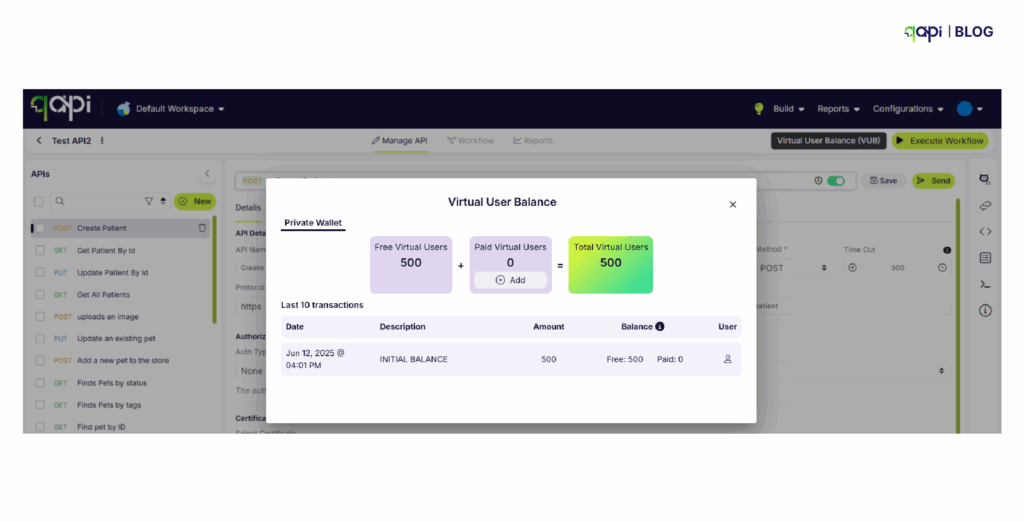
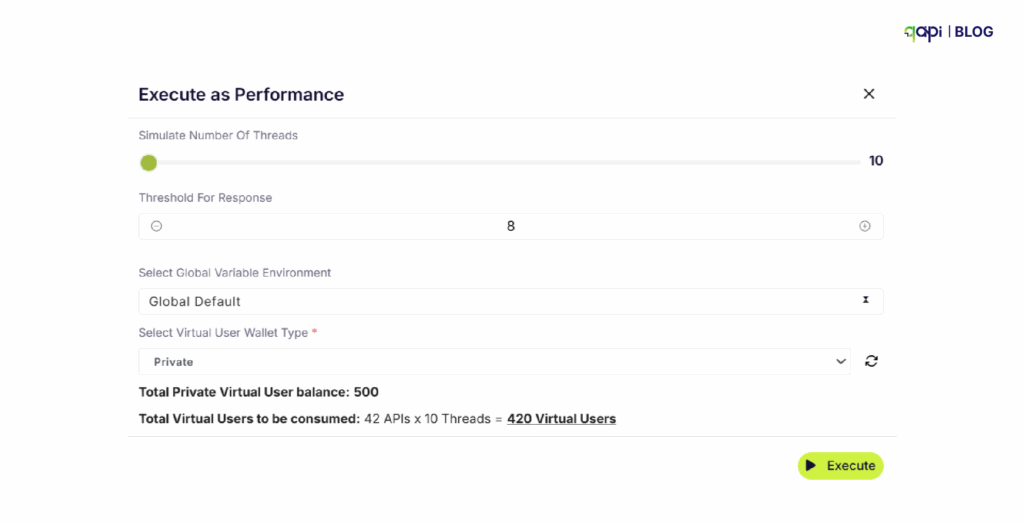
Virtual User Balance Simulate 1000s of concurrent users at a time to help analyse how your API simultaneously responds to multiple requests.

✅ Virtual User Balance: Simulate 1000s of concurrent users at a time to help analyse how your API simultaneously responds to multiple requests.

The image below shows the Virtual User Balance feature on qAPI, where users can select the number of users they want for the testing process according to their needs.

Step 3: Evaluate the Testing Workflow

Try each tool on a real API, it’s important to go beyond features and actually run a workflow on your own API. Document what works for you here’s what your analysis should look like-

Setup Time

Most tools require plugin installs, manual auth configs, or CLI setup.

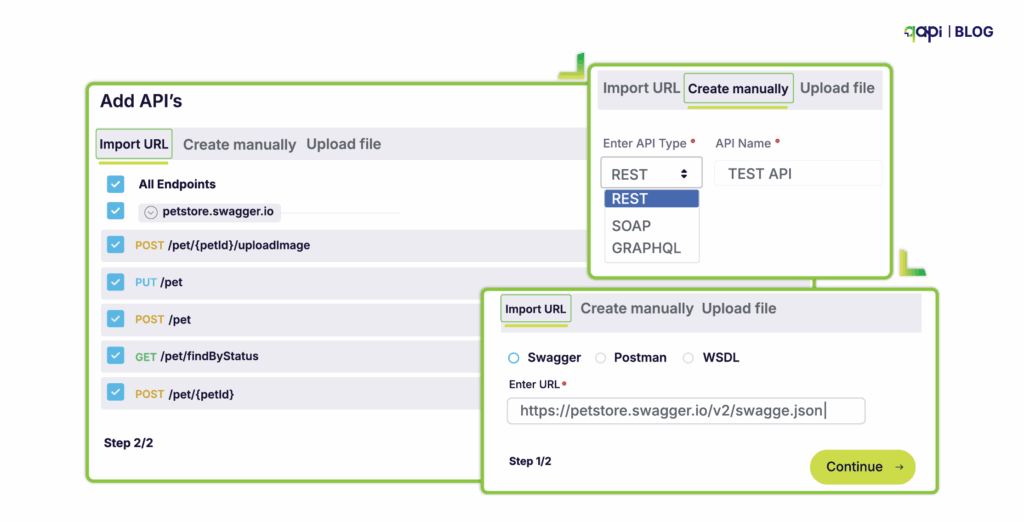
With qAPI:  Just import your API collection (Postman, Swagger/OpenAPI, or curl commandand etc) — and you’re ready to go.

No code, no configuration, no setup, no terminal commands. Setup takes under 5 minutes for most users.

Learning Curve

You shouldn’t need a scripting background to run meaningful API tests.

With qAPI:  The interface is intuitive and easy to get around to, it does not need code. Everything from request editing to assertions can be done with a few clicks through the UI. And for advanced users, there’s support for custom headers, environment variables, and chained requests — without writing scripts.

Test Creation & Maintenance

Maintenance often eats more time than writing the initial tests.

With qAPI:

✅ You can auto-generate test cases using our built-in AI(Nova).

✅ Organize your tests in collections and reuse steps easily.

✅ Update tests with new inputs or endpoints without breaking your suite.

This makes ongoing maintenance feel less like firefighting and more like fine-tuning.

Reporting Output

Reports should be more than just pass/fail—they should be actionable.

With qAPI:  Every run includes detailed logs, error traces, response comparisons, and visual graphs. You’ll know exactly what failed and why. Shareable reports also make team handoffs easier.

Parallel or Cloud Execution Support

Running tests sequentially slows everything down.

With qAPI:  Tests can be scheduled, triggered via webhook, or executed in parallel in the cloud — whether you’re testing one API or hundreds. The load is handled server-side so your local machine stays free.

q-tip: Watch out for:

✅ Tools that slow down CI/CD due to long execution or setup.

✅ Complex scripting requirements for basic test cases.

Step 4: Compare Cost vs. ROI

Even free tools come at the cost of time.

Criteria What to Consider
Free Trial Are key features locked behind paywalls, do you get to try the platform and are you able to navigate yourself after 1-2 test runs?
Team Pricing Is there per-user or per-workspace pricing?
Test Volume Are there limits on concurrent tests, environments, or API calls?
Support & Community Is there fast support or just docs/forums? Moreover, do you constantly need support?

q-tip:  Many dev teams are opting for free, AI-powered, and no-code platforms like qAPI to scale faster without complex pricing or setup.

qAPI is letting users a completely free end-to-end testing trial where users can TRY, GAUGE AND ANALYZE the impact it can create.

Step 5: Evaluate Collaboration & Access Control

2025 teams work cross-functionally. Ensure the tool supports:

✅ Role-Based Access Control (RBAC)

✅ Shared and private workspaces

✅ Real-time commenting or test review flows

✅ API version-specific environments

qAPI now allows users to collaborate in shared test environments, isolate variables, and manage access per user with just a few clicks.

Step 6: Review Reporting & Observability

An API test that fails silently is worse than no test.

Look for:

✅ Visual, actionable reports

✅ Response time graphs, error logs, coverage %

✅ Historical test trends & flakiness tracking

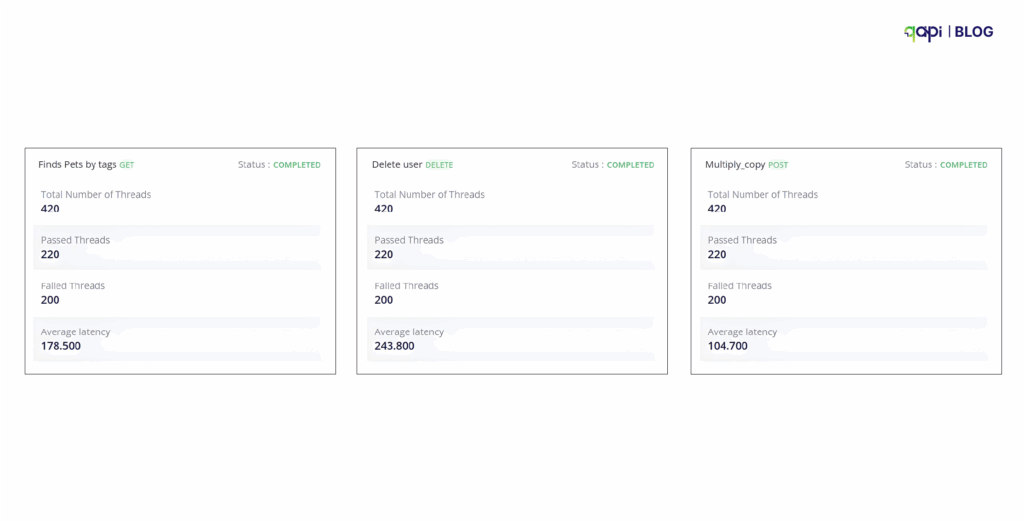
q-Tip:  You’ll want reports your testers, developers, and PMs can all understand. Here’s a sample of qAPI report

Virtual User Balance Image 3

Step 7: Plan for now and for years to come

APIs evolve. Your testing strategy must too.

Check if the tool supports:

✅ API contract testing (OpenAPI/Swagger validation)?

✅ Test reuse across API versions?

✅ AI-based updates to test cases when schema changes?

✅ Testing for edge cases, limits, and chaos scenarios?

Tools that grow with your ecosystem will save months later.

Final Checklist: What Makes the Right API Testing Tool in 2025?

The one that offers:

✅ No-code or low-code setup

✅ Built-in support for AI-generated test cases

✅ Works for both manual and automated pipelines

✅ Flexible pricing with generous free tier

✅ Collaboration-friendly

✅ Great reporting and integrations

✅ Can simulate real-world network and data conditions

✅ Ongoing support and clear roadmap

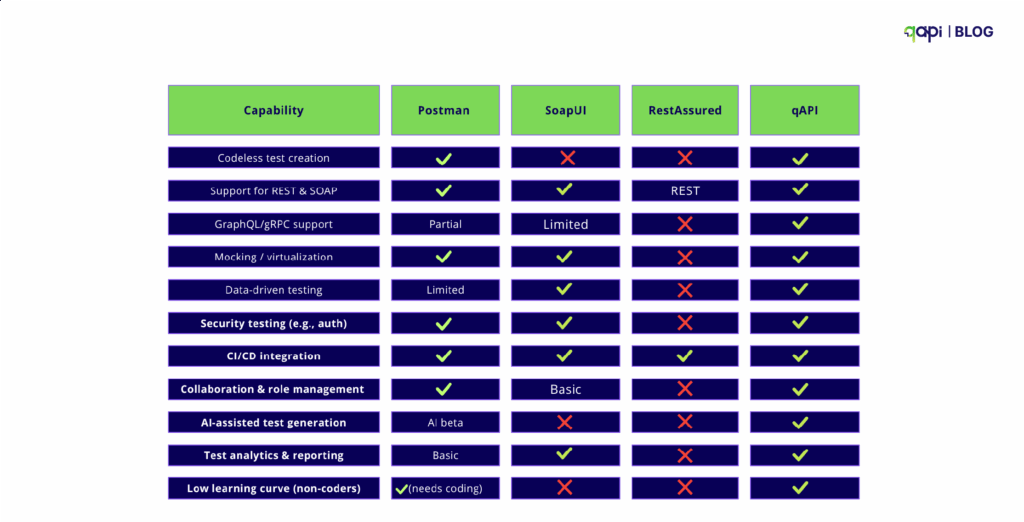
Analyzing Competitors

Analyzing Competitors

API Test Automation Best Practices: The only guide you need

As someone who’s been working, building and testing APIs for years, we’ve seen what works and what doesn’t. Here are the practices that matter:

Start Simple, But Think Big

Don’t try to automate everything on day one. Pick your most critical API endpoints – the ones that would break your app if they failed. Start there. We’ve seen too many teams spend months building elaborate test frameworks while their core features remain untested.

Begin with happy path tests – the normal user flows that work correctly. Once these are solid and running consistently, then add edge cases and error scenarios.

Test Structure That Makes Sense

The 3-Layer Approach

Unit Tests (Fast & Focused) Test individual API functions in isolation. These should run in seconds and catch basic logic errors.

Integration Tests (Real but Controlled) Test how your APIs work with databases, external services, and other components. Use test databases and mock external services.

End-to-End Tests (Full Journey) Test complete user workflows from start to finish on qAPI. Keep these on priority as they will take most of your time.

The 70-20-10 Rule: 70% unit tests, 20% integration tests, 10% end-to-end tests. This gives you speed and confidence without maintenance nightmares.

What Actually Works

Fresh Data Every Test Create and destroy test data for each test run. Yes, it’s slower, but it eliminates the “it worked on my machine” problems that waste hours of debugging.

Realistic but Safe Data Use real data (real names, addresses, phone numbers) but isn’t actually real. Libraries like Faker.js or Java Faker are perfect for this.

Separate Test Environments Never, ever test against production data. Have dedicated test databases that mirror production structure but contain only test data.

Multiple Environments Strategy

Local Development Every developer should be able to run API tests on their laptop without external dependencies. You can create separate environments in qAPI, local databases and share it with teams.

Staging Environment Mirror production as closely as possible. This is where you catch environment-specific issues before they reach users.

Production Monitoring Run basic health check tests in production continuously. Keep them lightweight – you’re monitoring, not testing new features.

Authentication and Security Testing

Don’t treat security as another checklist. Build it into your regular test suite.

Essential Security Tests:

Authentication Validation

● Test with valid tokens

● Test with expired tokens

● Test with malformed tokens

● Test without tokens

Authorization Checks

● Test user permissions (can regular users access admin endpoints?)

● Test data isolation (can users see other users’ data?)

Input Validation

● Test with harmful inputs (SQL injection attempts, XSS payloads)

● Test with oversized inputs

● Test with missing required fields

Performance Testing Reality

Don’t wait until launch to test performance. Build basic performance checks into your regular test suite.

Simple Performance Rules:

Response Time Baselines Set acceptable response times for each endpoint and alert when they’re exceeded. Start with generous limits and tighten them over time.

Load Testing Regularly test with realistic user loads. If you expect 100 concurrent users, test with 150. If you don’t know, start with 50 and work up.

Database Query Monitoring Watch for N+1 queries and slow database calls. These are the #1 cause of API performance problems.

CI/CD Integration That Actually Works

Pipeline Integration Strategy:

Fast Feedback Loop Run critical tests on every code commit. These should finish in under 5 minutes.

Comprehensive Nightly Tests Run full test suite overnight when speed doesn’t matter. Include performance tests and longer-running scenarios.

Pre-Deployment Validation Run smoke tests against staging before deploying to production. Basic functionality checks that take 2-3 minutes.

Your APIs will fail – plan for it.

Essential Error Scenarios:

Network Issues

● Timeouts

● Connection failures

● Partial responses

Server Errors

● 500 errors

● Database connection failures

● Third-party service outages

Input Errors

● Invalid data formats

● Missing required fields

● Data validation failures

Monitoring That Matters:

Real-Time Alerts Get notified immediately when core APIs fail. Use tools like PagerDuty or Slack notifications.

Error Rate Tracking Monitor error rates over time. A spike usually indicates a problem even if individual requests still succeed.

Response Time Trends Track response times over weeks and months. Gradual increases often indicate growing technical debt.

Common Mistakes to Avoid

The Big Ones:

Over-Mocking Don’t mock everything. Test real integrations where possible. Mocks hide integration problems until production.

Ignoring Test Maintenance Tests require ongoing care. Budget 20% of your testing time for maintaining existing tests.

Testing Too Much UI Through APIs APIs should test business logic, not user interface behaviour. Use proper UI tests for interface validation.

Hardcoded Test Data Avoid hardcoded IDs, dates, or other data that changes over time. Use data that can make a difference.

qAPI doesn’t just solve the hardcoded data problem—it eliminates the entire category of “maintenance debt” that comes with traditional test automation. Your tests become self-healing and your QA team focuses on testing business logic rather than fixing broken test data.

When dates change, products are discontinued, or business rules evolve, your tests adapt automatically instead of failing.

Ignoring Test Order Tests should be independent. If Test B fails because Test A didn’t run, you have a problem.

The Bottom Line

A Good API test automation strategy isn’t about having the most sophisticated setup. It’s about having reliable tests that catch real problems before your users do.

Start small, be consistent, and improve gradually. A simple test suite that runs reliably is infinitely better than a complex one that’s always broken.

Focus on business value, not test coverage percentages. 80% coverage of critical functionality beats 95% coverage that includes testing trivial getters and setters.

The best API test automation strategy is the one your team actually uses and trusts. Keep it simple, keep it working, and keep it focused on what matters most to your users.

qAPI is a new, AI-powered API testing platform designed for teams that want to simplify, scale, and automate their API testing workflows—without writing code. Built to support shift-left testing, CI/CD integration, and cross-team collaboration, qAPI enables both developers and non-developers to create, run, and manage API tests through an intuitive, codeless interface.

Don’t accept mediocre solutions and tools to validate the quality of your APIs.

Whether you’re an SDET, QA engineer, or product-led team, qAPI helps you move faster with fewer bugs—while giving full visibility into API health and performance.

Start by automating your API tests on qAPI, for free!