
Qyrus Named a Leader in The Forrester WaveTM: Autonomous Testing Platforms, Q4 2025 – Read More

Featured-thumbnail

Here is a situation every QA team knows: a test script passes in sprint one. It passes in sprint two. By sprint three, it has become the thing everyone quietly dreads — the test that someone has to fix before the release can go out, every single time. 

It’s not because of what they tested, but because of how they were written. There’s a interesting insight behind it, what happens is when a script passes in first sprint it has a chance of becoming a maintenance liability by sprint three.  It happens for various reasons if it’s properly coupled to fragile selectors, lacks clear failure context, or tries to validate too much at once. 

In this Qyrus guide, you’ll find a clear definition of what a test script actually is, a step-by-step authoring framework, examples across manual, code-based, and no-code approaches, clubbed with best practices that actually cut maintenance overhead, and the most common mistakes that silently affecting engineering teams worldwide.  

Let’s build scripts that stay reliable long after they’re written, so you and your teams finally can have a streamlined process. 

What Is a Test Script And Is It Different From a Test Case? 

We see a clear confusion between test cases and test scripts, it’s more than a vocabulary problem. It leads directly to weak automation strategies, coverage gaps, and maintenance costs that nobody budgeted for. 

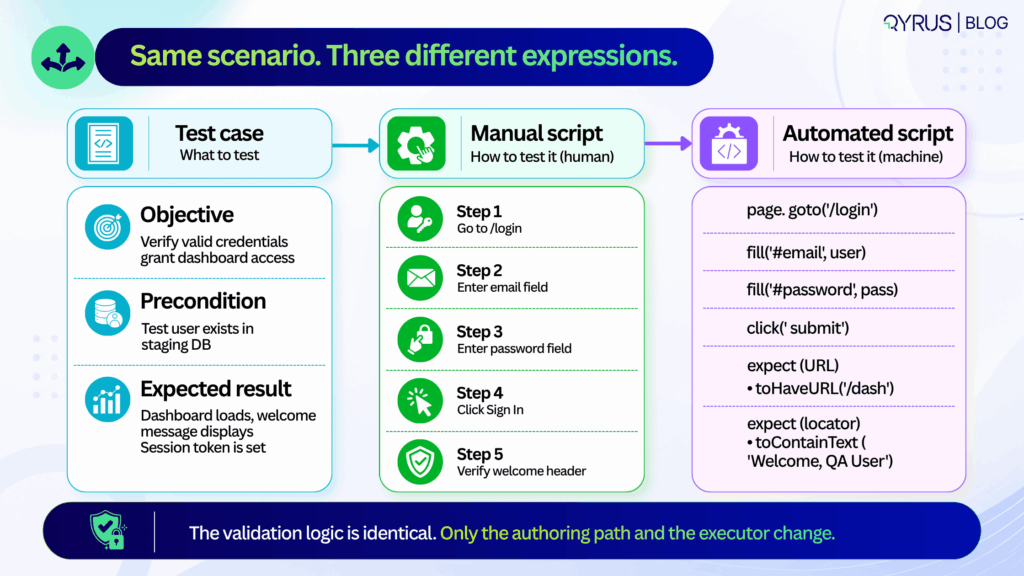
A test case defines what to test: it covers the objective, the preconditions, the inputs, and the expected outcome. It lives in a test management tool and traces back to a requirement or user story.  

Whereas a test script defines how to test it: the exact sequence of steps, interactions, and assertions that operationalise the test case. It lives in version control, a CI pipeline, or an orchestration platform. 

The clearest way to see the distinction 

Test case: Verify that a user with valid credentials can access the dashboard. 

Manual test script:  

  1. Navigate to /login. 
  2. Enter username “testuser@qyrus.com”. 
  3. Enter password “SecurePass3qww!”. 
  4. Click “Sign In”. 
  5. Confirm dashboard loads and welcome message displays.

Automated test script: A code block or no-code workflow that launches a browser, fills the credential fields, submits the form, waits for the /dashboard route, and verifies the presence and content of the welcome header element. 

The test case states the goal. The script operationalises it and neither substitutes for the other. 

It is only when teams start to treat them as interchangeable, they will end up with test cases that read like code comments — over-specified, hard to update when requirements change or automation scripts that try to validate five different user journeys in a single run. 

Both patterns produce the same outcome: the feedback is slow, debugging takes time, and maintenance costs that compound every sprint. 

Keeping them separate has a practical upside too. Product managers and QA can refine acceptance criteria in parallel with engineers building the executable scripts. If the UI changes, you update the script. If the business rule changes, you update the test case. One doesn’t break the other. 
How to Write a Test Script, Step by Step 

Writing a test script that survives multiple release cycles is not about clever code or exhaustive steps. It is about discipline, structure, and foresight. The following six steps apply equally whether you are writing a manual checklist, a Playwright test, or a no-code workflow. 
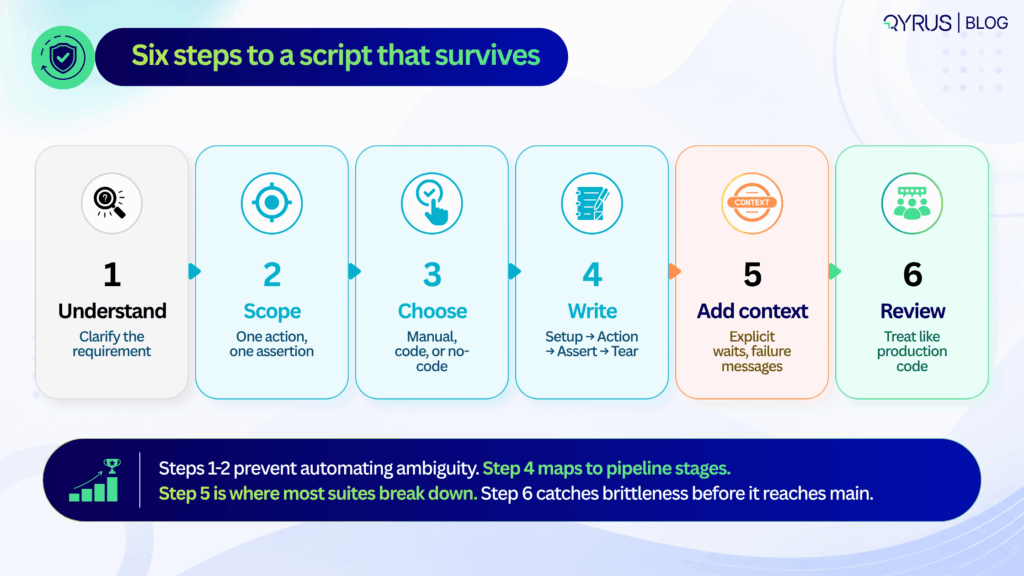
Step 1: Set the Context 

Before writing a single step, identify which specific acceptance criterion this script needs to verify. Is it a business rule, a UI state change, an API contract, or a data transformation? If you cannot state the purpose in one sentence, the scope is too broad and the script too will be broad. 

Step 2: Next define the scope  

When a script validates login, permissions checking, and data sync in a single run, a failure tells you nothing useful.  

You do not know whether login has failed, or the permissions were wrong, or whether the data sync had a race condition. You only know that the 20-step chain broke somewhere. Your scripts should isolate risk. They fail fast and point directly at the broken component. 

 A common argument is that atomic scripts increase the number of tests and execution time. While that concern can be valid, parallel execution can help teams manage the additional test volume. Parallel execution handles scale. The debugging time saved by atomic failures pays back the execution overhead many times over. 

Step 3: Choosing’ your authoring approach  

The most important question is not which framework is most powerful. It is: who will be maintaining these scripts in six months? If the answer is a dedicated SDET team, code-based frameworks offer the right level of control.  

If the answer is a mixed team of QA analysts and product managers, no-code authoring is more sustainable. If the answer is nobody — because the team is small and the feature is stable — a clear manual script may be the highest-ROI option. 

Choosing based on industry hype rather than team composition is the most common reason automation investments underdeliver. 

Step 4: Write in a consistent structure — setup, action, assertion, teardown 

Every reliable script follows the same four-phase lifecycle, regardless of format: 

  • Setup — prepare test data, authenticate the session, navigate to the starting state. Anything that must be true before the test action begins
  • Action — trigger the specific event being tested — a button click, a form submission, an API call, a file upload
  • Assertion — verify the expected state or response. One primary assertion per script. Secondary validations are a separate test
  • Teardown — clean up created records, close sessions, reset state. Teardown is the most commonly skipped phase and the most common source of cross-test contamination

This lifecycle maps cleanly to CI/CD pipeline stages and makes it possible to parallelize execution without shared state causing interference between tests. 

Step 5: Add failure context, not just failure conditions 

A script that fails silently — or dumps a raw stack trace — costs more time to diagnose than the defect it found costs to fix. Every test should include: 

  • Explicit waits — wait for DOM readiness, network idle, or specific element state — not sleep (5000) or arbitrary time delays that will be wrong in half your environments
  • Custom failure messages — “Expected /dashboard URL after valid login, got /login — check session cookie configuration” is useful. A raw assertion error is not
  • Data context in failure output — which test user, which environment, which data set was in use when the failure occurred

The engineer who receives this failure report at 11pm before a release will be grateful. So will the engineer who gets it at 9am three sprints later when the same failure reappears. 

Step 6: Review scripts like production code 

Test scripts that go unreviewed before merge accumulate the same kind of technical debt that unreviewed application code does — just more slowly and more expensively, because the symptoms (flaky CI, unexplained failures, maintenance backlogs) are harder to trace to their origin. 

The checklist for a test script review:  

  • Do assertions match the acceptance criteria in the test case?  
  • Are selectors stable, or are they tied to implementation details that change regularly?  
  • Is test data isolated, or does this script depend on state created by another test?  
  • Is teardown present and correct?  
  • Would a new team member understand what this test is verifying and why from the script alone? 

In 2026 and beyond, this workflow aligns directly with how your teams should ship. Requirements often start in AI-assisted product specs, but the verification logic still needs human clarity. 

Step 1 and 2 prevent the common trap of automating ambiguous acceptance criteria.  

Step 3 acknowledges that teams now blend SDETs, manual QA, and AI-generated snippets—tool choice should match team composition, not industry hype.  

Step 4’s setup-action-assertion-teardown pattern maps cleanly to pipeline stages, making it easier to parallelize execution and cache test environments.  

Step 5 is where most suites break down: without structured error context, flaky failures get quarantined instead of fixed, slowly eroding trust in the pipeline.  

Step 6 closes the loop. Many organizations now treat test script reviews as mandatory PR gates, catching brittle selectors and hardcoded data before they reach main.  

Following this sequence doesn’t just produce better scripts—it builds a testing culture that scales with release velocity. 

Test Script Best Practices That Actually Prevent Maintenance Pain 

Test scripts don’t decay because teams lack skill. They decay because small structural compromises compound over time. The practices below target the highest-leverage maintenance traps and are proven to extend script lifespan across release cycles. 

Keep scripts atomic  

One purpose, one primary assertion. When a script validates login, permissions, and data sync in a single run, a failure tells you nothing specific. Atomic scripts isolate risk and speed up root-cause analysis. 

Avoid hardcoded waits and brittle selectors 

Rigid XPath chains can contribute to flaky or brittle tests, particularly when they depend on implementation details that change frequently. Use explicit waits for network idle, DOM readiness, or API response states. Prefer stable attributes like data-testid or semantic roles over auto-generated class names. 

If your team is still fighting this, our deep dive on what actually causes test flakiness breaks down why brittle selectors are only part of the problem — and what the other 72% looks like. 

Standardize naming and formatting 

A script named test1_final_updated is a future debugging liability. Use consistent conventions:  MODULE_ACTION_EXPECTATION (e.g., AUTH_LOGIN_VALID_CREDENTIALS). Format code or steps uniformly so any team member can read, edit, or extend them. 

Isolate test data and state 

Shared test accounts or reused database rows cause cross-test contamination. Generate unique data per run, clean up after teardown, or use ephemeral test environments. State leakage is a silent suite killer. 

Parameterize intelligently.  

Don’t duplicate scripts for minor data variations. Use data tables, environment variables, or CSV/JSON inputs to run the same logic across multiple scenarios. Parameterization multiplies coverage without multiplying maintenance. 

Document intent, not just steps. 

A comment explaining why an assertion exists saves hours later. “Verify session token to prevent CSRF regression” is infinitely more useful than “Check token exists.” Intent documentation turns scripts into living quality documentation. 

These practices are practical as they map directly to how modern pipelines handle scale. In 2026 and years to come, they also align with how AI-assisted testing tools operate. AI can generate selectors or suggest waits, but it still depends on human-defined boundaries. Without atomic scope, AI-generated scripts inherit the same bloat.  

Without intent documentation, AI refactors can silently change verification logic. Treat these practices as guardrails, not suggestions. When baked into PR templates, linter rules, or no-code platform defaults, they become automatic rather than aspirational. 

Teams that enforce them see fewer quarantined tests, faster CI feedback, and lower handoff friction between QA and engineering. The goal isn’t perfection on day one it’s having predictability in the next months. 

Common Test Script Mistakes  

The most expensive test failures aren’t the ones that catch bugs. They’re the ones that waste time, erode trust, and quietly drain engineering capacity. Three patterns consistently drive those costs. 
Flaky vs. brittle failures 

They’re often conflated, but the root causes and fixes differ. A flaky test passes and fails intermittently under identical conditions—usually due to race conditions, network latency, or unstable test data.  

A brittle test fails predictably after a minor UI or API change—typically because of hardcoded selectors, rigid paths, or tight coupling to implementation details. Flakiness requires synchronization and data control. Brittleness requires abstraction and stable locators. Treating them as the same problem leads to the wrong fix. 

The hidden cost of poor structure 

Industry analyses from 2025 quality reports indicate that engineering teams spend 18–24% of their testing capacity maintaining or debugging unreliable scripts.  

The World Quality Report continues to highlight test maintenance as a top-three bottleneck for release velocity. When scripts lack error context, try to validate too much, or skip peer review, they accumulate silent debt.  

A single flaky script quarantined in CI might seem harmless, but ten of them degrade pipeline trust. Teams start ignoring failures, bypassing gates, or reverting to manual smoke checks—undoing the entire purpose of automation. 

The most common structural mistakes: 

  • Overly broad scripts that chain multiple user journeys, making failures impossible to triage quickly. 
  • Zero error handling or custom messaging, leaving engineers to reverse-engineer raw logs. 
  • Skipping review cycles, allowing brittle selectors and hardcoded data to merge into main. 
  • Ignoring teardown, which leaves orphaned sessions, locked records, or polluted test databases. 

The fix isn’t more automation. It’s better structure.  Scripts that fail clearly, maintain a focused scope, and clean up after themselves are easier to maintain. Poorly structured scripts become a maintenance tax on every release. 

Automated Test Scripts: When (and How) to Go Beyond Manual 

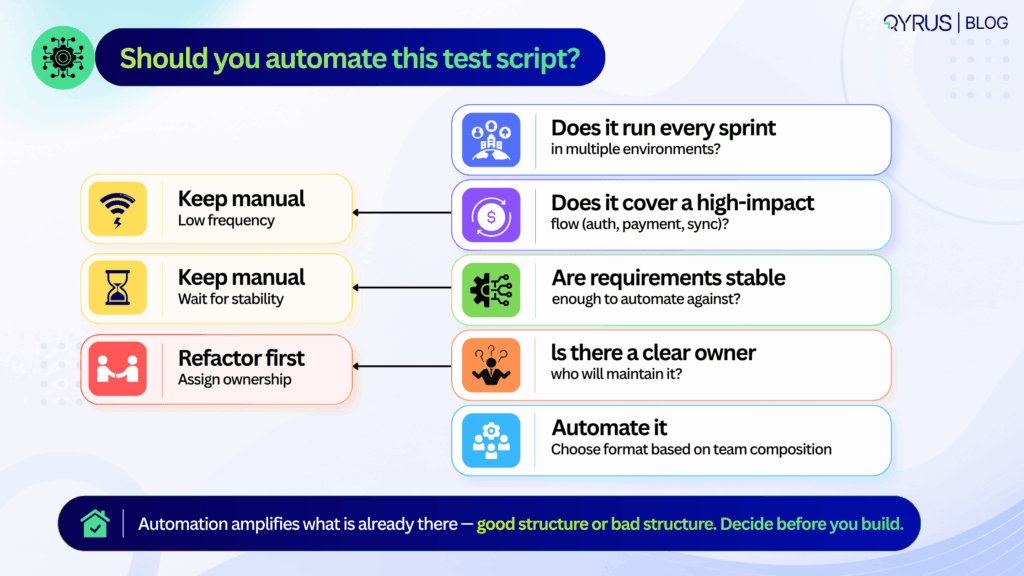
Automation isn’t a goal. It’s a leverage point. Knowing when to automate—and how to choose the right approach—prevents wasted effort and brittle suites. 

Signals it’s time to automate: 

  • The test runs repeatedly across sprints or environments. 
  • It covers a regression-prone area or a high-value business process (checkout, auth, data sync). 
  • Manual execution creates bottlenecks or delays feedback beyond acceptable SLAs. 
    If a test is exploratory, rarely executed, or highly subjective, manual execution often remains the smarter choice. 

Framework vs. no-code/low-code platforms 

Code-based frameworks offer maximum flexibility, deep CI/CD integration, and fine-grained control over execution. They require engineering bandwidth, version control discipline, and ongoing maintenance.  

No-code and low-code platforms trade some flexibility for speed, enabling QA analysts, product teams, and support engineers to author and maintain tests without writing code. The tradeoff isn’t quality—it’s ownership. Choose based on who will maintain the suite long-term, not who can write the first script fastest. 

For a direct comparison of modern end-to-end testing tools across both approaches, our guide breaks down the specific tradeoffs worth knowing before you commit to a testing stack. 

Where AI fits in 2026 

AI now helps with natural-language test authoring, locator generation, and self-healing mechanisms that adapt to minor UI shifts without manual intervention. But self-healing addresses symptoms, not structure.  It can update a broken selector or retry a flaky step, but it won’t fix an overly broad scope, a missing teardown, or an ambiguous assertion. 

AI-generated scripts still require the same best practices outlined above. A poorly structured script is equally brittle whether a human, a framework, or an LLM wrote it. The quality of the foundation matters more than the tool that built it. 

To understand how agentic testing takes this further, moving from self-healing individual scripts to AI agents that detect errors, generate test cases, and manage broader testing workflows, explore our guide before planning your next automation investment. 

How Qyrus Helps Teams Write and Maintain Test Scripts 

Qyrus is built to support the full spectrum of test script authoring and maintenance, whether your team prefers code, low-code, or codeless workflows across web, mobile, API, and desktop applications. 

The platform’s codeless script builder allows non-engineers to create structured, executable tests using plain-English steps and visual workflows, without sacrificing the setup → action → assertion → teardown lifecycle.  

For teams that prefer recording initial flows, the web and mobile recorder captures user interactions and converts them into editable, reusable scripts that can be refined with explicit waits and stable selectors. 

To address the maintenance burden highlighted earlier, Qyrus includes a self-healing engine that detects broken locators and suggests safe alternatives during execution. This reduces routine repair work and keeps pipelines moving, while still relying on well-scoped, atomic test design as the foundation. Self-healing complements good structure; it doesn’t replace it. 

Qyrus also supports parameterization and modular reusability out of the box. Teams can store test data securely, swap environments without rewriting steps, and chain reusable components across multiple scripts.  

For teams managing at scale, Qyrus’s approach to mobile testing shows how modular design — updating a “Login Block” once and having it propagate automatically to every script that uses it — can reduce maintenance overhead by up to 80% in real-world deployments. 

Whether your team manages scripts in version control, runs them through CI/CD gates, or orchestrates them alongside manual test cases, Qyrus provides a unified layer for authoring, execution, and reporting. The goal is consistent: reduce maintenance overhead, improve failure diagnostics, and keep test assets reliable as applications evolve. 

If your team is looking to standardize script authoring, reduce maintenance cycles, or bring manual and automated testing into a single workflow, you can explore how Qyrus handles these patterns in practice or request a walkthrough tailored to your current stack. 
Enterprise resource planning ecosystems have evolved from being standalone databases controlled by singular architectures. Contemporary SAP ecosystems reflect highly interconnected digital structures where a solitary configuration adjustment in the Financial Accounting and Controlling (FI/CO) module can immediately cause unexpected disturbances throughout Materials Management (MM), Sales and Distribution (SD), and Human Capital Management (HCM).  

The structural interdependence, when paired with SAP’s continuous release schedule, which includes significant cloud version upgrades, Feature Package Stacks (FPS), Support Package Stacks (SPS), and localized emergency transports, renders the conventional quality engineering model completely ineffective. 

Manual testing is structurally and mathematically incapable of keeping pace with this release velocity.  

Automation isn’t optional so much as a mandatory response to a scheduling problem: SAP ships continuous changes faster than human teams can manually re-validate the complex business processes those changes touch.  

That is why SAP test automation is no longer just a clever way to cut QA costs. Today, it’s a hard requirement. To maintain stable production, manage your release timelines, and successfully execute significant system migrations without disrupting the business, manual processes are not an option. 

To attain genuine test resilience, it is essential to move beyond fragile script-based validations. Today’s quality leaders must deploy scalable, workflow-driven orchestration that bridges disparate technologies, unifies legacy protocols with cloud-native web architectures, and seamlessly validates the next generation of enterprise workflows. 

What Is SAP Test Automation & How It Works 

At its core, SAP test automation involves utilizing dedicated software platforms to automatically carry out, verify, and oversee business processes throughout the whole SAP application environment. Instead of depending on manual operators to navigate through Transaction Codes (T-codes), input parameters, and check database conditions, automated testing performs comprehensive validation with complete consistency, traceability, and rapidity. 

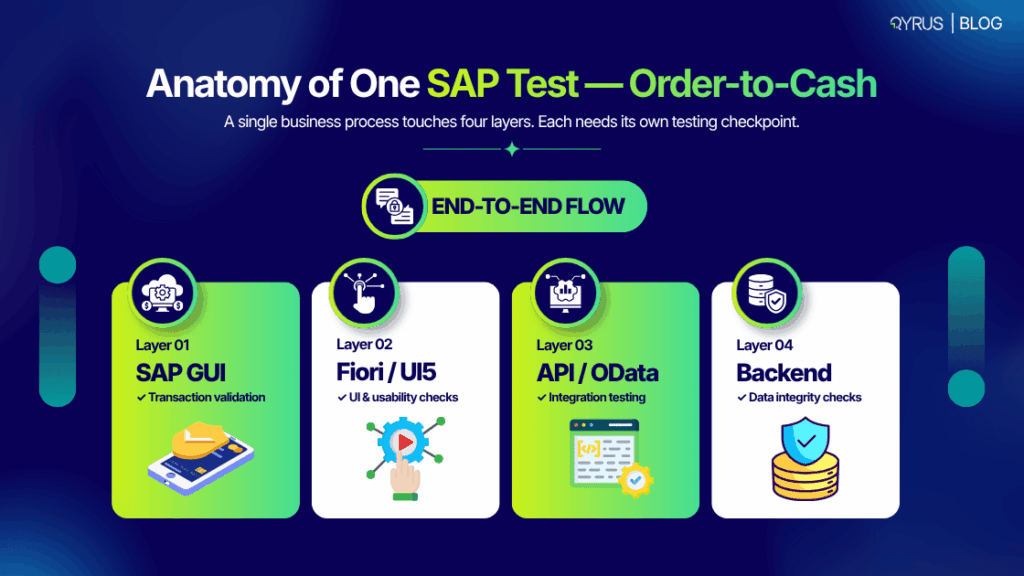
Nonetheless, automating an enterprise SAP environment is inherently more complicated than automating a typical web application. An effective SAP test automation framework for businesses should operate simultaneously across diverse UI technologies, communication protocols, and architectural layers: 

  • Legacy SAP GUI (WinGUI / JavaGUI): Based on proprietary SAP protocols and ActiveX-based rendering, validating the desktop GUI necessitates unique hook mechanisms that can interpret low-level SAP Scripting APIs instead of conventional web Document Object Model (DOM) elements. 
  • Modern SAP Fiori (SAPUI5): Testing Fiori is notoriously difficult because the underlying web framework is constantly shifting. You’re dealing with nested shadow roots, fluid CSS classes, and element IDs that regenerate every time a new session starts. If you try to rely on traditional XPath or coordinate-based selectors, your scripts will break almost instantly. 
  • API & Middleware Integration Layers: Core business logic frequently bypasses the UI entirely via Remote Function Calls (RFCs), Business Application Programming Interfaces (BAPIs), Intermediate Documents (IDocs), and modern OData / REST web services. 
  • Backend Database Validation: A test isn’t actually complete until you prove the data landed exactly where it belongs. True end-to-end validation means querying your underlying SAP HANA tables (like BSEG, BKPF, VBAK, or VBAP) to ensure financial ledgers are balanced and inventory counts are mathematically correct. 

For years, teams tried to manage this technical complexity using SAP’s bundled tools, like eCATT and CBTA. Those native utilities are fine if your processes never leave the core ABAP stack.  

But in the real world, enterprise workflows rarely stay inside a neat SAP bubble. The moment a transaction crosses over into Salesforce, a custom e-commerce frontend, or a third-party logistics API, those legacy tools hit a brick wall. 

Modern enterprises are replacing legacy tools with specialized third-party platforms. These platforms approach quality engineering not through isolated script execution, but by treating business processes as interconnected, node-based workflows.  

To understand how contemporary architectures compare across capabilities, review our technical guide to choosing the right SAP testing tools.   

Why Manual SAP Testing Breaks Down 

Depending on manual testing for a complicated ERP system is an inherently flawed approach, and the difficulties only increase with each new version. When an update is released and there’s no clear method to understand what it affects, QA teams find themselves in a difficult position.  

They’re forced to choose between two bad options: run a quick round of basic smoke tests and just hope nothing critical breaks in production, or grind through months of manual regression testing that brings your release schedule to a dead stop. 

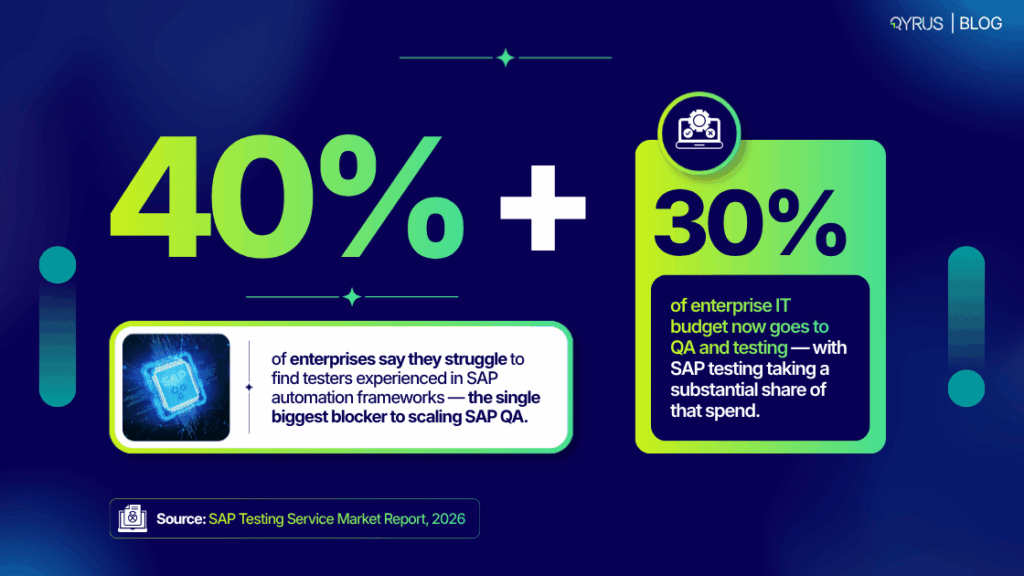
The worldwide demand for SAP testing services and software showcases the immediacy of this change. Independent market reports anticipate market valuations between USD 0.97 billion in 2026 and USD 1.79 billion by 2034, while some predictions expect growth reaching USD 4.7 billion by 2033. More than 3,000 service providers currently function within the SAP QA ecosystem, as companies dedicate as much as 30% of their total IT budgets specifically to QA and testing. 

The primary reason for this expenditure is an expanding skills gap. Industry statistics indicate that over 40% of companies face challenges in locating and keeping testers with extensive expertise in intricate SAP automation frameworks.  

Creating and sustaining conventional test scripts demands a rare combination of business process understanding, ABAP programming knowledge, and proficiency in test automation engineering. When scripts fail because of regular UI changes, manual testers are returned to typical execution, increasing technical debt and exhausting engineering resources. 

This human-capacity issue is encountering an unchangeable architectural deadline: SAP has announced that standard support for SAP ECC ends in 2027. Sticking with a legacy ERP means paying a steep premium for extended maintenance, but moving to S/4HANA is no walk in the park. It isn’t a simple in-place software update, it is a massive architectural tear-down. 

If your team doesn’t have a reliable sap test automation tool locked in before you start, your migration timeline will inevitably derail. You will find yourself trapped in endless manual regression cycles, and surprise production bugs will stall the project for months.  

Core Testing Types & What to Automate First 

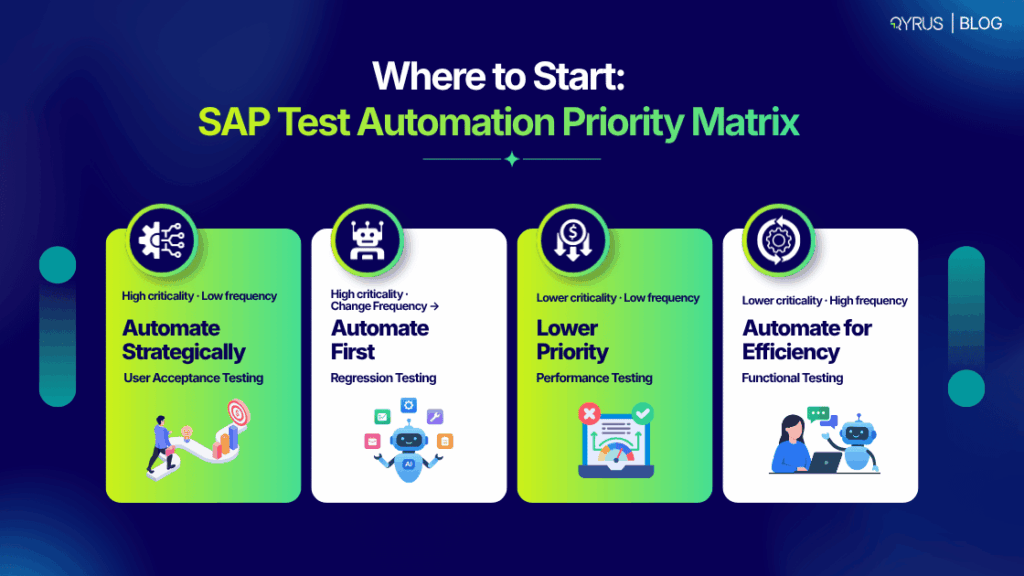
  1. Implementing a company-wide automation strategy doesn’t entail trying to automate every individual manual test case from the outset. Achieving sustainable success necessitates segmenting the testing area into separate functional categories and utilizing a risk-based prioritization framework. 
  2. SAP Functional Testing: Ensuring that individual transactions, user interfaces, custom ABAP applications, and system computations operate precisely as per technical requirements. This involves confirming both positive and negative validation rules, field dependencies, currency conversions, and automatic tax calculations across separate modules. Automated functional tests act as foundational components for larger regression suites. 
  3. SAP Regression Testing: Confirming that newly implemented transports, custom code improvements, security role changes, or support package stacks do not interfere with existing business operations. Due to the close interconnection of SAP systems, modifying an inventory valuation approach may unintentionally disrupt subsequent billing timelines or financial reports. Automated regression suites need to be designed to operate consistently in distributed environments. 
  4. Performance & Load Testing:  Moving to S/4HANA or rolling out a major Feature Package Stack isn’t just a software update. It completely rewires your underlying infrastructure, memory usage, and database query execution. Performance testing is how you prove this new architecture won’t buckle under real-world pressure. It guarantees the system stays online when it actually counts whether you are pushing through a heavy month-end financial close, handling a brutal Black Friday transaction spike, or running critical overnight payroll batch runs. 
  5. User Acceptance Testing (UAT): We need to make sure that the whole process works the way the business teams need it to be. With tools that use low-code and node-based automation, the business analysts and the team leaders can set up and record real-life business situations without having to write any code. This makes the UAT validation into tests that we can reuse and are automated. This way, it becomes easier and saves time.  

For organizations evaluating current testing methods, the most common mistake is attempting to automate edge cases too soon. Successful implementation demands precise prioritization. Begin by automating the primary “happy paths” of your crucial, high-risk business processes, the pathways that directly impact revenue or compliance, such as Order-to-Cash (O2C) or Procure-to-Pay (P2P). 

Once the core processes are stabilized, extend the focus to address edge cases and integrate the suite into a more extensive SAP CI/CD testing pipeline. Approaching it incrementally is the sole method to demonstrate ROI swiftly and gain the trust of the rest of the business in the automation.  

The 2026 Shift: AI Agents in your Workflow 

The discipline of enterprise software quality assurance is experiencing an architectural paradigm shift. Testing has traditionally been deterministic: if a user clicks a button, the system must produce an exact, predictable output. Nonetheless, SAP’s Hannover Messe 2026 agenda has officially verified that autonomous AI agents are now functioning directly within essential enterprise transactional processes. 

These smart agents are capable of making operational choices, such as adjusting purchase order routing according to live supplier risk ratings or independently addressing invoice discrepancies. This shift fundamentally expands the scope of modern quality assurance. AI-driven SAP testing is no longer restricted to using machine learning models to accelerate script authoring; it now requires validating the actual business logic and operational decisions made by autonomous AI agents operating within SAP itself.  

To manage this evolving landscape, modern orchestration platforms are advancing across three essential capabilities: 

Enterprise Testing Requirement Legacy Automation Approach 2026 Orchestration Standard 
Test Scope Selection Blindly retesting massive regression suites after every transport import, wasting time and compute resources. 

SAP change impact analysis inspects ABAP code and transport layers to pinpoint the exact processes at risk, enabling risk-targeted validation.  


UI Updates & Maintenance 

Static scripts break immediately when SAP Fiori updates dynamic element IDs or CSS classes, causing massive technical debt.  


Self-healing test automation uses dynamic computer vision and DOM heuristics to fix broken object locators in real-time during execution.  


Test Data Provisioning 

Copying static, sensitive production data into non-production environments, creating GDPR/CCPA compliance risks.  


Automated synthetic test data generation creates realistic, parameterized scenarios without exposing actual customer datasets.  


As these technologies converge, expect the enterprise software category to keep splitting into two tiers: native, bundled tooling covering basic Fiori web scenarios, versus specialized cross-system platforms needed for anything touching the SAP GUI, complex APIs, or genuine end-to-end business workflows. For an evaluation of modern synthetic data generation tools, explore KiwiQA’s breakdown of SAP test tools.  

How Qyrus Handles SAP Test Automation 

Moving beyond legacy point solutions requires a fundamental shift in how organizations approach quality engineering. Traditional tools frequently stumble when attempting to link legacy desktop protocols with modern web interfaces. Test orchestration is the company solution provided by Qyrus to seamlessly validate these cross-system business flows. Qyrus serves as both the company name and the comprehensive product platform designed specifically to handle the most demanding enterprise ecosystems. 

Rather than treating automated testing as isolated script files, Qyrus delivers deep architectural integration through purpose-built capabilities: 

  • SAP Scribe: A low-code, visual process authoring engine that allows technical QA architects and non-technical functional analysts to capture, parameterize, and orchestrate complex SAP business workflows without writing lines of brittle script code. 
  • ARS (Auto Recovery System) & Healer: Enterprise environments cannot tolerate test suite crashes caused by intermittent network latency or minor UI modifications. Qyrus’s ARS and Healer engines dynamically resolve broken element paths, handle unexpected system modal popups, and automatically realign object locators in real time during execution, virtually eliminating the maintenance burden.  
  • Cross-System End-to-End Orchestration: Real-world enterprise processes span far beyond the boundaries of an SAP application. A single automated test on Qyrus can originate in a third-party API, execute a transaction in the SAP GUI, validate the approval in SAP Fiori, and confirm the database entry in the backend without breaking session continuity. 
  • DataChain Technology: Resolves the test data bottleneck by automatically generating, conditioning, and injecting synthetic data entities into active test pipelines, ensuring that data availability never delays a release cycle. 

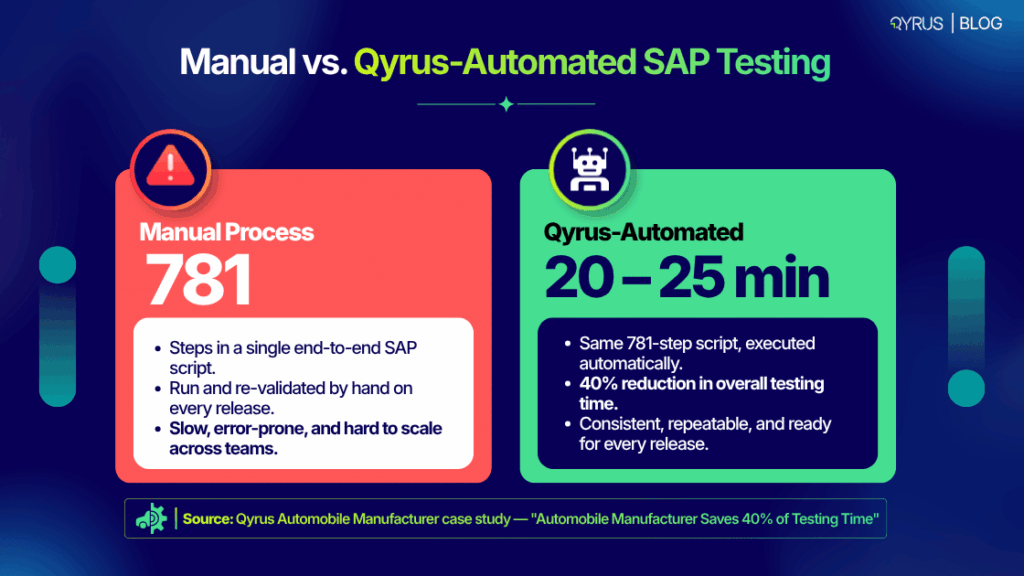
The real-world operational impact of this orchestration approach is proven across complex enterprise environments. A premier global automobile manufacturer utilized Qyrus to automate a massive, multi-departmental SAP business process comprising a 781-step end-to-end workflow. Building the complete automated test flow required just 7 to 8 hours of total authoring time on the Qyrus platform. During active release cycles, full execution was slashed to just 20 to 25 minutes, achieving a 40% total reduction in testing time compared to their manual baseline.  

To read more on how this methodology scales, explore turning nightmares into triumphs with an SAP test automation tool. 

Frequently Asked Questions 

What’s the difference between SAP test automation and regular test automation? 

Regular automation generally targets standalone web or mobile applications using standard DOM selectors. SAP automation requires specialized protocols to interact with proprietary SAP GUI scripting environments, complex ABAP-level integrations, and dynamic SAP Fiori architectures within a single test flow. 

Can you automate SAP GUI and Fiori together? 

Yes. Contemporary cross-system orchestration platforms enable the creation of smooth workflows that transition seamlessly between traditional SAP GUI desktop settings and modern SAP Fiori web interfaces, maintaining execution continuity. 

What’s eCATT vs. CBTA?  

eCATT (Extended Computer Aided Test Tool) is an older, native SAP tool primarily used for testing backend ABAP processes. CBTA (Component-Based Test Automation) is a newer native tool designed to test SAP business processes more modularly. Both often require third-party augmentation for true end-to-end testing across non-SAP enterprise applications.  

What does SAP test automation cost?  

Expenses differ significantly based on the scale of deployment, with options from subscription-based SaaS pricing for nimble teams to extensive enterprise site licensing. When assessing platforms, organizations need to consider typical obstacles such as significant initial setup effort and continuous script upkeep, which frequently surpass the initial software license expense. 

How long does implementation take? 

Traditional frameworks that rely heavily on scripts may require several months for deployment, whereas contemporary node-based orchestration platforms can frequently outline essential business processes and start running valuable regression suites in merely a few weeks. 

Does it work with S/4HANA migrations? 

Absolutely. Implementing a robust automation strategy is a prerequisite for migration. Automated test orchestration ensures you can run continuous validation as you move from ECC to the new data architecture. For further reading on validation requirements, see our complete guide to SAP S/4HANA migration performance testing. 

Conclusion 

The intersection of SAP’s 2027 ECC mainstream support cutoff, ongoing cloud release rhythms, and the integration of autonomous AI agents into transactional processes has fundamentally transformed enterprise quality engineering. Manual testing is no longer a practical operational approach; it subjects the organization to significant system failures, postponed transformation efforts, and unmanageable increases in QA budgets. 

To create a robust enterprise quality framework, QA leaders need to advance past isolated tool script automation and adopt comprehensive test orchestration. By utilizing a smart platform that can validate traditional SAP GUI screens, contemporary Fiori interfaces, intricate APIs, and their underlying databases within a self-healing framework, organizations can convert testing from a hindrance in deployment into a fundamental catalyst for business speed and release assurance. 

Test orchestration is the company solution provided by Qyrus to manage this exact complexity, accelerating your SAP s4hana testing release cycles while drastically reducing maintenance overhead. Request a demo to see how Qyrus automates SAP testing across GUI, Fiori, API, and backend in one flow.