Qyrus Named a Leader in The Forrester WaveTM: Autonomous Testing Platforms, Q4 2025 – Read More

Modernizing a mainframe is rarely a technology problem. 

Moving workloads off a legacy platform is a solved problem. What stalls programs is that nobody can say with confidence what the existing system does, and nobody can prove the new one does the same thing. 

The analyst view is moving the same way. In June 2026, Gartner predicted that more than 70% of mainframe exit projects started in 2026 will fail to deliver their intended benefits, citing an overestimation of what generative AI tooling can do. Its guidance favors in-place modernization and a workload-by-workload approach over a one-size-fits-all exit. 

This whitepaper sets out an evidence-first path for banks, credit unions and insurers: know the estate, decide from evidence, engineer with human validation, and prove equivalence before cutover. 

Who should read it 

CTOs, enterprise architects, and heads of engineering and QA at banks, credit unions and insurers running core or adjacent systems on mainframe-class platforms, including IBM Z, IBM i and Jack Henry Symitar environments. 

What’s inside the whitepaper 

  • Why mainframe programs stall on two separate risks, missing knowledge and unproven equivalence, and why most plans only address one. 
  • What “mainframe” actually means across IBM Z, IBM i, proprietary midrange cores such as Symitar Episys and others, and what tends to break on each. 
  • The evidence-first arc (Comprehend, Decide, Engineer, Prove) and seven dispositions, from Retain and Wrap to Replace and Retire, chosen from evidence rather than a target-state slide. 
  • A technical deep dive for architects: packed decimals, per-field EBCDIC translation, CICS syncpoint versus saga, cycle dates and control totals. 
  • How to prove equivalence: field-level reconciliation in five classes, parallel runs, signed evidence packs, and API-based testing of mainframe applications without screen scraping. 
  • The integration seam between a core and mainframe systems, where a large share of defects hide, and a four-step test pack to cover it: generate, inject, assert, break it. 
  • A phased path that starts with a proof of concept on your own code, plus the evidence US examiners ask to see. 

Modernize and Assure, Working From the Same Evidence 

QyrusAI brings understanding and proof into one continuous loop. QyrusAI Modernize builds a queryable model of your estate, with every business rule traced to its source, confidence level and owner, so decisions rest on evidence. QyrusAI Assure then proves that business behavior survived the change, through field-level equivalence testing, parallel-run reconciliation and signed evidence packs. 

Nothing reaches production on agent output alone. Human experts validate at defined gates, and the platform works alongside the transformation tools and partners you already use. 

See evidence-first modernization on your own estate 

Book a demo to see how QyrusAI can map your estate, rank what should change and prove equivalence before cutover. 
Most enterprise IT environments weren’t designed. They accumulated. A system that ran fine on its own five years ago has since picked up two integrations, a merger’s worth of inherited applications, and a handful of workarounds nobody documented. None of that shows up as a problem, until someone tries to change it.  

That’s the real challenge behind modernization: it’s rarely about deciding whether something needs updating. It’s about knowing what else gets affected when it is. Application discovery and dependency mapping is how enterprise architects, IT operations teams, and CIOs answer that question, by building an accurate picture of what’s actually running across an environment and how each piece depends on the rest, before anything gets touched.  

What Application Discovery and Dependency Mapping Actually Means  

Application discovery and dependency mapping is really two linked steps. Discovery identifies what exists — the applications, services, servers, and infrastructure running across an environment. Dependency mapping traces how those pieces connect: which service calls which database, which application sits on top of which infrastructure, and which business process breaks if a given component goes down.  

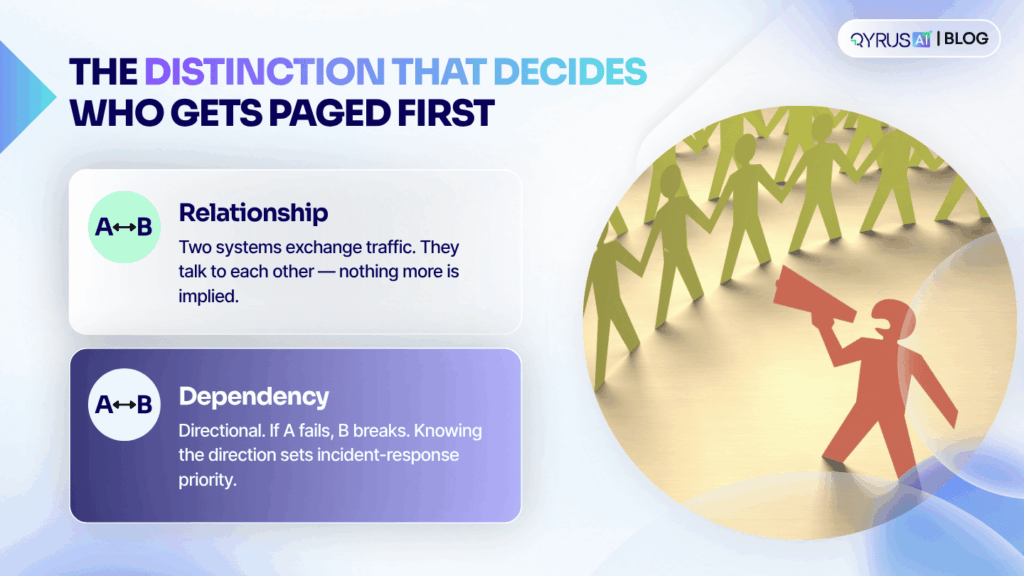
That second part carries more weight than it first appears to. A relationship just means two systems exchange traffic, they talk to each other. A dependency is directional: it means one system’s failure will break another. A payment gateway and an authentication service might have a relationship in a topology diagram, but if the authentication service fails, the payment gateway is the one that stops working, not the other way around. Knowing which direction that failure travels is what determines who gets paged first during an incident, and what teams prioritize before a planned change.  

Static inventories and manually maintained configuration management databases (CMDBs) were built for slower-moving environments. They capture what’s there at a point in time, but they don’t hold up once infrastructure starts changing weekly instead of quarterly, which is now the norm, not the exception, for organizations running hybrid cloud and containerized workloads.  

Why This Is Harder Than It Used to Be  

Enterprise environments have gotten more complex faster than the tools tracking them have kept pace. A typical environment today spans hybrid cloud infrastructure, containerized microservices, distributed APIs and SaaS applications, and infrastructure that scales continuously rather than on a fixed schedule. Layer in a few acquisitions or a legacy system nobody’s fully documented, and the gap between what’s on paper and what’s actually running starts to widen.  

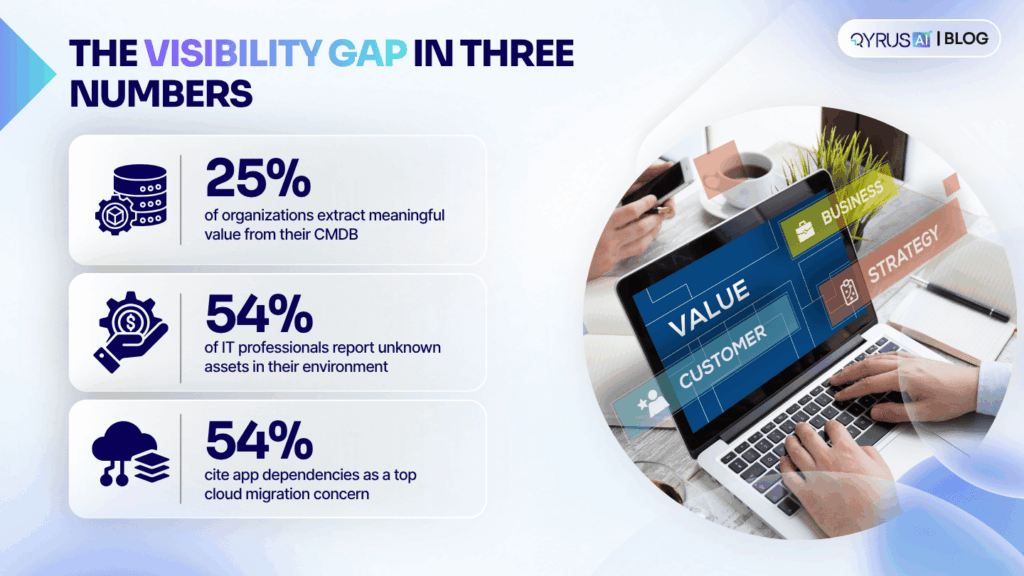
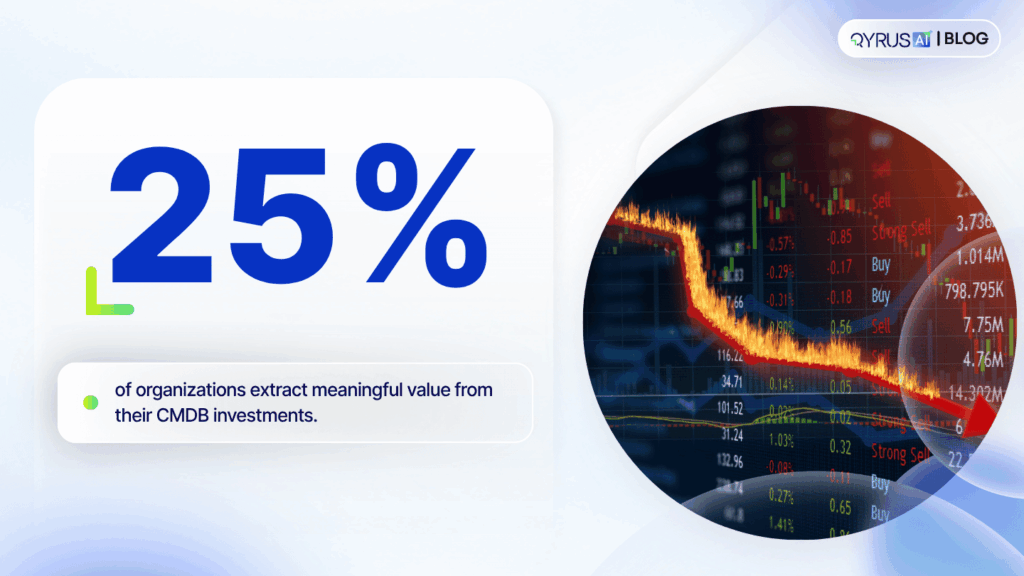
The numbers back this up. Gartner has found that only 25% of organizations extract meaningful value from their CMDB investments, the rest are working from data that’s incomplete, stale, or simply not trusted enough to act on. Separately, Forrester research cited by Virima found that 54% of IT professionals report unknown assets in their environments, systems nobody currently tracks are still running, still connected to something else, and still capable of breaking a change nobody saw coming.  

That visibility gap has a direct line to project risk. Application dependencies are one of the most commonly cited concerns IT teams raise about cloud migration projects, and budget overruns tied to unplanned rework are common enough that they show up in nearly every year’s IT leadership surveys. Periodic discovery scans and manually updated spreadsheets can’t keep up with environments that change this often, which is why the shift underway across the industry is toward continuous, automated discovery instead.  

From Discovery to a Living Model: The Knowledge Graph  

A one-time discovery scan produces a snapshot, accurate the day it’s run, and progressively less accurate after that. Continuous discovery instead produces something closer to a living model: infrastructure changes get detected automatically, dependencies stay current as the environment evolves, and the resulting map doesn’t need to be manually reassembled every time someone asks for it.  

The more useful shift is what happens to that discovery data next. Rather than sitting in a dashboard as a point-in-time diagram, discovered assets and their dependencies can feed into a persistent knowledge graph, a structured, queryable model of the environment that stays current as things change. That’s a meaningfully different architecture than “run a scan, export a report.” It turns discovery into infrastructure other systems can build on: incident response tools that can trace an issue back through its dependency chain automatically, planning tools that can simulate the impact of a proposed change, and automation that can act on accurate, current context instead of a document that was correct six months ago.  

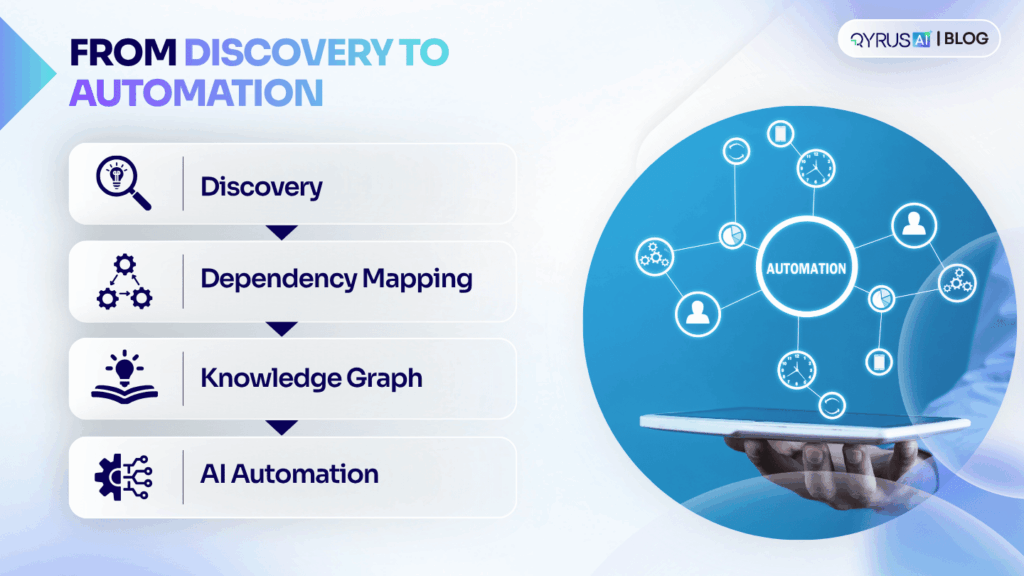
Put together, the pattern looks like a pipeline rather than a single tool: discovery identifies what’s running, dependency mapping traces how it connects, a knowledge graph holds that model in a form other systems can query, and from there, automated and AI-driven operations become possible because they’re finally working from something trustworthy. Skip the first two steps, and everything built on top of them inherits the same blind spots.  

Where This Shows Up: Cloud Migration  

Cloud migration is where the cost of skipping discovery becomes concrete fastest. Moving an application to the cloud is rarely just moving the application. It may depend on a database that isn’t moving on the same timeline, communicate with a service that stays on-premises, or support a larger business process that spans systems nobody thought to check.  

If those dependencies surface after the move, the project has a problem: a service that worked fine in testing breaks in production because something it depended on didn’t come along or came along on a different schedule. If they surface beforehand, the same information becomes a planning input instead of an incident. Teams can sequence the migration around what actually needs to move together, flag the dependencies that need special handling, and set expectations before a cutover date gets missed.  

This is also where discovery connects to the rest of the modernization lifecycle rather than standing apart from it. The same dependency data that de-risks a migration is what later informs application rationalization — deciding which systems are redundant or safe to retire — and technical debt assessment, which starts from knowing what’s actually in the environment before deciding what to fix. Discovery isn’t a standalone exercise; it’s the input every later modernization decision draws on.  

How QyrusAI Approaches Auto Discovery  

QyrusAI is an enterprise AI platform built around three workspaces — Modernize, Assure, and Operate — covering how organizations understand, test, and run their IT environments. Auto Discovery sits under Modernize, where it works alongside dependency mapping, application rationalization, and technical debt analysis to help enterprise teams understand what they’re working with before they change it.  

Auto Discovery continuously scans an organization’s IT environment across cloud, on-premises, and hybrid infrastructure, identifying what’s actually running, applications, services, infrastructure, and mapping the dependencies between them. It traces those relationships upstream and downstream and feeds the results into QyrusAI’s Enterprise Knowledge Graph, building a continuously updated model of the environment rather than a static diagram that has to be manually maintained.  

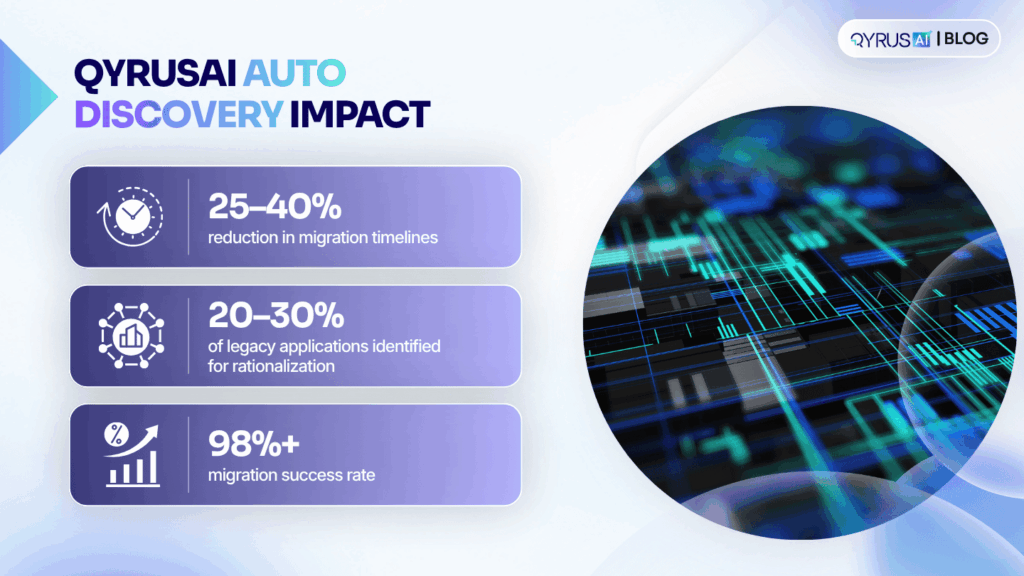
That shift from periodic to continuous, knowledge-graph-backed discovery shows up in the numbers: organizations applying this approach to their modernization lifecycle have seen a 25–40% reduction in migration timelines, 20–30% of legacy applications identified for rationalization, and a 98%+ migration success rate, driven by earlier, more accurate dependency visibility rather than late-stage surprises. The goal isn’t just a more complete inventory — it’s giving teams a foundation they can actually plan against before a project starts, not one they reconstruct after something breaks.  

Frequently Asked Questions  

What’s the difference between application discovery and dependency mapping?  

Discovery identifies what’s running in an environment — applications, services, infrastructure. Dependency mapping traces how those components connect and rely on each other. They’re typically delivered together because discovery data is what dependency mapping is built from.  

Is application discovery and dependency mapping the same as a CMDB?  

No. A CMDB is a database that stores configuration item records, often updated manually or on a schedule. Application discovery and dependency mapping is the process — increasingly automated and continuous — that keeps that data current and can feed directly into a CMDB rather than replace it.  

How often should IT environments be re-discovered?  

As close to continuously as the tooling allows. Environments that scale, deploy, or reconfigure weekly can go stale within days under a periodic scan model, which is why the industry trend is toward continuous, automated discovery rather than scheduled scans.  

Does application discovery work across hybrid and multi-cloud environments?  

Modern discovery tools are generally built to span cloud, on-premises, and hybrid infrastructure in a single pass, rather than requiring separate tools per environment. That unified view is what makes dependency mapping useful — a dependency that crosses environments is invisible if the discovery tool only sees one side of it.  

What happens if you skip dependency mapping before a migration?  

Dependencies tend to surface anyway — just later, and usually as an incident instead of a planning input. A database, service, or business process that wasn’t accounted for can break after a cutover, turning a planned migration into unplanned rework.  

Understand It Before You Change It  

Modernization projects don’t start with the first change — they start with understanding what’s already there. Application discovery and dependency mapping gives enterprise architects, IT operations teams, and CIOs the visibility to plan migrations, rationalize applications, and manage change with fewer surprises along the way.  

QyrusAI’s Auto Discovery continuously maps environments across cloud, on-premises, and hybrid infrastructure and feeds that model into the Enterprise Knowledge Graph — giving teams a current, connected view of their systems rather than a static inventory. Request a demo to see how QyrusAI Auto Discovery maps your environment before you modernize it. 

Featured Image

Picture an enterprise with hundreds of applications. A few run business-critical services. Several do almost the same job. Some barely get used. Application rationalization is the discipline of sorting that portfolio: reviewing every application and deciding whether to modernize it, consolidate it, retire it, or leave it alone.  

The decision matters because modernization budgets are finite. When every outdated application becomes a modernization project, teams spend months upgrading systems that should have been merged or switched off. This guide shows a practical way to make the call, based on business role, usage and cost rather than technical age alone.  

Why an old application isn’t automatically a modernization candidate  

Ask most teams where to start, and they point at the oldest systems. The instinct makes sense. Older applications often run on aging frameworks, with limited vendor support and more security exposure.  

But age measures technical condition. It says little about how much the business relies on the application. A decade-old billing system may sit behind every invoice you send. A recently bought workflow tool may have a dozen users and no clear owner.  

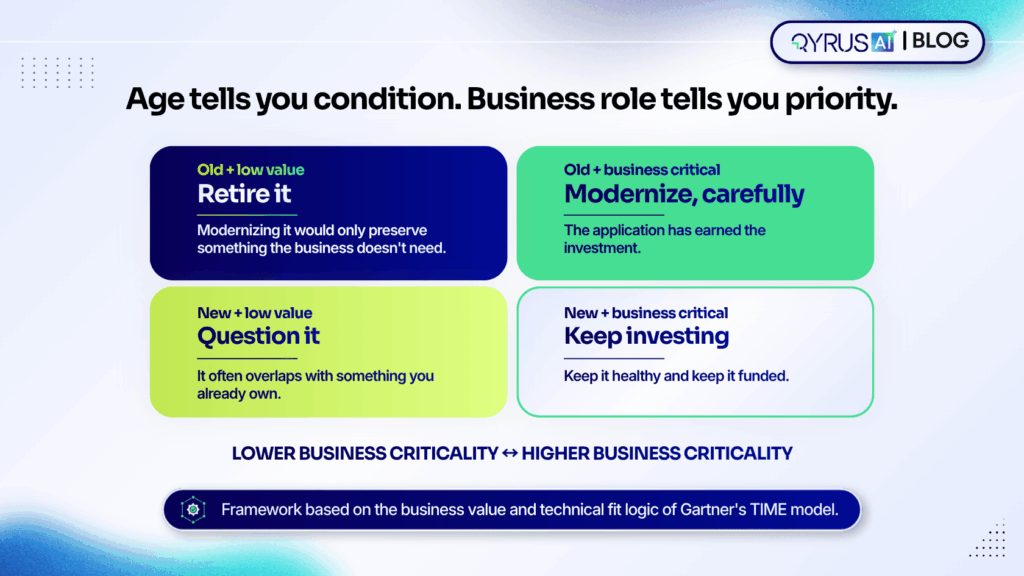
Gartner’s TIME model captures this by plotting each application on two axes, business value and technical fit, then sorting it into Tolerate, Invest, Migrate, or Eliminate, as LeanIX explains. Age feeds into technical fit. But it is only one input beside maintainability, compatibility and vendor support. Enterprise architects use the result to see which applications deserve money. The same logic gives you four cases to remember:  

  • Old and business critical: modernize, carefully. The application has earned the investment.  
  • Old and low value: retire it. Modernizing it would only preserve something the business doesn’t need.  
  • New and business critical: keep investing and keep it healthy.  
  • New and low value: question it. It often overlaps with something you already own.  

Treating all four the same is how modernization budgets get spread thin.  

The four decisions a portfolio review produces  

Frameworks use different labels. TIME says Tolerate, Invest, Migrate and Eliminate. Cloud-focused models talk about rehosting, replatforming, retiring and retaining. Underneath the vocabulary, a portfolio review comes down to four practical outcomes.  

Decision  

When it fits  

Roughly maps to  

Modernize  

The business needs the application, but its technology holds it back  

Migrate  

Consolidate  

Several applications do the same job, so one survives and the others’ users and data move across  

Migrate, then Eliminate  

Retire  

The application has low value, low use or a redundant role; switch it off and keep any data you must retain  

Eliminate  

Leave alone  

It works, costs little and nobody is asking for more  

Tolerate or Invest  


Look at what that table implies. Three of the four outcomes reduce the amount of modernization you need to fund. Consolidation merges projects. Retirement removes them. Leaving an application alone avoids them. Cost, usage and business role drive each choice, not the year the application was built. That is why the review should come before the modernization budget, not after it.  

A worked example: three departments, one job  

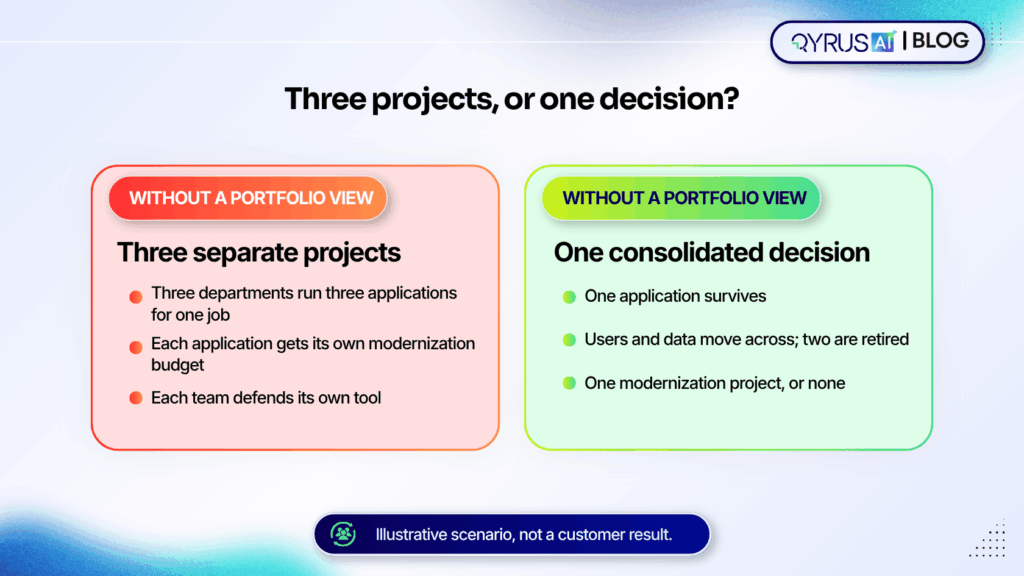
Here is an illustrative scenario, not a customer result. Sales, customer support and field services each run their own application to track customer requests. Each was a sensible purchase at the time. Now each carries its own licenses, infrastructure, upgrades and support contract.  

Without a portfolio view, a modernization program sees three separate applications and funds three projects. Each team defends its own tool, and the work starts from the assumption that all three will survive.  

A rationalization review asks different questions. How many people use each application every week? What does each cost to run? Which business process depends on it? Suppose the answers show that one application covers nearly everything the other two do, while the other two serve small teams for features the first already offers.  

Now the team can consolidate: keep one application, migrate the users and data from the others, and retire two. Three modernization projects become one, or none if the survivor is already healthy. Overlap isn’t always waste, though. If one department needs a regulated workflow the others lack, the duplication may be justified, and the review should say so.  

The same thinking applies to supporting systems. Test environments multiply in the same way, which is why we’ve written about how infrastructure consolidation lowers testing costs.  

Five steps that start with evidence  

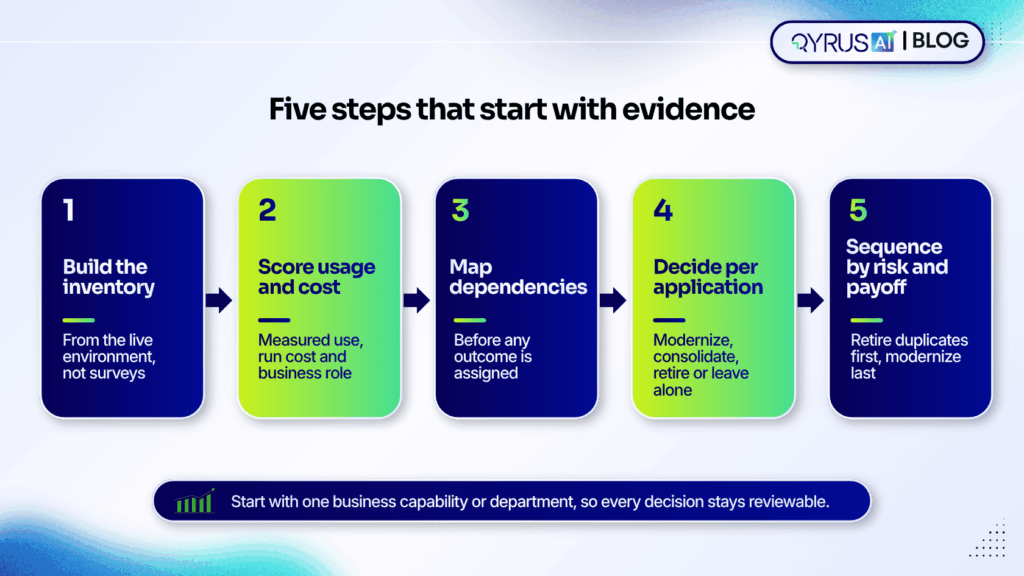
A review is only as good as the data behind it. These five steps put evidence ahead of opinion.  

  1. Build the inventory from the environment, not from surveys 

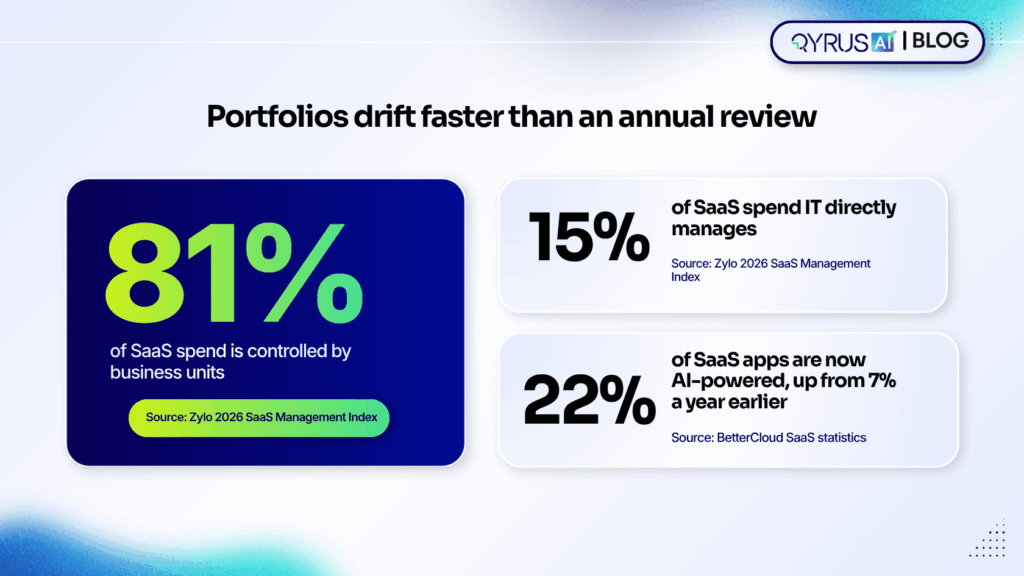
Most portfolios are bigger than the people running them believe. Zylo found that organizations underestimate their application count by about 1.7 times and their software spend by about 3 times, according to its analysis of SaaS sprawl. Ownership is scattered too. Business units control 81% of SaaS spend, while IT directly manages 15%, per Zylo’s 2026 SaaS Management Index. And Torii puts the average large enterprise at 2,191 business applications.  

A spreadsheet that people fill in by hand will miss much of that. Automated discovery gives you one application inventory that works as a single source of truth for every later decision.  

  1. Score usage, cost and business role 

For each application, record how often people actually use it, what it costs to run (licenses, infrastructure and support) and which business capabilities depend on it. Owners understandably defend their tools, so measured usage settles debates that opinion can’t.  

  1. Map dependencies before you decide 

A low-usage application can still feed a critical process. Map what each application connects to, including data feeds, integrations and shared infrastructure, before you assign an outcome. Finding a dependency before the decision is cheap. Finding it after the shutdown is not.  

  1. Decide per application 

Assign one of the four outcomes to each application in scope. Start with one business capability or department rather than the whole portfolio, so every decision stays reviewable. If a decision involves moving an ERP, plan the testing early; our guide to performance testing for a stable SAP S/4HANA go-live shows what to check. Whichever application survives a merger will also absorb new users and data, so it needs solid regression coverage. Here is how automated regression testing improves release quality.  

  1. Sequence by risk and payoff 

Retire clear duplicates first. They free up budget quickly and carry the least risk. Consolidations come next. Then modernize the critical applications, funded in part by what the earlier steps released. Revisit the plan each quarter as usage data changes.  

Retiring an application without breaking what depends on it  

Retirement looks like the easy win. It isn’t always. Legacy applications often feed reports, manual exports and indirect integrations. Those links can stay hidden until the system is gone, according to CIGen’s decommissioning guide.  

The opposite failure is the zombie application. Teams mark it retired and restrict access, but the database stays online and old integrations keep running. The savings never fully arrive, and nobody is sure the system can be switched off, a pattern that Archon describes in its decommissioning framework.  

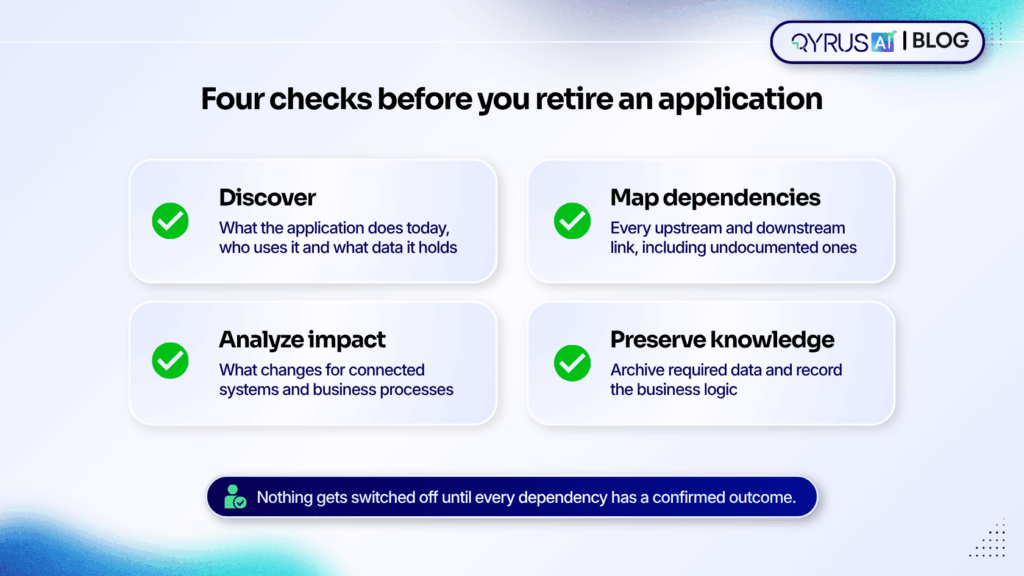
A safer retirement follows four checks:  

  • Discover: confirm what the application does today, who uses it and what data it holds.  
  • Map dependencies: list every upstream and downstream connection, including undocumented ones.  
  • Analyze impact: model what changes for connected systems and business processes before anything is switched off.  
  • Preserve knowledge: archive required data and record the business logic, so the organization keeps what the application knew after it is gone.

That last check matters more than most plans admit. When the people who understand an old system move on, the application itself is often the only record of how a process really works. Capture that before shutdown.  

Why a one-time cleanup doesn’t last  

A rationalized portfolio starts drifting the day you finish. Business units buy most SaaS themselves, so new tools rarely pass through central review. AI is speeding that up. BetterCloud reports that 22% of SaaS applications are now AI-powered, up from 7% a year earlier.  

New applications arrive faster than an annual review can catch them. Rationalization works best as a continuous practice: assess usage, overlap and cost as applications enter the portfolio, not once a year. Continuous assessment also keeps the inventory current, so the next decision starts from evidence instead of another survey.  

How QyrusAI supports application rationalization  

QyrusAI is a single AI platform that unites application modernization, software testing and autonomous IT operations. It organizes that work into three connected workspaces. Qyrus Modernize discovers, maps and modernizes the enterprise estate. Qyrus Assure validates every change through AI-driven test automation. Qyrus Operate detects and resolves issues in production. All three share one Knowledge Graph of the estate, so what one workspace learns informs the other two.  

Application rationalization sits inside Modernize, alongside application discovery, dependency mapping, legacy modernization, cloud migration intelligence and technical debt analysis. QyrusAI Application Rationalization looks across the whole portfolio and weighs how each application is used, what it costs to operate and what role it plays in the business. That gives teams the context to choose between modernizing, consolidating and retiring, instead of judging by technical age alone.  

Four capabilities support the decision:  

  • Auto-discovery and dependency mapping build the inventory and the connection map from the live environment, which reduces reliance on manual surveys and on a few subject-matter experts.  
  • Digital Twin impact analysis predicts the ripple effects of decommissioning an application before anyone switches it off.  
  • Knowledge retention keeps business logic and data context available in the Knowledge Graph after a system retires.  
  • Continuous assessment helps stop redundancy from building up again after the first review.  

QyrusAI’s targeted outcomes include decommissioning 20–30% of redundant legacy applications and achieving 15–20% infrastructure cost savings through right-sizing environments. These are targets, not guarantees, and results depend on the starting portfolio.  

Frequently asked questions  

What is application rationalization?  

It is a structured review of an organization’s application portfolio that decides what to modernize, consolidate, retire or keep as it is. The decision rests on usage, cost and business role.  

How is it different from application modernization?  

Rationalization decides which applications deserve which treatment. Modernization is the technical work of upgrading or re-platforming the ones you chose to keep and improve. Running the review first keeps you from modernizing systems you should have retired.  

When should a company start?  

Common triggers include mergers and acquisitions, a planned cloud migration, budget pressure, the retirement of a legacy system and a sudden rise in departmental or AI tools. Any of these tends to expose overlap.  

How many applications should a review cover at once?  

Start with one business capability or department. A narrower scope keeps the data reviewable and the decisions defensible, and you can extend the same method to the next area.  

What are the main risks of retiring an application?  

The biggest ones are hidden dependencies, data-retention obligations and user adoption. Mapping dependencies, archiving required data and planning for the people who use the application reduce all three.  

Make the right change in the right place  

The goal of modernization isn’t to make everything newer. It is to make the right change, in the right place, for the right reasons. Application rationalization gives you the evidence to do that: which applications to modernize, which to merge, which to retire and which to leave alone.  

QyrusAI Application Rationalization brings usage, cost and business context into that decision, backed by discovery and dependency mapping across the estate. Request a demo to see how QyrusAI can help you decide what to modernize and what to retire.